TRENDING ON AMAZON
Logitech G413 SE Full-Size Mechanical Gaming Keyboard Review: Is It Worth It?
Full-size mechanical gaming keyboard with tactile switches and an aluminum top plate — the durable, no-nonsense pick that undercuts Corsair and Razer on price.
Quick answer: Yes — the Logitech G413 SE is worth buying, and it's the best-value full-size mechanical keyboard on Amazon under $80. You get real tactile mechanical switches, a 5052 aluminum top plate, dedicated media controls, detachable USB-C and a clean white backlight for around $70 — half the price of a Corsair K70 or Razer BlackWidow without giving up the fundamentals that make mechanical keyboards better than membrane. Skip only if you specifically need wireless, per-key RGB, or hot-swap switches.
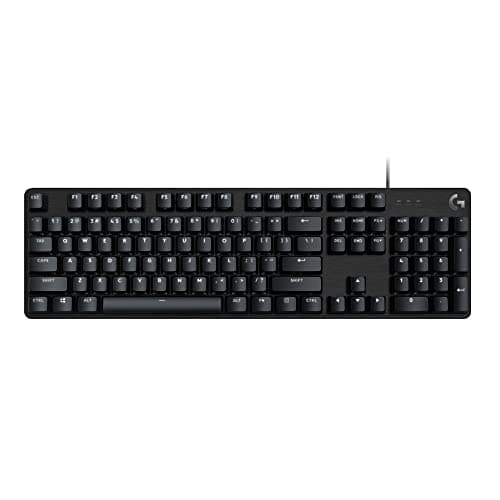
Product image from the Amazon listing.
Our verdict
Yes — the Logitech G413 SE is worth buying, and it's the best-value full-size mechanical keyboard on Amazon under $80. You get real tactile mechanical switches, a 5052 aluminum top plate, dedicated media controls, detachable USB-C and a clean white backlight for around $70 — half the price of a Corsair K70 or Razer BlackWidow without giving up the fundamentals that make mechanical keyboards better than membrane. Skip only if you specifically need wireless, per-key RGB, or hot-swap switches.
The short version
Most 'gaming' mechanical keyboards cost twice this and don't feel meaningfully better. The Logitech G413 SE keeps what matters — tactile mechanical switches, a real 5052 aluminum top plate, full 104-key layout with dedicated media controls, and anti-ghosting on the keys you care about — and skips the RGB light show most players end up turning off anyway. If you want a serious mechanical keyboard that lasts years without spending premium money, this is the smart pick.
Pros & cons
Pros
- Genuine mechanical switches — tactile feel and quick actuation
- 5052 aluminum top plate — durable, doesn't flex
- Full 104-key layout with numpad
- Dedicated media controls
- Detachable USB-C cable
- Compatible with Windows and macOS
- White LED backlighting (no distracting RGB)
Cons
- Not wireless — wired USB-C only
- Single-color backlight, not RGB
- No dedicated macro keys
Why people love it
Plug into USB-C
Comes with a detachable USB-C to USB-A cable. Plug into any Windows PC or Mac and it works immediately — no drivers, no software, no waiting.
Tactile mechanical switches
Each key uses a mechanical switch with a distinct actuation point rather than the mushy rubber-dome feel of a laptop keyboard. Once you use one, membrane keyboards feel wrong — for typing and gaming both.
White backlight, adjustable brightness
Single-color white LED backlighting with adjustable brightness. Skips the RGB gaming aesthetic in favor of a clean, professional look that fits both a battlestation and a work-from-home desk.
Who it's for
- Gamers on a budget
- Programmers and heavy typists
- Anyone upgrading from a membrane keyboard
- Dual-use work and gaming setups
Logitech G413 SE vs the mechanical keyboard rabbit hole (Keychron, AULA, boutique) — where does value peak?
The mechanical keyboard market splits into three tiers. Mainstream gaming brands (Logitech, Corsair, Razer, SteelSeries) at $70–200 deliver reliable performance, standard switches and gaming-oriented aesthetics — the G413 SE is one of the sharpest value picks here. Keychron and AULA occupy a middle ground: $100–200 gets you hot-swappable switches (so you can change switch feel without soldering), USB-C wireless in some models, and often better build than mainstream gaming boards — worth looking at if you want to experiment with switches. Our AULA F75 Keyboard review covers that scene in depth.
At the boutique end ($300+), custom-built keyboards from group buys use premium PCBs, gasket-mount cases, hand-lubed switches and premium PBT keycaps — the typing feel is genuinely another level, but the price and lead times aren't casual buys. For 90% of people who just want a solid mechanical keyboard that lasts years, the G413 SE at $70 delivers the vast majority of the benefit of a $200 mainstream board. If you fall in love with the mechanical typing feel, the Logitech MX Mechanical or a Keychron K3 Pro is the natural upgrade path for wireless and hot-swap capability.
Building a full desk setup around the G413 SE — keyboard, mouse, webcam, everything
The G413 SE pairs naturally into a value-first productivity + gaming setup. Core pairings: (1) A quality mouse — the Logitech MX Master 3S is the productivity standard for creators and coders, or a Logitech G502 for gaming. (2) A good webcam — the Logitech Brio 101 is the value pick, the Logitech C920x is the mainstream default, and the EMEET C960 is another solid budget option. (3) A monitor arm to free desk space. (4) A comfortable chair — non-negotiable for long sessions. (5) Solid audio — Bluetooth speaker or a good pair of headphones.
For under $400 total in accessories (keyboard, mouse, webcam, headset, decent monitor arm) plus whatever your monitor and PC cost, you can build a work-and-play desk that looks and performs like a $1500+ premium setup. The trick is knowing where the diminishing returns hit — for keyboards it's around $70–150, for mice around $80–120, for webcams around $70. Spending more than those thresholds buys aesthetics and marginal quality, not big functional gains. The G413 SE sits right at the value peak.
Mechanical keyboard maintenance — keeping the G413 SE typing like new for years
Mechanical keyboards last dramatically longer than membrane keyboards but do need basic care. Weekly: turn the keyboard upside down and shake out crumbs and dust; wipe the top plate with a slightly damp microfiber cloth to remove finger oils. The aluminum top on the G413 SE resists staining well but shows fingerprints on a clean surface. Monthly: pop off a few keys with a keycap puller and clean under the switches with compressed air — dust and hair are the main enemies of switch feel over time.
Every 6–12 months: consider a full deep clean. Pull all the keycaps (compatible keycap pullers cost $5), soak them in warm soapy water while you compressed-air the interior and switches, then dry and reassemble. Avoid liquid contact with the switches themselves — if you spill anything, unplug immediately and let it dry for 48 hours before testing. With basic care, the G413 SE's mechanical switches are rated for 70+ million keypresses per key, comfortably lasting 5+ years of daily heavy use. That's why the up-front premium over a membrane board is worth it — you'll replace 3–5 membrane keyboards in the time this lasts one lifecycle.
See Logitech G413 SE on Amazon
Check the latest price, photos and buyer reviews on Amazon.
Check Price on Amazon →Sold and shipped by AmazonFrequently asked questions
Is the Logitech G413 SE a good keyboard for gaming?
For most gamers, yes — it delivers everything that actually matters for gaming (mechanical switches, anti-ghosting on frequently-used keys, low input lag from wired USB) at a fraction of the cost of Corsair or Razer flagship boards. Competitive esports players may want faster linear switches or the tenkeyless layout for mouse room, and RGB-focused players will prefer boards with more elaborate lighting — but for the vast majority of gamers, the G413 SE hits the actual gaming performance targets at a price that's genuinely fair.
Logitech G413 SE vs Corsair K70 vs Razer BlackWidow — which is best?
The G413 SE is the value pick — clean design, aluminum build, tactile mechanical switches, no fancy RGB, around $70. Corsair K70 is the premium mainstream pick — full RGB, dedicated media wheel, more switch options, ~$150. Razer BlackWidow is the flashy gaming pick — Razer's Green switches, full Chroma RGB, ~$120–170. If you want a serious mechanical keyboard that looks professional and costs less, G413 SE wins. If you want the full RGB show and premium features, K70 or BlackWidow are the upgrade paths. All three deliver similar core mechanical typing feel — the price difference is aesthetics and extras, not typing quality.
Is the Logitech G413 SE good for programming and typing all day?
Absolutely — tactile mechanical switches are typically preferred over membrane keyboards for long typing sessions because the distinct actuation point reduces the fatigue of bottoming out every keypress. The full-size layout with numpad suits programmers who use number-heavy data or spreadsheets, and the aluminum construction feels solid under fast typing. If you type 6+ hours a day, an ergonomic split keyboard (Kinesis, Ergodox) may be worth exploring, but for standard flat-layout mechanical typing at a fair price, the G413 SE is a strong pick.
What switches does the Logitech G413 SE use?
The G413 SE uses tactile mechanical switches — a bump partway through the keypress signals the actuation point without needing to fully bottom out. This is similar to Cherry MX Brown, the most popular general-purpose mechanical switch. It's a good choice for mixed gaming and typing — quiet enough for an office, tactile enough that you can feel keystrokes register. Not as fast as linear switches (Red-style) for hardcore FPS gaming, but the tactile bump helps typing accuracy.
Does the Logitech G413 SE work on Mac?
Yes — it works out of the box on macOS as a standard USB-C keyboard. All standard keys map correctly. The Windows-labeled keys function as Command keys, and there's no Logitech G Hub software for Mac, so custom key remapping requires macOS's built-in keyboard settings or third-party utilities like Karabiner. For most Mac users, the keyboard 'just works' plug-and-play.
How does the Logitech G413 SE compare to the Logitech MX Mechanical?
Different tools for different jobs. G413 SE is the gaming-oriented pick: full-size, tactile switches, white backlight, wired USB-C, ~$70. Logitech MX Mechanical is the productivity-first pick: full-size or Mini, tactile-quiet switches, RGB smart backlight, wireless via Bolt receiver or Bluetooth, ~$170. Pair the MX Mechanical with a Logitech MX Master 3S mouse for the ultimate productivity setup; pair the G413 SE with a solid gaming mouse for a value gaming rig. Both are excellent — the choice comes down to gaming aesthetics + wired reliability vs. wireless productivity design.
Is the Logitech G413 SE the same as the older G413 Carbon or Silver?
No — the G413 SE (this review) is the current entry-level revision, and it's a genuinely different keyboard from the original G413 Carbon/Silver that Logitech launched in 2016. The SE simplified the switch selection to a single tactile switch option (the older G413 offered Romer-G Tactile), swapped RGB per-key lighting on the older 'Carbon' variant for single-color white LEDs to hit the ~$70 price, and updated the top plate finish. Build quality is comparable — same 5052 aluminum, same anti-ghosting, same USB-C connection — but the SE is the version currently in production and the one you'll actually find on Amazon in 2026. If you see a listing for 'G413 Carbon' at a similar price, that's an older, discontinued model; the G413 SE is the current mainstream buy.
As an Amazon Associate, TopCrate earns from qualifying purchases at no extra cost to you. Product image, price, availability and ratings are shown on Amazon and are subject to change.