TRENDING ON AMAZON
Logitech C920x HD Pro Webcam Review: Is It Worth It?
The full-HD webcam that's been the safe recommendation for over a decade — 1080p at 30fps, stereo mics, auto light correction, and it just works on every OS.
Quick answer: Yes — the Logitech C920x HD Pro is worth it, and it's the safest single webcam recommendation you can make in 2026. Twelve years after the original C920 launched, it's still the answer to 'noticeably better than my laptop camera without paying flagship prices.' Genuine 1080p through a real glass lens, stereo mics good enough to skip a separate microphone, auto light correction that handles backlit rooms, and universal plug-and-play compatibility with every OS. Its real limitations — 30 fps ceiling, USB-A only, no built-in privacy shutter — matter for a small minority of professional streamers, and are worth stepping up to the Brio 500 to fix. For the other 95% of buyers, the C920x is the boring correct answer, and boring correct is exactly what a webcam should be.
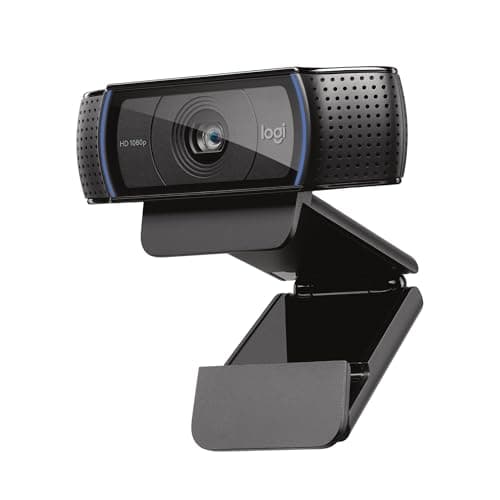
Product image from the Amazon listing.
Our verdict
Yes — the Logitech C920x HD Pro is worth it, and it's the safest single webcam recommendation you can make in 2026. Twelve years after the original C920 launched, it's still the answer to 'noticeably better than my laptop camera without paying flagship prices.' Genuine 1080p through a real glass lens, stereo mics good enough to skip a separate microphone, auto light correction that handles backlit rooms, and universal plug-and-play compatibility with every OS. Its real limitations — 30 fps ceiling, USB-A only, no built-in privacy shutter — matter for a small minority of professional streamers, and are worth stepping up to the Brio 500 to fix. For the other 95% of buyers, the C920x is the boring correct answer, and boring correct is exactly what a webcam should be.
The short version
Some products earn 'default recommendation' status by out-lasting their competition. The Logitech C920 is one of them: it's been the answer to 'which webcam should I buy?' since 2012, and the current C920x is the refreshed version with a longer USB-A cable and free 3-month XSplit VCam license. It shoots crisp full-HD 1080p at 30 fps through a genuine five-element glass lens, with stereo microphones that don't sound like a tin can, automatic light correction that handles the window-behind-you scenario most laptops butcher, and plug-and-play compatibility with Windows, Mac, ChromeOS and Linux. Not the flashiest camera in Logitech's lineup — the Brio series adds 4K and 60 fps — but for daily Zoom, Teams and Meet calls, Twitch streaming, and everyday content creation, the C920x is the smart-money pick that costs a third of the flagship and does 90% of the job.
Pros & cons
Pros
- Genuine 1080p at 30 fps through a real glass lens
- Dual stereo mics — good enough that you don't need a separate one
- Automatic light correction handles backlit scenes
- Universal USB-A plug-and-play (Windows, Mac, ChromeOS, Linux)
- Physical universal clip mounts to laptops, monitors, tripods
- Backed by Logitech's driver support and multi-year firmware updates
Cons
- USB-A only — you'll need an adapter for USB-C-only laptops
- 30 fps ceiling (no 60 fps for gaming/streaming smoothness)
- No physical privacy shutter (a bundled clip-on cover is included)
- Autofocus can hunt slightly in low-light rooms
Why people love it
Clip it to your monitor
The universal mount clips over any laptop or monitor bezel, with a folding foot and a 1/4-20 tripod thread on the bottom for stand mounting.
Plug in USB-A and go
No drivers needed on any modern OS — Windows, Mac, ChromeOS and Linux all recognize it as a standard UVC webcam within seconds. Zoom, Teams, Meet and OBS see it automatically.
Auto light correction handles the room
The onboard image processor adjusts exposure, white balance and light levels in real time, so backlit windows and dim rooms don't turn you into a silhouette.
Who it's for
- Anyone whose laptop camera is holding them back on Zoom
- Remote workers on daily Teams / Meet / Zoom
- Twitch and YouTube streamers on a budget
- Podcasters and video-tutorial creators
Why the Logitech C920 has stayed the default webcam recommendation for over a decade
Very few tech products stay the correct answer to 'what should I buy?' for 12+ years. The Logitech C920 is one of them, and understanding why matters. When it launched in 2012, 1080p webcams were rare and expensive. Logitech nailed the specific combination — genuine glass optics, autofocus, stereo mics, universal USB compatibility — at a price point that undercut the specialty cameras and outclassed everything cheaper. Then, critically, the webcam category stalled. Most consumers didn't need 4K. Laptops shipped worse cameras year after year (the specific reason the used-market C920 stayed valuable). And no competitor delivered a materially better package at the same price. So the C920 became the answer by staying good while the alternatives stagnated.
The 2020 remote-work boom vindicated that positioning. When millions of workers suddenly needed a real webcam, the C920 (specifically the C920s refresh with a privacy shutter) sold out globally for months. Prices spiked to $150+ on the secondary market. Logitech has since released the Brio 300/500/4K line, the newer StreamCam, and various other options — but for the specific use case of 'noticeably better than my laptop camera without paying flagship prices,' the C920x is still the right answer. It's cheaper than the Brio 500, comparable in image quality on a Zoom call, more compatible with older setups, and Logitech's driver support means it'll work on operating systems ten years from now. Sometimes the boring answer is the right answer, and this is that answer.
Building the complete remote-work camera setup around a C920x
A great webcam is one part of a great video-call setup, and the rest matters more than most people realize. First: lighting. Put a light source in FRONT of your face, not behind — a ring light, a desk lamp with a soft bulb, or a Key Light Air ($130 from Elgato) all work. The C920x's auto-light-correction can only do so much with a dark room and a bright window at your back; even a $20 ring light dramatically upgrades your on-screen image. Second: camera position. Eye level, not looking down at a laptop screen. Put your laptop on a stand, an extended arm, or a stack of books — a webcam clipped to a monitor at eye level is instantly more flattering than a laptop camera pointing up at your ceiling.
Third: background. A messy office is a distraction. The C920x's free XSplit VCam bundle handles background replacement without a green screen — useful for pro work. Alternatively, simplify what's visible behind you: a plant, a piece of art, a clean bookshelf. Fourth: audio. The C920x mics are fine for meetings, but if you're recording tutorials or streaming, a dedicated USB mic like the Blue Yeti or a boom-arm-mounted Shure MV7 is a bigger upgrade to perceived quality than 4K resolution. Combine an eye-level C920x, a $30 ring light, a clean background, and — if you're stepping up your audio — a proper mic on a boom arm, and you've built a setup that looks better than 95% of remote workers on any given Zoom call, for well under $200 total.
C920x vs mirrorless-camera-as-webcam setups: when to skip both
A growing category of creators use a mirrorless camera (Sony ZV-E10, Fujifilm X-S20, Canon R50) piped through a capture card or a USB-C-connected direct-to-webcam mode as their video source. The results are genuinely cinematic — large sensors, real depth of field, dedicated lens choice — and they blow away any webcam on pure image quality. That comes at cost: $700-1500 for camera + lens, plus a $150 capture card if the camera doesn't do direct-to-webcam mode, plus a proper tripod or arm. And you deal with battery life, external mic connections, and a camera that shuts off after too long on standby.
For most people, the C920x is the right pick because the tradeoffs don't work out. On a Zoom call, participants see you in a small tile — the difference between C920x 1080p and mirrorless cinematic depth is barely visible at that size. For YouTube tutorials or professional streaming where the video fills the screen, a mirrorless setup does look meaningfully better, and if that's your job it's worth investing in. For everyone else — remote workers, students, casual streamers, video-podcast guests — the C920x hits the exact right point on the price-quality curve. It's the pragmatic choice, and pragmatic is what most people actually need.
See Logitech C920x HD Pro on Amazon
Check the latest price, photos and buyer reviews on Amazon.
Check Price on Amazon →Sold and shipped by AmazonFrequently asked questions
Is the Logitech C920x still worth buying in 2026?
Yes, for the vast majority of buyers. The C920 line has been the default webcam recommendation since 2012 for a specific reason: it hits the exact 'obviously better than any built-in laptop camera' sweet spot at a price point where the alternatives are almost all no-name Chinese cameras with poor firmware and worse low-light. In 2026 that's still true. Newer webcams (the Brio 300/500 and Brio 4K) exist for streaming pros and 4K creators, but for the specific job of looking sharp on Zoom, Teams and Meet, the C920x is what 95% of remote workers should buy. The image is genuinely crisp, the mic is good enough to avoid a separate USB mic for most calls, and Logitech's driver support is years ahead of the competition.
C920x vs C920s vs C920: what's the difference?
Same optics, different bundles. The original C920 (2012-2019) was the classic — 1080p, no privacy shutter. The C920s added a physical privacy shutter around 2019. The C920x is the current 'refresh' with a 5-foot USB-A cable (longer than the original), a free 3-month XSplit VCam license (background replacement for streamers), and typically comes with a small clip-on privacy cover. Image and sound quality are indistinguishable between the three — they all use the same Carl Zeiss-branded glass lens and sensor. If you find a used C920 or C920s on sale for meaningfully less, buy it; if buying new, get the C920x because the pricing is nearly identical and you get the newer bundle.
C920x vs Logitech Brio 500 vs Brio 4K: when should I spend more?
Spend more if you specifically need a feature the C920x doesn't have. The Logitech Brio 101 at under $40 is the entry-level competitor — 1080p, RightLight auto-brightness, USB-A, similar bundle. Brio 300 adds USB-C and noise-canceling dual mics for around $60. Brio 500 adds 1080p at 60 fps, Show Mode (tilts to show your desk for tutorials) and a premium build for around $130. Brio 4K delivers genuine 4K at 30 fps for high-end YouTube creation around $200. If you're a Twitch streamer wanting butter-smooth 60 fps, spend up for the Brio 500. If you're recording tutorials that need a top-down desk shot, Brio 500's Show Mode is worth it. If you're a YouTube creator uploading 4K, get the Brio 4K. For everyone else, the C920x delivers 90% of the on-screen quality at a fraction of the price.
Are the built-in microphones actually usable, or do I need a separate mic?
Genuinely usable for meetings and casual streaming. The C920x has stereo dual mics with omnidirectional pickup and Logitech's built-in noise reduction — you'll sound clear and natural on Zoom, Teams and Meet without needing a separate USB mic. Where the mics fall short: professional podcasting (where you want a broadcast-quality dynamic mic like the Shure MV7 or a Blue Yeti), music recording, or streaming where you specifically want a hyper-focused voice pickup that rejects room noise. For 90% of remote-work video calls, the C920x mics are good enough that most owners never bother with a separate microphone.
Does the C920x work with USB-C laptops (MacBook, Framework, newer XPS)?
Yes, with an adapter. The C920x ships with a USB-A cable, which won't plug directly into a modern MacBook or a USB-C-only laptop. A generic $5-10 USB-A-to-USB-C adapter from Amazon fixes this — plug the C920x into the adapter, plug the adapter into your laptop, everything works automatically. It's a mild annoyance, but not a reason to spend more on a USB-C native webcam unless you're a keyboard-connection minimalist. If you'd rather avoid the adapter, the Logitech Brio 300 ships with USB-C for about $20 more.
How does the C920x handle low-light rooms and backlit windows?
Auto light correction is one of the specific features that separates the C920x from cheap webcams. The onboard image processor adjusts exposure and white balance in real time, so if you're sitting with a bright window behind you (the classic Zoom-silhouette problem), the camera brightens your face rather than exposing for the window. In genuinely dim rooms (evening video calls with only a desk lamp), the image gets noisy but stays usable — most cheap webcams give up entirely below a certain brightness level. For best results, put a lamp or an inexpensive ring light in front of you rather than relying purely on ambient overhead light.
Can I use the C920x for Twitch streaming, YouTube videos or OBS?
Yes, and it's the most common starting webcam for new streamers. The C920x shows up as a standard webcam in OBS, Streamlabs, Twitch Studio and every streaming software. 1080p at 30 fps is fine for talking-head streams, tutorial videos, YouTube uploads and Twitch chatting streams. The specific streaming limit is 30 fps — if you want butter-smooth 60 fps for gaming streams, upgrade to the Brio 500 or 4K Brio. Free XSplit VCam license bundled with the C920x lets you do background replacement without a green screen, which is genuinely useful for creators streaming from a messy home office.
As an Amazon Associate, TopCrate earns from qualifying purchases at no extra cost to you. Product image, price, availability and ratings are shown on Amazon and are subject to change.