TRENDING ON AMAZON
Logitech Brio 101 Full HD 1080p Webcam Review: Is It Worth It?
The sub-$40 Logitech that looks better on Zoom than webcams costing twice as much — RightLight auto-brightness, built-in mic, privacy shutter, and it just works.
Quick answer: Yes — the Logitech Brio 101 is the best-value webcam on Amazon right now, and the correct upgrade if your laptop camera makes you look bad on Zoom. Sharp 1080p, RightLight auto-brightness that handles dim rooms, a usable built-in mic, and a physical privacy shutter — all for under $40 and from an established brand. It's not the pick for professional streamers or 4K content creators, but for the specific job of daily video meetings and classes, this is the webcam to buy and stop thinking about. If your laptop is USB-C only, budget a couple of dollars for a USB-A adapter or step up to the USB-C Brio 300.
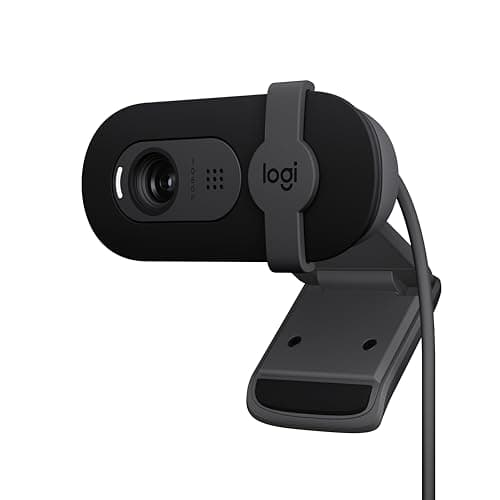
Product image from the Amazon listing.
Our verdict
Yes — the Logitech Brio 101 is the best-value webcam on Amazon right now, and the correct upgrade if your laptop camera makes you look bad on Zoom. Sharp 1080p, RightLight auto-brightness that handles dim rooms, a usable built-in mic, and a physical privacy shutter — all for under $40 and from an established brand. It's not the pick for professional streamers or 4K content creators, but for the specific job of daily video meetings and classes, this is the webcam to buy and stop thinking about. If your laptop is USB-C only, budget a couple of dollars for a USB-A adapter or step up to the USB-C Brio 300.
The short version
The Brio 101 is Logitech's entry into the 'good enough for meetings' webcam category, and it's the one to buy if your laptop's built-in camera is making you look like a potato on Zoom. Full HD 1080p at 30 fps, Logitech's RightLight auto-brightness that boosts image quality up to 50% in dim rooms, a built-in mic that's genuinely usable for video calls, and a slide-over privacy shutter for peace of mind. USB-A plug-and-play — no drivers needed on Windows, Mac, ChromeOS or Linux. Compatible with Zoom, Microsoft Teams, Google Meet, and even Nintendo Switch 2's GameChat mode. At under $40, it's the best value in webcams right now.
Pros & cons
Pros
- Sharp 1080p at 30 fps — genuine upgrade from most laptop cameras
- RightLight auto-brightness boosts image up to 50% in dim rooms
- Built-in mic that's actually usable for meetings
- Physical privacy shutter slides over the lens
- USB-A plug-and-play — no drivers needed
- Works with Zoom, Teams, Meet, OBS, and Nintendo Switch 2
- Compact universal clip mounts to laptops and monitors
Cons
- USB-A only — no USB-C plug in the box
- Fixed focus (no autofocus)
- No 4K or 60 fps if you want cinematic quality
- Built-in mic picks up desk keyboard noise
Why people love it
Clip it to your screen
The Brio 101's universal mount clips to laptops, external monitors and tripods. Flexible enough to sit above nearly any screen at eye level.
Plug in and go
USB-A cable, no drivers, no setup. Windows, Mac, ChromeOS and Linux all recognize it as a standard UVC webcam within seconds.
RightLight adjusts automatically
The Brio's onboard image processing brightens your face in dim rooms up to 50% — no lighting rig needed for calls at your dining table at 6 pm.
Who it's for
- Anyone whose laptop camera makes them look bad
- Remote workers on daily Zoom / Teams / Meet
- Students on video classes
- Anyone who wants a proper webcam without spending $150+
Why the Logitech Brio 101 became the default 'first webcam' recommendation in 2026
The webcam category settled into a clear structure over the past few years: laptop cameras got noticeably worse (Apple briefly excepted), 4K webcams got expensive without offering much benefit for meetings, and the sub-$40 category filled with cheap Chinese webcams that all had similar problems — poor low-light performance, tinny mics, no privacy shutter, weird color reproduction. Logitech's Brio 101 dropped into that gap as a legitimate 1080p webcam from an established brand at the price point where the alternatives are all compromised. It's not the highest-spec webcam Logitech makes — the Brio 300, 500 and 4K exist for higher tiers — but for the specific job of 'my laptop camera makes me look bad on Zoom,' it's the correct answer.
The three things it does better than competing sub-$40 webcams: image quality (RightLight actually works, and the color science is Logitech-quality), mic (usable enough that most people don't need a separate one), and reliability (Logitech's driver support and multi-OS compatibility are years ahead of no-name brands). The privacy shutter is the fourth feature — a small piece of plastic that costs nothing to include but that many competing webcams still skip. Add it all up and the Brio 101 hits a specific value sweet spot: better than every laptop camera under $2,000, and close enough to premium webcams that most users can't tell the difference on a Zoom call.
Logitech Brio 101 vs premium webcams (Brio 500, Brio 4K, Insta360 Link): when to spend more
The Brio 101 is the correct pick if your primary use case is video meetings, video classes, or occasional streaming. It's not the pick if you're a professional content creator, a full-time streamer with a proper lighting setup, or someone who wants 4K video for YouTube uploads. For those use cases, the tier structure matters: Brio 500 adds 1080p at 60 fps and Show Mode (tilts down to show your desk for tutorials) for around $130. Brio 4K delivers genuine 4K at 30 fps for high-end content creation at around $200. Insta360 Link is the premium AI-tracking webcam that auto-follows you around the room for around $300 — genuinely magical for solo creators, overkill for meetings.
The Brio 101 also isn't the pick if you want to replace a proper camera setup with a big sensor and shallow depth of field. That's what a mirrorless camera plugged into a capture card is for — a Sony ZV-E10 or Fujifilm X-S20 delivers cinematic video quality that no webcam can match, but at a very different budget. For most people, the Brio 101 hits the exact right price point: it's noticeably better than what came with your laptop, cheap enough to buy without deliberating, and reliable enough that you'll forget you have it in the good sense. That's the best value in webcams right now.
How to make yourself look best on a webcam call (regardless of which camera you buy)
The webcam is only half the equation — lighting and positioning matter as much as sensor quality. First, put a light source in front of you (facing you), not behind you. A single window in front of you at midday is often better than any specialty light. If you're indoors at night, a cheap ring light or even a bright lamp bounced off a white wall in front of you does most of the work. Never have a bright window behind you unless you close the blinds — backlit shots make you look like a silhouette regardless of how good your camera is.
Second, position the camera at eye level or slightly above. Laptop cameras built into the screen mean you're always looking down at people, which is unflattering. Prop the laptop on a stand or clip an external webcam like the Brio 101 to the top of an external monitor at eye height. Third, background matters more than most people realize — a clean wall or a bookshelf is better than a messy desk. Blur backgrounds work but often look artificial around your hair. Fourth, sit at a normal arm's-length distance from the camera; too close is invasive, too far makes you look small. Fifth, look at the camera lens (not your own preview window) when you want to appear to make eye contact. Nail these five, and even a mediocre webcam produces professional-looking calls. Skip them, and even a 4K webcam looks bad. One quick add-on: wipe the actual lens before an important call. A month of desk dust and finger-smudge on a webcam lens softens the image far more than most people realize — a stick-on cleaner like the WaterBear pad parked on the monitor bezel means you'll actually do the ten-second wipe before you hit join, instead of thinking about it at home while the meeting starts.
See Logitech Brio 101 on Amazon
Check the latest price, photos and buyer reviews on Amazon.
Check Price on Amazon →Sold and shipped by AmazonFrequently asked questions
Is the Logitech Brio 101 actually 1080p? Real-world image quality?
Yes — genuine 1920×1080 at 30 fps, and the image quality is a clear step up from typical 720p laptop cameras. Skin tones look natural (Logitech's color processing is well-tuned), edges are sharp for a fixed-focus lens, and RightLight handles the tricky dim-office-with-window-behind-you scenarios that make cheap webcams look terrible. It won't compete with a mirrorless camera piped through a capture card, but for meetings, streaming and everyday video calls, it's noticeably better than the built-in camera on almost any laptop under $2,000.
Brio 101 vs Brio 300 vs Brio 500: which Logitech webcam should I buy?
The Brio 101 is the sub-$40 entry point — 1080p, RightLight, privacy shutter, built-in mic. The Brio 300 adds noise-canceling dual mics and a slightly better lens for around $60. The Brio 500 adds 1080p at 60 fps, Show Mode (tilts down to show your desk), and Logitech's premium build for $130+. For most video-call use cases the Brio 101 is the correct answer — it hits the exact 'obviously better than my laptop camera' sweet spot without spending money on features you'll rarely use. Only step up to the 500 if you're a full-time streamer or content creator.
Does the Brio 101 work with Mac, ChromeOS and Linux, or is it Windows-only?
Works with all of them. It's a standard UVC webcam that any operating system recognizes without drivers — Mac, ChromeOS, Linux (Ubuntu, Fedora, etc.), Windows 10 and 11 all just work. Logitech's optional G Hub or Logi Tune software adds fine-tuning controls on Windows/Mac (image adjustment, RightLight override), but you don't need it for basic use. Also works with the Nintendo Switch 2's new GameChat mode.
How's the built-in microphone?
Actually usable for meetings, which is more than you can say for most cheap webcam mics. It's a single omnidirectional mic — good enough that most casual users don't need a separate microphone for Zoom, Teams or Google Meet. If you're recording podcasts or streaming professionally, upgrade to a dedicated USB mic like the Blue Yeti or an Audio-Technica AT2020. For 90% of remote-work video calls, the Brio's mic is fine.
Does the Brio 101 have a USB-C plug or is it USB-A only?
USB-A only in the box. If your modern laptop only has USB-C ports, you'll need either a USB-A-to-USB-C adapter (a couple of dollars on Amazon) or a USB-C dock. Logitech's higher-tier Brio 300 and 500 come with USB-C. This is the main real limitation of the Brio 101, and depending on your setup it's either a minor annoyance or a reason to spend a bit more on the Brio 300.
How well does the privacy shutter work — is it a real physical cover?
Yes, it's a genuine physical plastic slide that covers the lens completely when closed. Slide it right to reveal the camera, left to cover it. Unlike some webcams that use a software-only 'privacy mode,' the Brio 101's shutter is a physical barrier — even if your webcam were compromised by malware, it can't see through the shutter. Simple, effective, and the specific feature security-conscious remote workers should look for in any webcam.
Can I use the Brio 101 for streaming (Twitch, YouTube, OBS)?
Yes for casual streaming and full HD content. It shows up as a standard webcam in OBS, Streamlabs, Twitch Studio and any streaming software. 1080p at 30 fps is fine for talking-head streams, tutorial videos, YouTube Shorts and Twitch chatting streams. For professional streamers wanting 1080p at 60 fps or 4K, step up to the Brio 500 or 4K Brio. The Brio 101 is the correct pick for someone who occasionally streams and needs a webcam that also handles daily work calls.
Logitech Brio 101 vs the Logitech MX Brio — how do the 2026 reviews compare?
They're targeting completely different buyers. The MX Brio is Logitech's flagship 4K creator webcam with a Sony STARVIS 2 sensor, USB-C, a magnetic privacy shutter and a Show Mode tilt — it costs about $200 and is meant for content creators, streamers and pros who care about image quality above all. The Brio 101 is the $40 workhorse webcam for meetings, classes and everyday video calls. If you're picking between the two, the honest question is whether you'll actually notice 4K on the other end of a compressed Zoom call — usually no, and the Brio 101 is the right answer. Choose the MX Brio only if you're recording high-quality video, streaming professionally, or you want Show Mode to demo a physical desk during tutorials.
As an Amazon Associate, TopCrate earns from qualifying purchases at no extra cost to you. Product image, price, availability and ratings are shown on Amazon and are subject to change.