HANDS-ON REVIEW
WaterBear Stick-On Screen & Lens Cleaner Review: Is It Worth It?
The coin-sized WaterBear phone and lens cleaner that lives on the back of your device — peel it off, wipe the smudge, stick it back. Rinse to renew.
Quick answer: Yes — the WaterBear screen cleaner works and is worth $19.99: a coin-sized microfiber-style pad that sticks to the back of the exact device it cleans, wipes smudges in three seconds, and rinses under the tap to renew for months. It wins on the only metric that matters for a cleaning tool — it's there when you need it. Stuck to the device it serves, rinsed clean in a sink, re-stuck for months, it turns proper screen and lens care from a thing you forget into a three-second reflex. Cheap, clever, and far better for your glass than a shirt hem has ever been.
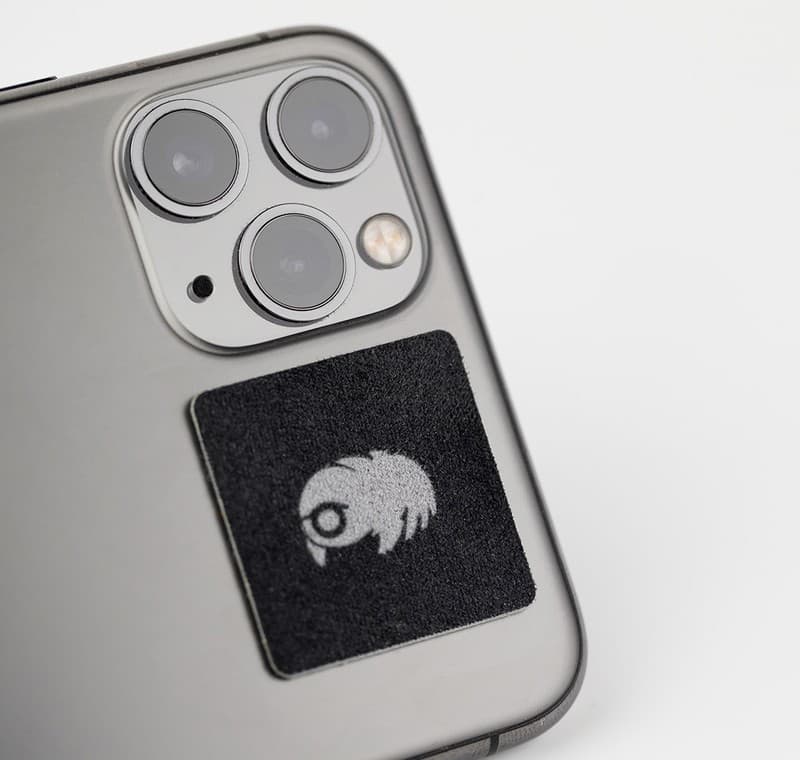
WaterBear rides on the back of your phone until a smudge needs wiping. Photo: KUVRD
Our verdict
Yes — the WaterBear screen cleaner works and is worth $19.99: a coin-sized microfiber-style pad that sticks to the back of the exact device it cleans, wipes smudges in three seconds, and rinses under the tap to renew for months. It wins on the only metric that matters for a cleaning tool — it's there when you need it. Stuck to the device it serves, rinsed clean in a sink, re-stuck for months, it turns proper screen and lens care from a thing you forget into a three-second reflex. Cheap, clever, and far better for your glass than a shirt hem has ever been.
The short version
You clean your screen with whatever's nearby — a sleeve, a shirt hem, a napkin — because the microfiber cloth is never where you are. WaterBear fixes the 'never where you are' part: it's a coin-sized, two-sided cleaning pad with reusable adhesive that sticks flat to the back of your phone, laptop or camera. Peel it off, wipe the smudge with the soft side, stick it back. When it gets dirty, rinse it under the tap and it's new again.
Pros & cons
Pros
- Always with you — it lives on the device it cleans
- Two-sided: textured face for grime, soft side for polish
- Washable and reusable — rinse under a tap to restore it
- Adhesive re-sticks hundreds of times without residue
- Safe on phone screens, laptop displays and camera lenses
- Slim enough to stay out of the way (and case-friendly)
Cons
- Easy to misplace once peeled off — stick it back immediately
- Wireless charging pads may need it repositioned
- It's a cleaner, not a screen protector — no drop protection
How it works
Stick it on
Press the WaterBear flat onto the back of your phone, laptop lid or camera body — the reusable adhesive holds firm.
Peel and wipe
Smudged screen? Peel it off and wipe with the soft cleaning side — fingerprints, grime and haze lift in seconds.
Re-stick, rinse, repeat
Stick it back in place. When the pad itself gets grubby, rinse it under water, let it dry, and both sides revive.
Who it's for
- Anyone whose screen is currently cleaned with a shirt hem
- Glasses and sunglasses wearers who smudge everything
- Photographers and vloggers who need a lens wipe on the camera
- Remote workers with a laptop screen full of fingerprints
Why your shirt is a terrible screen cleaner (and this isn't)
Wiping a screen with clothing or a napkin moves oil around and drags whatever grit is in the fabric across the glass — that's where micro-scratches and permanent haze come from, especially on coated lenses. Proper microfiber works by trapping oil and particles in split fibers instead of dragging them, which is why every camera store sells the cloths. The problem was never the cloth; it's that the cloth is in a drawer at home.
WaterBear is that correct cleaning surface made un-losable: a two-layer pad — textured face for lifting grime, soft face for polishing — with a washable adhesive back that parks it on the device itself. The clean is only as good as the pad, which is why the rinse-to-revive trick matters: thirty seconds under a tap flushes the trapped oils out and restores it.
Is WaterBear worth it vs a microfiber cloth?
A basic cloth is cheaper, and if you reliably carry one, keep carrying it. WaterBear's pitch is for the other 95% of us: the cleaner that's physically attached to the thing that gets dirty wins by default. Phone in hand, smudge spotted, peel-wipe-stick — three seconds, no pockets, no drawer. For camera people it's even more practical: stuck beside the lens mount, it's a lens wipe that can't be forgotten at home.
The pack also scales sensibly — the larger pad suits phones and laptops while mini sizes ride on AirPods cases and keyboards. Against a $1 cloth it costs more; against the scratched screen or hazy lens from a year of shirt-hem wipes, it's cheap.
Where to stick it, and how to keep it working
Placement matters a little: on a phone, park it low on the back or on the case, away from the camera bump so it sits flush — and if you charge wirelessly, offset it from the coil zone in the middle. On laptops, the lid is prime real estate; on cameras, next to the mount or on the strap keeps it a finger away from the lens.
Maintenance is a rinse: when either side looks glossy with oil or stops gliding, run it under warm water, rub it gently, and let it air-dry sticky-side up. The adhesive itself revives with a rinse too — dust is what weakens it, and water clears the dust. Replace it when the soft face wears smooth; until then, it just keeps re-sticking.
Frequently asked questions
What is the WaterBear exactly?
A coin-sized, two-sided cleaning pad with reusable adhesive backing. It sticks flat to the back of your phone, laptop or camera; you peel it off to wipe screens and lenses, then stick it back so it's always with you.
Will the adhesive mark my phone or wear out?
It's a residue-free, washable adhesive designed to re-stick hundreds of times. If it picks up dust and loses grip, a rinse under the tap restores the tack — no sticky marks left behind.
Is it safe on camera lenses and coatings?
Yes — the soft cleaning face is a microfiber-style surface made for coated glass, the same approach as a proper lens cloth. It lifts oil rather than dragging grit, which is exactly what coatings need.
How do I clean the WaterBear itself?
Rinse it under warm water, rub gently, and air-dry. That flushes the trapped oils out of the pad and revives both the cleaning faces and the adhesive.
Will it interfere with wireless charging?
Keep it away from the center of the phone where the charging coil sits — low on the back or on the case is ideal. Positioned there, it charges fine on most pads.
Does it work through a phone case?
Yes — stick it to the case instead of the phone. Flat, smooth case surfaces hold best; heavily textured cases give the adhesive less to grip.
Is WaterBear worth it, or is a microfiber cloth enough?
Worth it for anyone who doesn't reliably carry a cloth (which is most people). A microfiber cloth costs a dollar and works fine when it's in your pocket — but if it lives in a drawer, you end up wiping your screen on a shirt hem instead, which drags grit across the glass and scratches coatings over time. WaterBear parks the correct cleaning surface on the device itself, so the wipe is always three seconds away. Cheaper than one scratched phone screen, and it rinses to renew for months.
How long does the WaterBear last before it needs replacing?
The soft cleaning face gradually wears smooth after many months of daily use, and that's when to replace it. In between, a rinse under warm water flushes trapped oils out of the pad and revives the adhesive too — dust is what weakens the tack, and water clears it. Most people get well over a year out of one pad if they rinse it whenever it stops gliding smoothly across the screen.
When you buy through links on this page, TopCrate may earn an affiliate commission at no extra cost to you. Specifications reflect the manufacturer's listing. Prices accurate as of publish time.