TRENDING ON AMAZON
Logitech Ergo K860 Wireless Ergonomic Split Keyboard Review: Is It Worth It?
The wireless curved-split keyboard with a pillowed memory-foam wrist rest — designed to keep wrists neutral instead of bent, and quiet enough to run in a shared office.
Quick answer: Yes — the Logitech Ergo K860 is worth $130 for anyone whose wrists, forearms or elbows ache after long typing days, or for anyone trying to prevent that from happening. A curved split keyframe that cuts wrist bend by 25%, a pillowed wrist rest that lets your palms actually rest, a full-size layout with numpad, and 12-24 months of battery on two AAAs. It's not the pick for hardcore ergonomic devotees who want fully separated halves — that's Kinesis Freestyle Edge territory — but for the specific case of an office worker or remote employee who spends all day at a keyboard and doesn't want that keyboard to hurt them, this is the correct answer. Add a sit-stand base, an eye-level monitor and 45-minute breaks and the ergonomic problem is genuinely solved.
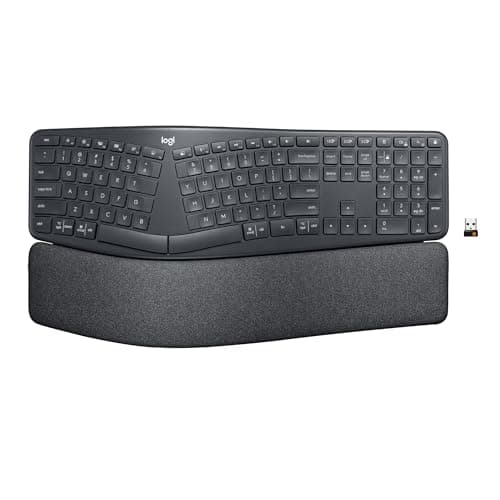
Product image from the Amazon listing.
Our verdict
Yes — the Logitech Ergo K860 is worth $130 for anyone whose wrists, forearms or elbows ache after long typing days, or for anyone trying to prevent that from happening. A curved split keyframe that cuts wrist bend by 25%, a pillowed wrist rest that lets your palms actually rest, a full-size layout with numpad, and 12-24 months of battery on two AAAs. It's not the pick for hardcore ergonomic devotees who want fully separated halves — that's Kinesis Freestyle Edge territory — but for the specific case of an office worker or remote employee who spends all day at a keyboard and doesn't want that keyboard to hurt them, this is the correct answer. Add a sit-stand base, an eye-level monitor and 45-minute breaks and the ergonomic problem is genuinely solved.
The short version
The Ergo K860 is Logitech's flagship ergonomic keyboard and the answer for anyone whose wrists or forearms hurt after a long typing day. The one-piece curved split keyframe holds your hands at a natural shoulder-width angle, the pillowed memory-foam wrist rest supports the base of your palms so your wrists don't collapse forward, and Logitech's own ergonomic tests show a 25% reduction in wrist bend and 54% more wrist support versus flat keyboards. It runs off two AAAs for up to 24 months on a charge, pairs to up to three devices via Bluetooth or the included Logi Bolt USB receiver, and includes the full numpad most other split keyboards drop. It's not the split-in-two-halves keyboard for hardcore ergonomic devotees — that's Kinesis Freestyle Edge territory — but it's the specific keyboard most desk workers should buy when their standard keyboard starts to hurt.
Pros & cons
Pros
- Curved split keyframe cuts wrist bend by ~25%
- Pillowed memory-foam wrist rest supports the palm base
- Full-size layout with numpad — rare on split keyboards
- Bluetooth + Logi Bolt USB: pairs with 3 devices, one-key switch
- Up to 24 months of battery on 2 AAAs
- US-Ergonomics certified — the assessment is genuine
- Windows, Mac, Linux, Chrome OS all work out of the box
Cons
- Bigger footprint than a flat keyboard — measure your tray
- Not fully split into two halves like a Kinesis or MoErgo
- Not mechanical — membrane switches with a soft feel
- Costs 3-4x a basic full-size keyboard
Why people love it
Sit at neutral shoulder width
The one-piece curved split angles the two halves outward so your forearms are shoulder-width apart and your wrists stop bending toward the pinky side — the exact bend that causes ulnar-side wrist pain.
Rest, don't hover
The pillowed memory-foam wrist rest and the adjustable palm-lift feet let your palms actually rest on the keyboard between keystrokes, so you're not holding your wrists up all day. The palm-lift raises the front to negative tilt for standing-desk use.
Pair to any 3 devices
Bluetooth Low Energy for phones, tablets or laptops that don't have a spare USB port; Logi Bolt for the desktop where you want fastest response. Easy-Switch keys 1/2/3 flip between them instantly.
Who it's for
- Desk workers with wrist, forearm or elbow pain
- Anyone typing 6+ hours a day
- People who want ergonomics without going full-split
- Multi-device setups (laptop + iPad + phone)
Is the Logitech Ergo K860 worth $130? An honest 2026 verdict
At around $130 the Ergo K860 costs about four times what a basic full-size Logitech keyboard runs, and roughly the same as the flat MX Keys S. The value question comes down to a specific personal calculation: how much is not having wrist pain worth to you? For anyone whose wrists genuinely ache after a workday, the K860 pays for itself the first month you don't have to ice your forearms in the evening. For people with no wrist issues and no risk factors, it's a nice-to-have and a flat keyboard is fine. The single-biggest predictor of whether it's worth it: whether you've noticed any wrist, forearm, elbow or shoulder discomfort after long typing days. If yes, buy it now, not after the discomfort turns into an injury.
The value comparison inside Logitech's own lineup is illuminating. The MX Keys S is the beloved premium flat keyboard — beautiful typing feel, backlit, sleek — but it doesn't address posture at all. The Ergo K860 is the postural keyboard — bigger footprint, less pretty, but built specifically to reduce the ulnar deviation and forearm pronation that cause repetitive-strain-flavor wrist pain. If your primary concern is aesthetics or you already have zero wrist issues, buy the MX Keys S. If your primary concern is stopping or preventing pain, buy the K860. And if you spend all day at a desk, the honest recommendation is to also address the sitting side of the equation with a sit-stand base like the FlexiSpot E7 — the keyboard and the desk together solve the problem the keyboard alone can't.
How to actually set up the Ergo K860 for maximum ergonomic benefit
Just plugging it in and typing is only half the value. Position matters more than most people realize. Place the K860 directly in front of your body — not offset to one side — and center it on your midline. Your monitor should be at eye level, arm's-length away, so your neck stays neutral. Your elbows should sit at roughly 90-110° when your hands are on the home row, which usually means either lowering your desk or raising your chair until your forearms are parallel to the floor. If you have a sit-stand base like the FlexiSpot E7 standing desk, the K860 works equally well seated and standing — flip out the negative-tilt palm-lift feet for standing use to keep your wrists neutral.
The wrist rest is meant to support the base of your palms, not your wrists — this is the counterintuitive but important detail. Actual wrists should hover slightly above the rest while typing, and your palms should rest between keystrokes rather than during them. Sit far enough back that your forearms can rest on your desk or chair armrests, taking the load off your shoulders. Take a two-minute break every 45-60 minutes to stretch your wrists, forearms and neck. The K860 does the postural half of the work; the habits do the rest. Combined with a proper ergonomic chair and monitor position, most people notice a real difference in wrist and forearm comfort within 2-3 weeks.
Ergo K860 vs mechanical ergonomic keyboards: when to upgrade further
The Ergo K860 uses membrane switches with a soft, quiet feel — perfect for a shared office or a home setup where a partner is in the same room. What it doesn't offer is the tactile feedback, key-per-key customization, or long-term repairability of a mechanical keyboard. If you fall in love with the ergonomic split concept and want to go further, the next tier is a fully separated mechanical ergonomic like the Kinesis Freestyle Edge RGB (two halves connected by a cable, mechanical switches, programmable), the ZSA Moonlander (Cherry MX or Kailh switches, fully separated with tenting angles, open-source firmware), or the Glove80 (contoured concave halves for the true ergonomic devotees). Prices climb from $130 (K860) to $200-400 (Kinesis, ZSA) to $400+ (Glove80, MoErgo, custom builds).
The K860 is where most people should start. It delivers 80% of the ergonomic benefit with 20% of the learning curve and complexity, and for a huge share of users it's the final destination — not a stepping-stone. Only escalate to fully separated split mechanicals if you have serious RSI, if you're a heavy typist who values the tactile feel of mechanical switches, or if you specifically want the ability to independently position each half. For office workers, professionals who use a keyboard heavily but aren't hobbyists about it, and anyone who cares more about 'stop hurting' than 'perfect keyboard experience,' the Ergo K860 is the right answer. Pair it with a matching ergonomic mouse like the Logitech MX Master 3S — same design language, same Easy-Switch multi-device pairing, same 'quiet and durable' feel — and you've built a complete desk setup that doesn't hurt to use all day.
See Logitech Ergo K860 on Amazon
Check the latest price, photos and buyer reviews on Amazon.
Check Price on Amazon →Sold and shipped by AmazonFrequently asked questions
Does the Logitech Ergo K860 actually reduce wrist pain?
For most people with typical repetitive-strain-flavor wrist pain — yes, meaningfully. The mechanism is real: the curved split holds your forearms and wrists at a more neutral angle so you're not chronically bending your wrists to the pinky side (ulnar deviation) or pronating your forearms 90° flat. Logitech's own certified ergonomic testing showed a 25% reduction in wrist bend and 54% more wrist support compared to a standard flat keyboard, and that lines up with what most users report after 2-3 weeks of adjustment. It's not going to fix carpal tunnel syndrome or a diagnosed injury — that's what a physical therapist and possibly surgery are for — but for the everyday 'my wrists ache after 10 hours at the desk' problem, the K860 is one of the most effective single upgrades you can make. Pair it with a proper sit-stand base like the FlexiSpot E7 standing desk so you can vary your posture through the day, and the two together resolve the ergonomic problem more completely than either alone.
Ergo K860 vs Logitech MX Keys S: which Logitech keyboard should I buy?
Different tools for different jobs. The MX Keys S is a premium flat keyboard — sleek, backlit, low-profile, universally loved for its typing feel — but it's not ergonomic in the postural sense. The Ergo K860 is bigger, curvier, and specifically designed to reduce wrist strain; it's the pick when the goal is 'stop hurting,' not 'type on a beautiful minimalist slab.' If you have no wrist issues and love a low-profile design, buy the MX Keys S. If your wrists ache by the end of the workday or you're trying to prevent that from happening, buy the K860. Some people own both — MX Keys S for their travel laptop, K860 anchored at the main desk.
Ergo K860 vs Kinesis Freestyle Edge vs Microsoft Sculpt Ergonomic: how do they compare?
Three well-known split/ergonomic keyboards with different philosophies. The Ergo K860 is a one-piece curved split with the palm rest built in — easy to set up, gentle learning curve, works for most people. The Microsoft Sculpt Ergonomic is the closest direct competitor: similar curved split, similar palm rest, slightly cheaper, but discontinued Bluetooth support and older wireless tech. The Kinesis Freestyle Edge is the extreme: two fully separated halves you can position independently at any angle or distance, mechanical switches, aimed at hardcore users and gamers with real ergonomic needs. For most desk workers, the K860 is the correct default — meaningful ergonomic benefit without a steep learning curve. For serious RSI cases or people who already know they want full separation, the Kinesis is worth the money and the adjustment period.
Is there a learning curve for a split keyboard?
A small one, and it disappears fast. The Ergo K860 uses the same standard QWERTY layout — no remapped keys — so the only adjustment is the split angle. Touch typists notice it most on the first day, especially the B key (it's on the left half, which surprises 'wrong-hand B' typers). Most users adapt in 2-3 days and hit their normal typing speed within a week. The bigger adjustment is muscle memory for palm placement: you'll want to actually rest your palms on the wrist rest between keystrokes rather than hover. That's the whole point of the design, and it's the habit that delivers the ergonomic benefit.
How is the battery life, and what happens when the batteries die?
Genuinely 12-24 months on two AAAs depending on daily use — one of the longest runtimes in wireless keyboards. Logitech gets there by making the K860 non-backlit (no LEDs to drain the battery) and using efficient wireless protocols. When the batteries eventually die, there's no charging cable to hunt for — you just swap the two AAAs and keep working. Some users prefer rechargeable NiMH batteries (Eneloop or similar) so they never buy alkalines; others just keep a spare pair in a drawer. The K860 gives a low-battery warning weeks in advance, so it's never a surprise mid-meeting.
Can I use the Ergo K860 with a Mac, and does the layout adapt correctly?
Yes, and Logitech Options+ (their configuration software) auto-detects Mac vs Windows and remaps the modifier keys so Cmd is where you expect it, not Windows key. The physical keycaps say 'Alt' and 'Start' but the actual key mapping is Cmd/Option on macOS. Function keys work out of the box for volume, brightness, Mission Control, media playback and screenshot. Chrome OS and Linux work too — you may need to remap modifier keys manually on Linux, but everything works as a standard USB HID keyboard even without Logitech's software installed.
Is the K860 backlit, and does it have media/multimedia keys?
Not backlit — this is the most common thing people wish it had. Logitech's reasoning is battery life (backlit keyboards run 2-6 months per charge; K860 runs 12-24 months), and for daily desk use in a normally-lit room the backlight isn't necessary. For dedicated media control it has F-keys with volume up/down/mute, media play/pause and skip, brightness, and OS-specific keys (Mission Control on Mac, Task View on Windows). If backlighting is critical for your setup (dim room, night work, poor eyesight), the MX Keys S is a better pick and you sacrifice the ergonomic split. For most desk workers, the trade-off toward battery life is the right one.
As an Amazon Associate, TopCrate earns from qualifying purchases at no extra cost to you. The Ergo K860 is a consumer ergonomic keyboard, not a medical device — it does not diagnose, treat or cure any repetitive-strain condition. Consult a doctor or physical therapist for diagnosed wrist, forearm or nerve conditions. Product image, price, availability and ratings are shown on Amazon and are subject to change.