TRENDING ON AMAZON
Logitech MX Keys S Wireless Keyboard Review: Is It Worth It?
The quiet, low-profile wireless keyboard that shows up on every 'best of' list for a reason — smart proximity backlight, multi-device Bluetooth, and the smoothest scissor-switch typing at this price.
Quick answer: Yes — the Logitech MX Keys S is the wireless keyboard to buy if you type for a living, jump between multiple computers, or want a quiet, precise keyboard that doesn't compromise on typing feel. Editor's Choice at every major tech review site for a reason: it's the rare productivity keyboard that's genuinely better than the cheap ones in ways you feel every day. Get the Mini if desk space is tight, the full-size if you need a numpad, or the Combo if you're also buying a mouse. Pair with a good aluminum stand and it's the setup remote workers keep for years.
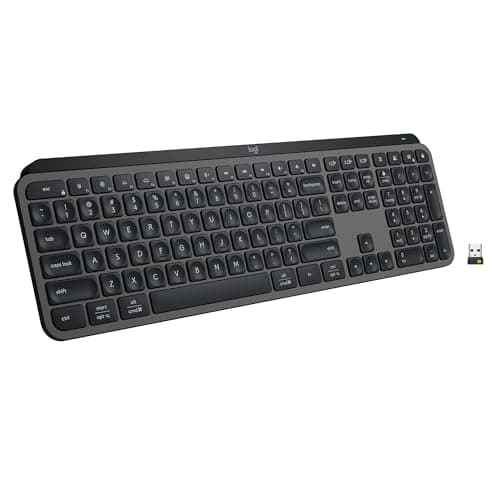
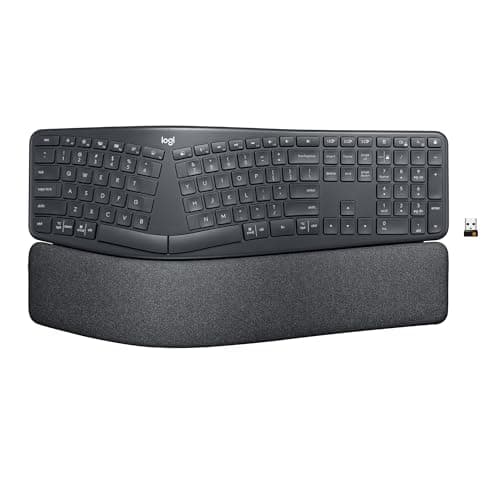
Product image from the Amazon listing.
Our verdict
Yes — the Logitech MX Keys S is the wireless keyboard to buy if you type for a living, jump between multiple computers, or want a quiet, precise keyboard that doesn't compromise on typing feel. Editor's Choice at every major tech review site for a reason: it's the rare productivity keyboard that's genuinely better than the cheap ones in ways you feel every day. Get the Mini if desk space is tight, the full-size if you need a numpad, or the Combo if you're also buying a mouse. Pair with a good aluminum stand and it's the setup remote workers keep for years.
The short version
Logitech's MX Keys S is the productivity keyboard that beats every other wireless option in this price range, and it's not particularly close. The scissor-switch keys are quiet, precise and nearly identical to what a MacBook feels like — but with a fuller travel that's kinder to your hands over a full day. Smart backlighting turns on when your hands approach and off when you walk away, saving battery for the 10-day charge cycle (5 months if you leave the light off). Multi-device Bluetooth lets you switch between a laptop, iPad and phone with a single button press, and Logi Flow lets you drag the cursor between two computers as if they were one big desktop. Available in full-size, Mini and Combo (with the MX Master 3S mouse) versions.
Pros & cons
Pros
- Quiet, precise scissor-switch typing — better than MacBook feel
- Smart backlight lights up when your hands approach
- Multi-device Bluetooth pairing across up to 3 devices
- USB-C rechargeable — 10 days per charge, 5 months without backlight
- Programmable smart keys (dictation, screenshot, emoji, mic mute)
- Compatible with Windows, macOS, Linux, ChromeOS, iPadOS
- Available in full-size, compact Mini and MX Keys S Combo bundles
Cons
- Premium price — many times a basic wireless keyboard
- No dedicated numpad on the Mini version
- Backlight drops battery life significantly if left on
Why people love it
Pair once via Logi Bolt or Bluetooth
Plug in the included Logi Bolt USB receiver, or pair directly over Bluetooth to any device that speaks it. The keyboard remembers up to three devices.
Switch with one key
Three programmable device keys let you jump between your work laptop, personal MacBook and iPad instantly — no re-pairing, no menus.
Backlight follows your hands
A proximity sensor detects when your hands are near and lights the keys automatically, then turns off when you walk away to save battery.
Who it's for
- Remote workers on a laptop all day
- Anyone jumping between multiple computers or a computer and iPad
- People who want a quiet keyboard for shared or open-plan offices
- MacBook and iPad users who like scissor-switch feel
- Logi Flow users pairing it with the [Logitech MX Master 3S](/reviews/logitech-mx-master)
Why the Logitech MX Keys S keeps winning best-wireless-keyboard reviews
The MX Keys S is the wireless keyboard almost every tech review site awards Editor's Choice, and the reasons are consistent across reviewers. Typing feel is the first: the scissor-switch mechanism uses a spherical-dished keycap that guides your fingertip to the center of each key, and the actuation is quiet, tactile and consistent across the entire board — none of the mushy corner keys that cheap wireless keyboards develop. It's the closest wireless keyboard to a MacBook Pro's feel, but with slightly deeper travel that reduces typing fatigue over long sessions. The aluminum backplate keeps the whole keyboard rigid so you're not typing on a flexing plastic tray, which matters more than people realize for typing accuracy.
The second reason is that Logitech nailed the wireless integration details other brands still get wrong. Multi-device pairing lets you switch between three paired devices with a single button — no re-pairing, no unpair-and-repair cycles, and the switch is instant. Logi Bolt provides a stable receiver connection with imperceptible input lag for people who don't want Bluetooth. The smart backlight is a small but real quality-of-life improvement — the keys light up when your hands approach and turn off when you walk away, saving battery you'd waste on ambient light. And Logi Options+ software adds programmable smart keys for dictation, screenshots, emoji picker and mute — features you'll actually use every day. Nothing else in the wireless-keyboard category integrates as well.
MX Keys S vs Keychron K3 vs Apple Magic Keyboard: which productivity keyboard should you buy?
Three legitimate wireless keyboards at three different design philosophies. Keychron K3 is a low-profile mechanical wireless keyboard — you get true mechanical switches (choose your feel: brown/red/blue) in a thin-profile body, hot-swappable switches for customization, and wired-or-wireless flexibility. Best for people who want mechanical clackiness in a thin package and are willing to trade Logitech's software polish for switch customization. Apple Magic Keyboard is the Mac-only pick — thinnest, quietest, most aesthetically 'Mac,' but limited to Apple devices and no backlight (on the base model). MX Keys S is the productivity-first choice: works everywhere, quietest typing sound, smart backlight, best multi-device switching, and integrates with Logi Options+ software.
The best choice depends on your priorities. Type all day in an open office → MX Keys S (quietest, most ergonomic). Want mechanical feel and switch customization → Keychron K3. Mac-only aesthetic-first setup → Apple Magic. Cross-platform daily productivity with three devices → MX Keys S wins on integration and features. For remote workers juggling a work Mac, personal Windows machine, and an iPad, the MX Keys S is the correct answer, full stop — nothing else handles multi-device switching as smoothly.
How to set up your MX Keys S for maximum productivity
First 15 minutes: install Logi Options+ (free download from Logitech), pair the keyboard to all your devices via the three device buttons, and disable any keys you don't use. Options+ lets you remap the smart keys — the three programmable buttons above the F-keys — to functions you actually use. Popular remaps: microphone mute (Zoom/Teams), screenshot (Cmd+Shift+3 on Mac), and dictation trigger. The default configurations are fine, but 10 minutes of setup pays off across years of use.
If you also own a Logitech MX Master 3S mouse, enable Logi Flow in Options+: it lets you drag your cursor from one computer's screen edge onto another computer's screen as if they were one big desktop, with the keyboard and mouse automatically switching between them. Files, text and images can be dragged between the two computers as easily as within one. It's the closest thing to a shared-workspace multiplexer that exists without dedicated KVM hardware. For remote workers running a work laptop next to a personal desktop, Logi Flow is genuinely life-changing, and it's the specific reason the MX Keys S Combo (keyboard + mouse) makes sense as a bundle even if you have other input devices. Set the backlight to auto-off after 10 seconds of inactivity to extend battery life, and set the F5 key to toggle the backlight when you specifically need it — most days you'll run without backlight and hit 5 months per charge.
See Logitech MX Keys S on Amazon
Check the latest price, photos and buyer reviews on Amazon.
Check Price on Amazon →Sold and shipped by AmazonFrequently asked questions
Logitech MX Keys vs MX Keys S: what's the difference and which should I buy?
The MX Keys S is the 2023-refresh successor to the original 2019 MX Keys — same core scissor-switch typing feel, same aluminum backplate, same 10-day battery with backlight (5 months without), but with three meaningful improvements: three programmable smart keys above the F-row (dictation, screenshot, emoji picker, mic mute — genuinely useful daily), Logi Bolt receiver support (more secure and stable than the older Unifying receiver), and improved Logi Options+ software integration. If you already own the original MX Keys and love it, there's no urgent reason to upgrade — but if you're buying new in 2026, the MX Keys S is the correct pick over the older MX Keys because the price difference is minimal and the smart keys plus Bolt receiver are real quality-of-life wins. The original MX Keys is still sold at a small discount and remains a great keyboard; it's just no longer the best current-generation choice.
Is the Logitech MX Keys S actually worth the premium over a cheap wireless keyboard?
For anyone typing several hours a day, yes — the difference in typing feel between a $30 wireless keyboard and the MX Keys S is genuinely large. The scissor-switch keys have precise, spherical-dished keycaps that guide your fingertips to the center of each key, the actuation is quiet and consistent across the whole board, and the aluminum backplate keeps everything rigid so you're not typing on a flexing plastic tray. For light or occasional typing, a cheap wireless keyboard is fine; for actual daily productivity use, the MX Keys S pays off within weeks in reduced typing fatigue and fewer typos.
MX Keys S vs MX Keys S Mini — which should I buy?
Full-size MX Keys S if you use the numeric keypad regularly (data entry, spreadsheets, accounting) or you have desk space and prefer classic full-layout typing. MX Keys S Mini if desk space is tight, you don't need a numpad, or you're pairing with a laptop for a more compact desk setup. The Mini also positions your mouse hand closer to your typing hand, which some ergonomists prefer. Same key feel, same smart backlight, same multi-device Bluetooth — just the layout differs.
Does it work with Mac, iPad, Windows, ChromeOS and Linux?
Yes, all of them. The MX Keys S ships with keycaps labeled for both Mac and Windows layouts (Cmd/Alt on Mac, Alt/Win on PC), so the same keyboard works natively across ecosystems. Logitech's Options+ software (available for Mac and Windows) unlocks the smart keys, key customization and Logi Flow cross-computer control. On iPad, ChromeOS and Linux the keyboard works over standard Bluetooth without any drivers.
How long does the battery actually last?
About 10 days of typical use with the smart backlight on, or up to 5 months with the backlight disabled. The backlight is the single biggest battery drain — turn it off manually with the F5 key if you rarely type in the dark and you'll be plugging in only a few times a year. Charging happens via USB-C, and a 3-minute quick charge gets you enough juice for a full workday if you're caught empty.
Can I use the MX Keys S with the Logitech MX Master 3S mouse together?
Yes — Logitech sells them as the MX Keys S Combo specifically because they're designed to be used together. Both support the same Logi Options+ software, both work with Logi Flow for controlling multiple computers, and both use the same Logi Bolt USB receiver if you want to pair via one dongle. If you already own the MX Master 3S, buying the keyboard separately makes more sense than the Combo bundle.
MX Keys S vs Apple Magic Keyboard: which is better?
Different priorities. Apple Magic Keyboard is thinner, has a slightly shorter key travel, and feels most 'at home' on a Mac desk aesthetically. The MX Keys S has a longer key travel that most touch typists prefer for long sessions, adds smart proximity backlighting, and supports Windows/Linux/ChromeOS in addition to Mac. If your desk is Mac-only and you value aesthetics, Magic Keyboard. If you switch between systems, want backlight, or type for hours daily, MX Keys S wins on ergonomics and features. It also costs less than a Magic Keyboard with Touch ID.
Is the MX Keys S actually quiet — quiet enough for an open office or a shared bedroom?
Yes. It's specifically engineered to be quiet, with a low-travel scissor-switch design that produces a soft, muted click rather than the sharp clack of mechanical keyboards. Sound tests place it at roughly 45-50 dB in normal use — below conversation volume — which is genuinely open-office and shared-space appropriate. If you've been holding back on a keyboard upgrade because your partner works from the same room or you share desks with light sleepers, this is the wireless keyboard that solves that specific problem.
As an Amazon Associate, TopCrate earns from qualifying purchases at no extra cost to you. Product image, price, availability and ratings are shown on Amazon and are subject to change.