TRENDING ON AMAZON
Logitech MX Master 3S Wireless Mouse Review: Is It Worth It?
The wireless mouse software developers, designers and spreadsheet jockeys quietly default to — sculpted, silent and stupidly precise.
Quick answer: The MX Master 3S is the mouse most pros end up on after trying everything else — comfortable, quiet, ridiculously fast to scroll, and built to last. A genuine workday upgrade.
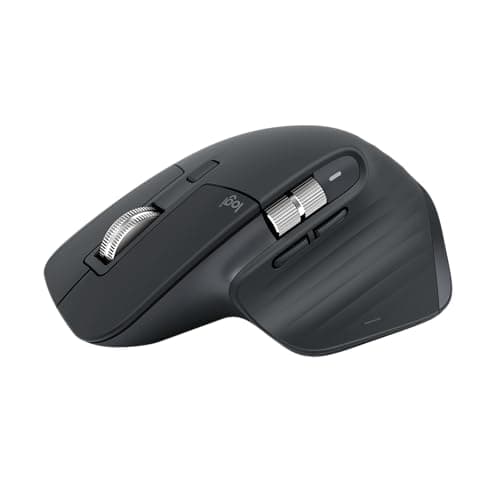
Product image from the Amazon listing.
Our verdict
The MX Master 3S is the mouse most pros end up on after trying everything else — comfortable, quiet, ridiculously fast to scroll, and built to last. A genuine workday upgrade.
The short version
Most people don't think about their mouse until they use a good one — and then they can't go back. The MX Master 3S has a sculpted shape your hand falls into, a magnetic scroll wheel that auto-shifts from clicky to a hyperfast free-spin, a thumb wheel for sideways scrolling, near-silent clicks, and tracks on glass. One USB-C charge lasts about two months, and the Logi Options+ app lets you set per-app shortcuts. It's the mouse you buy once and don't think about again.
Pros & cons
Pros
- Sculpted shape that fits the hand all day
- MagSpeed wheel switches from clicky to hyperfast free-spin
- Quiet clicks (8x quieter than the previous gen)
- Tracks on glass and rough surfaces
- About 70 days per USB-C charge
- Per-app shortcuts via Logi Options+
- Pairs to up to three devices, switch with a button
Cons
- Right-handed shape only
- Pricier than basic mice
- App setup unlocks the best features
Why people love it
Pair and charge
Pair via Bluetooth or the included USB receiver, then top up with USB-C every couple of months.
Customize the buttons
Install Logi Options+ to set per-app shortcuts on the thumb buttons and wheels.
Flow between machines
Press the device-switch button (or use Flow) to move between a laptop, desktop and tablet seamlessly.
Who it's for
- Spreadsheet, code or design pros
- Anyone with wrist or hand fatigue
- People juggling multiple computers
- Long workdays at a desk
Why the MX Master 3S is worth more than a $20 mouse
A basic mouse moves a cursor; the MX Master 3S removes friction from an entire workday. The sculpted body keeps your wrist in a neutral, supported position so your hand isn't clenched for eight hours, which is the difference people with wrist or hand fatigue notice first. The thumb rest, gesture button and horizontal scroll wheel mean common actions — switching desktops, scrubbing a timeline, panning a spreadsheet sideways — happen without reaching for the keyboard.
Then there's the MagSpeed wheel, the feature owners rave about. It clicks precisely for line-by-line control, but flick it harder and it free-spins almost frictionlessly, coasting through thousand-row spreadsheets or long documents in a single push. Once you've lived with it, a normal notched scroll wheel feels broken.
MX Master 3S vs 3S for Mac vs MX Anywhere 3S
The standard MX Master 3S and the 'for Mac' version are nearly identical hardware — the Mac edition is tuned and colored for Apple gear and ships with a Bluetooth-first setup, while the standard model includes the Logi Bolt USB receiver that's handy on Windows desktops. Either works cross-platform through the Logi Options+ app.
If you mainly want portability, the smaller MX Anywhere 3S is the travel-friendly sibling: lighter, flatter and pocketable, with the same quiet clicks and a great wheel, but a less supportive shape for all-day desk work. Buy the full-size MX Master 3S for a fixed desk; pick the Anywhere for a bag you carry everywhere.
Getting the most out of Logi Options+
Most of the MX Master 3S's value is locked behind a five-minute setup in Logi Options+. There you can remap the thumb buttons and gesture button per application — for example, making the gesture control mission-control on a Mac, or assigning copy/paste and undo to the thumb buttons in your editor of choice. You can also tune pointer speed, scroll direction and the wheel's auto-shift threshold.
The standout is Logi Flow: with the app on two computers, you can move the cursor straight off the edge of one screen onto another machine — even copying text or files between them. For anyone running a laptop next to a desktop, it quietly replaces a KVM switch.
See Logitech MX Master 3S on Amazon
Check the latest price, photos and buyer reviews on Amazon.
Check Price on Amazon →Sold and shipped by AmazonFrequently asked questions
What's new in the 3S vs the original MX Master 3?
Quieter clicks, an 8,000 DPI sensor that tracks on more surfaces, and USB-C charging — same comfortable shape and battery life.
Does it work on Mac and Windows?
Yes — Logi Options+ runs on both, and it pairs to up to three devices you can switch between with a button.
Is the scroll wheel really that good?
It's the standout feature — MagSpeed flips automatically from precise clicks to a long free-spin that flies through huge documents.
How long does the battery last?
About 70 days per charge with typical use, and a quick top-up gives hours more.
Can I use the MX Master 3S without the USB receiver?
Yes — it connects over Bluetooth to most modern laptops, or you can use the tiny Logi Bolt USB receiver for a rock-solid connection on a desktop.
Is the MX Master 3S good for gaming?
It's built for work, not competitive gaming — the sensor and clicks are superb, but dedicated gaming mice have lower latency and lighter bodies. For everything outside fast-twitch esports, it's excellent.
As an Amazon Associate, TopCrate earns from qualifying purchases at no extra cost to you. Product image, price, availability and ratings are shown on Amazon and are subject to change.