TRENDING ON AMAZON
NIIMBOT D110 Portable Bluetooth Thermal Label Maker Review: Is It Worth It?
The pocket-sized Bluetooth thermal label maker that quietly took over home-organization TikTok — designs on your phone, prints in seconds, no ink or toner to ever buy, and it's under $25 on Amazon.
Quick answer: Yes — the NIIMBOT D110 is the specific label maker most people should own in 2026, and 80,000+ Amazon reviews at 4.6 stars aren't hype: it's genuinely the product that fixed the label-maker category. Bluetooth phone-app design (no more hunting-and-pecking on a tiny keyboard), thermal printing (no ink or toner cartridges ever), 203 DPI sharp resolution, 4+ hour battery, and $25 price versus $60-100+ for a comparable Brother or DYMO. The economics are compelling — label rolls at 2-4 cents per label versus 15-30 cents on cartridge systems — and the phone-app workflow is dramatically better UX for home-organization projects. Not the pick for outdoor-durable labels (thermal fades in direct sunlight — buy a Brother laminated tape system for that) or for wide 50mm+ shipping labels (buy the NIIMBOT B1 instead). For the mainstream 'organize my pantry, cables, storage bins, and files' use case, this is the specific default recommendation. Pair with matching pantry jars, cable ties, and clear storage bins and you've built a real home-organization system for well under $100.
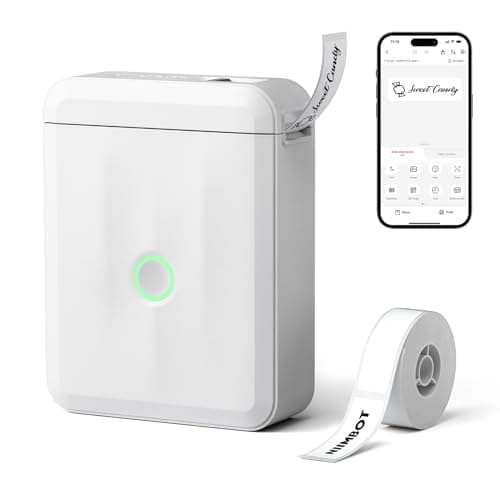
Product image from the Amazon listing.
Our verdict
Yes — the NIIMBOT D110 is the specific label maker most people should own in 2026, and 80,000+ Amazon reviews at 4.6 stars aren't hype: it's genuinely the product that fixed the label-maker category. Bluetooth phone-app design (no more hunting-and-pecking on a tiny keyboard), thermal printing (no ink or toner cartridges ever), 203 DPI sharp resolution, 4+ hour battery, and $25 price versus $60-100+ for a comparable Brother or DYMO. The economics are compelling — label rolls at 2-4 cents per label versus 15-30 cents on cartridge systems — and the phone-app workflow is dramatically better UX for home-organization projects. Not the pick for outdoor-durable labels (thermal fades in direct sunlight — buy a Brother laminated tape system for that) or for wide 50mm+ shipping labels (buy the NIIMBOT B1 instead). For the mainstream 'organize my pantry, cables, storage bins, and files' use case, this is the specific default recommendation. Pair with matching pantry jars, cable ties, and clear storage bins and you've built a real home-organization system for well under $100.
The short version
Traditional label makers (Brother P-touch, DYMO LabelManager) have a specific product-experience problem: they're bulky handheld devices with tiny keyboards you have to hunt-and-peck on, they use proprietary label cartridges that cost more than the printer over time, and they live in a drawer between rare uses. The NIIMBOT D110 solves the whole design pattern: it's a 149g pocket-sized thermal printer with no keyboard at all — you design the label on your phone via a free app, then print via Bluetooth. Thermal printing means zero ink or toner cartridges ever (labels are the only consumable, and they're cheap generic thermal rolls widely available on Amazon). 203 DPI print resolution is sharp enough for barcodes, QR codes, small text and simple graphics. The 1500mAh built-in battery runs 4+ hours of continuous printing. And crucially, it costs under $25 — versus $60-100+ for a comparable Brother or DYMO, plus their $15-30 label cartridges. Amazon reviews cluster at 4.6 stars across 80,000+ ratings, and it's the specific label maker that's driven the current home-organization TikTok wave.
Pros & cons
Pros
- Bluetooth control from your phone — no fiddly built-in keyboard
- Thermal printing = zero ink or toner cartridges ever
- 203 DPI resolution — sharp text, barcodes and QR codes
- 149g pocket-sized — lives in a drawer, tote or desk
- 1500mAh battery runs 4+ hours of continuous printing
- Under $25 on Amazon — cheaper than one Brother label cartridge
- Free NIIMBOT app with hundreds of templates and fonts
- Standard 15mm × 40mm label rolls widely available
Cons
- Thermal labels can fade over years in direct sunlight — not for permanent outdoor use
- Requires the NIIMBOT app on iOS or Android — no desktop software (yet)
- Label size options are limited compared to full-size Brother/DYMO systems
Why people love it
Pair the D110 to your phone over Bluetooth
Download the free NIIMBOT app (iOS and Android). Turn on the D110, open the app, and it pairs in about 15 seconds. Once paired, the app handles all the design work — text, fonts, icons, barcodes, QR codes, templates.
Design in the app and print
Tap through the app's template library (hundreds of pre-made designs — pantry, kids' toys, cable management, file organization) or design your own. Tap Print and the label emerges seconds later, ready to peel and stick. No ink, no toner, no waiting for a warm-up cycle.
Peel, stick, done
The labels are pre-cut and use a peel-and-stick adhesive that grips most surfaces (glass, plastic, metal, wood, cardboard, fabric-with-limits). No cutting, no measuring, no lamination. When you run out of a roll, drop in a new one — takes about 10 seconds.
Who it's for
- Home-organization enthusiasts (pantry, spice jars, kids' storage bins)
- Small-business owners printing product labels or shipping labels
- Office workers labeling files, cables, storage boxes
- Anyone who's ever been frustrated by a Brother P-touch keyboard
Why the NIIMBOT D110 quietly disrupted the label-maker category
Label makers were a stagnant category for two decades — Brother and DYMO dominated with slightly-different iterations of the same handheld-with-keyboard-and-tape-cartridge design, and consumers accepted the razor-and-blades economics (cheap printer, expensive proprietary cartridges) because there wasn't a better alternative. NIIMBOT's specific innovation is the combination of (1) removing the built-in keyboard entirely and delegating all design work to a phone app, which is dramatically better UX than hunting-and-pecking on a tiny device keyboard, (2) using thermal printing with standard-size labels, which eliminates the proprietary cartridge lock-in and drops per-label cost by 80-90%, and (3) pricing the printer itself at ~$25 rather than $60-100, which lowers the barrier to trying it. Each innovation individually is modest; combined they change the whole category economics.
The result is that NIIMBOT went from unknown brand to Amazon best-seller in the label-maker category in roughly 3 years (2022-2025), driven substantially by home-organization TikTok and YouTube content where the phone-app workflow is dramatically more shareable than a traditional Brother P-touch. Brother and DYMO are now scrambling to release Bluetooth-app-controlled models of their own, but NIIMBOT's price and ecosystem lead is real. For the specific 'I want to organize my pantry, storage bins, cables, and files without spending $80+ on a label maker plus $20/cartridge forever' user, this is the specific product that solves it. Full-size professional Brother systems still win for laminated durable outdoor labels and industrial use — but for the mainstream home-organization use case, NIIMBOT D110 is the correct default in 2026.
How to build a home-organization system around the NIIMBOT D110
Label makers work best when paired with a coherent organization system — 'label everything' without a plan produces cluttered results. The specific system that works for most homes: (1) Pantry — decant dry goods (pasta, rice, flour, snacks) into matching glass jars, label each with contents and expiration date (or purchase date). This is the most-viral use case on TikTok, and it genuinely improves cooking workflow. (2) Refrigerator — label leftover containers with contents and date-cooked. Prevents the 'mystery Tupperware' problem and food waste. (3) Kids' storage — label bins with contents (LEGO, art supplies, dolls, cars) so cleanup is obvious for the kids themselves. (4) Cables — label both ends of every cable in a home office or entertainment center. This one-time investment saves hours of 'which cable is this?' frustration for years. (5) Files and folders — replace handwritten file labels with printed ones for a professional look. (6) Chest freezer/deep freezer — label everything with contents and date-frozen so the 8-month-old chicken doesn't get lost.
Complementary tools that turn labels into a system: matching glass jars for pantry decanting (OXO POP containers or generic glass jars), clear plastic storage bins for closets and toys, over-the-door shoe organizers for small-item storage, and a proper label-storage caddy (a small drawer organizer for keeping the D110, extra label rolls, and scissors together). For cable management specifically, pair the D110's cable labels with Velcro cable ties for a clean setup. The result is a home where you never open a box or drawer and wonder what's inside — every container has an intentional purpose and label. Total investment: ~$25 for the D110, ~$50-100 for storage containers and bins, ongoing ~$10/year for label rolls.
Getting the most out of the NIIMBOT D110 (advanced tips and workflows)
The NIIMBOT app has several capabilities that first-time users often miss. (1) Custom templates — after you design a label you'll reuse (e.g., 'pantry jar' with specific font, size, and layout), save it as a template. Then future labels in that category take 15 seconds instead of 2 minutes. (2) Batch printing — for a big project like labeling every spice jar, use the app's batch mode: enter a list of names, choose a template, print all labels in sequence. Much faster than one-at-a-time. (3) Barcode and QR code generation — the app can generate scannable barcodes and QR codes. Use QR codes for pantry organization where the QR code links to a recipe or expiration-tracking spreadsheet, or for small-business product labeling. (4) Font management — download additional font packs from the app's marketplace for a more polished aesthetic (basic fonts are functional; premium fonts add hand-lettered, calligraphy, and modern typographic styles).
Advanced use cases beyond basic home organization: (1) Meal prep — label meal-prep containers with day-of-week, meal-name, and reheating instructions. Turns Sunday meal prep into a system rather than a memory task. Pair with a Bentgo Modern bento box for the transit side of the equation. (2) Emergency preparedness — label your bug-out bag contents, first-aid kit sections, and emergency water containers with contents and rotation dates (Aquatabs expire; water rotates every 6 months). Pair with a LifeStraw water filter and other emergency supplies for a complete labeled preparedness system. (3) Small business — for anyone selling handmade goods, the D110 handles product labels, shipping labels (with the B1 model for larger sizes), and inventory tags for a fraction of the cost of dedicated small-business label solutions. (4) Home library or media collection — label DVD/Blu-ray cases, board games, and books for easy shelf navigation. Every one of these workflows is dramatically better than handwritten labels or masking-tape improvisation, and the D110's economics make it accessible for casual daily use.
See NIIMBOT D110 on Amazon
Check the latest price, photos and buyer reviews on Amazon.
Check Price on Amazon →Sold and shipped by AmazonFrequently asked questions
NIIMBOT D110 reviews on Amazon — what do 80,000+ buyers actually say?
NIIMBOT D110 reviews on Amazon at 4.6 stars across 80,000+ ratings cluster on three consistent themes. First, the print quality is genuinely sharp — 203 DPI is high enough for small text, barcodes, and QR codes to work reliably, which is a legitimate step up from cheaper thermal printers. Second, the app is stable and intuitive — hundreds of pre-made templates for common home-organization use cases (pantry jars, kids' bins, cables, files) mean most users don't need to design from scratch. Third, the 'no ink ever' economics are the specific reason repeat buyers stay in the ecosystem — one label roll costs $3-8 and prints hundreds of labels, versus $20-30 per Brother cartridge that prints far fewer. The most common negative reviews are (1) users who expected DYMO-style multi-size label support and found NIIMBOT's roll sizes limited, (2) users who tried to use it for permanent outdoor labels and were disappointed when thermal fade appeared after 6-12 months of direct sun exposure (thermal isn't UV-stable — that's a category-wide limitation, not NIIMBOT-specific), and (3) users with older iPhones who had Bluetooth pairing hiccups (recent iOS versions handle it fine). For indoor home and office use — which is 95% of the use case — the reviews match the product.
NIIMBOT D110 vs Brother P-touch vs DYMO LabelManager — which label maker should I actually buy?
Different products for different use cases. NIIMBOT D110 (this page, ~$25): thermal Bluetooth label printer, no ink ever, phone-app control, best for indoor home and office organization. Brother P-touch (varies $30-150): more mature product line with tape cartridges in many sizes and colors, laminated durable labels that survive outdoor use, built-in keyboards on higher models, but tape cartridges cost $20-30 each. DYMO LabelManager (varies $30-100): similar to Brother — proprietary label cartridges, built-in keyboards, but generally lower resolution and less refined build. For indoor home/office organization where you're labeling pantry jars, cables, files, storage boxes: NIIMBOT D110 wins on price ($25 vs $60+) and consumables cost ($3-8/roll vs $20-30/cartridge). For outdoor durable labels (electrical panels, tool cases, industrial use), Brother's laminated tapes win — they survive UV, water, and abrasion far better than thermal. For the crossover buyer who wants both, most users end up with a NIIMBOT D110 for everyday home/office use and a cheap Brother PT-D210 for occasional outdoor/durable label needs. NIIMBOT is the specific default recommendation for the mainstream home-organization use case.
Do NIIMBOT D110 labels fade over time, and where can I use them?
Thermal labels are excellent for indoor use and problematic for direct-sunlight outdoor use — this is a general thermal-printing limitation, not NIIMBOT-specific. What thermal labels handle well: indoor pantry jars, kids' storage bins, office file labels, cable labels, spice jars in a spice cabinet, closet organization bins, kitchen drawer inserts, and any indoor use where the label isn't exposed to direct sunlight or high heat. Realistic lifespan for indoor use: 5+ years of no visible fade for most applications. What thermal labels handle poorly: outdoor storage bins exposed to direct sun, greenhouse or garden labels, dashboard labels in a hot car, any use above 140°F ambient temperature. In those cases, thermal labels can fade meaningfully within 6-12 months. The NIIMBOT has thousands of successful use cases in home organization; if your specific use is outdoor-durable, upgrade to Brother's laminated tape system or use a laser-printer-and-clear-shipping-tape workaround for a hybrid solution.
What kind of label rolls does the D110 use, and how much do they cost?
NIIMBOT D110 uses standard 15mm × 40mm (or similar-sized) thermal label rolls — the same industry-standard size used by many other thermal label printers, so you're not locked into NIIMBOT-branded consumables. NIIMBOT's own rolls run $4-8 for 100-240 labels per roll (depending on size). Generic third-party rolls (searchable on Amazon as 'NIIMBOT compatible labels' or by dimension) run $2-5 for equivalent quantities. Per-label cost lands at 2-4 cents, versus 15-30 cents per label from a Brother or DYMO cartridge system. The variety is real: white paper, transparent, colored (yellow, blue, pink, green), and specialty (round labels, cable-flag labels). One roll typically prints 100-500 labels depending on size — a single roll lasts most home users for months or a year of casual home-organization use. The ongoing cost of ownership is genuinely trivial.
How does the NIIMBOT D110 work with iPhone and Android — and does it need internet?
The D110 pairs to your phone via Bluetooth, and the NIIMBOT app runs on both iOS (iPhone/iPad) and Android. Setup takes about 5 minutes total: download the free NIIMBOT app, turn on the D110, open the app, tap 'Add Device,' and it discovers the D110 automatically. The app doesn't require an internet connection for basic label printing (once installed), which is genuinely useful for using it in workshops, garages, or areas with spotty Wi-Fi. Internet is only needed for downloading additional templates or icon packs from the app's marketplace, which is optional. The app supports all common label features: multiple fonts (dozens included), custom text, QR codes, barcodes (Code 128, EAN, UPC), simple graphics, and template imports. For power users, you can save custom templates for repeated use (e.g., 'spice jar template' with your standard formatting), which speeds up bulk labeling projects significantly.
NIIMBOT D110 vs D11 vs B1 — which NIIMBOT model should I buy?
NIIMBOT makes several models at different price/feature points. D110 (this page, ~$25): the mainstream default — Bluetooth phone control, 203 DPI, standard label rolls, best for home and office organization. D11 (~$18): the older/smaller sibling — similar concept but slightly smaller form factor and lower resolution; the D110 is worth the small premium for the resolution alone. B1 (~$45): the step-up model — larger label width support (up to 50mm vs D110's 15mm), heavier-duty for shipping labels or larger organization labels, otherwise same Bluetooth-app workflow. B21 (~$65): the professional model with even wider label support and stronger thermal element for higher-volume printing. For 90% of home-organization and small-office use, the D110 is the right pick. Upgrade to B1 if you specifically need wider labels for shipping labels or product labeling for a small business. Skip the D11 (older, minor savings) and B21 (overkill for home use).
As an Amazon Associate, TopCrate earns from qualifying purchases at no extra cost to you. NIIMBOT D110 uses thermal labels which are not UV-stable — for outdoor durable labels, use a Brother laminated tape system. Product image is illustrative — see Amazon for the actual product. Product image, price, availability and ratings are shown on Amazon and are subject to change.