TRENDING ON AMAZON
Blue Yeti USB Microphone Review: Is It Worth It?
The plug-and-play USB condenser mic that's been the default for podcasters, streamers and remote-work upgrades for over a decade — four polar patterns, one cable.
Quick answer: Yes, the Blue Yeti is still worth buying in 2026 — it's the bestselling USB microphone in the world for real reasons: plug-and-play simplicity, four polar patterns and a genuine audio upgrade over any laptop or headset mic. Not the last word in pro-mic quality, but the safest one-mic recommendation for podcasters, streamers and remote workers on a budget.
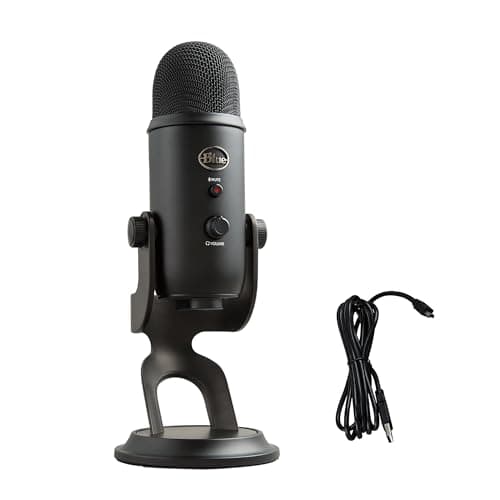
Product image from the Amazon listing.
Our verdict
Yes, the Blue Yeti is still worth buying in 2026 — it's the bestselling USB microphone in the world for real reasons: plug-and-play simplicity, four polar patterns and a genuine audio upgrade over any laptop or headset mic. Not the last word in pro-mic quality, but the safest one-mic recommendation for podcasters, streamers and remote workers on a budget.
The short version
The Blue Yeti is the bestselling USB microphone in the world, and it's been that way for over a decade for straightforward reasons: you plug it into any USB port on a Mac or PC, and it sounds better than any laptop mic or gaming headset without an audio interface, XLR cables or phantom power. Four polar patterns (cardioid, omni, bi-directional and stereo) mean one mic handles solo podcasting, two-person interviews across a table, streaming, remote meetings and even instrument recording. It's not the last word in mic quality, but for beginners and pros who want one plug-and-play mic that does everything well, it's still the safest recommendation on the market.
Pros & cons
Pros
- Genuinely plug-and-play USB — no interface or drivers needed
- Four polar patterns for solo, duo, stereo and room recording
- Big upgrade over any laptop or headset mic
- Heavy, stable desk stand included
- Onboard mute button, gain knob and headphone monitoring
- Broadly compatible with every streaming, podcasting and meeting app
Cons
- Condenser design picks up keyboard, fan and room noise
- Requires a boom arm and pop filter for the cleanest podcasts
- Not the sound quality of a proper XLR studio mic
Why people love it
Plug USB in
Connect the included USB cable to any Mac or PC — no audio interface, no XLR, no phantom power. It shows up as an input device instantly.
Pick a polar pattern
Cardioid for solo voice or streaming, bi-directional for two-person interviews, omni for a whole room, stereo for instruments — the knob on the back covers it all.
Monitor live
Plug headphones into the mic's 3.5mm jack for zero-latency monitoring, and use the gain knob and mute button on the mic itself while you're recording or on a call.
Who it's for
- Podcasters and YouTubers starting out
- Twitch and YouTube streamers
- Anyone who wants studio-adjacent voice on remote meetings
- Musicians recording rough demos
Is the Blue Yeti still the best USB microphone in 2026?
The short answer is that the Blue Yeti isn't the very best USB mic in every category anymore, but it's still the most versatile and the safest single recommendation. Over the past few years, Shure's MV7 and MV6 have taken the podcasting-specific crown for dynamic-mic clarity in noisy rooms, and various small-brand USB condensers now compete on raw sound at a lower price. What the Yeti keeps is the completeness of the package: four polar patterns, an onboard gain knob and mute button, a headphone jack for zero-latency monitoring, a heavy desk stand, and near-universal plug-and-play compatibility with every recording, streaming and meeting app on Mac or PC.
For a beginner buying their first real mic, and for a lot of intermediate creators who don't want to think about it, that completeness is the reason to still choose it. You can podcast solo on cardioid, interview a guest across the desk on bi-directional, capture a whole meeting on omni, and record a rough acoustic-guitar demo on stereo — one mic, one cable, done. For pure sound quality on a budget, competitors have caught up. For a one-mic-does-everything answer, the Yeti still wins, which is why it remains the bestselling USB microphone in the world.
How to make the Blue Yeti sound genuinely professional
The single biggest complaint about the Yeti is that it 'picks up everything' — the fan, the keyboard, the room echo. That's not a defect; it's how any condenser mic behaves, especially one this sensitive. The fix is technique. Turn the gain knob down until your voice barely peaks in the meter (people wildly overrun the gain by default), set the polar pattern to cardioid, and speak into the front of the mic — the Blue Yeti records off the side of the grille when standing upright, not off the top, which is a common mistake. Get the mic within 6-8 inches of your mouth so your voice dominates whatever's in the room.
The other move that transforms it is switching to a boom arm with a shock mount and adding a pop filter. Off the included desk stand, the Yeti picks up keyboard vibrations through the desk and rumble from movement; on a boom arm, that's gone. A pop filter kills the plosives that ruin p-sounds. Combine those with a bit of soft furnishing in your recording space — a rug, curtains, a bookshelf — and the Yeti sounds shockingly close to a pro-studio dynamic mic on a fraction of the budget. Pair it with a good pair of studio-adjacent headphones like the Sony WH-1000XM5 for tracking and you have a genuinely usable home podcasting setup.
Blue Yeti vs Blue Yeti X vs Blue Yeti Nano: which model should you buy?
Logitech's Yeti line has three main tiers, and matching model to use case is straightforward. The standard Blue Yeti is the do-everything default and where most people should start — four patterns, 16-bit/48kHz audio, and the classic feature set at a reasonable price. Step up to the Blue Yeti X if you stream and want real-time visual level metering with an LED ring, 24-bit/48kHz audio, and Logitech G Hub effects/samples — worth the extra spend for live-broadcast use cases where seeing your level while you talk actually matters.
At the other end, the Blue Yeti Nano is the compact, cardioid+omni-only version. It's smaller, lighter, cheaper and better-looking on a clean desk, but you lose the bi-directional and stereo patterns. Buy the Nano if you only ever need solo voice recording and want the smallest footprint. For everyone else — podcasters interviewing guests, streamers who want future flexibility, remote workers who might record instruments — the standard Yeti's four patterns are the reason it's a bestseller. The Nano is charming, the X is a treat, but the classic Yeti is still the answer to 'which one should I buy?'
See Blue Yeti on Amazon
Check the latest price, photos and buyer reviews on Amazon.
Check Price on Amazon →Sold and shipped by AmazonFrequently asked questions
Do I need an audio interface or drivers for the Blue Yeti?
No — that's the whole point of it being a USB microphone. Plug it into any Mac or PC and it appears as an input device automatically, no drivers or interface required. That's the biggest reason it's dominated the beginner and prosumer market for over a decade.
What are the Blue Yeti's four polar patterns for?
Cardioid is the default and picks up sound in front of the mic — best for solo podcasting, streaming and voiceovers. Bi-directional captures the front and back, ideal for a two-person interview across a table. Omnidirectional records the whole room, useful for group conversation or field ambience. Stereo captures a wide left-right image for music and instruments. One mic, four use cases.
Is the Blue Yeti good for podcasting in 2026?
Yes — it remains the default beginner-to-prosumer podcasting mic because it's plug-and-play, sounds substantially better than any headset or laptop mic, and lets you monitor with headphones live. The one caveat is that it's a condenser mic, which picks up room noise, keyboard clicks and fans; treat your space (or use a boom arm and pop filter, and set the mic close to your mouth) and it holds its own for most shows.
What's the difference between the Blue Yeti and the Blue Yeti X?
The Yeti X is a step up: higher-resolution 24-bit audio, a real-time LED meter showing your level, and Logitech G Hub integration for effects and sample control. If you stream and want live meter feedback, the X is worth the extra cost. For most podcasters and remote workers, the standard Yeti delivers the same core sound quality and pattern flexibility for less money.
How do I stop the Blue Yeti from picking up background noise?
Three moves fix most of it: turn the gain knob down as far as you can while still being audible (a common mistake is running it wide open); set the pattern to cardioid so it rejects the sides and rear; and get the mic within 6-8 inches of your mouth, ideally on a boom arm with a pop filter. That's the routine every serious podcaster uses on the Yeti.
Blue Yeti vs Shure MV7: which is better for podcasting?
The Shure MV7 is a dynamic mic (better at rejecting room noise) and sounds a touch more radio-broadcast out of the box, so if you record in a noisy room and only need cardioid, it's often the smarter pick. The Blue Yeti wins on price and versatility — four patterns for the same money — and holds up beautifully in a treated space. Buy the MV7 if room noise is your enemy, the Yeti if flexibility and value are.
As an Amazon Associate, TopCrate earns from qualifying purchases at no extra cost to you. Product image, price, availability and ratings are shown on Amazon and are subject to change.