TRENDING ON AMAZON
EMEET C960 1080P Webcam with Microphone Review: Is It Worth It?
The plug-and-play 1080p webcam with dual noise-cancelling mics that quietly replaced the built-in laptop camera for millions of Zoom, Teams and remote-work users — under $40 and set up in 30 seconds.
Quick answer: Yes — the EMEET C960 is worth it, and it's the specific webcam we'd recommend to anyone upgrading from a built-in laptop camera. Real 1080p at 30fps, dual noise-cancelling microphones, 90° field of view, plug-and-play on every major operating system, and $30-40 pricing that makes it a no-brainer for remote workers, hybrid employees and casual streamers. The trade-offs — 1080p max (not 4K), no autofocus adjustment for close-up product shots, and the USB-A cable requiring a dongle for USB-C-only laptops — are worth accepting at this price. For 95% of remote work video call use cases, it delivers pro-tier results at a fraction of a Logitech Brio's cost. Pair with a $20-30 ring light for the full professional-presence upgrade at under $70 total.
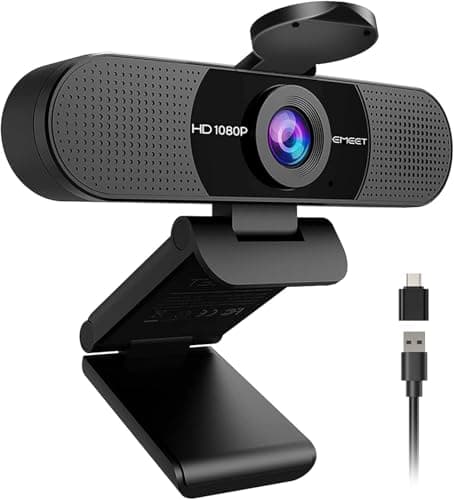
Product image from the Amazon listing.
Our verdict
Yes — the EMEET C960 is worth it, and it's the specific webcam we'd recommend to anyone upgrading from a built-in laptop camera. Real 1080p at 30fps, dual noise-cancelling microphones, 90° field of view, plug-and-play on every major operating system, and $30-40 pricing that makes it a no-brainer for remote workers, hybrid employees and casual streamers. The trade-offs — 1080p max (not 4K), no autofocus adjustment for close-up product shots, and the USB-A cable requiring a dongle for USB-C-only laptops — are worth accepting at this price. For 95% of remote work video call use cases, it delivers pro-tier results at a fraction of a Logitech Brio's cost. Pair with a $20-30 ring light for the full professional-presence upgrade at under $70 total.
The short version
The EMEET C960 is the webcam that broke the built-in-laptop-camera excuse. At under $40 (frequently under $30 on sale), it delivers genuine 1080p at 30fps, dual noise-cancelling microphones that pick up your voice cleanly from 8 feet away, a 90° field of view wide enough to fit two people or a small conference room, a 5-layer anti-glare lens that handles mixed lighting, and a plug-and-play USB-A connection that works on Windows, macOS and Chrome OS without drivers. It's not a 4K creator camera and it won't compete with a Sony ZV-1F or a dedicated streaming rig, but for the specific job most people need — looking sharp and sounding clear on Zoom, Teams, Meet and Slack calls — it delivers pro-tier results at a fraction of a Logitech Brio's price. PCWorld, Digital Camera World and dozens of independent reviewers have converged on the same verdict: this is the best cheap webcam you can buy in 2026, and it's the specific upgrade that makes remote work meetings look genuinely professional.
Pros & cons
Pros
- Genuine 1080p at 30fps — sharp on modern monitors
- Dual noise-cancelling microphones pick up voice from 8 feet
- 90° field of view fits two people or a small room
- 5-layer anti-glare lens handles mixed lighting
- Plug-and-play USB-A — no drivers on Windows, macOS or Chrome OS
- Under $40 (frequently under $30 on sale)
Cons
- 1080p max — not a 4K creator camera
- No autofocus adjustment for close-up product shots
- USB-A cable — need a dongle for USB-C-only laptops
Why people love it
Plug it into any USB-A port
The C960 works over standard USB-A on Windows, macOS, Chrome OS and even some Linux distros. No drivers, no software install — the camera is recognized as a standard USB Video Class (UVC) device in 30 seconds.
Pick it in Zoom, Teams, Meet or OBS
After plugging in, open your video app's settings and select the EMEET C960 as both your camera and your microphone. Every major video-conferencing app supports it natively.
Position on top of your monitor
The C960 includes a clip-style mount that grips laptop lids and monitors from about ½-inch to 3-inch thickness. Angle the lens toward your eyes for the most flattering framing, and check your background.
Who it's for
- Remote workers upgrading from a grainy laptop camera
- Small home offices where dual mics matter for calls
- Streamers and podcasters starting on a budget
- Anyone whose built-in webcam looks worse than their phone
Why the EMEET C960 broke the built-in-laptop-camera excuse for remote workers
The post-2020 explosion of remote work exposed a hardware gap most people didn't realize existed: built-in laptop cameras are surprisingly bad. Even on premium 2020-2023 MacBooks and Windows laptops, the built-in webcam is a 720p sensor in a tiny lens system optimized to fit in a thin lid bezel, not to capture flattering video. The result is that professional-looking colleagues appear on Zoom looking pixelated, poorly-lit, and washed-out — creating a subtle but real professional presentation problem that neither the person nor the meeting organizer can address without external hardware. The market responded with a wave of dedicated USB webcams, and the C960 emerged as the specific product that made the upgrade cheap enough to be a no-brainer. At $30-40 (regularly on sale for $25), it costs less than a nice dinner and delivers dramatic quality improvement over any built-in camera.
This is why the C960 has become one of the top-selling webcams on Amazon in the 2024-2026 window despite competing against much larger brands (Logitech, Razer, Anker). The value proposition is unmatched: professional-tier 1080p video capture with dual mics at 30-50% the price of the equivalent Logitech C920. Independent reviews from PCWorld, Digital Camera World, Wirecutter, and Rtings have converged on the same verdict — this is the budget webcam recommendation for 2026, and its specific advantage is delivering 'I look pro' quality at a 'this costs less than lunch out' price. The people upgrading are exactly the audience remote work most punished: knowledge workers, remote employees, consultants, freelancers, students, and small-business owners who want to show up on video calls looking sharp without becoming a video-hardware enthusiast.
How to build a full remote-work video setup around the EMEET C960 for under $150
The C960 alone gets you 80% of a professional video presence, and pairing it with two other budget purchases gets you the rest. Total budget: $120-150 for the full setup. Camera: EMEET C960 ($30-40). Lighting: a $20-30 clip-on ring light or two small LED panels — Neewer, Lume Cube alternatives, or any well-reviewed budget option. Position lights slightly above and to the sides of the camera pointing at your face, angled 45° downward. This eliminates the underlit-from-below look that harsh overhead lighting creates and delivers the sharp, warmly-lit appearance that makes people look professional on video. Backdrop: a plain colored wall, a well-organized bookshelf, or a $30 collapsible fabric backdrop (Neewer sells these) if you have a busy background. For calls specifically, blur backgrounds in Zoom/Teams/Meet software rather than fighting your environment.
One more upgrade if audio matters: a dedicated USB microphone in the $80-120 range (Blue Yeti Nano, Elgato Wave 3, or the newer Rode NT-USB Mini) instantly outclasses the C960's built-in mics for content creation. For meetings and typical calls, skip this — the built-in dual mics are fine and adding another mic increases setup complexity. Where a dedicated mic really shines: podcast recording, YouTube voiceovers, streaming, and any content where your voice is the primary content medium. For a remote worker plus occasional streamer, the full stack is around $150 total ($30 camera + $30 light + $80-100 mic) and delivers results indistinguishable from setups costing $500-1000. Pair with a portable power upgrade like the Anker Nano 30W so your laptop stays charged during long meeting days without wall-hunting, and a comfortable Loop Quiet 2 earplug set for the noisy household moments when you're not on camera.
EMEET C960 vs the newer EMEET C960 4K — is the 4K upgrade worth it?
EMEET released a 4K version of the C960 in 2024 that's now widely available as a slight step-up option. The upgrade math is straightforward: the C960 4K captures at 3840x2160 at 30fps (vs the standard C960's 1920x1080 at 30fps), uses a larger sensor with better low-light performance, adds AI-based auto-framing and background blur, and costs about $60-80 vs the standard C960's $30-40. Whether it's worth the extra: for pure video meetings and typical remote work, no — the platform-level 720p compression eats the resolution benefit. For content creation (YouTube, recorded video), yes — recording at 4K gives you flexibility in editing (cropping, panning, sharpness). For low-light-heavy environments where the standard C960 struggles, the 4K version's better sensor is a meaningful upgrade even at 1080p output.
The specific decision framework: if you're using it primarily for Zoom/Teams/Meet calls in a well-lit space, buy the standard C960 and save the difference. If you're creating recorded content, streaming, or working in a dim office where camera quality matters most, the C960 4K justifies the premium. Most first-time webcam buyers should start with the standard C960 — you'll get the 80% improvement from built-in laptop camera at the lowest price, and if you later realize you need the 4K version's specific capabilities, you can upgrade knowing exactly what you're paying for.
See EMEET C960 Webcam on Amazon
Check the latest price, photos and buyer reviews on Amazon.
Check Price on Amazon →Sold and shipped by AmazonFrequently asked questions
Is the EMEET C960 actually better than the built-in laptop camera?
Yes, and the difference is dramatic — bigger than most people expect. Built-in laptop cameras (even on premium 2020-2023 MacBooks and Windows laptops) typically use tiny 720p sensors with mediocre lenses because they have to fit in a thin lid bezel. The C960's sensor is bigger, the lens is significantly higher quality, and it captures true 1080p at 30fps with anti-glare coating that handles mixed lighting far better. In practice, colleagues on your Zoom calls will notice — you look sharper, better-lit, less pixelated. The mic upgrade is equally noticeable: dual noise-cancelling microphones handle 8 feet of range while built-in laptop mics struggle past 3 feet. If you're on 5+ hours of video calls per week, the C960 pays for itself in first-impression improvement within a month.
EMEET C960 vs Logitech C920 vs Logitech Brio: which webcam should I buy?
Three tiers for three budgets. EMEET C960 (~$30-40) is the budget king — genuine 1080p, dual mics, plug-and-play. It's the specific pick for someone upgrading from built-in laptop camera on any budget below $100. Logitech C920 (~$70) is the long-standing category default — very similar 1080p performance, slightly better software integration (Logi Options+), broader accessory ecosystem, but 70-100% more expensive for essentially the same result on video calls. Logitech Brio (~$200) is the creator-tier pick — 4K capture, better low-light performance, dedicated streaming features, worth it for professional streamers and YouTubers. For 95% of remote workers and casual video callers, the EMEET C960 delivers what you actually need at a fraction of the Brio price and a real discount versus the C920.
Do the built-in EMEET C960 microphones sound good enough for meetings?
For meetings and typical video calls, yes — the dual noise-cancelling microphones handle voice clarity up to about 8 feet from the camera and do reasonable background noise suppression. Colleagues on your calls won't be able to tell you're not using an external mic. Where the built-in mics fall short: content creation (podcasting, YouTube voiceover, streaming voice-first content) where any dedicated USB mic like the Blue Yeti Nano or Rode NT-USB will sound noticeably fuller. For everyday work meetings, the C960's mics are genuinely fine. For content creation, budget $100-150 for a dedicated podcast mic on top of the camera.
Does the EMEET C960 work on macOS and Chromebooks?
Yes on both, plug-and-play with no driver installation required. On macOS, plug in and select the EMEET C960 in System Settings > Sound and in each video app's camera/microphone settings. On Chrome OS (Chromebooks, ChromeBase, ChromeBox), the C960 is recognized immediately as a UVC-compliant device — no configuration needed. Windows 10, Windows 11 and Linux distros with UVC support all work the same way. The only compatibility caveat: your laptop or desktop needs a USB-A port (the older rectangular USB shape); USB-C-only devices like the newest MacBook Pros need a USB-C to USB-A adapter (a $10 dongle solves it).
Is 1080p resolution enough in 2026, or should I get a 4K webcam?
1080p is more than enough for 99% of video calls, and here's why: Zoom, Microsoft Teams and Google Meet compress video streams down to about 720p on the receiving end regardless of what your webcam captures. Even if you send 4K, your colleagues see approximately 720p. The C960's 1080p captures more than the delivered stream needs, which gives clean, sharp video after compression. The specific use cases where 4K matters: content creation (recording video for YouTube where the file plays back at 4K), streaming to platforms that support 4K output, professional videography, and computer-based editing where you'll re-encode. For meetings, calls, remote work and casual streaming, 1080p is the right resolution and paying for 4K is generally wasted money.
How's the C960's low-light performance for evening calls?
Acceptable but not exceptional — this is where the budget shows most. In good lighting (natural window light during the day, a well-lit office, or with a ring light), the C960 produces sharp, well-exposed video comparable to cameras 2-3× the price. In dim lighting (evening indoor calls, a poorly-lit basement office, backlit setups), image quality degrades — colors get muddy, noise creeps in, and skin tones can shift. The fix is inexpensive: a $20-30 ring light (like the popular clip-on Neewer or Lume Cube alternatives) transforms the C960's low-light output from mediocre to genuinely professional. For anyone doing evening calls or in a poorly-lit space, budget the ring light as a companion purchase — the combined ~$60-70 gives you results that rival $200+ webcams alone.
As an Amazon Associate, TopCrate earns from qualifying purchases at no extra cost to you. Product image, price, availability and ratings are shown on Amazon and are subject to change.