TRENDING ON AMAZON
AULA F75 Pro 75% Wireless Hot-Swappable Mechanical Keyboard Review: Is It Worth It?
The under-$70 hot-swappable 75% mechanical keyboard with pre-lubed Reaper switches, a rotary knob, tri-mode wireless and RGB — the keyboard that broke the 'good custom mechanical needs $150' rule.
Quick answer: Yes — the AULA F75 Pro is worth it, and the honest long-term take after months of daily use is that it still delivers the mechanical-keyboard experience $150-200 pre-builts used to charge for, at under $70. Genuine premium features (gasket mount, pre-lubed Reaper switches, hot-swap, PBT double-shot keycaps, tri-mode wireless, rotary knob, per-key RGB) at a price that used to buy a basic plastic gaming board. Skip if you're a Mac purist who wants perfect out-of-box Mac layout (Keychron is easier), a competitive esports gamer who demands the latest optical switches, or if you need deep software customization (Logitech or Razer wins). For everyone else — first-time mechanical buyers, remote workers, hobbyists — this is the correct entry point to the mechanical keyboard hobby and one of the best-value keyboard purchases of 2026.
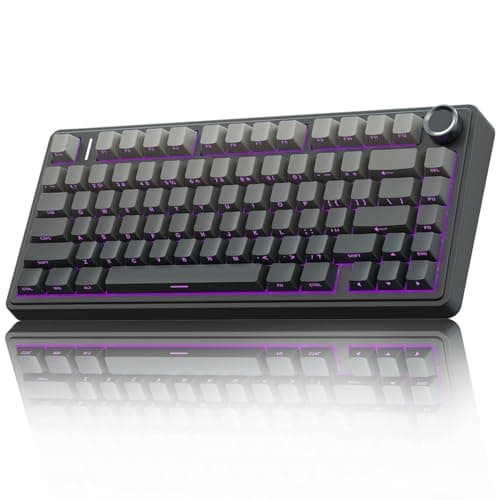
Product image from the Amazon listing.
Our verdict
Yes — the AULA F75 Pro is worth it, and the honest long-term take after months of daily use is that it still delivers the mechanical-keyboard experience $150-200 pre-builts used to charge for, at under $70. Genuine premium features (gasket mount, pre-lubed Reaper switches, hot-swap, PBT double-shot keycaps, tri-mode wireless, rotary knob, per-key RGB) at a price that used to buy a basic plastic gaming board. Skip if you're a Mac purist who wants perfect out-of-box Mac layout (Keychron is easier), a competitive esports gamer who demands the latest optical switches, or if you need deep software customization (Logitech or Razer wins). For everyone else — first-time mechanical buyers, remote workers, hobbyists — this is the correct entry point to the mechanical keyboard hobby and one of the best-value keyboard purchases of 2026.
The short version
The AULA F75 Pro is one of the most-purchased mechanical keyboards on Amazon and Reddit's r/MechanicalKeyboards for a specific reason: it delivers a genuine 'custom keyboard' feel — gasket-mount cushioning, pre-lubed switches, PBT double-shot keycaps, hot-swappable sockets — at a price that used to only buy you a basic plastic gaming board. 75% layout keeps the arrow keys and function row but drops the numpad for a more compact desk footprint. A rotary knob in the top-right controls volume, media or app-defined functions. Tri-mode connectivity (2.4GHz USB dongle, Bluetooth 5.0, or wired USB-C) means it works with a PC, Mac, laptop, tablet or phone. And because the switches are hot-swappable, you can experiment with different feels (linears, tactiles, clickies) without soldering. For remote workers, hobbyist builders, or gamers who want a nicer typing experience without diving into $200+ custom keyboard builds, this is the smart-money entry point.
Pros & cons
Pros
- Gasket-mount cushioning + sound-dampening foam — premium typing feel
- Hot-swappable sockets — try different switches without soldering
- Tri-mode wireless (2.4GHz + Bluetooth + wired USB-C)
- Pre-lubed AULA Reaper switches (smoother than stock Cherry MX)
- 75% layout keeps arrows + F-row in a compact footprint
- Rotary knob for volume/media/programmable actions
- PBT double-shot keycaps (durable, oil-resistant)
- Full per-key RGB with side lighting
Cons
- Software is thinner than Logitech/Corsair equivalents
- Bluetooth latency isn't ideal for competitive gaming (use 2.4GHz for that)
- Reaper switches are good but not audiophile-tier (swap if you want fine-tuning)
Why people love it
75% layout without a numpad
The compact 75% form factor keeps everything you actually use — full alpha, function row, arrow keys, and edit keys — while dropping the numpad most people don't need at their desk. Result: more mouse space, cleaner setup, comfortable typing distance.
Hot-swap without soldering
5-pin hot-swap sockets let you pop any switch out and swap in a different one — linear (smooth, gaming-favorite), tactile (bump for typing feedback), clicky (loud, satisfying) — using the included keycap/switch puller. Try samples from Drop or Kono for $10-15.
Tri-mode wireless
USB-C wired for lowest latency and charging, 2.4GHz USB dongle for wireless gaming (near-wired latency), or Bluetooth 5.0 for multi-device switching (phone, tablet, Mac, PC). One keyboard, every device.
Who it's for
- First-time mechanical keyboard buyers
- Hobbyists curious about hot-swap builds
- Remote workers upgrading from a laptop keyboard
- Gamers wanting a compact wireless board
Why the mechanical keyboard hobby is having a moment, and why the F75 is the perfect entry point
Mechanical keyboards used to be a niche hobby for programmers and enthusiasts willing to spend $200+ on a Cherry MX board and $100+ on custom keycaps. The past three years changed that. Chinese manufacturing (Womier, AULA, Akko, Keychron) figured out how to deliver premium-tier features — gasket mount, pre-lubed switches, hot-swap sockets, PBT keycaps — at prices under $100. Wireless technology got good enough (2.4GHz USB dongles with sub-1ms latency) to eliminate the wired-only limitation. And YouTube keyboard reviewers (Taeha Types, ThereminGoat) made the hobby visible and approachable. The result: mechanical keyboards are now mainstream, and the entry-level tier is where the best value in the entire category sits.
The AULA F75 Pro is specifically positioned as the entry point. For $50-70, you get every 'premium' feature — the gasket mount that gives it a soft, cushioned feel; the pre-lubed switches that eliminate scratchy stock action; the hot-swap sockets that let you experiment with different switch feels without soldering; the PBT double-shot keycaps that don't get shiny after a year of typing; the rotary knob for tactile media control. This is exactly what a $200 custom build gave you three years ago. It's the specific product that turns 'I've heard mechanical keyboards are nice' into 'I get why people are into this' — and it opens the door to further customization (swap switches, upgrade keycaps, tune sound) without a huge upfront investment. For anyone curious about the hobby but reluctant to spend $150+ to try, this is where to start.
AULA F75 Pro vs the DIY custom keyboard route: what you'd give up (and save)
A hand-built custom mechanical keyboard — buy a barebones kit like the GMMK Pro or Keychron Q1 ($150-200), buy switches ($30-70), buy keycaps ($60-150), do the assembly yourself — can run $300-500 total. The AULA F75 Pro delivers 85-90% of that experience for around $60. What you'd give up going pre-built: the specific customization (choose your exact switches, exact keycap set, exact gasket firmness), the assembly satisfaction (many hobbyists find building the keyboard is half the fun), and slight refinements (a $200 barebones kit uses higher-quality PCB, gasket material, and case aluminum than a $60 pre-built).
What you'd save: about $250, plus 3-6 hours of research and assembly time. For most people entering the hobby, the F75 Pro is the correct starting point — try a hot-swap keyboard, learn what switch feel you prefer, decide if you want to invest deeper. If after 6 months you know you love mechanical keyboards, THEN consider a DIY build for the specific customization it offers. Many hobbyists own both: an F75 or similar as their 'workhorse' daily driver and a DIY build as their 'nice' keyboard for weekends. The Logitech MX Master 3S mouse pairs nicely with either — it's the productivity mouse the mechanical-keyboard-and-comfy-desk crowd universally recommends.
How to make the AULA F75 Pro your permanent daily driver
The out-of-box experience is good; a few upgrades make it exceptional. First upgrade: keycaps. AULA's included PBT double-shot keycaps are objectively decent but generic. A $30-50 set of custom keycaps (from KBDfans, Drop, or Amazon — search 'PBT keycap set') transforms the aesthetic and often improves typing feel. Popular pick: MDA or Cherry profile PBT keycaps with a legend style you enjoy. Second upgrade: try different switches. The included Reaper switches are good but generic; if you don't love them, hot-swap them out. Sample packs from Drop or NovelKeys ($10-15) let you try 5-10 switch types before committing.
Third: tune the sound. Out of the box, the F75 has a slightly hollow sound that some people love and some don't. To make it deeper/thockier, add a layer of foam under the PCB (small foam pack costs $5 on Amazon) or upgrade the stabilizers (the wide keys — spacebar, shift, enter, backspace — sound better with lubed and clip-modified stabilizers). Both take 15-30 minutes and are undo-able. For working setup: pair with an ergonomic mouse, a good monitor arm, and a comfortable chair. The whole point of a mechanical keyboard is enjoying typing — combine it with the rest of a good desk setup and it multiplies daily quality of life. For most people, the F75 doesn't need any of these upgrades to be great; but if you fall in love with the hobby, they're inexpensive next steps.
See AULA F75 Pro on Amazon
Check the latest price, photos and buyer reviews on Amazon.
Check Price on Amazon →Sold and shipped by AmazonFrequently asked questions
AULA F75 long term review: does it hold up after months of daily use?
Yes — after months of daily typing, the AULA F75 Pro holds up in the ways that matter and shows its price in the ways it doesn't. What holds up: the gasket-mount feel stays cushioned (the silicone pads don't fatigue on any timescale most owners will notice), the pre-lubed Reaper switches keep their smoothness (factory lube on quality switches lasts years of everyday typing), the PBT double-shot keycaps don't develop the greasy shine that ABS caps get within months, and the rotary knob's encoder is still crisp. What shows the price over the long term: the RGB LEDs on a couple of specific keys sometimes dim before the rest (a known issue with budget-tier per-key RGB — not a failure, just uneven aging), the tri-mode wireless dongle occasionally needs re-pairing after a Windows update (rare, takes 20 seconds), and the software remains basic compared to Logitech or Razer. The one honest maintenance note: re-snug the case screws at the 3-month mark and again around a year — cheap fasteners can loosen slightly with keystroke vibration. None of this changes the recommendation; the F75 Pro is a genuine long-term daily driver, not a novelty that fades. Most owners still using theirs after a year describe it as the keyboard that made them stop shopping.
Is AULA keyboard good?
Yes — AULA keyboards, and the F75 Pro in particular, are genuinely good and one of the biggest value stories in the hobbyist mechanical keyboard scene. AULA has moved from an obscure Chinese brand to a mainstream Amazon and r/MechanicalKeyboards recommendation because their gasket-mount boards with pre-lubed switches deliver the typing feel of $150-200 pre-built keyboards for well under $100. The F75 Pro specifically packs premium features — hot-swap sockets, PBT double-shot keycaps, rotary knob, tri-mode wireless, per-key RGB — that even Logitech and Corsair charge a big premium for. Where AULA is not good: consumer-facing support, in-depth software, and long-term warranty depth are all thinner than the big brands. If you want a nicer keyboard on a real budget, AULA is a yes. If you want corporate-grade support, buy Logitech.
Which is the best AULA keyboard right now?
The AULA F75 Pro is currently the best AULA keyboard for most people, and it's the one to buy unless you have a very specific reason not to. It sits at the sweet-spot 75% layout (keeps arrows and function row, drops the numpad), adds all the premium features AULA is known for (gasket mount, pre-lubed Reaper switches, hot-swap sockets, tri-mode wireless, rotary knob, PBT keycaps, RGB), and does it for well under $100. Compared to the AULA F99 (larger 96% layout with numpad) and F108 (full-size), the F75 Pro is the most desk-friendly and covers 95% of users. If you specifically need a numpad for spreadsheet work, look at the F99. If you're brand new to mechanical keyboards and want AULA's cheapest entry, the F75 basic (non-Pro) is a solid ~$40 alternative but skips the gasket mount and rotary knob.
Is the AULA F75 Pro actually good, or is it just Amazon marketing hype?
It's genuinely good, and the buzz reflects real value. The specific combination it delivers — gasket-mount cushioning, pre-lubed switches, PBT keycaps, hot-swap sockets, tri-mode wireless, rotary knob, RGB — used to require either a $150-200 pre-built (Keychron K8 Pro, Glorious GMMK Pro) or a $200+ hobbyist DIY build. AULA and a few other Chinese enthusiast brands (like Womier and Akko) figured out how to deliver most of the premium feel at $50-80 by cutting overhead on marketing, distribution and warranty support. The trade-off is that AULA's software is basic, replacement parts require some search effort, and there's less consumer-facing support than Logitech or Corsair. But the actual typing experience competes with keyboards costing 2-3x more. For someone entering the mechanical keyboard hobby or wanting a nicer daily driver without paying enthusiast prices, this is the right first purchase.
What are the AULA Reaper switches actually like — are they good?
Yes, meaningfully better than stock Cherry MX switches out of the box. AULA Reaper switches come in three variants: Red (linear — smooth, gaming favorite, no tactile bump), Brown (tactile — small bump for typing feedback), and Blue (clicky — loud, click-jacket for satisfying feedback). They're pre-lubed at the factory, which eliminates the scratchy stock feel and click-sound of un-lubricated switches. Compared to Cherry MX equivalents: Reaper Reds are smoother and quieter, similar actuation. Reaper Browns have a similar tactile bump but less scratch. Reaper Blues are cleaner-clicking than Cherry MX Blues. If you want to level up further, popular switch upgrades from the hobbyist community include Gateron Yellows (smooth linear), Kailh Boxes (crisp tactile), and Cherry MX Ergo Clears (medium tactile) — all $15-25 for a set of 65-70 switches to fit the F75.
AULA F75 Pro vs Keychron K8 Pro vs Logitech MX Mechanical Mini — which should I buy?
Three legitimate 75% keyboards at different price/feature tiers. AULA F75 Pro (~$50-70): premium feel at the lowest price, hot-swap, gasket mount, rotary knob, tri-mode wireless, RGB. Best for hobbyists and value seekers. Keychron K8 Pro (~$110-150): more polished software (QMK/VIA firmware for full remapping), better Mac/PC compatibility, hot-swap, no rotary knob or gasket mount. Best for Mac users and those wanting more software depth. Logitech MX Mechanical Mini ($150-180): premium build and software, not hot-swap, no wireless customization depth. Best for corporate/office users who want a mechanical feel but without the hobbyist ecosystem. For value + features + hobbyist entry, F75 wins. For polish + software + Mac ecosystem, Keychron K8 Pro. For 'nicer Logitech,' MX Mechanical. If you specifically want a full-size mainstream gaming keyboard with a numpad, the Logitech G413 SE at ~$70 is the value pick over Corsair/Razer flagships.
Is the 75% layout right for me, or should I get a full-size or a 60%?
Depends on your work and desk space. Full-size (100%): includes numpad — best for accountants, spreadsheet-heavy users, and anyone who uses the numpad daily. Takes up the most desk space. 75% (this keyboard): keeps arrow keys, function row, edit keys — drops numpad. Best for programmers, writers, and general knowledge workers who want a smaller footprint without losing important keys. 65% (like Logitech MX Keys S Mini): drops function row too — cleanest look, but requires layer combinations for F-keys. Best for minimalist setups and travel. 60%: drops arrows and F-row — best for gamers who prioritize desk space above all. For most people transitioning from a full-size keyboard, 75% is the specific sweet spot — you get compactness without giving up keys you actually use.
Does the AULA F75 Pro work with Mac?
Yes, with a caveat. It works out of the box on Mac via USB-C wired or Bluetooth, but the layout defaults to Windows (Ctrl and Alt in the standard Windows positions rather than Mac's Cmd and Opt). AULA doesn't include Mac-labeled keycaps like Keychron does, so you either need to remap Ctrl and Alt in Mac's System Settings (Keyboard → Modifier Keys), or buy Mac-labeled replacement keycaps. Once remapped, it functions perfectly as a Mac keyboard. For Mac users specifically, the Keychron K8 Pro is a slightly better out-of-box experience (comes with Mac + Windows keycaps and Mac-first firmware), but the F75 works fine with 3 minutes of setup.
How's the RGB, and does it drain the battery fast?
RGB is per-key with side-strip lighting, 20+ effects, and full brightness/color/effect control from onboard shortcuts (Fn+key combos) or the AULA software. It's actually quite nice — smoother animation than most budget boards, no dim/uneven LEDs. Battery impact is meaningful: at full brightness RGB with 2.4GHz wireless, expect 8-15 hours of use; RGB off, maybe 40-60 hours. Bluetooth is more efficient than 2.4GHz. Practical advice: use RGB when plugged in or use a dim static color when on battery — turning off RGB entirely is silly (that's a feature you paid for). Or set a 'work' RGB profile (dim static color) and a 'gaming' profile (full color effects) via the onboard shortcuts.
Can I customize the rotary knob and program macros?
Yes, both. The rotary knob defaults to volume up/down when clicked in on the keyboard, but you can reassign it via the AULA software to control media playback, zoom in/out, brightness, scroll wheel emulation, or custom app shortcuts. Macros can be assigned to any key using the software or via Fn+combinations. The software is basic (not as feature-rich as Corsair iCUE or Razer Synapse), but it covers the essentials. For deeper customization, some users flash the F75 with QMK-compatible firmware (advanced, not officially supported by AULA — do at your own risk). For most users, the built-in software provides all needed customization.
As an Amazon Associate, TopCrate earns from qualifying purchases at no extra cost to you. Product image, price, availability and ratings are shown on Amazon and are subject to change.