HANDS-ON REVIEW
ThePhotoStick Omni Photo & Video Backup Review: Is It Worth It?
Plug it in, click once, and it automatically finds and backs up every photo and video — no cloud fees, ever.
Quick answer: For anyone who's been meaning to back up their photos 'someday,' ThePhotoStick Omni removes every excuse — no subscription, no sorting, one click. It's the simplest way we've seen to make sure a lost or broken phone doesn't take your memories with it. If a computer is the only thing you need cleared out, the cheaper [$34.99 original](/reviews/thephotostick) does that job without the phone connectors; if it's your phone that's full, [ThePhotoStick Mobile](/reviews/photostick-mobile) is the narrower buy. The Omni earns its premium only when you want one stick covering both.
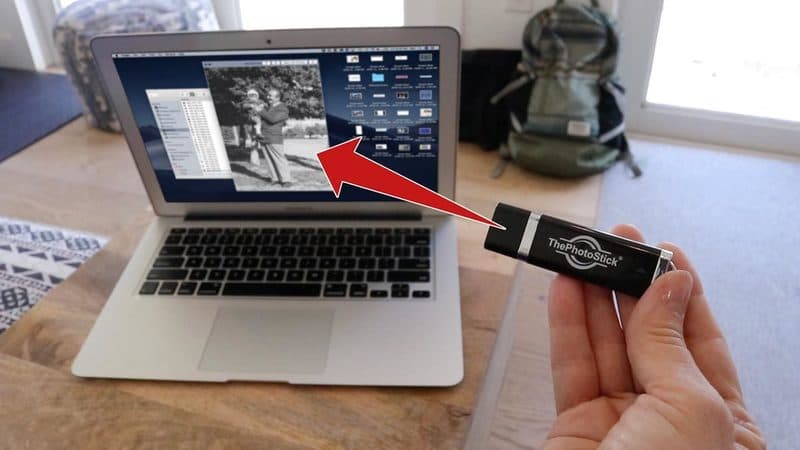
One click finds and saves your photos automatically. Photo: ThePhotoStick
Our verdict
For anyone who's been meaning to back up their photos 'someday,' ThePhotoStick Omni removes every excuse — no subscription, no sorting, one click. It's the simplest way we've seen to make sure a lost or broken phone doesn't take your memories with it. If a computer is the only thing you need cleared out, the cheaper [$34.99 original](/reviews/thephotostick) does that job without the phone connectors; if it's your phone that's full, [ThePhotoStick Mobile](/reviews/photostick-mobile) is the narrower buy. The Omni earns its premium only when you want one stick covering both.
The short version
Most of us have thousands of photos scattered across phones and laptops, one dropped device away from being gone forever. ThePhotoStick Omni is a plug-in drive that automatically searches your device, finds every photo and video, and copies them over in a single click — no monthly cloud subscription, no sorting, and a physical backup you actually own.
Pros & cons
Pros
- Finds and backs up photos and videos automatically
- One click — no sorting, no tech skills required
- No subscription and no monthly cloud fees, ever
- Works across phone, PC and Mac (Omni)
- Skips duplicates so you don't store the same shot twice
- A physical backup you keep in your own hands
Cons
- Fixed storage capacity (pick the size you need)
- Not a real-time cloud sync — you run it periodically
- You have to remember to back up regularly
How it works
Plug it in
Connect ThePhotoStick Omni to your phone or computer — no software install or account to set up.
Click 'Go'
Hit the button and it scans your device, finding every photo and video automatically.
Done
Your memories are copied over and de-duplicated, safe on a drive you own.
Who it's for
- Anyone with thousands of unsorted photos and videos
- People who don't want another monthly cloud bill
- Less tech-savvy users who want one-click simplicity
- Anyone protecting irreplaceable family memories
ThePhotoStick Omni vs. cloud backup: which should you choose?
Cloud services like iCloud or Google Photos sync automatically and let you reach your photos from anywhere, which is genuinely convenient — but they're a recurring bill, and the moment your library outgrows the free tier you're renting storage every month for the rest of your life. There's also the quieter discomfort of your most personal photos living on someone else's servers, subject to their account rules, price changes, and outages. ThePhotoStick Omni is the answer for people who'd rather pay once and own the backup outright.
The honest trade-off is that the Omni isn't real-time. It's a physical drive you plug in and run on demand, so it captures your library at the moment you click — not the photo you took five minutes later. That makes it a complement to, or replacement for, the cloud depending on how you think about it: a tangible copy you control, with no subscription, that you refresh periodically. Many people use both — cloud for convenience, the stick for a copy nobody can lock them out of.
How ThePhotoStick Omni finds and backs up your photos
The appeal is that it removes every decision. You plug the Omni into your phone or computer — no account, no software install — and press one button. It then scans the device, recognizes photo and video file types automatically, and copies them to the drive. You don't have to know where your pictures are stored, sort them into folders, or understand file paths, which is exactly why it's pitched at people who find the cloud and file managers intimidating.
It also de-duplicates as it goes, so if the same shot exists in two places it won't waste space saving it twice — a real benefit when years of phone backups have scattered copies everywhere. The Omni name refers to its cross-device reach: it's built to work across phones, PCs, and Macs, so one stick can consolidate the family's photos from several devices. Just remember it copies what's there when you run it, so the habit to build is plugging it in periodically rather than expecting it to catch new photos on its own.
Which storage size should you buy, and is one stick enough?
The Omni comes in a few fixed capacities, and picking the right one mostly depends on whether you shoot a lot of video. Photos are small — you can fit tens of thousands on a modest drive — but 4K video eats space fast, so a heavy video shooter should size up. A practical check: open your phone's storage screen, see how many gigabytes your photos and videos currently occupy, then buy a capacity comfortably above that so you have room for years of new shots before you run out.
Because capacity is fixed, the one limitation to plan around is that a stick can fill up, and there's no expanding it later. For true peace of mind, treat the Omni as one copy in a small set rather than your only safety net — the classic advice is to keep more than one backup, ideally with one stored somewhere separate from your devices. A single Omni is a huge upgrade over no backup at all; two, kept in different places, is how you make sure a flood, theft, or fire can't take everything at once.
The 3-2-1 backup rule, translated into a real household routine
The gold-standard backup strategy IT professionals recommend — the '3-2-1 rule' — sounds intimidating but is actually simple: keep three copies of every important file, on two different types of storage media, with one copy stored off-site. Applied to a family's photo library, that means: (1) the originals on your phone (copy one), (2) a ThePhotoStick Omni you plug in monthly (copy two, different media type — solid-state flash rather than phone storage), and (3) a second copy stored somewhere else — either a second Omni kept at your parents' house or a safe-deposit box, or a cheap cloud service (Google One at $1.99/month for 100GB is the pragmatic minimum) for the off-site leg. The 3-2-1 rule exists because each of those copies fails differently: phones get dropped and stolen (copy one gone), a fire or flood takes both the phone and the stick sitting next to it (copies one and two gone), and a cloud account gets locked or hacked (copy three gone). Keeping three copies with one physically elsewhere is how you make sure at least one survives any single-event disaster.
The realistic household implementation for someone starting from zero: buy one Omni now, back up monthly, and use whatever free cloud tier your phone gives you (iCloud 5GB, Google Photos free tier storing compressed backups) as the off-site copy. Upgrade to two Omnis at year-end (keep one at a family member's house or in a safety deposit box), swap them every 6 months so both stay recent. Total lifetime cost: roughly $120 for the sticks, zero recurring fees. Compare to iCloud 2TB at $9.99/month or Google One 2TB at $9.99/month — either is $600 over five years and rising, and both lock your family's memories inside an account subject to policy changes, price hikes and the account owner's continued attention. For anyone who wants a serious backup plan without a monthly bill, the two-Omni-plus-free-cloud strategy is the specific real-world implementation of the 3-2-1 rule most families should adopt. Pair it with an occasional review of your phone's Settings → Storage → Photos so a runaway library doesn't outgrow the sticks you have, and the backup problem is solved for years.
Try ThePhotoStick Omni for Yourself
Available now for $59.99.
Check Availability & Price →Ships to your doorFrequently asked questions
Is there a subscription?
No. You pay once for the device — there are no monthly cloud or storage fees.
Does it work on my phone?
The Omni version is designed to work across phones, PCs and Macs, finding photos and videos on each.
How does it find my photos?
It scans your device automatically and locates your photo and video files for you — you don't have to hunt them down.
How much can it hold?
It comes in different storage capacities (typically 64GB, 128GB and 256GB tiers). Rough sizing: 64GB fits roughly 40,000 average phone photos or a few hundred short 4K videos; 128GB is the sweet spot for most families; 256GB is the pick if you shoot a lot of 4K or plan to consolidate several devices onto one stick. Check your phone's Settings → Storage → Photos to see your current library size before ordering, then pick the next tier up for headroom.
Do my photos stay on my phone after I back them up to the Omni?
Yes — it copies your photos and videos to the stick rather than moving them, so the originals remain on your device untouched. That makes it safe to run without fear of deleting anything. If you want to free up phone space afterward, you can then delete the originals yourself, knowing a copy is already on the drive.
How often should I run ThePhotoStick Omni?
Because it captures your library at the moment you plug it in, it's worth running on a regular cadence — monthly is a sensible default, or right after big events like a vacation or a holiday. It skips duplicates automatically, so re-running it only adds the new photos since last time, keeping each backup quick.
ThePhotoStick Omni vs SanDisk iXpand — which one-click photo backup should I buy?
They're the two mainstream options and they solve the problem differently. The SanDisk iXpand Flash Drive is a Lightning/USB-C drive with a companion app that also does one-click photo backup and can auto-back-up when plugged in; it's slightly cheaper per GB and comes from a well-known storage brand, but the app has historically been buggier and it's more oriented at file browsing than a simple hit-Go-and-forget flow. ThePhotoStick Omni is dead simple by design — no account, no file browser, one button — which is exactly why it's the one to recommend to a less tech-savvy parent, grandparent or partner. If you're comfortable with a slightly fussier app in exchange for a lower price and SanDisk's storage pedigree, iXpand is a fair pick. If you want the least friction between plugging in and being done, the Omni wins. Our ThePhotoStick Omni vs SanDisk iXpand explainer walks the two apps side by side.
Is ThePhotoStick Omni legit, and how does the refund work?
Yes. It's a real physical product sold by ThePhotoStick through its own store at thephotostick.com with a stated 30-day money-back guarantee, tracked shipping and a working customer service flow at returns@thephotostick.com. Shipping, handling and taxes are non-refundable per the official refund page. Our is ThePhotoStick Omni legit guide walks the checkout, the guarantee's fine print, and how to avoid the counterfeit-drive risk on marketplace listings. For the full buying guide across the direct store, Amazon and the counterfeit-risk landscape (and how to tell a real Omni from a fake-capacity knockoff after it arrives), see our where to buy ThePhotoStick Omni walkthrough.
When you buy through links on this page, TopCrate may earn an affiliate commission at no extra cost to you. Storage capacity varies by model. Prices accurate as of publish time.