HOW TO
How to Use FIXD: Setup, Pairing, Your First Scan, Clearing the Light and Skipping Premium (2026)
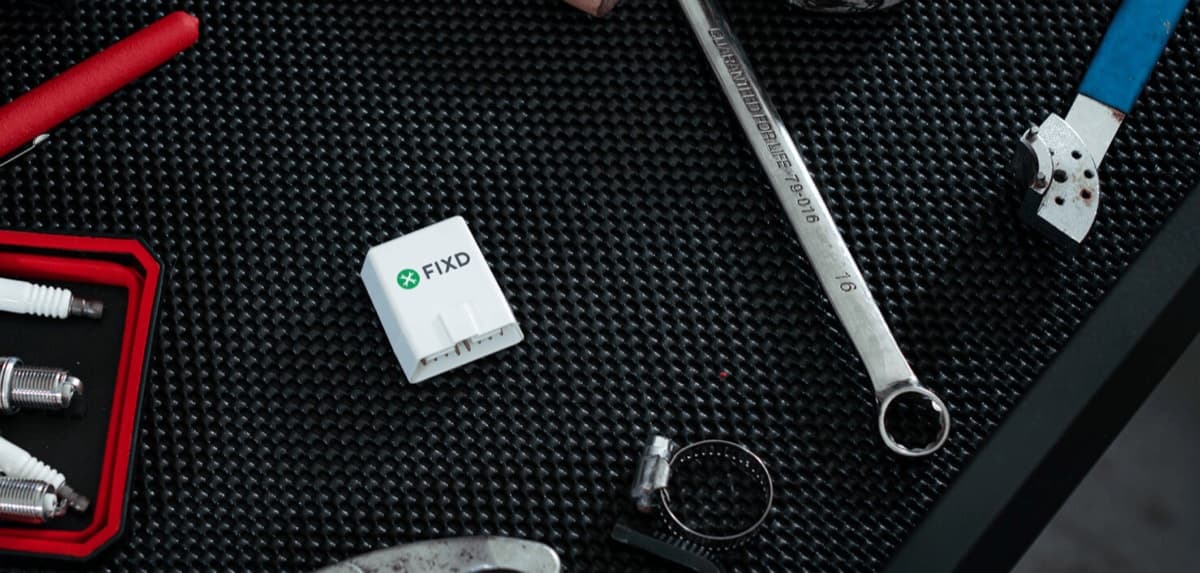
FIXD setup takes a few minutes: install the app, start the car, plug the sensor into the OBD2 port and let the app find it. Here's every step from FIXD's own guides, what to do when the app can't find the sensor, how to read a scan, and how to avoid paying for Premium you don't want.
To use FIXD, download the free FIXD app, turn on your phone's Bluetooth, start your car, plug the FIXD sensor into the car's OBD2 port, and tap "Sensor is Plugged In" in the app so it can find and set up the sensor. Then tap to scan. FIXD's getting-started guide says a blue light on the sensor flashes when it's connected, and the app takes a few seconds to find it. You don't need tools, and you don't pair it in your phone's Bluetooth settings.
Below is the full setup from FIXD's own guides, the fixes for the most common pairing problem, how to read what the scan shows, what clearing the check engine light does, and how to handle the optional FIXD Premium trial so it doesn't turn into a charge you didn't plan for. If you haven't bought the sensor yet, our full FIXD review covers whether it's worth $19.99, and is FIXD legit covers the company and the guarantee.
Before you start: check your car works with FIXD
FIXD's offer page says the sensor works with gas-powered cars and trucks built in 1996 or newer and diesels built in 2008 or newer, and that the app runs on iPhone and Android. FIXD's help center setup guide adds a second condition, as shown in search results: the vehicle should be one sold in the US. If your car fits, it has a standard OBD2 port, which is what the sensor plugs into.
The sensor reads the standard OBD2 engine codes on those vehicles. FIXD's FAQ says enhanced codes, such as ABS, airbag, body control module, tire pressure (TPMS) and transmission, are supported on many makes and models, not all. If one of those systems is what you care about, don't assume it will show up on your car.
Have your phone, the sensor and, ideally, your VIN to hand. FIXD's guide says the app may ask for your 17-character VIN, which is on the driver's side of the dashboard near the windshield or inside the driver's door.
How to set up FIXD, step by step
1. Download the free FIXD app from the Apple App Store or Google Play.
2. Turn on Bluetooth in your phone's settings. Don't try to pair the sensor from the phone's Bluetooth menu; FIXD's help center says the app handles pairing itself.
3. Create your FIXD account. If you bought the sensor on FIXD's website, use the same email you gave at checkout.
4. Start the car. FIXD's guide says to plug the sensor in with the vehicle running.
5. Find the OBD2 port and plug the sensor in. On most cars the port is under the dashboard on the driver's side, near the steering column. When the sensor is connected correctly, its blue light flashes.
6. In the app, tap "Sensor is Plugged In." The app searches for the sensor, which can take several seconds. When it appears, tap "Tap to Setup," then enter a name for the vehicle and the VIN if asked.
7. Tap "Tap to Scan" to run your first diagnostic scan.
FIXD app can't find the sensor? Try this
The most common setup problem is the app not finding the sensor. FIXD's help center checklist, as it appears in search results, comes down to a handful of checks: make sure the app is up to date, the vehicle is running, the sensor is fully plugged in, and your phone is within range. Sitting in the driver's seat is the easiest way to be in range.
If that doesn't work, unplug the sensor, wait a moment and plug it back in, then try again from the app. And if you paired the sensor through your phone's Bluetooth menu by mistake, that's worth undoing, since FIXD says pairing should run through the app.
If none of that helps, contact FIXD support before your return window closes. The offer page lists a 30-day money-back guarantee and a 1-year limited warranty on FIXD sensors, with free returns and replacements.
How to read a FIXD scan
After a scan, the app shows any trouble codes with a plain-English description, a severity rating and, for many codes, an explanatory video. FIXD's offer page says the severity rating is there so you can decide whether it's safe to keep driving, and that the app can detect up to 39,000 different issues.
The free app is enough to understand what the check engine light means and how urgent it is. FIXD's getting-started guide notes that Premium subscribers also see a Confirmed Fix and cost estimate. Our guide to why your check engine light is on covers the most common causes so you know what you're looking at.
Use the result as a starting point, not a final diagnosis. A code tells you which system reported a problem; a mechanic may still need to test parts to confirm the cause. Having the code and its severity in hand before you go in is what FIXD is for.
A simple routine works well: run a scan as soon as the check engine light comes on, note the code and the severity the app shows, and screenshot the result. If you take the car to a shop, show them the code. If the app rates the issue as minor and the light goes out on its own after a few drives, scan again to confirm nothing new has appeared. And because FIXD's FAQ says the sensor and app are free to use as many times as you like on your family's vehicles, it's worth scanning each of them once after setup.
Can FIXD clear the check engine light?
Yes, for minor issues. FIXD's offer page says you can turn off the light if the problem isn't serious. That's useful after you've fixed something simple, such as a loose gas cap, or to check whether a one-off fault comes back.
Clearing the light doesn't fix anything. If the fault is still there, the car's computer will detect it again and the light will come back. Don't clear a code just before an emissions test or a sale, and don't clear one the app rates as serious without getting it checked.
Maintenance tracking and adding more cars to FIXD
FIXD's offer page says the app tracks your mileage and reminds you when routine maintenance is due, and that the sensor syncs with your phone over Bluetooth while you drive. Enter your current mileage during setup and turn on alerts so the reminders are accurate.
You can add more vehicles at any time. FIXD's getting-started guide says there's no limit on how many vehicles you can scan, and you can connect several sensors to one phone to keep an eye on family cars from one account. Each car needs a sensor plugged in for ongoing monitoring; the offer page sells 1, 2 and 3 packs, with a single sensor listed at $19.99 on November 8, 2026.
How to handle the FIXD Premium trial
You don't need Premium to use the sensor. FIXD's FAQ says the sensor and app are free to use as many times as you like, and that Premium is a 100% optional upgrade with cost estimates, an on-call mechanic hotline and DIY help. It's offered as a 14-day free trial.
If you start the trial, put the end date in your calendar. Subscriptions bought through the app renew automatically unless you cancel at least 24 hours before the period ends, and the App Store lists the yearly plan at $99.99. Cancel through your Apple or Google account if you subscribed in the app. Our is FIXD Premium worth it guide covers what you lose by skipping it and how to cancel on each platform.
FIXD vs FIXD Guardian, and the Fixed app
Two names get mixed up with the FIXD sensor. The first is FIXD Guardian, another FIXD product. It's a cellular sensor that also tracks your car's location, it sets up differently (you scan its IMEI, ICCID and serial number in the app before plugging it in), and FIXD says it needs a yearly subscription. If your sensor came with those numbers on the box, follow the Guardian guide instead of the steps above. The second is Fixed, a parking-ticket app that has nothing to do with FIXD Automotive; they're different companies.
If you're still choosing a scanner, our FIXD vs BlueDriver comparison covers where each one wins. Disclosure: TopCrate earns a commission if you buy FIXD through our link, at no extra cost to you.
Read our full FIXD review
Our verdict on the $19.99 FIXD OBD2 sensor: what the free app does, how Premium is priced and who it's worth it for.
Read our full FIXD review →Frequently asked questions
How do I set up my FIXD sensor?
Install the FIXD app, turn on Bluetooth, create an account, start the car and plug the sensor into the OBD2 port under the dash. Then tap "Sensor is Plugged In" in the app, tap "Tap to Setup" when the sensor appears, name the car and run a scan.
Why won't my FIXD sensor connect?
Check that the app is up to date, the car is running, the sensor is fully plugged in and you're sitting in the driver's seat. Then unplug the sensor and plug it back in. Pair through the FIXD app, not your phone's Bluetooth settings.
Where is the OBD2 port for FIXD?
On most cars it's under the dashboard on the driver's side, near the steering column. FIXD works on gas cars from 1996 on and diesels from 2008 on.
Can FIXD turn off the check engine light?
Yes. FIXD says you can clear the light if the issue isn't serious. If the fault is still there, the light will come back.
Do you have to pay a subscription to use FIXD?
No. FIXD says the sensor and app are free to use. Premium is optional and starts with a 14-day free trial; cancel before it ends if you don't want the $99.99 yearly plan.
Can you leave FIXD plugged in?
FIXD is designed to sync with your phone while you drive, which is how the maintenance tracker works. FIXD's setup pages don't address battery drain, so if a car sits unused for weeks, unplugging the sensor is a sensible precaution.
TopCrate is reader-supported. When you buy through links on our site we may earn an affiliate commission, at no extra cost to you. Content is for general information and isn't a substitute for professional advice.