TRENDING ON AMAZON
Wyze Cam v3 1080p Indoor/Outdoor Security Camera Review: Is It Worth It?
The $35 indoor/outdoor 1080p camera that quietly outperforms security cams three times its price — color night vision, weather-sealed, and no monthly fees to just use it.
Quick answer: The Wyze Cam v3 remains the best cheap security camera you can buy. For $35, it's a real 1080p indoor/outdoor camera with free local storage, color night vision, and easy Alexa/Google integration. It's not perfect — the app has bugs, and Wyze has had privacy stumbles — but as a way to get lots of camera coverage without a monthly bill, nothing beats it. Great as a first camera, and great as a fifth camera.
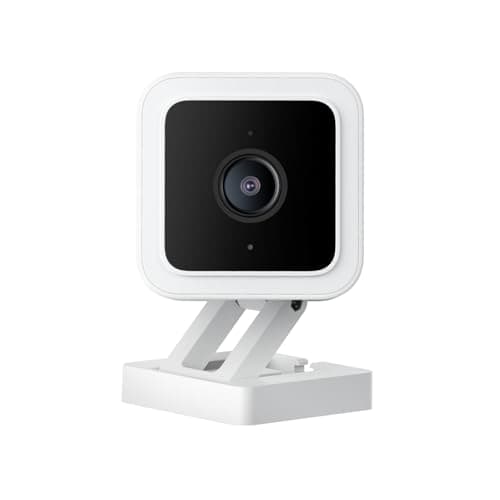
Product image from the Amazon listing.
Our verdict
The Wyze Cam v3 remains the best cheap security camera you can buy. For $35, it's a real 1080p indoor/outdoor camera with free local storage, color night vision, and easy Alexa/Google integration. It's not perfect — the app has bugs, and Wyze has had privacy stumbles — but as a way to get lots of camera coverage without a monthly bill, nothing beats it. Great as a first camera, and great as a fifth camera.
The short version
The Wyze Cam v3 is the security camera that broke the market. For around $35 you get a real 1080p color camera that works indoors OR outdoors (IP65 weather-sealed), records to a microSD card so you don't need a paid cloud plan just to use it, and includes color night vision that turns dim scenes into usable footage. It's not perfect — the app can be clunky and Wyze has had privacy incidents in the past — but if you want a lot of coverage cheap, or want to try a camera without committing hundreds of dollars, this is the one to start with.
Pros & cons
Pros
- 1080p full HD video with a wide 130° field of view
- Works indoors AND outdoors — IP65 weather-sealed
- Color night vision (Starlight sensor) works in near-darkness
- Records free to a microSD card — no forced cloud subscription
- Works with Alexa and Google Assistant
- Absurdly cheap for the feature set (typically $35)
Cons
- Cloud storage and person/package AI detection cost extra ($3-5/mo)
- Wyze has had past privacy/security incidents — some users won't trust it
- App can be laggy and notification delays happen
Why people love it
Plug in, place anywhere
USB-power the camera indoors or outside on a covered surface (IP65 seal handles rain and dust), then mount it to a wall or set it on a shelf using the included magnetic base.
Set up on your Wi-Fi
Pair to your 2.4GHz Wi-Fi through the Wyze app in about two minutes, name the camera, choose motion-detection zones and set up alert notifications on your phone.
Watch, record, review
Live-view any time from the app, record 24/7 to a microSD card, get motion push notifications, and optionally add a Cam Plus subscription for AI person/pet/package detection and cloud recording.
Who it's for
- Renters and homeowners who want cheap camera coverage
- Anyone tired of forced $10/mo cloud plans
- Package theft, driveway and porch monitoring
- Baby room and pet monitoring on a budget
Is the Wyze Cam v3 worth it in 2026?
The Wyze Cam v3 has been on sale since 2020 and is still one of the best cheap camera buys in 2026 — but the calculus depends on what you're comparing it to. Against $150-250 Nest, Ring or Arlo cameras, Wyze wins massively on price and matches on core features (1080p, night vision, motion alerts, cloud, mobile app). Where it loses is polish and ecosystem: Ring/Nest integrate with alarms, smart doorbells and premium services; Wyze is a scrappier one-app ecosystem. Against newer $35-50 cheap cameras from TP-Link Tapo, Eufy Solo, and Reolink Argus, Wyze is competitive but no longer the only value option — you should cross-shop.
The v3 remains the pick if you want: multiple cameras cheap ($35 x 6 = $210 for whole-house coverage), no forced subscription, working microSD recording, IP65 outdoor use, and Alexa/Google integration. It's not the pick if you want: professional-quality AI detection, 4K resolution, battery-only wire-free operation, or absolute privacy assurance. For the money, it remains a startlingly capable little camera, and 200,000+ Amazon reviews averaging 4.5+ stars is not an accident.
Wyze Cam v3 vs v3 Pro vs Wyze Cam OG: which model is the right one?
Wyze makes a confusing lineup, so here's the map. Wyze Cam v3 (this one) is the classic $35 workhorse — 1080p, IP65, color night vision, microSD. Wyze Cam v3 Pro is the $60 upgrade — 2K resolution (2560x1440), improved AI processing (person/package/vehicle onboard), spotlight-ready, and a faster CPU for smoother live view. Wyze Cam OG is the newer $30-40 compact — 1080p, similar features to v3 but a smaller cube form factor and a magnetic base that installs in seconds.
For most buyers, the v3 is the value sweet spot — you save money on the camera and can put that toward more cameras or a microSD card. Step up to the v3 Pro only if you care about 2K sharpness (which matters for reading license plates or seeing faces at distance) or want spotlight/color-at-night functionality. Choose the OG if you want the smallest, cheapest option for indoor use where weather-sealing isn't critical.
How to set up a Wyze Cam v3 for outdoor security (do's and don'ts)
The v3 is IP65 rated, but real-world outdoor life depends on how you install it. Do mount the camera under an eave, soffit, porch overhang, or wall shelter that keeps direct sunlight and driving rain off the lens — not because the camera will fail (it won't), but because the lens gets covered in dust, pollen and spider webs faster without cover. Do run the USB cable through the wall into an indoor outlet if possible — the cable is the most likely point of failure over years. Don't leave the USB brick outdoors; put that inside.
Do set up motion-detection zones inside the Wyze app to exclude the street or a busy sidewalk if you don't want a hundred false alerts a day. Do use the Rules feature to schedule the camera to record only when you're not home, or to auto-turn night vision on after sunset. Do add a Cam Plus subscription if you get more than a handful of motion events per day — the free 5-minute cooldown will miss things. And do enable two-factor authentication on your Wyze account: cameras have been targeted by credential-stuffing attacks industry-wide, and 2FA closes off the main attack path. One workflow detail people forget until it bites them: microSD loops overwrite the oldest footage every week or two, so if you catch something you actually want to keep — a package thief, a break-in attempt, a neighborhood incident — pull the clip off the card the same day. For long-term archiving of the clips you care about, plus the family photos and videos scattered across every device, ThePhotoStick Omni is the one-click, subscription-free way to consolidate everything into a single physical archive.
See Wyze Cam v3 on Amazon
Check the latest price, photos and buyer reviews on Amazon.
Check Price on Amazon →Sold and shipped by AmazonFrequently asked questions
Wyze Cam v3 vs Blink Outdoor vs Ring Stick Up Cam: which security camera should I actually buy?
They win on different axes. Wyze Cam v3 is by far the cheapest and includes 24/7 free microSD recording, but requires a wired USB cable. Blink Outdoor is battery-powered (great for anywhere you can't run a cable), lasts 2 years on AA batteries, but records only motion clips to the Sync Module or cloud. Ring Stick Up Cam has the best app polish and neighborhood integration, but every meaningful feature requires a Ring Protect subscription. Buy Wyze for max cameras cheap. Buy Blink for battery/no-wire installs. Buy Ring if you already own a Ring Doorbell and want one app.
Do I need a Wyze subscription for the camera to work?
No — and that's the whole point. Without any subscription, you get live view, motion notifications, 12-second cloud clips (with a cooldown), and 24/7 continuous recording to a microSD card you insert yourself. Cam Plus ($3-5/mo) adds no-cooldown event recording, cloud storage of full-length clips, and AI person/pet/package detection. Most users go a year on the free tier before deciding whether to subscribe.
Is the Wyze Cam v3 really weatherproof enough for outdoor use?
Yes — the v3 is IP65 rated (dust-tight, resists water jets from any direction), and thousands of installations show it survives rain, snow, ice and heat for years. That said, don't submerge it or put it under a fountain. Mount it under an eave, soffit or porch overhang when possible to further extend life. The USB cable is not rated for permanent outdoor exposure — either drill through the wall to bring the cable inside, or use waterproof cable covers on the outdoor run.
Is Wyze safe? What about the past privacy incidents?
Wyze has had two publicly-reported security incidents (2019 database exposure and 2023-2024 event where some users briefly saw other users' camera thumbnails after a service update). Both were fixed and disclosed. If you're privacy-conscious about a camera in your bedroom or a room where anyone might be undressed, use a different brand — Eufy Security or Reolink are strong local-storage alternatives, or a hardwired Ubiquiti/Amcrest cam for maximum privacy. For a porch camera, a driveway camera, or a pet cam, most people accept the tradeoff for the $35 price.
How much microSD storage do I need for continuous recording?
With continuous 1080p recording, a 32GB card holds about 6-7 days of loop, a 64GB card holds about 2 weeks, and a 128GB card (the maximum the camera supports) holds about a month. Use a Class 10 U1 or better card rated for high endurance — dashcam-rated cards last much longer than standard cards under continuous write. When the card fills, it overwrites the oldest footage automatically.
Does the Wyze Cam v3 need to be plugged in, or can it run on battery?
The Cam v3 must be plugged in via its USB cable — it's not battery-powered. If you need battery, Wyze makes the Battery Cam Pro or Wyze Cam OG (with a separate outdoor battery adapter) — or use Blink Outdoor. Battery cams have tradeoffs: no continuous recording, motion-only detection, and you have to remember to swap or recharge batteries. For most porch/driveway installs, a USB-powered v3 running to a covered outdoor USB outlet is the more reliable choice.
As an Amazon Associate, TopCrate earns from qualifying purchases at no extra cost to you. Product image, price, availability and ratings are shown on Amazon and are subject to change.