TRENDING ON AMAZON
Rocketbook Fusion reusable smart notebook Review: Is It Worth It?
The reusable notebook people actually stick with — 42 mixed-template pages (lined, planner, calendar, task) you scan to any cloud, wipe clean and use for years.
Quick answer: Yes, the Rocketbook Fusion is worth it if you fill notebooks fast and want your handwriting to reach the cloud without buying paper forever. Write with a FriXion pen, scan pages to Google Drive, Dropbox or email through the Rocketbook app, wipe every page clean with a damp cloth, and start over. One notebook lasts years and replaces a shelf of legal pads and planners.
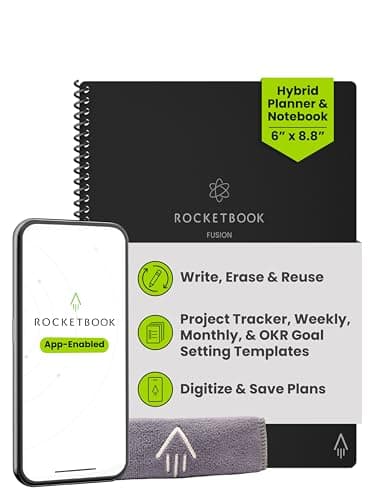
Product image from the Amazon listing.
Our verdict
Yes, the Rocketbook Fusion is worth it if you fill notebooks fast and want your handwriting to reach the cloud without buying paper forever. Write with a FriXion pen, scan pages to Google Drive, Dropbox or email through the Rocketbook app, wipe every page clean with a damp cloth, and start over. One notebook lasts years and replaces a shelf of legal pads and planners.
The short version
The Rocketbook Fusion is a reusable notebook with a mix of page templates — lined, dot grid, planner, task list, calendar. You write with a Pilot FriXion pen, scan the pages to the cloud with the Rocketbook app, then wipe the whole notebook clean with a damp cloth and start over. It's an outrageously practical way to write things down without ever running out of pages.
Pros & cons
Pros
- Reusable pages you wipe clean and start over
- Mix of templates — lined, dot grid, planner, calendar, task list
- App scans pages and sends them to your cloud of choice
- Cuts paper waste dramatically
- Same notebook lasts years
- Handwritten notes stay handwritten but become searchable and shareable
Cons
- Only works with FriXion pens/erasers
- Pages need to dry fully before writing
- Not as fast as typing for pure text notes
Why people love it
Write with FriXion
Use a Pilot FriXion pen — the erasable ink writes smoothly and dries in a few seconds.
Scan to your cloud
Open the Rocketbook app, and it auto-detects the page, deskews it and files it to a destination you set — Google Drive, Dropbox, email, iCloud.
Wipe and reuse
When the notebook fills up, wipe every page clean with a damp microfiber cloth — starts fresh in seconds.
Who it's for
- Note-takers who want handwriting plus digital search
- Students and remote workers
- Anyone reducing paper waste
- People juggling planners and lined notebooks in one book
Is a Rocketbook actually better than a regular notebook and a scanner app?
The Rocketbook Fusion gets compared to a plain notebook plus a scanner app, and the honest answer is that for casual note-takers, the plain notebook wins on cost and simplicity. Where the Rocketbook earns its place is for people who fill notebooks fast and hate the paper waste — students, journalers, prolific meeting-note-takers — and for anyone whose notes need to reach a digital home reliably. The Rocketbook's four-corner auto-detect and one-tap-to-cloud workflow turns 'scan every note' from an intention into a habit, and the reusable pages mean one notebook lasts years instead of six weeks.
The other real benefit is the template mix. Traditional bullet journalers manage lined pages, calendar spreads, task lists and habit trackers by drawing them manually every month. The Fusion has all of them printed and ready to fill in, and after you scan them at month-end you wipe them and reset for the next month. It's the closest thing to a paper planner and a digital archive combined. For people fully digital already (iPad + Apple Pencil in Notability, for example), the Rocketbook feels redundant. For people who prefer real pen-on-paper for thinking, it's the elegant compromise.
Rocketbook workflow: how to set it up so scanned notes actually get used
Rocketbook's whole promise falls apart if scanned notes disappear into a folder no one opens. The setup that makes it worth it: open the Rocketbook app, tap each of the seven small symbols at the page bottom, and assign each one to a specific cloud destination. A common pattern is diamond → Google Drive/Meeting Notes, star → email to yourself, circle → Google Drive/Personal Journal, horseshoe → Todoist or Notion. Before you scan a page, check the symbol that matches where you want the note to go, and the app files it automatically.
Once destinations are wired up, the routine is quick. Write your page. At the end of the day or meeting, open the app, scan every filled page in about 10 seconds each. The app handles deskewing, contrast and image cleanup. Turn on OCR if you want searchable text of your handwriting. Once a week or when the notebook is full, wipe every page and reset. The whole system takes 15 minutes of setup and then runs on autopilot. Skip the setup and the Rocketbook is just a slower notebook — that's the mistake most people make. One belt-and-suspenders habit worth adding: once a quarter, pull every scanned notebook page (plus your photos and PDFs) onto a physical archive like ThePhotoStick Omni, so an accidentally-deleted Google Drive folder never takes years of notes with it.
FriXion pens, cleaning and taking care of a Rocketbook
The pen matters. Only Pilot FriXion pens (and FriXion highlighters) are formulated to write cleanly and wipe off Rocketbook's coated pages. Other pens either smear, won't erase, or leave permanent marks. Buy a small pack of FriXion 0.5mm or 0.7mm pens up front and keep one attached to the notebook with the included pen loop — losing the pen is the number one way people abandon the system.
For cleaning, the routine is simple: wait 15-30 seconds after writing before closing the notebook so ink doesn't smear across pages. Wipe pages clean only when you're ready to reset (not between individual notes) with a damp microfiber cloth. Avoid leaving the notebook in a hot car — FriXion ink is heat-sensitive and can fade prematurely if left above about 140°F. If pages start feeling slick or ink starts skipping, a light wipe with a dry microfiber cloth removes buildup. Cared for well, a single Rocketbook lasts years — the pages simply keep working. That longevity is the whole point.
See Rocketbook Fusion on Amazon
Check the latest price, photos and buyer reviews on Amazon.
Check Price on Amazon →Sold and shipped by AmazonFrequently asked questions
What pens can I use with a Rocketbook?
Any Pilot FriXion pen or highlighter. Other pens either won't erase or will smear the coated pages.
How long before I can wipe a page clean?
After you've scanned it and are ready to reset the notebook, a damp microfiber cloth wipes ink off in a few seconds. Wait at least 15 seconds after writing before closing the notebook so pages don't smear.
How do the pages get scanned into the app?
The app auto-detects the four corner symbols on each page, deskews the image, and sends it to whichever destination you've programmed in the app — Google Drive, Dropbox, email, Slack, iCloud and more.
How many pages does the Fusion have?
Around 42 pages including lined, dot grid, task list, weekly planner, monthly calendar, goal-setting and idea pages. Multiple template types in one book — that's the Fusion's thing versus other Rocketbook models.
Rocketbook Fusion vs Rocketbook Core vs Everlast: what's the difference?
The Core (formerly Everlast) is the classic Rocketbook — lined or dot grid pages only. The Fusion adds planner, calendar and task pages mixed in. The Wave and Flip are older/smaller variants. Pick the Fusion if you use planners and to-do lists, the Core if you only want a lined or dot grid notebook.
Are handwritten Rocketbook pages searchable?
With the OCR (handwriting recognition) feature turned on in the app, your handwriting is converted to searchable text and stored alongside the image. Accuracy depends on how neat your writing is — printed writing works better than cursive.
As an Amazon Associate, TopCrate earns from qualifying purchases at no extra cost to you. Product image, price, availability and ratings are shown on Amazon and are subject to change.