HANDS-ON REVIEW
ThePhotoStick Mobile Phone Photo Backup Review: Is It Worth It?
The photo stick for mobile: a two-headed backup stick that plugs straight into your phone and copies every photo and video with one tap — then plugs into your computer to move them anywhere.
Quick answer: Yes, ThePhotoStick Mobile is worth it if you'd rather own your photo archive than rent it forever from iCloud or Google One. One tap backs up the entire camera roll, the USB end moves it to any computer, and nobody bills you monthly for your own memories. Get the right connector version, make it a monthly ritual, and pair it with the desktop [ThePhotoStick Omni](/reviews/thephotostick-omni) if you also have years of family photos scattered across drives.
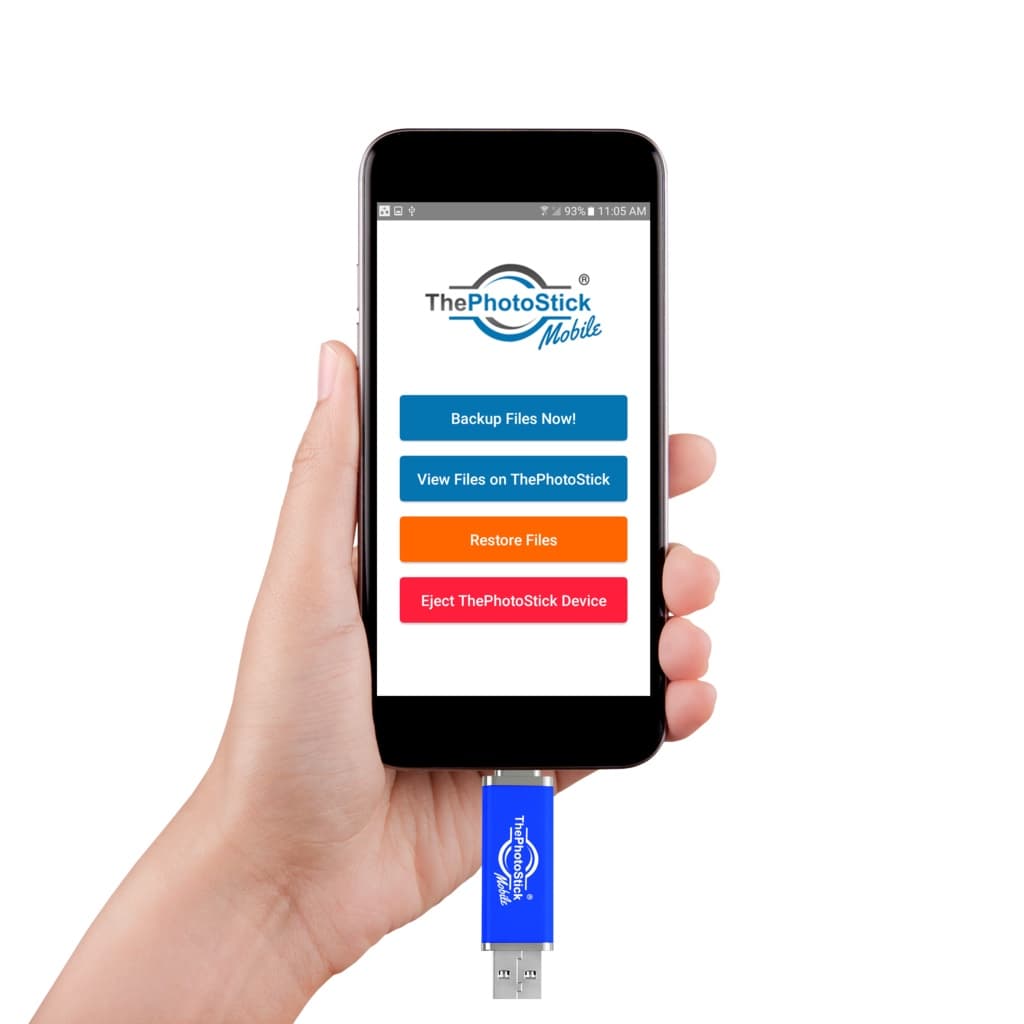
Plug the stick into your phone, tap Backup, done. Photo: ThePhotoStick
Our verdict
Yes, ThePhotoStick Mobile is worth it if you'd rather own your photo archive than rent it forever from iCloud or Google One. One tap backs up the entire camera roll, the USB end moves it to any computer, and nobody bills you monthly for your own memories. Get the right connector version, make it a monthly ritual, and pair it with the desktop [ThePhotoStick Omni](/reviews/thephotostick-omni) if you also have years of family photos scattered across drives.
The short version
Your phone holds your entire photo life, and its backup plan is probably a cloud account that's been 'almost full' for a year. ThePhotoStick Mobile is the offline fix: a small two-headed stick — phone connector on one end, USB-A on the other. Plug it into your phone, open the free companion app, tap 'Backup Files Now!', and every photo and video copies onto the stick. Then plug the USB end into any computer to view, move or archive them. No cloud, no subscription, no full-storage ransom.
Pros & cons
Pros
- One tap in the app backs up every photo and video
- Frees up phone storage without paying for more iCloud/Google
- Two-headed: phone connector one end, USB-A the other
- View, restore and eject right from the companion app
- No subscription, account or cloud involved
- Android and iPhone versions available
Cons
- Get the right version — connectors differ for iPhone vs Android
- Backup is on-demand, not automatic — make it a habit
- Large video libraries fill smaller capacities quickly
How it works
Plug into your phone
The stick's phone connector plugs straight into the charging port — Android (with a USB-C adapter included) or the iPhone Lightning version.
Tap Backup in the app
The free ThePhotoStick Mobile app finds your photos and videos and copies them to the stick with one tap — View, Restore and Eject live in the same app.
Offload anywhere
Flip it around and the USB-A end plugs into any computer, so your backup moves to a laptop, external drive or fire safe.
Who it's for
- Anyone whose phone storage is perpetually full
- People who refuse to pay monthly for iCloud or Google One
- Parents archiving years of kid photos off old phones
- Travelers who want a backup that works with no signal
The 'storage full' problem, solved offline
Phone makers monetize your memories twice: first the phone fills up, then the cloud subscription starts. Deleting photos to free space is the modern heartbreak, and paying monthly forever is the alternative. A hardware backup stick breaks that loop — copy everything to the stick, verify it's there, then clear space on the phone with a clean conscience.
The offline part matters more than people expect. A stick works on a plane, abroad without data, and during outages; it can't be phished; and the only person who can see your camera roll is whoever's holding the stick. For sensitive family archives, offline is a feature, not a limitation.
iPhone vs Android versions — get the right connector
This is the one place buyers trip. The Android version is a blue/silver stick with micro-USB plus an included USB-C adapter, covering essentially every Android phone; backups run through the free ThePhotoStick Mobile app from Google Play. The iPhone version is a separate black stick with a Lightning connector and its own iOS app.
Both share the same design logic: phone connector on one end for the backup, full-size USB-A on the other for offloading to a computer. Households with both platforms buy one of each and share the archive habit — the sticks are the cheap part compared to a lost camera roll.
Stick vs cloud: an honest comparison
The cloud is better at one thing that matters: it's automatic and offsite by default. If your phone falls in a lake tonight, iCloud has yesterday's photos; the stick only has whatever you copied on your last backup day. If you'll reliably pay and manage a subscription, the cloud is the stronger safety net.
The stick wins everywhere else for its audience: one-time cost instead of a forever-subscription, no privacy questions, no 'storage almost full' upsells, works without signal, and produces a physical archive you can hand to your kids. The disciplined answer is both — cloud for the daily net, a stick for the offline family archive. For the subscription-averse, the stick alone (used monthly) is a fine plan.
Sizing the right capacity — a practical guide by how you actually use your phone
The 'which size do I buy' question trips almost everyone up because photo storage math is unintuitive. Some grounded rules of thumb for the current tiers: 64GB fits roughly 20,000–25,000 typical iPhone/Android photos (HEIC/HEIF at 2-3 MB each) or about 4-6 hours of 4K video, and it's the right pick if your camera roll is under 40GB today and you shoot mostly stills. 128GB fits roughly 40,000-50,000 photos or 10-12 hours of 4K video, and it's the sweet spot for most families where the parent is the household photographer — enough headroom for two to three years of new memories without a refill. 256GB fits ~90,000 photos or 22+ hours of 4K video, and it's the right pick for heavy 4K shooters, event photographers, or households consolidating multiple phones onto one archive.
Two sizing tricks people miss. First: before ordering, check your phone's actual storage — iPhone: Settings → General → iPhone Storage → Photos; Android: Settings → Storage → Media. Buy the tier that has roughly 40% headroom above your current library, so you're not full again within a year. Second: if you record a lot of 4K video (a single 4K/60fps clip runs about 400 MB per minute), that eats capacity 15-20× faster than photos, so size up meaningfully. For a truly bulletproof archive, buy two of the same capacity and keep them in different physical locations (one at home, one at a parent's house or a bank safe deposit box) — a $100 pair beats a single $60 stick every time a house fire, a flood or a theft happens. And for years of scattered files that pre-date your phone, pair with the desktop ThePhotoStick Omni to consolidate old external drives, computer folders and downloaded cloud archives into the same organized backup habit.
Try ThePhotoStick Mobile for Yourself
Available now for $49.99.
Check Availability & Price →Ships to your doorFrequently asked questions
How does the backup actually work?
Plug the stick into your phone's port, open the free ThePhotoStick Mobile app, and tap 'Backup Files Now!'. The app copies your photos and videos onto the stick; View, Restore and Eject options live in the same app.
Which version fits my phone?
Android phones use the Android version (micro-USB with an included USB-C adapter); iPhones use the iPhone version with a Lightning connector. Check your port before ordering — the two versions aren't interchangeable.
Can I move the photos to a computer afterwards?
Yes — the other end of the stick is standard USB-A, so it plugs into any Windows or Mac machine like a normal flash drive for viewing, copying or archiving.
Does it need Wi-Fi or a subscription?
Neither. Everything happens over the physical connection — no cloud account, no monthly fee, and it works anywhere, including planes and dead zones.
Can I delete photos off my phone after backing up?
That's the main use: back up, spot-check a few files on the stick or a computer, then clear space on the phone. Keep the stick somewhere safe — it's now the archive.
Is the backup automatic?
No — it runs when you plug in and tap Backup. Pair it with a habit (first of the month works) so the archive stays current.
How much storage does ThePhotoStick Mobile hold, and how many photos is that?
It's sold in tiered capacities — commonly 64GB, 128GB and 256GB. As a rough rule of thumb, expect around 30,000-40,000 typical smartphone photos per 128GB, or 5-8 hours of 4K video; higher-resolution HEIC images and long 4K clips fill it faster, small screenshots use very little. If you shoot a lot of 4K video or have years of camera roll to archive, size up — the app tells you how much space each backup will use before it runs.
What's the difference between the ThePhotoStick Mobile and the desktop ThePhotoStick Omni?
The Mobile version is designed to plug into your phone directly for on-the-go camera-roll backups; the desktop ThePhotoStick and the ThePhotoStick Omni plug into a computer's USB port and scan hard drives, cloud folders and connected phones for photos and videos to consolidate. Many households own both — Mobile for the monthly phone dump, then the ThePhotoStick Omni on the family PC to unify years of scattered files into one archive.
When you buy through links on this page, TopCrate may earn an affiliate commission at no extra cost to you. Confirm the correct version for your phone's connector before ordering. Prices accurate as of publish time.