TRENDING ON AMAZON
Apple TV 4K (3rd generation) Review: Is It Worth It?
The streaming box people who care about picture quality actually pick — snappy, ad-free interface, and it works with everything.
Quick answer: Yes — the Apple TV 4K is the Apple TV box worth buying, and it's the fastest, ad-free streaming box with the best picture and sound at any price. It's several times pricier than a Roku or Fire Stick, but the A15 chip, Dolby Vision handling, tvOS updates and app-first home screen make it the streamer people buy once and stop thinking about. If you just want cheap streaming, a [Roku Streaming Stick 4K](/reviews/roku-streaming-stick) is fine; if you want the best Apple TV box, this is it.
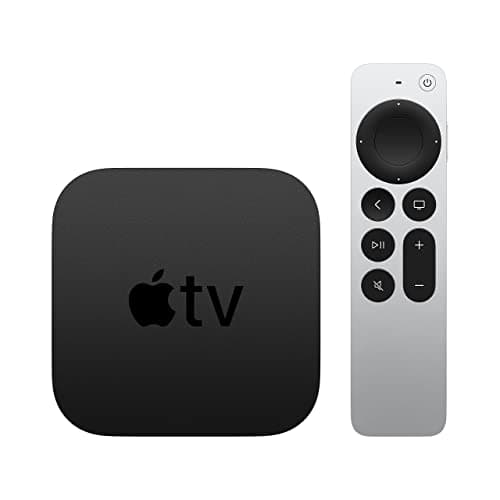
Product image from the Amazon listing.
Our verdict
Yes — the Apple TV 4K is the Apple TV box worth buying, and it's the fastest, ad-free streaming box with the best picture and sound at any price. It's several times pricier than a Roku or Fire Stick, but the A15 chip, Dolby Vision handling, tvOS updates and app-first home screen make it the streamer people buy once and stop thinking about. If you just want cheap streaming, a [Roku Streaming Stick 4K](/reviews/roku-streaming-stick) is fine; if you want the best Apple TV box, this is it.
The short version
The Apple TV 4K is the streaming box you buy when you're tired of laggy menus, ad-choked home screens and mystery buffering. Apple's A15 chip makes the interface instantly responsive, the tvOS home screen shows apps — not ads — and Dolby Vision, Dolby Atmos and 4K HDR come standard. It costs more than a Fire Stick or a Roku, and it's the premium streaming device that quietly justifies the price on day one.
Pros & cons
Pros
- Fastest, smoothest streaming interface you can buy
- 4K HDR with Dolby Vision and Dolby Atmos
- Ad-free home screen — apps, not banners
- Excellent Siri Remote with clickpad and Find My
- Works as an AirPlay target for iPhone and Mac
- Software gets years of updates
Cons
- Priced well above Roku and Fire Stick
- No live-TV features built in
- Some content locked behind Apple's own services
Why people love it
Plug it in once and log in
Connect via HDMI and power, sign in with your Apple ID or scan a code from your iPhone — most settings and Wi-Fi transfer over automatically.
Apps not ads
tvOS shows your apps front and center. Netflix, Disney+, YouTube TV, HBO, Prime Video, Peacock and every major service are here — no promoted rows you can't turn off.
Watch, mirror, listen
Stream 4K HDR from any app, mirror your iPhone or Mac via AirPlay, control smart-home HomeKit devices, or use it as a Wi-Fi hub with Thread and Matter.
Who it's for
- Anyone who cares about picture quality
- People frustrated by Fire TV and Roku ads
- Households already in the Apple ecosystem
- AirPlay and HomeKit users
Apple TV 4K vs Fire TV Stick 4K vs Roku Streaming Stick 4K
The Fire TV Stick 4K is Amazon's box: cheap, capable, but the home screen is dominated by promoted Prime content and ads that you can't turn off. The Roku Streaming Stick 4K is the neutral, no-agenda pick — Roku doesn't have its own content library to push, so the interface is refreshingly simple and every major app is available. Both work fine. Both have interfaces that feel slower than a modern smartphone.
The Apple TV 4K is a different class of device. The A15 chip is roughly ten times more powerful than what's inside a Fire Stick, which shows in every menu transition, app launch and video-format switch. Dolby Vision handling and HDR calibration are more reliable, and the software gets updates for years after purchase. The trade-off is price — you're paying two to three times a Fire Stick — and if you don't care about ads or picture-quality nuance, that gap is hard to justify. But once you use the Apple TV, the cheaper boxes feel sluggish in a way you can't unsee.
Is Apple TV 4K worth it if you don't own an iPhone?
Apple markets Apple TV 4K to Apple households, but here's the underrated truth: it's the best streaming box for non-Apple households too. Every major streaming app — Netflix, Disney+, HBO Max, Prime Video, YouTube TV, Peacock, Hulu, Paramount+ — has a native tvOS app that runs beautifully. You don't need an iPhone to use it any more than you need one to use a MacBook. Setup uses an Apple ID (free), and after that, it's just a very good streaming box.
Where iPhone ownership helps: AirPlay mirroring is one tap and gorgeous for photos, videos and Zoom, Continuity Camera lets you use your iPhone as a webcam for tvOS apps, and HomeKit turns Apple TV 4K into a smart-home hub with Thread and Matter routers built in. If you're Android or Windows, you skip those extras but the core streaming experience is identical. The people who most regret spending on Apple TV 4K are those who buy it for cheap streaming when a Roku would have been fine — buy it because you want the speed and picture quality, not because you're an Apple person.
How to set up Apple TV 4K for the best picture and sound
Out of the box, Apple TV 4K auto-configures 4K HDR and Dolby Atmos if your TV and sound system support them, but a few tweaks meaningfully improve the picture. First, in Settings → Video and Audio, run 'Match Content' for both dynamic range and frame rate — this makes tvOS output video at its native rate and HDR flavor instead of upconverting everything to 4K HDR (which can add banding and judder). Match Content is the single biggest picture improvement, and Apple leaves it off by default.
Second, use the Color Balance calibration if you have an iPhone. Hold the phone near the screen; the FaceTime camera reads the color output, and tvOS corrects for your TV's white balance. It's a legitimate calibration that would cost hundreds from a pro. Finally, for smart-home users, plug in the Ethernet model — the extra bandwidth and lower latency make HomeKit and Matter/Thread routing far more reliable than Wi-Fi, especially in a house full of smart plugs and bulbs. Fifteen minutes of setup takes it from great to genuinely excellent. And once the box is dialed in, the Photos screensaver is genuinely one of the loveliest ambient features on any streaming device — but it's only as good as the source album, so consolidate the family shots scattered across phones, laptops and old drives with ThePhotoStick Omni first, then point iCloud Photos at the curated set.
See Apple TV 4K on Amazon
Check the latest price, photos and buyer reviews on Amazon.
Check Price on Amazon →Sold and shipped by AmazonFrequently asked questions
What is the Apple TV box, and which Apple TV box should I buy in 2026?
The 'Apple TV box' is Apple's small black streaming device that plugs into any TV via HDMI and runs tvOS — the same apps you know (Netflix, Disney+, YouTube TV, HBO, Prime Video, Peacock, Hulu) but faster, cleaner and without a home screen of ads. The current Apple TV box is the Apple TV 4K (3rd generation, released late 2022 and still Apple's flagship in 2026 — Apple hasn't refreshed it because it hasn't needed to). Two variants: Wi-Fi only with 64GB and Wi-Fi + Ethernet with 128GB and Thread/Matter smart-home radios. Most people should buy the Wi-Fi version; get the Ethernet + Thread model if your Wi-Fi struggles with 4K or you have HomeKit/Matter/Thread smart-home devices. Skip older 'Apple TV HD' and 2nd-gen 4K units on the resale market — the A15 chip in the current box is the specific reason it feels a generation ahead of every other streaming box, and older ones don't have it.
Is the Apple TV 4K worth the price over a Fire Stick or Roku?
If picture quality, interface speed and no ads matter to you, yes. The A15 chip loads apps instantly, video quality is consistently better via Dolby Vision, and the home screen shows your apps instead of being covered in promoted rows. If you just want cheap streaming, a Roku Streaming Stick or Fire Stick 4K costs a fraction and works fine — it's a real trade-off.
Do I need an iPhone to use Apple TV 4K?
No. It works with any TV over HDMI and doesn't require an iPhone, though setup, AirPlay mirroring and Apple ecosystem features are easier if you have one. Android and Windows users can still install and use all major streaming apps.
Does it support 4K, HDR, Dolby Vision and Dolby Atmos?
Yes to all four, including HDR10 and HLG. When the source and TV support it, Apple TV 4K passes through Dolby Vision video and Dolby Atmos audio automatically — one of the most reliably-configured 4K HDR boxes you can buy.
Can Apple TV 4K replace cable?
With apps like YouTube TV, Sling, Hulu Live, Fubo and antenna add-ons, yes — it's a common cord-cutting hub because every major live-TV service has a native tvOS app. The box itself doesn't include a tuner, though, so over-the-air antenna users need a separate networked tuner.
What's the difference between the Wi-Fi and Wi-Fi + Ethernet models?
The higher-tier model adds an Ethernet port and doubles storage (to 128GB). Ethernet is worth it if your Wi-Fi struggles with 4K, if you have HomeKit/Thread devices, or if you sideload games and apps. Most people are fine with the base Wi-Fi model.
Does the new Siri Remote suck less than the old one?
Yes — the current Siri Remote uses a clickpad you can navigate with buttons (not the old glass touchpad that sent you flying past your target). It has dedicated back, Siri and mute buttons, USB-C charging, and Find My so you can ping it when it slides between the couch cushions.
How do I hear TV dialogue better on Apple TV 4K without cranking the volume?
Two moves. In tvOS, go to Settings → Video and Audio → Audio Style and pick 'Dialogue' rather than 'Automatic' — this remixes the audio stream to boost speech relative to music and effects, which is genuinely useful on badly-mixed modern soundtracks and doesn't require a new sound system. Second, if the volume war on the couch is chronic, the hardware fix is a personal TV listening headset: something like the HearDirect wireless TV headset plugs into any TV's audio output (optical, AUX or coaxial) and gives one person their own volume dial with dialogue-clear audio inches from their ears, while the room's speakers keep playing normally for everyone else. Combine dialogue-mode audio on the Apple TV with a personal headset for the one person who needs it louder, and the mumbled-dialogue problem is basically solved.
As an Amazon Associate, TopCrate earns from qualifying purchases at no extra cost to you. Product image, price, availability and ratings are shown on Amazon and are subject to change.