HOME WIFI
Why Is My WiFi Slow in One Room? (The Physical Reasons — and the $50 Fix That Ends It)
The router is fine. Your plan is fine. One room is where the signal goes to die — and the reason isn't your ISP. Here's what's actually happening between the router and that back bedroom, and the ranked ladder of fixes from free to 'never notice it again.'
Everywhere in the house streams 4K without a hiccup — the couch, the kitchen, the front porch. Then you walk into the back bedroom, the basement office, or the garage over the driveway and Netflix starts buffering, Zoom pixelates, and the download speed test that read 300 Mbps in the living room reads 4. Same phone, same router, same internet plan, five seconds later. Something between there and here is eating your WiFi, and the reason it feels so mysterious is that WiFi is genuinely invisible: unlike a coaxial cable you can trace, radio waves are getting absorbed, reflected, and interfered with by things you can't see, in ways that are easy to picture once someone draws you the map.
The good news is that a slow-in-one-room WiFi problem is one of the most solvable home-tech problems there is. It's not your ISP, it's not your plan, and — in the vast majority of cases — you don't need to buy a new router. This guide covers what's actually happening in the room that suffers, why the fixes people try first (rebooting the router, upgrading the plan, buying a new phone) rarely help, and the ranked ladder of what does — from free-and-obvious to the plug-in fix that ends it entirely.
First: it isn't your ISP, and it isn't your router being broken
The classic tell that a slow-in-one-room WiFi problem is a coverage problem — not an internet problem — is exactly what you already know: everywhere else in the house is fine. If your ISP were failing or your router were dying, every room would slow down in lockstep. When one specific room misbehaves and the rest of the house is normal, physics is the villain: the radio waves that carry WiFi are getting weaker between the router and that specific corner of the house, and by the time they arrive they've lost enough energy that your phone can barely hold a connection.
That's why the first troubleshooting round most people try — reboot the router, run a speed test, call the ISP, upgrade the plan — never fixes it. You can pump 1 gigabit into the modem and it still won't reach the room the signal was struggling to get to. The internet plan controls how fast bits move on the cable coming into the house; it has zero effect on how far radio waves can travel through drywall, cast-iron pipes, and the neighbor's competing 2.4 GHz network. Diagnose the coverage problem and the plan you already pay for will suddenly work everywhere.
What actually kills WiFi between two rooms
The three physical villains, in rough order of how badly they hurt: building materials, distance, and interference. Building materials first, because they're the biggest surprise for most people. WiFi passes through drywall and wood studs with almost no loss. It's brick, concrete, plaster with metal lath (common in pre-1950s houses), stone, tile, and — worst of all — anything metal that eats it. A single interior brick wall between the router and the room can drop signal strength by 50-70%. A metal HVAC duct in the ceiling? A mirror on the wall? A stainless-steel fridge or a chest freezer sitting between rooms? Each one takes a real bite. That's why the room right next to the router can be dead if there's a chimney, a bathroom (with tile and plumbing), or the kitchen (with the fridge and microwave) between them, while a room three walls away in a different direction works fine.
Distance and interference finish the job. WiFi signal weakens exponentially with distance, and modern homes running the 5 GHz band — which is much faster than 2.4 GHz but doesn't travel as far — feel this most. A 5 GHz signal that's crisp 20 feet from the router can be effectively dead at 50 feet, especially through a couple of walls. And in apartments and dense neighborhoods, your WiFi is competing with every neighbor's WiFi for the same handful of radio channels. Your microwave, an older cordless phone, some baby monitors, and Bluetooth devices also spray noise into the 2.4 GHz band. In a dense apartment building, the interference alone can turn a good router into a mediocre one.
Prove it in 30 seconds — the phone-in-hand walk test
Before you spend anything, do the free diagnostic that confirms this is a coverage problem and not something weirder. Open a WiFi analyzer app (free on both iOS and Android; search for 'WiFi analyzer'), start it running, and walk slowly from the router toward the room that suffers. Watch the signal-strength number, which is measured in negative dBm — bigger negative number equals weaker signal. -30 to -50 dBm is excellent, -60 is fine for video, -70 is where things start getting flaky, and -80 or worse is basically dead. You'll usually see the number crash by 20-30 dBm at a very specific spot on the walk: a brick wall, a bathroom, the transition to a different floor. That crash spot is the point where the signal falls off the cliff. Everything past it is running on fumes.
The walk test also tells you the placement answer to the fix. Note the last spot on the walk where the signal was still strong — probably a hallway, a stair landing, or a room between the router and the problem area. That's the outlet you want to plug a range extender into. From that midpoint the extender picks up a healthy signal and rebroadcasts a fresh copy into the room that was struggling. The whole trick to any of the fixes below is 'get a strong signal as close to the problem room as possible, then bridge the last leg.'
The ranked ladder of fixes — free first, $50 last
Start with the free stuff, because it works surprisingly often. Move the router. If yours is stuffed in a media cabinet against an exterior wall in the corner of the basement, it's spraying half its signal into the yard and the other half through the worst possible obstacles. A router wants a central, high, open location — on top of a bookcase in a central hallway is a classic winner, and 'not inside a metal cabinet, not on the floor, not behind the TV' is the shortest advice you'll ever get. Second free move: raise it. WiFi signal radiates roughly horizontally out from the antennas, so a router on the floor sprays half its signal into the basement and half into the ceiling. Head-height is the target. Third: change channels. Your router's admin page lets you switch WiFi channels (channels 1, 6, and 11 on 2.4 GHz are the non-overlapping ones); if your neighborhood's routers are all crammed on the default channel, moving to a quieter one is a free upgrade. A WiFi analyzer app shows you which channels are least crowded in your specific building.
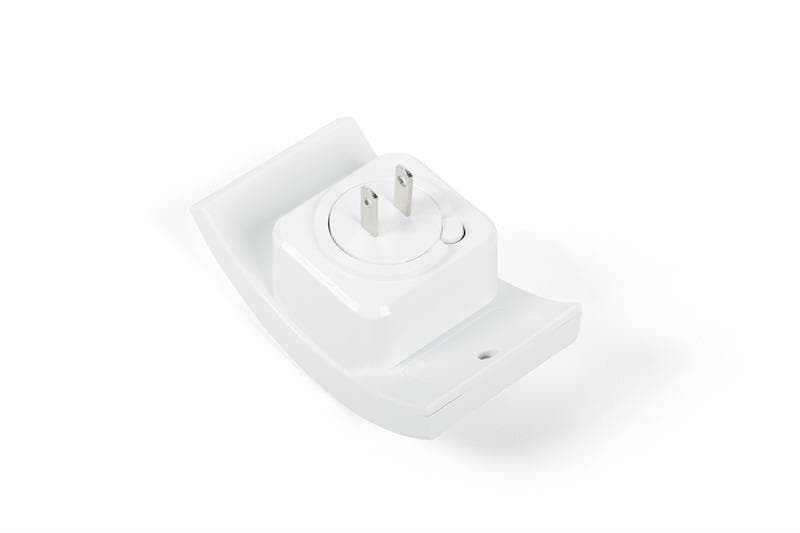
If free doesn't get you all the way there — and in a house with real brick or a big footprint, it often won't — the cheap layer is a range extender. A plug-in unit like the Omega WiFi Amp is the specific fix for the specific problem of 'one room, dead signal.' It plugs into an outlet at the midpoint you identified in the walk test, grabs your existing WiFi at that spot (where the signal is still strong), and rebroadcasts a fresh copy the rest of the way to the dead zone. No new router, no wiring, no drilling, no changing your ISP or plan. Set-up is a WPS button on the router and a WPS button on the extender — they pair themselves. For the specific 'back bedroom that buffers' case, this is a $50 problem, not a $500 one, and treating it as anything more is over-engineering. The honest limit worth knowing: an extender rebroadcasts what it can pick up, so placement matters — put it too far out (in the dead zone itself) and it has nothing to boost. Halfway. Every time.
The upgrade tier is a mesh system — Eero, Google Nest, TP-Link Deco and the like — and it's the right answer if you have more than one problem area, if you live in a big or oddly-shaped house, or if you want handoff between rooms to be truly seamless (mesh nodes cooperate; a range extender creates a separate network that some devices won't auto-hop to). Mesh is $200-500 versus the extender's $50, and unless your specific problem is 'many dead rooms and a big house,' it's overkill for a one-room dead-zone problem. The final tier is Ethernet — running actual cable to the far room and plugging in a WiFi access point there. It's the gold standard, and if you own the house and can hide cable in an attic or basement crawl, it's worth it. For renters, apartment dwellers, and anyone unwilling to drill through walls: the extender is the answer that fits your life.
Two setup habits pay off with any of the above. Move the router's location before you buy anything — it's free and it fixes 30% of these problems on its own. And treat 'the WiFi is bad in that room' as one specific coverage problem, not a general 'internet is slow' complaint. Slow-in-one-room is a fixed problem with a $50 shelf ceiling; slow-everywhere is a different conversation that starts with your plan.
Two special cases that need a different fix
Case one: it's not one room, it's one device. If your phone works fine in the back bedroom but your smart TV in that same bedroom buffers, the coverage isn't the problem — the TV's built-in WiFi radio probably is (TV WiFi chips are notoriously cheap and old). Fix: run an Ethernet cable to the TV if you can, or plug the extender in near the TV and hardwire the TV to the extender's Ethernet port. Both bypass the TV's weak radio and use the extender's better one. Same trick works for game consoles and desktops that lag in an otherwise-fine WiFi environment.
Case two: it's the whole floor above or below, and you have a two-story house or a basement. WiFi radiates mostly horizontally, so a router on the main floor barely reaches the basement or the second-floor bedrooms. In that case, an extender on the stair landing is the classic move — halfway between floors, with a clear signal path up and down. If your problem is 'the entire upstairs is bad,' one extender in the stairwell often converts the upstairs from unusable to solid without touching anything else. Same $50 fix, different placement logic.
What not to bother with
Upgrading your internet plan. If your problem is coverage, a faster plan just means faster bits reaching the router and the same slow signal reaching the room. You'll pay more per month and the bedroom will still buffer. Prove coverage isn't the issue before you upgrade — run a speed test in the good room and a speed test in the bad room; if the good room is fast and the bad one is slow, the plan is fine. Fix the coverage.
Buying a whole new router before diagnosing. A new router is a legitimate fix if your current one is genuinely ancient (WiFi 5 or older) or if it's the ISP-provided combo box, which is often mediocre. But a $200 new router in the same bad location loses to a $50 extender in the right location, every time. If you're going to buy hardware, buy it based on what the walk test told you: one dead spot? Extender. Many dead spots and a big house? Mesh. Router itself is the bottleneck (everywhere is slow)? Then a new router. Diagnose first.
Tinfoil-hat 'WiFi boosters' from marketplace ads. There's a whole category of $20 devices that claim to be miraculous WiFi extenders and are, in reality, empty plastic shells with a status LED — actual measurements show zero effect. Real range extenders have real specs (dual-band, WPS, Ethernet port, mainstream brand). If a product's Amazon listing is 90% claims and 10% technical detail, it's the empty-plastic-shell tier. A legit plug-in extender in the $40-70 range is what actually works.
Read our Omega WiFi Amp review
The plug-in range extender that fixes the specific 'one room buffers' problem — WPS-paired to your existing router in under a minute, an Ethernet port for the TV or console in the far room, and no drilling, no new plan, no mesh overhaul.
Read our Omega WiFi Amp reviewFrequently asked questions
Why is my WiFi slow in one room only when everywhere else in the house is fine?
It's a coverage problem, not an internet problem — physics is stopping the WiFi signal between your router and that specific room. The three villains, in order: building materials (brick, concrete, tile, metal ducts, mirrors, appliances all absorb WiFi signal aggressively), distance (WiFi weakens exponentially with distance, and the 5 GHz band that's fast up close doesn't travel far), and interference (neighbor networks, microwaves, baby monitors, and cordless phones spray noise into the same radio bands). Since the rest of the house works fine, your router and internet plan are fine — the signal just isn't reaching that one room. A plug-in range extender like Omega WiFi Amp at the halfway point ($50) is the standard fix.
Will upgrading my internet plan fix a slow-in-one-room WiFi problem?
No — this is the single most common wasted upgrade in home tech. A faster plan pushes faster bits to your router; it does nothing to help those bits travel across brick walls to a distant bedroom. Run a speed test in the good room and one in the bad room. If the good room is fast and the bad one is slow, the plan is doing its job and the WiFi coverage is the problem. Save the extra monthly charge and put a $50 range extender in the hallway between the router and the dead zone instead.
Do I need a mesh system, or is a WiFi extender enough?
For one dead room, an extender is enough — and much cheaper. Mesh systems ($200-500) are the right answer if you have multiple dead zones, a big or oddly-shaped house, or if you need seamless handoff for constantly-roaming devices like a phone on a call while walking upstairs. For the specific 'back bedroom that buffers' or 'garage office loses signal' problem, a $50 plug-in extender like Omega WiFi Amp at the midpoint is the tool built for exactly that use-case. Don't over-engineer a one-room coverage problem into a whole-home-mesh purchase.
Where should I put a WiFi extender for the best result?
At the midpoint between your router and the room with bad signal — specifically, at the last outlet where the signal is still strong. Do the walk test with a WiFi analyzer app: walk slowly from the router toward the dead room and watch the signal number drop. Plug the extender in at the last strong-signal spot, not in the dead zone itself. An extender rebroadcasts what it can pick up, so placing it inside the dead zone leaves it with nothing to boost. Hallways, stair landings, and rooms adjacent to the problem area are usually the winners.
How can I tell if the problem is really WiFi coverage and not my internet plan?
The give-away is that the rest of the house works fine — only one room struggles. Confirm it with two speed tests: run a wired speed test at the router (an Ethernet cable straight from the router to a laptop) and a WiFi speed test from your phone in the bad room. If the wired result matches your plan and the WiFi result in the bad room is 10x slower or more, coverage is the problem. A WiFi analyzer app that shows -70 dBm or worse in the bad room seals it: your signal is arriving weak, and no plan upgrade will change that.
Can walls really block WiFi that much?
Yes — and this catches most people off guard. Interior drywall and wood studs barely affect WiFi, so most modern homes' interior walls are fine. But brick, concrete, plaster with metal lath (pre-1950s houses), tile bathrooms, stone chimneys, and metal HVAC ducts absorb radio waves hard. A single interior brick wall can drop signal strength by 50-70%. Kitchens are also villains: metal appliances (fridge, dishwasher, oven), the microwave (which actively sprays 2.4 GHz interference when running), and often plumbing behind the walls all conspire. If the dead room is on the other side of a bathroom, kitchen, or chimney from your router, that's your answer.
Will moving my router actually help?
Yes, often dramatically — and it's free. Routers want to sit centrally, high (head-height, on top of furniture rather than the floor), and out in the open (not inside a media cabinet, not behind a TV, not on top of the fridge). A router stuffed against an exterior wall in a basement corner is spraying half its signal into the yard and losing the rest through the worst possible obstacles. Moving it to a central hallway on top of a bookcase fixes about 30% of one-room-slow problems on its own. Try this before you buy anything.
TopCrate is reader-supported. When you buy through links on our site we may earn an affiliate commission, at no extra cost to you. Content is for general information and isn't a substitute for professional advice.