HANDS-ON REVIEW
Omega WiFi Amp Range Extender Review: Is It Worth It?
A plug-in booster that grabs your existing WiFi and rebroadcasts it into the dead zones — no new router, no wiring.
Quick answer: Yes — Omega WiFi Amp is the right first move for a stubborn WiFi dead zone: plug it in halfway, tap WPS, and the room that used to buffer gets a usable signal — for a fraction of the cost of a mesh system. As long as you place it sensibly and keep your expectations to coverage rather than magic speed, it's a cheap, effective fix for one problem room. For two or more dead zones or a home over 2,500 sq ft, skip the extender and go straight to mesh.
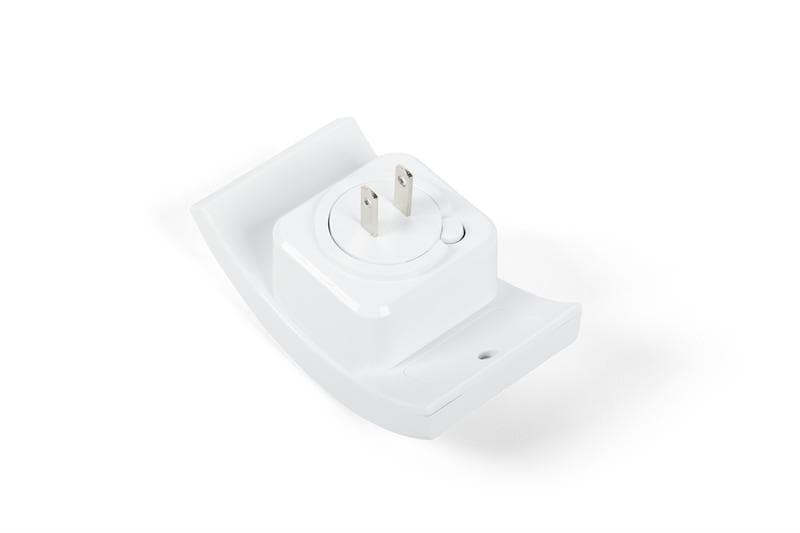
Plug Omega WiFi Amp in halfway to the dead zone and it rebroadcasts your signal. Photo: Omega
Our verdict
Yes — Omega WiFi Amp is the right first move for a stubborn WiFi dead zone: plug it in halfway, tap WPS, and the room that used to buffer gets a usable signal — for a fraction of the cost of a mesh system. As long as you place it sensibly and keep your expectations to coverage rather than magic speed, it's a cheap, effective fix for one problem room. For two or more dead zones or a home over 2,500 sq ft, skip the extender and go straight to mesh.
The short version
The back bedroom that buffers, the patio with no bars, the office over the garage — most homes have a WiFi dead zone the router just can't reach. Omega WiFi Amp plugs into an outlet between your router and the dead spot, grabs the existing signal and rebroadcasts it to extend coverage. There's an Ethernet port for wired devices and a WPS button for one-tap setup. No new router, no running cables through walls.
Pros & cons
Pros
- Extends your existing WiFi into weak-signal rooms and dead zones
- Plugs straight into an outlet — no wiring or drilling
- WPS button for fast, one-tap connection to your router
- Ethernet port to hardwire a TV, console or PC
- Compact; doesn't hog the whole outlet area
- Works alongside your current router and plan
Cons
- An extender rebroadcasts existing signal — it can't beat your internet plan's speed
- Best placed midway; too far from the router and it has little to boost
- One unit covers one problem area, not a whole large home
How it works
Plug it in halfway
Put Omega in an outlet roughly between your router and the room with bad signal — where it can still get a solid connection.
Tap WPS to pair
Press WPS on the router and on Omega, and they link up automatically — no apps or long passwords to type.
Connect and roam
Your devices join the extended network and get usable signal in the room that used to drop. Hardwire one device via the Ethernet port if you want.
Who it's for
- Anyone with a room, basement or patio where WiFi drops out
- Renters who can't run cabling or replace the ISP's router
- People who stream or work in a far corner of the house
- Households that want a cheap fix before buying a whole mesh system
How a WiFi extender actually fixes dead zones
WiFi gets weaker the further it travels and the more walls, floors and appliances it passes through — which is why one corner of the house always suffers. A range extender like Omega WiFi Amp solves this by sitting partway between your router and the weak spot: it receives the still-decent signal at that midpoint and rebroadcasts a fresh, stronger copy onward into the room that was struggling.
Crucially, it does this without touching your internet plan or replacing your router. You plug it into a wall outlet, link it to your existing network, and it quietly fills the gap. The WPS button means you don't have to wrestle with settings — a tap on the router and a tap on the extender pairs them.
Extender vs mesh vs a new router — which do you need?
If you have one or two problem spots — a back bedroom, a patio, a garage office — a plug-in extender is the cheapest, simplest fix, and that's exactly Omega's lane. A whole-home mesh system is more powerful and seamless but costs several times more and is overkill if most of your house already works. Replacing the router helps only if the router itself is the weak link rather than distance.
The honest limitation of any extender is that it can only rebroadcast what it receives: it boosts coverage, not your underlying internet speed, and it works best when placed where it still gets a solid signal to amplify. Put it too far out, in the dead zone itself, and there's little left to boost. Placed at the midpoint, it's a genuinely effective, low-cost upgrade.
Getting the best placement and speed
Placement is everything with an extender. Walk toward the dead zone watching your phone's WiFi bars and plug Omega into an outlet at the last point where the signal is still strong — usually a hallway or room between the router and the trouble spot. From there it has a good signal to amplify and can push it the rest of the way.
For a stationary device that needs the most reliable connection — a smart TV, a game console, a desktop — use the Ethernet port to hardwire it to the extender instead of relying on WiFi. And remember the realistic goal: an extender turns 'no usable signal' into 'solid, streamable signal' in that room. It won't make a far room faster than your internet plan allows anywhere else.
Omega WiFi Amp vs TP-Link RE315, Netgear EX3700 and a mesh system
The plug-in-extender category has three real reference points to check against. TP-Link RE315 ($25-35) is the most-recommended budget dual-band extender: 2.4GHz + 5GHz simultaneous rebroadcast, 300+433 Mbps, WPS pairing, an Ethernet port for hardwiring a smart TV, and TP-Link's OneMesh compatibility if you later buy a matching TP-Link router. It's the specific extender Wirecutter and RTINGS name as the safe pick for a $30-ish plug-in. Netgear EX3700 ($30-40) is the direct competitor from a bigger-name US brand: same simultaneous dual-band and Ethernet port, similar rated speeds, slightly bulkier form factor, and Netgear's Nighthawk app for tuning. Both are proven, both work with any router.
Omega WiFi Amp sits in the same one-outlet-per-problem-zone lane and prices similarly, and it's the right choice when you want a single-purpose 'kill this one dead spot' box without picking a specific router brand's ecosystem to marry into. If you have two or more separate dead zones or a large home (2,500+ sq ft with several floors), stop buying extenders — the honest upgrade is a mesh system (TP-Link Deco X20, Eero 6, or Google Nest WiFi) at $150-250 for a 2-3 pack that replaces your router entirely and puts a mesh node in each trouble zone. Mesh handoff between nodes is seamless (you don't have to rejoin a separate '_EXT' network as you walk around); extender handoff usually isn't. Rule of thumb: one dead zone, one plug-in extender (Omega, RE315 or EX3700 are all defensible picks); two or more, or a home where the router itself is aging, mesh. Skip the temptation to daisy-chain extenders — signal loss compounds at each hop and the second one usually rebroadcasts junk.
Try Omega WiFi Amp for Yourself
Available now for $49.99.
Check Availability & Price →Ships to your doorFrequently asked questions
What does Omega WiFi Amp do?
It's a plug-in WiFi range extender. It picks up your existing router's signal and rebroadcasts it to reach weak-signal rooms and dead zones, so devices in those areas get a usable connection — without a new router or any wiring.
Do I need technical skills to set it up?
No. It has a WPS button — you press WPS on your router and on Omega and they pair automatically, so there are no apps or long passwords to enter for basic setup.
Will it make my internet faster?
It extends coverage, not your internet plan's top speed. It turns a dead or weak area into a usable one; it can't make any room faster than the speed your provider delivers.
Can I plug in a wired device?
Yes — it has an Ethernet port, so you can hardwire a smart TV, game console or PC to the extender for a more stable connection in that room.
Where should I put it?
Roughly midway between your router and the dead zone — at the last spot where the signal is still strong. Placing it too far out, inside the dead zone itself, leaves it little signal to boost.
Will it work with my router and provider?
Yes — it works alongside standard home routers and your existing internet service. You keep your current setup; Omega just extends its reach.
When you buy through links on this page, TopCrate may earn an affiliate commission at no extra cost to you. A range extender boosts coverage of your existing network; actual speeds depend on your internet plan and home layout. Prices accurate as of publish time.