TRENDING ON AMAZON
Valve Steam Deck OLED handheld gaming PC Review: Is It Worth It?
A full Windows-caliber game library in your hands — the OLED screen, longer battery and quieter fan turn the original Deck's promise into a keeper.
Quick answer: For anyone with a Steam library, the OLED refresh is the version to buy. Better screen, better battery, quieter fan — the Deck's original promise, finally delivered.
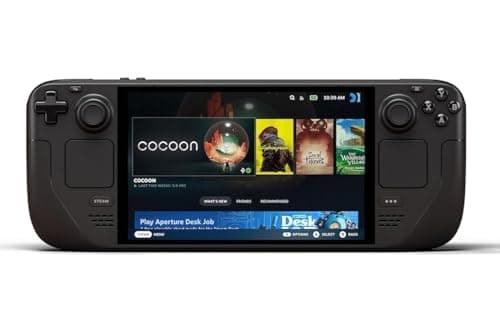
Product image from the Amazon listing.
Our verdict
For anyone with a Steam library, the OLED refresh is the version to buy. Better screen, better battery, quieter fan — the Deck's original promise, finally delivered.
The short version
The Steam Deck OLED is what the original Deck should have been. A stunning HDR OLED display, longer battery life, a lighter chassis and a much quieter fan make it the handheld that finally lets you play your Steam library on the couch, on a plane, or in bed. It plays thousands of games out of the box and it feels like a real console — not a novelty.
Pros & cons
Pros
- Vibrant HDR OLED display with 90Hz refresh
- Noticeably longer battery than the original LCD Deck
- Lighter, cooler and much quieter fan
- Plays the vast majority of your existing Steam library
- Full desktop Linux under the hood — install emulators, browsers, Game Pass via workarounds
- Dockable to a TV with a hub or the official dock
Cons
- Still bulky compared to a Switch
- Some newer AAA games run at reduced settings
- Storage fills up fast if you keep many big games installed
Why people love it
Sign in to Steam
Log in with your Steam account and your existing library appears, ready to install straight from the store.
Install and play
Deck-verified titles run out of the box with controller mappings and defaults tuned for the handheld.
Dock or stream
Plug into a TV via USB-C or use Steam Link to stream games from your gaming PC around the house.
Who it's for
- PC gamers with a big Steam library
- Travelers who want console-quality games on the go
- Emulator enthusiasts and retro gamers
- Anyone who wants Switch-style portability without giving up PC titles
Is the Steam Deck OLED worth it in 2026?
Two years in, the Steam Deck OLED is the handheld PC that clearly earned its price. The original 2022 LCD Deck felt like an ambitious first attempt — great idea, loud fan, mediocre battery, washed-out screen. The OLED refresh fixes all of that in one product. The HDR OLED panel makes dark scenes look genuinely cinematic instead of grey, the fan is quiet enough to use in bed without waking a partner, and the extra battery life turns 'plane game or subway game' from a hopeful claim into reality. For anyone who bounced off the original Deck, the OLED is a different experience.
The remaining reasons to hesitate are honest but narrow. It's still notably bigger and heavier than a Switch, so it lives in a backpack rather than a coat pocket. Cutting-edge AAA games sometimes need visual concessions to hit a solid frame rate — Cyberpunk 2077 or Alan Wake 2 look great, but they're not running at ultra settings. And SteamOS occasionally reminds you it's Linux, especially if you try to run games with aggressive kernel-level anti-cheat. For 90% of the Steam catalog and a huge share of emulators, though, it just plays.
Steam Deck OLED vs ROG Ally X vs Legion Go: which handheld PC wins?
The Deck OLED, ASUS ROG Ally X and Lenovo Legion Go all target the same buyer, and each is best at something different. The Deck OLED wins on price, on ergonomics — the grips and trackpads still feel the most natural in long sessions — and on OS: SteamOS is polished, boots straight to a controller-friendly UI, and treats the Deck as a console. It's also the most reliably 'just works' for indie games, older titles and emulators.
The ROG Ally X and Legion Go trade some of that polish for raw Windows power. Their AMD Z1 Extreme chips deliver higher peak framerates on modern AAA titles, and they run every launcher out of the box — Game Pass, Battle.net, Epic — where the Deck usually needs a workaround. The trade-off is worse battery life at full tilt, a fussier Windows-on-handheld experience, and a higher price. Buy the Deck if you value price, polish and battery. Buy an Ally or Legion Go if you're chasing top-end frame rates and native Windows compatibility.
How to get the most out of your Steam Deck OLED
A few settings turn a great handheld into a fantastic one. Cap the framerate to 40fps or 60fps for most games — the 90Hz OLED syncs neatly, battery life leaps, and you rarely feel the difference in a handheld screen. Use the built-in per-game TDP slider to trim wattage on titles that don't need full power, and turn on the Deck's fan curve override if you find the default too aggressive. Storage-wise, add a fast microSD card (A2, at least 256GB) for indies and older games; keep the internal SSD for the big AAA installs.
Beyond gaming, Desktop Mode is where the Deck gets genuinely nerdy. Install EmuDeck for a plug-and-play emulator front-end covering everything from Game Boy to GameCube, add Firefox and a keyboard for a legitimate travel laptop replacement, and set up Steam Link on your home PC to stream demanding titles at ultra settings when you're within Wi-Fi range. A good USB-C hub or Valve's dock turns the same device into a couch console. Few purchases end up doing this many jobs this well.
See Steam Deck OLED on Amazon
Check the latest price, photos and buyer reviews on Amazon.
Check Price on Amazon →Sold and shipped by AmazonFrequently asked questions
Do I need a gaming PC to use the Steam Deck OLED?
No — it's a standalone handheld PC. It runs games itself. A separate gaming rig is only useful if you want to stream games to the Deck via Steam Link.
How is it different from the original LCD Steam Deck?
Bigger, brighter HDR OLED screen at 90Hz, a more efficient chip that boosts battery life, a lighter chassis and a much quieter fan. Same games, better everything else.
Will it run games I already own on Steam?
Most of them. Steam labels every title as Verified, Playable, Unsupported or Unknown so you can check compatibility before you install.
Can I dock it to a TV?
Yes — it has USB-C video output, so a USB-C hub or Valve's dock lets you play on a TV with a Bluetooth controller.
Steam Deck OLED vs Nintendo Switch OLED: which should I buy?
Different libraries. The Switch OLED plays Nintendo exclusives (Zelda, Mario, Splatoon) that you can't get anywhere else and is smaller and lighter. The Steam Deck OLED plays your PC games — anything from Baldur's Gate 3 to Cyberpunk 2077 — with far more raw horsepower. If your library is on Steam or you want AAA PC games portably, the Deck wins. If you want first-party Nintendo games, the Switch is the only option.
How long does the Steam Deck OLED battery last?
It varies wildly by game. Lightweight 2D indies can push past 10 hours; demanding modern 3D games land in the 3-5 hour range. Capping the framerate to 30 or 40fps and dropping brightness noticeably extends runtime, and the OLED's per-pixel dimming makes dark games sip less power than they did on the LCD Deck.
As an Amazon Associate, TopCrate earns from qualifying purchases at no extra cost to you. Product image, price, availability and ratings are shown on Amazon and are subject to change.