HANDS-ON REVIEW
SmartCard Slim Bluetooth Tracker Review: Is It Worth It?
A wallet-thin Bluetooth tracker that helps you find your wallet, bag or keys right from your phone.
Quick answer: For thirty bucks, SmartCard is cheap insurance against the universal frustration of a missing wallet. It's thin enough to forget, works both ways, and turns a frantic ten-minute search into a quick tap on your phone.
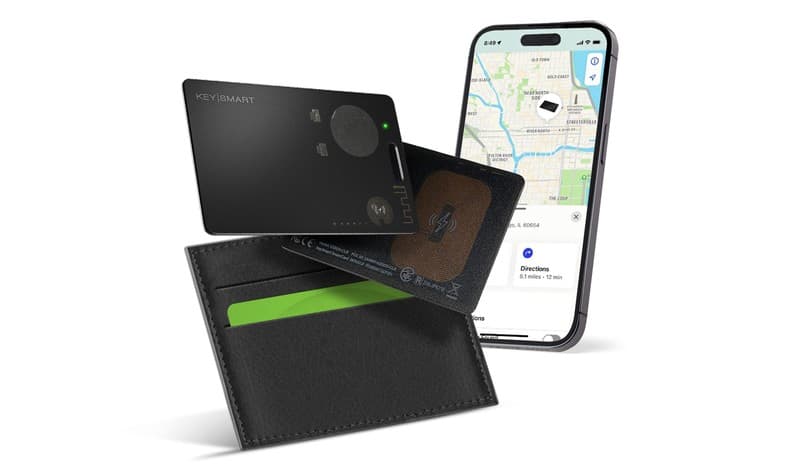
As thin as a credit card — it slips into any wallet. Photo: SmartCard
Our verdict
For thirty bucks, SmartCard is cheap insurance against the universal frustration of a missing wallet. It's thin enough to forget, works both ways, and turns a frantic ten-minute search into a quick tap on your phone.
The short version
If you've ever torn the house apart looking for your wallet, SmartCard fixes that. It's a tracker about as thin as a credit card that slides into your wallet, purse or bag, pairs with your phone, and lets you ring it or see its last location on a map. It even works in reverse — tap the card to find your phone.
Pros & cons
Pros
- Thin as a credit card — fits any wallet or purse
- Ring it from your phone to find it nearby
- See its last known location on a map
- Works two ways — tap it to find your phone
- No bulky keychain fob to carry
- Simple app setup in minutes
Cons
- Bluetooth range is limited up close
- Requires the companion app on your phone
- Best for everyday items, not long-distance tracking
How it works
Slip it in
Drop the SmartCard into your wallet, purse or bag — it's thin enough to forget it's there.
Pair the app
Connect it to your phone in a couple of minutes through the companion app.
Find it fast
Lost it? Ring the card or check its last location — or tap the card to ring your phone.
Who it's for
- Anyone who constantly misplaces their wallet or bag
- Travelers who can't afford to lose their essentials
- Forgetful households that lose things daily
- People curious about trackers but who want something wallet-thin
How a wallet tracker like SmartCard actually helps you find things
SmartCard works over Bluetooth, the same short-range wireless your earbuds use. Once it's paired to your phone through the companion app, two things become possible. If your wallet is somewhere nearby — under a couch cushion, in yesterday's jacket — you open the app and make the card ring, then follow the sound. And because Bluetooth is a two-way connection, the relationship runs in reverse: tap the card and it pings your phone, which is the trick for when it's the phone that's gone missing.
The other piece is location memory. The app records where the card was last detected by your phone, so even if it's out of Bluetooth range you get a map pin showing the last place the two were together — usually enough to jog your memory about where you left a bag. It's worth being clear-eyed that this is last-seen location, not live GPS tracking. SmartCard shines at the everyday 'where did I put it' problem around the house, car, and office, which is exactly the problem most people actually have.
SmartCard vs Apple AirTag and Tile Slim: which wallet tracker to buy
The three real card-format tracker options each solve the problem differently. Apple AirTag ($29 or $99 for a 4-pack) is the strongest at last-seen recovery because it piggybacks on Apple's Find My network — any nearby iPhone (there are roughly a billion of them) anonymously reports the AirTag's location, so a wallet left in a taxi across town often shows up on your map within minutes. The catches: it's a disc rather than a card so it needs an adhesive card-shaped sleeve to fit a wallet slot (Nomad, Cardhop and similar make them for around $15), and it only works well if you're inside the Apple ecosystem — Android support is limited to unwanted-tracker alerts. Tile Slim ($30) is the direct card-format competitor: same thin credit-card shape as SmartCard, works cross-platform on iPhone and Android, and uses Tile's own community network for last-seen updates (smaller than Apple's, but real). The catch there is battery — Tile Slim is sealed with a 3-year non-replaceable battery, so you replace the whole card every three years.
SmartCard sits in the value slot: card-thin, cross-platform, one-time purchase around $30, no monthly fee. It gives up the community-network recovery reach of AirTag and Tile Slim — a wallet that's genuinely across town won't ping unless another SmartCard user happens by — so the honest positioning is that it's the pick for the 'where in the house or car did I put it' problem rather than the 'my wallet is somewhere in this city' problem. How to choose: iPhone user who sometimes loses things far from home, get AirTag with a card sleeve; Android user or mixed household who wants the same network reach, get Tile Slim; anyone whose losses are consistently within Bluetooth range of home and who wants the cheapest card-thin tracker without an ecosystem commitment, SmartCard is the smart-money pick. Whatever you pick, drop one in every high-panic item — wallet, laptop bag, passport sleeve — because trackers only work in things you actually put them in.
Setting up SmartCard and getting the most out of it
Setup takes only a few minutes: install the companion app, turn on your phone's Bluetooth, and follow the prompts to pair the card. Once it's connected, slip it into whatever you lose most — wallet, purse, laptop bag, or even tucked into a passport sleeve before a trip. Keeping the app installed and Bluetooth enabled is what lets the two-way ringing and last-location features work, so it's worth leaving both on rather than toggling Bluetooth off to save battery.
To get the most from it, think about placement and habits. Put it in the item you panic about most, and get in the routine of glancing at the app's last-seen map before tearing the house apart — it often points you straight to the right room. For travelers, dropping one into a checked bag or a day pack adds a quick layer of reassurance. Just keep expectations matched to the technology: it's at its best finding things within Bluetooth reach, so it's everyday insurance, not a long-distance recovery system.
Frequently asked questions
How does it work?
It connects to your phone over Bluetooth. From the app you can make the card ring or see where it was last detected, so you can track down whatever it's tucked into.
Will it fit my wallet?
Yes — it's about as thin as a credit card and sits in a card slot or pocket.
Can it find my phone too?
Yes. Tap the card and it rings your phone, so it works in both directions.
What's the range?
It's a Bluetooth tracker, so it's best for finding items in and around your home, car and bag rather than across long distances.
Does SmartCard need its own cell plan or monthly fee?
No. It connects directly to your phone over Bluetooth and works through the free companion app, so there's no SIM card, cell plan, or subscription involved. You buy the card once and that's it — the only ongoing requirement is keeping the app installed and Bluetooth turned on so the two stay paired.
What happens if I leave my wallet somewhere far away, like a restaurant?
Once the card is out of Bluetooth range, you can't ring it live, but the app shows the last place your phone and the card were detected together — typically enough to recall where you left it. Think of it as a last-seen map pin rather than live GPS, which is ideal for retracing your steps to that restaurant table.
When you buy through links on this page, TopCrate may earn an affiliate commission at no extra cost to you. Range and features depend on Bluetooth conditions. Prices accurate as of publish time.