TRENDING ON AMAZON
Philips Hue Starter Kit (Bridge + Color Bulbs) Review: Is It Worth It?
The premium smart-lighting system that just works — 16 million colors, reliable app control and years of updates.
Quick answer: Philips Hue is what smart lighting looks like when it's done right. Buy the Bridge and a starter kit, and you'll be building routines and adding bulbs for years — this is the smart-home upgrade that reliably delights.
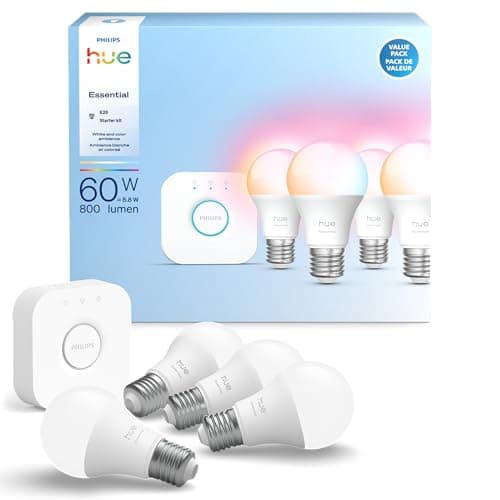
Product image from the Amazon listing.
Our verdict
Philips Hue is what smart lighting looks like when it's done right. Buy the Bridge and a starter kit, and you'll be building routines and adding bulbs for years — this is the smart-home upgrade that reliably delights.
The short version
Philips Hue is the smart-lighting system that got smart lighting right first — and after a decade of updates, it's still the one most people recommend. A small Bridge plugs into your router and speaks Zigbee to the bulbs, which means faster, more reliable control than Wi-Fi-only competitors. The bulbs themselves are among the highest-quality in the category, with true 16-million-color range, warm-to-cool white tuning and a huge ecosystem of switches, motion sensors and outdoor lights.
Pros & cons
Pros
- Rock-solid reliability — bulbs turn on the moment you press the switch
- Truly wide color range and lovely warm whites
- Works with Alexa, Google, Apple Home, HomeKit and Matter
- Huge ecosystem of accessories, dimmers and outdoor lights
- Years of firmware updates
- Handles 50+ bulbs on one Bridge
Cons
- Bulbs cost more than most competitors
- The Bridge is a separate device to plug in
- Some new features require the app
Why people love it
Bridge speaks Zigbee to bulbs
A tiny Hue Bridge plugs into your router and pairs to the bulbs over Zigbee — a lightweight mesh network that's more reliable than Wi-Fi for small commands like on/off/dim.
One app for every light
The Hue app groups bulbs by room, saves scenes, sets schedules and syncs with your voice assistant of choice — Alexa, Google, Apple Home.
Add switches and sensors
Dimmers, motion sensors, tap buttons and outdoor lights all join the same Bridge — so you can control lights without the app when you want to.
Who it's for
- Anyone starting a smart home
- Renters who want lighting they can take with them
- Home theater and gaming setups
- Households with kids who lose the app
Philips Hue vs cheaper Wi-Fi smart bulbs: what actually breaks?
Everyone asks whether Philips Hue is worth 3-5x the price of a Kasa or Wyze Wi-Fi bulb. Both technologies turn lights on and off from an app. What separates them is what happens on day 400. Cheaper Wi-Fi bulbs share your home Wi-Fi network alongside your phone, laptop, TV and camera — and when your router does a firmware update, gets overloaded or gets rebooted, bulbs go offline in ways that are slow to recover. If you have 10 Wi-Fi bulbs, that's 10 devices competing for router bandwidth and IP addresses.
Hue's Zigbee mesh sidesteps all of that. The Bridge is the only device on your Wi-Fi; the bulbs form their own tiny network on a different radio frequency, so they don't clog your router and they self-heal when one bulb reboots. Commands are faster (typically under 100ms versus 300-800ms for Wi-Fi bulbs), and after years of use, Hue setups just keep working. If you're putting one smart bulb in a lamp for fun, cheaper is fine. If you're wiring 20+ lights across a house, the reliability gap is the whole reason Hue exists.
Which Philips Hue starter kit should you buy?
Philips sells several starter kits and the choice comes down to bulb count and color capability. The base Color starter kit (Bridge + 2-3 color bulbs) is the right entry for most people — it lets you set up the Bridge, try Color in one lamp, and see if you want to expand. The White Ambiance starter kit costs less and covers bedrooms and offices well, since warm-to-cool white tuning is the useful part; you don't need purple mood lighting on your nightstand. If you know you're going all-in, the larger kits with 4+ bulbs are the cheapest per bulb.
The other decision is bulb shape. Standard A19 fits most household lamps. BR30 is for recessed can lights in ceilings. Candelabra E12 is for chandeliers and vanities. GU10 is for track and spot lighting. Check the bulb bases in the rooms you want to smarten before buying — a Hue A19 does not screw into a recessed can, and this is the most common purchase mistake.
Setting up scenes, routines and Hue Sync (the underrated feature)
A Hue system without scenes is just app-controlled bulbs. Scenes are where it earns its price. In the Hue app, create scenes like 'Relax' (warm 2000K amber), 'Concentrate' (cool 6500K daylight), 'Movie' (dim rear lights, front off) and 'Sunrise' (a gradual wake-up from red to daylight over 30 minutes). Then trigger them from the app, a voice assistant, a physical Hue dimmer or a routine. Wake-up and go-to-sleep routines that fade slowly are the feature people actually use every day.
For entertainment, Hue Sync is the killer feature nobody mentions. On desktop, the Hue Sync app on Mac or Windows matches your bulbs to what's on screen — games, movies, YouTube — for surprisingly immersive ambient lighting. On TV, the Hue Sync Box (sold separately) does the same for HDMI sources. If you have a home theater or gaming setup, this is where Hue leaves cheaper systems behind entirely. It's genuinely fun and would cost thousands to replicate with pro theater lighting.
See Philips Hue on Amazon
Check the latest price, photos and buyer reviews on Amazon.
Check Price on Amazon →Sold and shipped by AmazonFrequently asked questions
Do I need the Hue Bridge, or can I use Wi-Fi bulbs?
Philips does sell Bluetooth-only Hue bulbs that work app-to-bulb without a Bridge, but you're limited to 10 bulbs, no schedules from outside the home, no voice control routines and no accessories. The Bridge is what makes Hue reliable — Zigbee is faster and more stable than Wi-Fi, and you can scale to 50+ bulbs. Get the Bridge if you're going beyond a bedroom.
What's the difference between White, White Ambiance and Color bulbs?
White is a simple dimmable warm bulb — the cheapest. White Ambiance adds warm-to-cool tuning (great for wake-up routines and reading). Color adds 16 million colors and is the one people usually mean by 'Hue.' Buy Color for living rooms and entertainment spaces; White Ambiance is often fine for bedrooms and offices.
Does Hue work with Alexa, Google Home and Apple HomeKit?
Yes — Hue is one of the few systems that integrates natively with all three, plus Matter and Samsung SmartThings. Set up the Bridge in the Hue app first, then add it to your voice assistant of choice.
How many bulbs can one Hue Bridge control?
Officially up to 50 bulbs and 12 accessories per Bridge. That's enough for a large multi-room home; if you exceed it, you can run a second Bridge on the same network.
Are Philips Hue bulbs worth it, or are cheaper smart bulbs fine?
Cheaper Wi-Fi smart bulbs (Kasa, Wyze, Sengled) work, but reliability is the main gap — they can lag, drop off Wi-Fi, or fail after a router firmware update. Hue's Zigbee network is dramatically more reliable, updates come for years, and color quality is noticeably better. If you plan to expand your smart home, Hue pays back the premium; for a single lamp, cheaper options are fine.
What happens if my Wi-Fi goes down?
Local Zigbee control still works: the Bridge and bulbs, plus any physical dimmer or motion sensors, keep functioning. You just lose remote control from outside the house and voice control (since Alexa/Google route via the internet). Regular wall switches still work if you leave them powered on.
As an Amazon Associate, TopCrate earns from qualifying purchases at no extra cost to you. Product image, price, availability and ratings are shown on Amazon and are subject to change.