TRENDING ON AMAZON
Paperlike Screen Protector for iPad Review: Is It Worth It?
The matte iPad screen protector that turns slippery glass into a paper-textured writing surface — the single accessory every Apple Pencil note-taker ends up buying, and the reason a lot of people finally stopped carrying a paper notebook.
Quick answer: Yes — for anyone who writes, draws, or marks up PDFs on iPad with an Apple Pencil, Paperlike is the single highest-leverage accessory you can add. It fundamentally transforms the writing experience from slippery glass into real paper-feel friction, so your hand actually controls the pen instead of skating across the surface. The trade-offs — very slight color softening and Pencil tips that wear roughly 2-3× faster — are real but small compared to the daily writing upgrade. If a cheaper generic matte film is on your radar, Bellemond and JETech get you about 80% of the experience at half the price; Paperlike is the calibrated original that's still the safest buy.
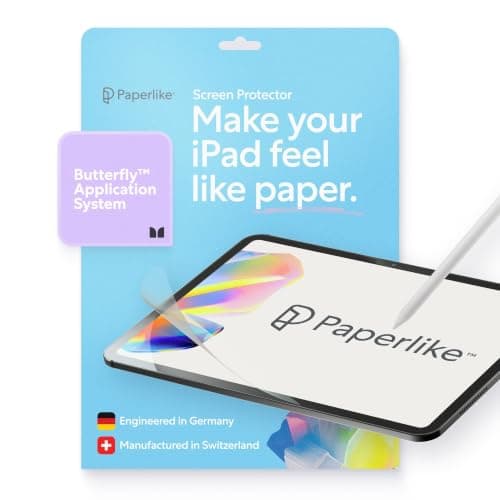
Product image from the Amazon listing.
Our verdict
Yes — for anyone who writes, draws, or marks up PDFs on iPad with an Apple Pencil, Paperlike is the single highest-leverage accessory you can add. It fundamentally transforms the writing experience from slippery glass into real paper-feel friction, so your hand actually controls the pen instead of skating across the surface. The trade-offs — very slight color softening and Pencil tips that wear roughly 2-3× faster — are real but small compared to the daily writing upgrade. If a cheaper generic matte film is on your radar, Bellemond and JETech get you about 80% of the experience at half the price; Paperlike is the calibrated original that's still the safest buy.
The short version
Paperlike is the matte screen protector designed specifically for iPad users who write and draw with the Apple Pencil — the accessory that turns the slippery glass slide of a bare iPad into a paper-textured surface with real friction. If you take notes, sketch, mark up PDFs, or handwrite anything on your iPad, this is the single biggest quality-of-life upgrade you can add, and it's the reason many students and creators have finally switched from paper notebooks.
Pros & cons
Pros
- Genuine paper-like friction under Apple Pencil
- Reduces screen glare significantly
- Anti-fingerprint matte finish
- Precise iPad Pro/Air/mini fit
- Guide stickers make installation easy
- Two pack in every box
Cons
- Slightly softens screen color vibrancy
- Apple Pencil nib wears faster (offset by better feel)
- Bubble installation requires patience
Why people love it
Matte film with paper texture
A precision-cut PET film with a slightly rough matte finish that mimics the tooth of paper under a pencil nib.
Apply once, use for years
Install with the included alignment stickers, and it lasts about 12-18 months of heavy daily use before needing replacement — Paperlike sells replacements individually.
Real friction, real feedback
Instead of the frictionless slide of glass, you get resistance and feedback under the Apple Pencil that matches actual paper — smoother handwriting, more accurate drawing.
Who it's for
- Students taking notes on iPad
- Digital artists and sketchers
- Anyone marking up PDFs regularly
- People who switched from paper notebooks
Is Paperlike worth it, or is a cheap matte screen protector enough?
The Paperlike premium is real, but so is the outcome. What you're paying for isn't just 'matte' — it's a specific calibrated texture that mimics real paper's tooth under a pencil, with pixel-scattering that reduces glare without making text look grainy. Generic $10 matte protectors are either too smooth (feels like slick vinyl) or too textured (blurs display noticeably). Bellemond, JETech and PaperTexture are the closest Paperlike-inspired competitors at around half the price — they're 80% of the experience and worth trying if you don't want to spend $40 on a screen film.
The daily-use case for Paperlike is: you take handwritten notes on your iPad for at least an hour a day (student, doctor, meeting note-taker), or you draw / sketch / mark up designs regularly. In these cases the paper feel isn't cosmetic — it directly makes your handwriting more legible, your drawings more controlled, and long sessions less fatiguing. If you use the Apple Pencil casually (occasional annotation, signing PDFs), a $10 generic matte protector is fine. If the iPad is a paper notebook replacement, Paperlike earns the premium.
Paperlike vs the Apple Pencil Pro with its 'squeeze' features vs an actual paper notebook
The comparison to a real paper notebook is worth thinking about honestly. Paper is still slightly more natural to write on — genuine cellulose fibers vs an engineered PET texture — but the gap is now very small with a Paperlike. What paper can't do: search across notes, sync across devices, undo, change pen color mid-word, integrate with your existing digital calendar and to-do system, or hold thousands of notebooks in one thin slab. For students and knowledge workers, iPad + Apple Pencil + Paperlike + Notability/GoodNotes is now genuinely competitive with paper for most workflows, and better for the specific reasons above.
The Apple Pencil Pro adds a squeeze gesture, haptic feedback and a barrel roll for rotating brushes, but none of these changes how the tip feels against the screen — that's determined by whether you're on bare glass or on a Paperlike. So the Pencil Pro is compatible and helpful, but doesn't replace the need for a paper-texture protector if handwriting feel is your goal. The most 'notebook-like' iPad setup in 2026 is: iPad Air or Pro + Apple Pencil Pro + Paperlike + Notability. That combination hits close enough to paper that most people who try it stop buying paper notebooks.
How to install Paperlike without bubbles or dust (and make it last)
The right environment matters more than the technique. Install in a bathroom right after running a hot shower — steam settles dust, and the humid air keeps dust suspended off surfaces. Clean the iPad screen thoroughly with the included alcohol wipe, then the microfiber cloth, then any final dust particles with the included dust-lifting sticker. The alignment tabs (four small stickers) attach to the iPad frame first — they hold the Paperlike in position while you peel backing. Use them; they're the trick that makes crooked installs nearly impossible.
Once installed, expect 12-18 months of heavy daily use before it starts to visibly wear (small scratches or reduced texture in high-use areas like where you rest your palm). Paperlike sells replacement films as singles at reduced price for repeat customers. Clean the screen weekly with a microfiber cloth — no chemical cleaners that could break down the matte coating. Trim your Apple Pencil tip when it becomes noticeably worn (feel gets scratchier); expect to replace Pencil tips every 6-12 months at a few dollars each.
See Paperlike on Amazon
Check the latest price, photos and buyer reviews on Amazon.
Check Price on Amazon →Sold and shipped by AmazonFrequently asked questions
Does Paperlike really feel like paper?
Yes, and it's a bigger difference than photos suggest. Writing on bare iPad glass feels slippery and slightly delayed — like writing on a plate of glass. Writing on Paperlike feels like writing on smooth cardstock — you get real friction and tactile feedback with every stroke, which lets your hand actually control the pen instead of skating. Most people notice the difference within the first minute of writing on it. It's the specific fix for the 'iPad handwriting feels weird' problem.
Paperlike vs generic matte screen protector: is it worth 4× the price?
Paperlike's edge is the specific paper-texture film — it's calibrated to feel like paper without over-scattering pixels (some cheaper matte protectors make text look grainy). Generic matte protectors are typically either too smooth (not paper-like) or too textured (softens the display noticeably). If you're a light-use note-taker, a $10 generic matte protector is fine. If you write or draw for hours daily and care about the feel, Paperlike is genuinely worth the premium — the daily-use difference compounds. Compromise pick: some brands like Bellemond and JETech make Paperlike-inspired films at 1/2 the price with 80% of the quality.
Does it hurt the display quality?
Slightly — this is the honest trade-off. The matte finish scatters light to reduce glare, which also very slightly softens the display's color vibrancy and sharpness. On a 12.9-inch iPad Pro with the Liquid Retina XDR display, the softening is more noticeable to color-critical work like photo editing. On the regular iPad, iPad Air and iPad mini, most people don't notice unless they compare side-by-side. If you're a photo or video editor who cares about display accuracy, skip screen protectors entirely and just deal with the glossy glass. If you're a note-taker or student, the softening is more than worth the paper feel.
Does it wear down the Apple Pencil tip faster?
Yes — this is a real trade-off. The paper-like texture that gives you writing feel also abrades the Apple Pencil's soft plastic nib faster than the smooth glass does. Expect to replace Pencil tips 2-3× more often — roughly every 6-12 months of daily use instead of every 2 years. Replacement Pencil tips are cheap ($20 for a 4-pack). The trade is 'better writing experience daily, replace a $5 tip twice a year' — for anyone who takes notes seriously, worth it easily.
How hard is it to install?
Not hard, but requires patience. Paperlike includes alignment stickers (four small tabs that attach to the iPad frame first, hold the protector in position while you peel the backing). Clean the screen thoroughly with the included wipes, apply in a dust-free environment (bathroom right after a shower is a common trick — steam settles dust), and use the included dust-lifting stickers to remove any specks that get trapped. Take your time; the alignment stickers make it nearly impossible to end up with a crooked install.
Does it fit iPad Pro, iPad Air and iPad mini?
Yes — Paperlike is precision-cut for each specific iPad model, and you select the exact size when ordering. The 11-inch and 12.9-inch iPad Pro, iPad Air, iPad mini and regular iPad all have dedicated cut-outs including camera and Face ID sensor cuts. Don't try to reuse a Paperlike between iPads of different sizes — the fit will be off. Buy the correct model for your iPad.
Is the Paperlike screen protector worth it for iPad note-taking?
For anyone taking handwritten notes on iPad for more than an hour a day, yes — the Paperlike screen protector is the accessory that finally makes an iPad feel like paper under the Apple Pencil. On bare glass, the nib slides and skates, letters lean and long sessions get fatiguing; the Paperlike's calibrated matte texture adds real friction so your hand controls the pen, handwriting comes out more legible and you can write for hours without cramping. The trade-offs are minor (very slight color softening, Pencil tips wear 2-3× faster at a few dollars a tip), and for students, meeting note-takers and knowledge workers it's the single highest-impact iPad accessory you can add.
As an Amazon Associate, TopCrate earns from qualifying purchases at no extra cost to you. Product image, price, availability and ratings are shown on Amazon and are subject to change.