TRENDING ON AMAZON
Nintendo Switch OLED Model Console Review: Is It Worth It?
The Switch you actually want: a vibrant 7-inch OLED screen, sharper speakers and a proper kickstand — same games, better everywhere but docked.
Quick answer: The Nintendo Switch OLED is the definitive way to play Switch games. Buy it as your first Switch. Upgrade to it if you play handheld or tabletop. Skip it if you're a docked-only original Switch owner. It's not a Switch 2, but it doesn't need to be — the library is enormous, and the OLED screen makes every game you already love look like the first time you played it.
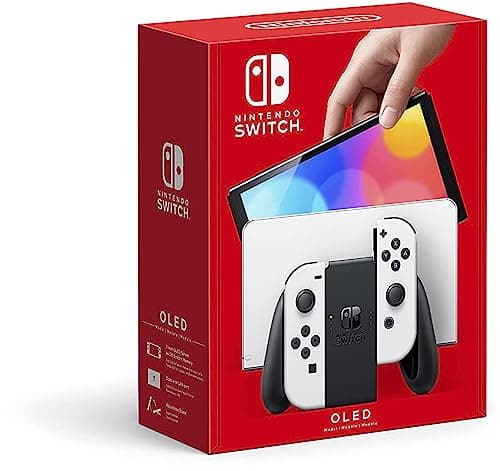
Product image from the Amazon listing.
Our verdict
The Nintendo Switch OLED is the definitive way to play Switch games. Buy it as your first Switch. Upgrade to it if you play handheld or tabletop. Skip it if you're a docked-only original Switch owner. It's not a Switch 2, but it doesn't need to be — the library is enormous, and the OLED screen makes every game you already love look like the first time you played it.
The short version
The OLED model is the Switch upgrade that actually matters for the way most people play. The 7-inch OLED screen makes handheld and tabletop mode look dramatically better than the original Switch's washed-out LCD, the wide adjustable kickstand finally works on a real table, the speakers are noticeably clearer, and it ships with a wired LAN port in the dock. It plays the exact same library at the exact same performance — this isn't a Switch 2, it's the definitive way to enjoy the Switch you already know.
Pros & cons
Pros
- Gorgeous 7-inch OLED screen with deep blacks and vibrant colors
- Sturdy wide-angle kickstand — actually usable in tabletop mode
- Enhanced onboard speakers sound clearly better
- 64GB internal storage (double the original)
- Wired LAN port built into the new dock
- Full compatibility with every Switch game and accessory
Cons
- Same CPU/GPU — no performance boost, same 720p handheld / 1080p docked resolution
- Joy-Con drift is still possible on the included controllers
- OLED burn-in theoretically possible if you leave a static image on screen for hours
Why people love it
Play anywhere
Slide the Joy-Cons on for handheld, stand it on the wide kickstand for tabletop, or dock it to your TV for the same game to keep playing on the big screen.
Sharper OLED screen
The 7-inch OLED panel replaces the original's 6.2-inch LCD, giving deeper blacks, punchier colors and better outdoor visibility for handheld and tabletop play.
Same game library
Every physical Switch cartridge and every eShop download works, so upgrading from an original Switch is a plug-and-play jump — pop in the cart and go.
Who it's for
- First-time Switch buyers picking the definitive model
- Handheld-primary players who mostly play on the screen
- Anyone with an original Switch tired of the washed-out LCD
- Families sharing one console between handheld and docked play
Is the Nintendo Switch OLED worth it in 2026?
The honest answer is yes — with one caveat. If you already own an original Switch and mostly play docked to a TV, the OLED upgrade is minor: same games, same performance, same TV output. You're paying $350 for a better screen you barely use, a better kickstand and a wired LAN port. Skip it. But if you play handheld or tabletop more than half the time, the upgrade is dramatic and immediate — the OLED panel is one of those changes you feel every session, and the wider adjustable kickstand fixes the single most-complained-about hardware issue on the original Switch.
For a first-time Switch buyer, there's no debate: the OLED is the right model. It's only about $50-60 more than the original at retail, the display is meaningfully better, and it has more storage plus the improved dock — all upgrades you'll appreciate for years. The library is now enormous — Zelda: Tears of the Kingdom, Mario Kart 8 Deluxe, Metroid Dread, Animal Crossing, Pokémon Scarlet/Violet, indie masterpieces — and the OLED is how those games are meant to look on a portable screen.
Nintendo Switch OLED vs Steam Deck vs ROG Ally: which handheld should you buy?
The Switch OLED and PC handhelds like Steam Deck and ROG Ally are more different than they look. The Switch is Nintendo-exclusive — you buy it for Zelda, Mario, Pokémon, Smash, Animal Crossing and the world's best first-party games. It's plug-and-play, quiet, gets 4-9 hours of battery on most games, and requires zero setup. It cannot play PC games at all. The library is the pitch and it's a monster of a pitch.
Steam Deck and ROG Ally are portable PCs — they play your Steam library, they're vastly more powerful, they can be tweaked infinitely, but they're heavier, hotter, louder, worse in battery life (typically 2-5 hours), and none of Nintendo's exclusives run on them. If you're a Steam gamer who wants to play PC games portable, buy a Steam Deck OLED. If you're anyone else who wants a portable console — especially for kids, families, or people who don't want to fuss with settings — buy the Switch OLED. Many households own both.
How to set up the Nintendo Switch OLED like a pro
First-day setup that matters: enable auto-sleep to a short interval (3-5 minutes) to protect the OLED panel, create a Nintendo Account (not just a user profile), turn on Cloud Saves via a Nintendo Switch Online membership so your saves are safe if the console is ever lost or damaged, and enable two-factor authentication on your Nintendo Account (Switch accounts have been targeted by attackers — 2FA blocks the most common attacks). Add a microSD card if you plan to download more than a couple of digital games; the internal 64GB fills up fast with modern titles.
Peripheral choices that transform the experience: a Pro Controller ($60-70) is much better for long docked sessions than the Joy-Cons and is worth the money if you'll ever play Zelda or Smash for hours. A good tempered-glass screen protector prevents scratches when docking — the dock's felt strips wear out. A carrying case for handheld travel keeps the OLED panel safe in a backpack. And if you play online, plug the Ethernet cable directly into the new dock's built-in LAN port — Switch Wi-Fi is notoriously flaky for online multiplayer, and wired closes the gap immediately.
See Nintendo Switch OLED on Amazon
Check the latest price, photos and buyer reviews on Amazon.
Check Price on Amazon →Sold and shipped by AmazonFrequently asked questions
Nintendo Switch OLED vs original Switch vs Switch Lite: which one should I buy?
The OLED is the pick for almost everyone who plays on the screen. It has the best display, the best kickstand, better speakers and more storage — the original Switch is only worth buying used for a discount. The Switch Lite is the value pick for kids or as a dedicated handheld, but it can't dock to a TV or use the Joy-Cons detached, so it's not upgradeable. If you'll ever want to play on a TV, choose the OLED.
Is the OLED model more powerful than the original Switch?
No. It uses the exact same processor, GPU, RAM and resolution as the original — 720p handheld, 1080p docked. Games do not run at higher framerates or sharper resolutions. What's upgraded is the display panel, the kickstand, the audio, the storage (64GB vs 32GB) and the dock (adds a wired LAN port). It's a refresh, not a next-gen console.
Should I worry about OLED burn-in on the Switch?
In normal use it's a non-issue. OLED burn-in requires the same static image displayed at high brightness for extended hours — HUD elements in games do move, and the auto-sleep timer is short. To be extra safe, keep auto-sleep at a few minutes, lower brightness in dark rooms, and don't leave the game paused on a bright static screen overnight. Nintendo publishes anti-burn-in guidance, and no widespread burn-in complaints have surfaced from millions of units in the field.
Does the OLED come with any games?
No — it ships as a console-only bundle. Amazon does sometimes list bundles that include Mario Kart 8 Deluxe, Zelda: Tears of the Kingdom or an eShop credit; those go in and out of stock, so if a bundle is available in the color you want, grab it. Otherwise the eShop lets you download digital games instantly the moment you finish setup.
Will Joy-Con drift affect the OLED like it did the original Switch?
The Joy-Cons included with the OLED use the same analog stick design as the originals, so drift is still theoretically possible after months to years of heavy use. Nintendo repairs drifting Joy-Cons for free even outside warranty in most regions — keep the emails and receipts. For zero-drift play, use a Pro Controller when docked, and consider Hall-effect third-party Joy-Con replacements once yours wear out.
Can I transfer my save data and eShop games from an original Switch?
Yes. Nintendo has a built-in System Transfer wizard: put both consoles side by side, sign into the same Nintendo Account and follow the prompts. Physical carts move over by simply popping them into the new console. Digital games and saves transfer with the account. Cloud saves (for games that support them) sync automatically for Nintendo Switch Online subscribers, so a lost or broken Switch doesn't lose your progress.
As an Amazon Associate, TopCrate earns from qualifying purchases at no extra cost to you. Product image, price, availability and ratings are shown on Amazon and are subject to change.