TRENDING ON AMAZON
Apple MagSafe Wireless Charger Review: Is It Worth It?
The snap-on magnetic wireless charger that pairs perfectly with iPhone 12 through 16 — 15W fast wireless, aligned every time.
Quick answer: MagSafe is one of the highest-utility $40 Apple accessories — for iPhone 12 and newer users, it turns wireless charging from 'sometimes works' to 'always works,' plus it unlocks a whole ecosystem of magnetic accessories. If you use an iPhone and are still fighting with unreliable Qi pads, this is the fix.
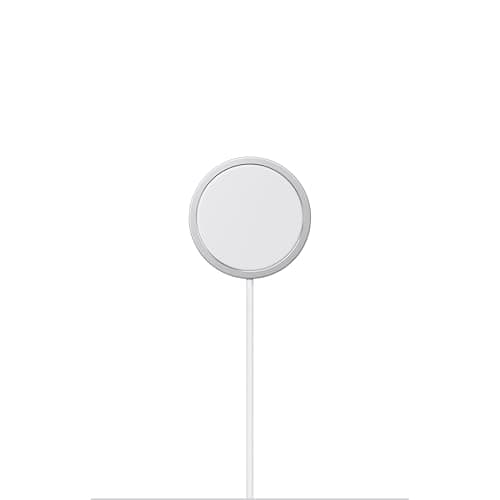
Product image from the Amazon listing.
Our verdict
MagSafe is one of the highest-utility $40 Apple accessories — for iPhone 12 and newer users, it turns wireless charging from 'sometimes works' to 'always works,' plus it unlocks a whole ecosystem of magnetic accessories. If you use an iPhone and are still fighting with unreliable Qi pads, this is the fix.
The short version
MagSafe is Apple's magnetic wireless charging system — a small metal-and-fabric puck that snaps to the back of any iPhone 12 or newer and delivers up to 15W of wireless charging (25W with the newer 2m cable on iPhone 16 Pro). Unlike generic Qi wireless pads that require perfect alignment or slowly wander off, the magnets guarantee your phone charges every time. Combined with a compatible USB-C power adapter, it's the everyday wireless charger that finally works reliably. For iPhone users, this is one of the highest-utility $40 accessories in the Apple ecosystem.
Pros & cons
Pros
- Magnetic alignment — always charges correctly
- Up to 15W (25W on iPhone 16 Pro with 2m cable)
- Genuine Apple product, not knockoff
- Works with cases (if MagSafe-compatible)
- Compact and portable
- Cable long enough for nightstand or desk use
Cons
- Requires 20W+ USB-C power adapter (sold separately)
- Slower than wired Lightning/USB-C
- Warms iPhone slightly during charge
Why people love it
Magnetic array snaps to iPhone
A ring of magnets in the puck aligns with a matching magnet ring on the back of every iPhone 12 or newer, snapping into perfect alignment automatically.
15W fast wireless charging
With a 20W USB-C power adapter (or 30W for 25W on iPhone 16 Pro), MagSafe delivers up to 15W of wireless power — significantly faster than legacy Qi pads.
USB-C to MagSafe cable
The current version uses a USB-C connector on the power side (older Lightning versions still exist on Amazon; the USB-C version is the current standard as of 2026).
Who it's for
- iPhone 12-16 users tired of unreliable Qi pads
- Nightstand and desk charging
- Anyone using MagSafe-compatible car mounts or accessories
- Apple ecosystem users who want simple reliability
Is MagSafe worth $40 over a $15 Amazon wireless pad?
For iPhone users, yes — clearly. The core value of MagSafe isn't the wireless charging itself; it's the reliability guarantee that comes from magnetic alignment. A generic $15 Qi pad works when you set the phone down perfectly aligned with the coil, and doesn't work when you don't. In practice, this means dozens of nights where you wake up to a 20% battery because the phone wasn't quite centered. MagSafe eliminates this entirely — the magnets snap the phone to the correct position every single time. Over a year, this is the difference between 'reliable charger' and 'sometimes reliable' — a big quality-of-life gap.
Additionally, MagSafe delivers 15W (25W on iPhone 16 Pro) versus 7.5W for standard Qi on iPhone. Real-world impact: MagSafe charges an iPhone 15 Pro from 20% to 100% in about 2 hours; a Qi pad takes 3.5-4 hours. If you use wireless as your primary charging method, that speed difference matters. And MagSafe unlocks the full MagSafe accessory ecosystem — car mounts, wallets, PopSockets, tripods — that all snap on and off magnetically. For an ecosystem investment, $40 for the charger is small; it's the entry to a much larger useful system.
The MagSafe accessory ecosystem: what else is worth buying?
Beyond the charger, MagSafe opened a whole category of magnetic snap-on accessories that are genuinely useful. MagSafe car mounts (Belkin, ESR, Peak Design) let you slap your phone onto the dashboard for navigation — no complicated clamps, just snap it on, snap it off. Way better than the old vent-mount + case combos. MagSafe wallets (Apple's own, Nomad, Peak Design, Bandolier) attach a card holder to the back of the iPhone — turning your phone into a wallet-plus-phone. Great for minimalist carry.
MagSafe tripods and grips (Moment, Peak Design) let you mount your iPhone to a tripod or handheld grip without cases or clamps — the magnetic snap is genuinely strong enough for photography (though not for aggressive action). MagSafe battery packs (Apple's own, Anker MagGo, ESR) snap to the back of the phone for on-the-go charging — no cables. And MagSafe stands (Belkin BoostCharge, Anker MagGo) let you charge upright with the phone in landscape or portrait, useful for FaceTime, StandBy mode, or watching videos. The whole ecosystem is compelling once you're in — the charger is the gateway.
MagSafe vs wired USB-C charging: which should you actually use for iPhone?
Wired USB-C is faster (up to 30W on iPhone 16 Pro vs 25W wireless) and more energy-efficient (less heat, slightly less battery wear over years). MagSafe is more convenient (one-handed snap-on, no cable to plug in) and better for casual use where speed doesn't matter. The right strategy for most iPhone users: use MagSafe as your primary daily charger (nightstand, desk) where you have time, and reserve wired USB-C for fast top-offs when you need to leave in 20 minutes.
This dual-charger setup is what most Apple ecosystem users end up with: a MagSafe on the nightstand for overnight and morning charging, a USB-C cable at the desk for daytime top-offs and fast emergency charges, and a MagSafe car mount for hands-free navigation. Total cost $60-80 for both plus adapter, and it covers 95% of charging scenarios reliably. If you have to pick one, pick MagSafe — the reliability gain is bigger than the speed loss.
See Apple MagSafe Charger on Amazon
Check the latest price, photos and buyer reviews on Amazon.
Check Price on Amazon →Sold and shipped by AmazonFrequently asked questions
MagSafe vs standard Qi wireless charging: what's the actual difference?
Two big differences. First, alignment: MagSafe uses magnets to guarantee perfect coil-to-coil alignment every time; Qi pads require you to place the phone in exactly the right spot (which is why so many people wake up to a phone that didn't charge overnight). Second, speed: MagSafe delivers up to 15W of wireless power to iPhone 12-15 and up to 25W to iPhone 16 Pro (with the 2m cable and 30W+ adapter). Standard Qi charging on iPhone tops out at 7.5W. MagSafe is roughly twice as fast, and it works reliably every single time. Once you use it, going back to a Qi pad feels broken.
What iPhone models does MagSafe work with?
Full 15W (or 25W) MagSafe works on iPhone 12, 12 mini, 12 Pro, 12 Pro Max, 13 series, 14 series, 15 series, and 16 series — every iPhone from 2020 onward has the magnet ring. Older iPhones (iPhone 11 and earlier) don't have the magnet ring, so MagSafe won't snap into place — you can technically still use the charger as a slow Qi pad on iPhone 8-11, but it'll only deliver 5W and won't stay aligned. If you have an older iPhone, use a standard Qi pad instead.
Do I need Apple's power adapter, or can I use my existing USB-C wall charger?
Any decent USB-C Power Delivery (PD) adapter of 20W or more will work — you don't need Apple's specific adapter. Anker, Aukey, Belkin, Ugreen, and Baseus all make excellent USB-C PD adapters at reasonable prices. For 25W charging on iPhone 16 Pro, you need a 30W+ adapter. Common recommendation: pair the MagSafe cable with an Anker 30W or 45W USB-C PD adapter — around $20-25 for the adapter, and it'll charge MagSafe, iPad, MacBook Air, and other devices. Don't pair MagSafe with an old 5W legacy Apple charger — you'll get very slow speeds.
Genuine Apple MagSafe vs the many Amazon MagSafe-compatible chargers: are they the same?
Not quite. Genuine Apple MagSafe delivers full 15W wireless to iPhone. Amazon 'MagSafe-compatible' chargers that don't have Apple's MFi certification technically use the same magnetic-alignment idea, but they're limited to 7.5W on iPhone regardless of the wattage they claim — Apple only allows full 15W to certified accessories. Some Amazon knockoffs claim 15W but only deliver 7.5W to iPhone. For 15W actual charging, buy either genuine Apple MagSafe or MFi-certified alternatives from Belkin, Anker (their MagGo line), or ESR. The premium is worth it for real 15W speed.
Does MagSafe damage the iPhone battery?
No, based on all available evidence. Modern iPhones are engineered for wireless charging cycles, and MagSafe's 15W is well below the battery's stress threshold. The one real concern with any wireless charging is heat — wireless is less efficient than wired, so some energy becomes heat, and heat over years does slightly degrade batteries. Apple mitigates this with intelligent charging management. For nightstand charging (slow overnight top-off), MagSafe is genuinely fine long-term. For fastest charging when you're in a hurry, use wired USB-C — it's faster and generates less battery heat.
Can I use MagSafe with my iPhone case?
Yes, but only with MagSafe-compatible cases (which have their own magnet ring). Most Apple cases, and any third-party case marked 'MagSafe compatible' (Otterbox, Spigen, Peak Design, Nomad, and others) preserve the magnetic snap. Standard cases without MagSafe magnets will let MagSafe charge through them at reduced speed (maybe 7-10W instead of 15W) if the case is thin enough, but the magnetic snap is gone. Thick cases (rugged/tactical cases without MagSafe support) can block charging entirely. If you use MagSafe daily, buy a MagSafe-compatible case.
MagSafe is great at home — what do I use when there's no outlet?
That's the specific gap a portable power bank fills. MagSafe is a wired-wireless charger (still needs a wall outlet for the USB-C adapter) so it doesn't help on a long flight, a full airport day or a festival where outlets are scarce. Two ways to solve it: (1) a MagSafe-compatible battery pack that snaps directly to the back of the phone (Apple's own, Anker MagGo, ESR — best for hands-free top-ups while walking around); (2) a proper high-capacity portable charger like the Anker portable power bank plugged into your phone with a USB-C cable — dramatically more capacity per dollar than any snap-on battery, and it can also charge your AirPods, iPad, Kindle or a friend's phone. Most travelers carry both — the MagSafe puck for the nightstand at home, and an Anker power bank for the road.
As an Amazon Associate, TopCrate earns from qualifying purchases at no extra cost to you. Requires a compatible USB-C power adapter (sold separately). Product image, price, availability and ratings are shown on Amazon and are subject to change.