TRENDING ON AMAZON
Amazon Kindle Colorsoft Signature Edition Review: Is It Worth It?
Amazon's first Kindle with a real color e-ink display — glare-free paper-like reading with book covers, highlights and photos in color.
Quick answer: Yes — the Kindle Colorsoft is worth it if you read anything illustrated (cookbooks, comics, kids' books, magazines, travel guides). The color e-ink is muted and paper-like the way it should be, book covers finally look right, and highlights work like a real highlighter. A meaningful upgrade for any Kindle reader who's ever wished for color.
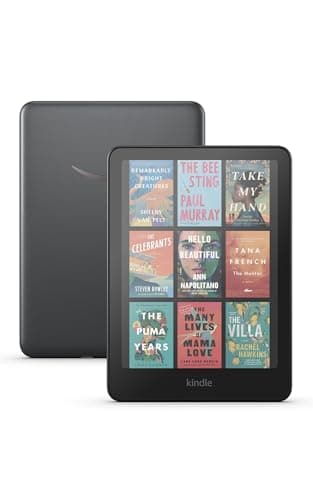
Product image from the Amazon listing.
Our verdict
Yes — the Kindle Colorsoft is worth it if you read anything illustrated (cookbooks, comics, kids' books, magazines, travel guides). The color e-ink is muted and paper-like the way it should be, book covers finally look right, and highlights work like a real highlighter. A meaningful upgrade for any Kindle reader who's ever wished for color.
The short version
The Colorsoft is Amazon's first Kindle with a genuine color e-ink screen — not a backlit LCD, but the same paper-like matte screen a Kindle has always had, now with the ability to show muted, natural color. Book covers actually look right, highlights are yellow and pink like on paper, PDF diagrams show color, and children's books come alive. It's frontlit for night reading, IPX8 waterproof for the bath and beach, gets weeks of battery on a charge, and reads perfectly in direct sunlight the way LCDs never can. It costs more than a regular Paperwhite, but for readers who buy illustrated books, magazines, comics, cookbooks or kids' books, it's the biggest Kindle upgrade in a decade.
Pros & cons
Pros
- Genuine color e-ink — muted, natural, paper-like
- Frontlit and readable in bright sun with zero glare
- IPX8 waterproof for bath, pool and beach
- 8-week battery life on typical daily use
- Perfect for illustrated books, comics, kids' books and cookbooks
- Wireless charging built in (Signature Edition)
Cons
- Colors are muted vs a phone/tablet — designed for reading, not video
- Costs significantly more than a standard Paperwhite
- Overkill if you only read text novels
Why people love it
Load your library
Books download over Wi-Fi in seconds; your Kindle library, notes and reading position sync across all devices.
Read anywhere in any light
The frontlit color e-ink is readable in bright sun (no glare), pitch dark (adjustable warm light) and everything in between.
Charge every few weeks
An 8-week typical battery life means you rarely think about it. Wireless-charging capable on the Signature Edition.
Who it's for
- Readers of illustrated books, comics or manga
- Parents reading kids' picture books
- Cookbook and travel-book readers
- Anyone with a regular Kindle wanting a real upgrade
Is the Kindle Colorsoft worth it, or should you get a Paperwhite?
The Kindle Colorsoft is the biggest hardware change to Kindle in over a decade — the first Kindle with a genuine color e-ink screen. Whether it's worth the roughly $90 premium over a Paperwhite depends on one honest question: what do you actually read? If you read plain-text fiction — novels, memoirs, biographies — the Paperwhite is a better value and does the exact same job with the exact same reading experience. The Colorsoft doesn't make text read any better; it just adds color for content that has it.
Where it earns the premium is anything illustrated. Cookbooks look right for the first time on a Kindle. Comics and manga become viable (previously you'd need a tablet with all its downsides — glare, battery, weight). Children's picture books, travel guides with photos, magazines, business books with charts and diagrams, coffee-table-style photo books — all become meaningful reading on the device instead of things you'd read on paper or a tablet. Buy Colorsoft if any of that describes what you read. Buy Paperwhite if you're a pure text reader and want to save the money.
Kindle Colorsoft vs Kobo Clara Colour vs iPad Mini — how the color e-readers compare
The color e-reader market is small but there are choices. The Kobo Clara Colour is the primary alternative — cheaper by around $90, similar color e-ink technology, similar 7in screen, waterproof, integrates with library apps directly (no separate Libby app needed). The trade-offs: Kobo's ecosystem is smaller than Kindle's, and there's no Audible integration. If you're already deep in Kindle's ecosystem with a big library, the Colorsoft's $90 premium buys you seamless continuity. If you're starting from scratch and want library integration, Kobo is genuinely competitive.
An iPad Mini is a different tool — vibrant color, fast, everything a tablet does. But it has all of a tablet's downsides for reading: heavier, glare in sunlight, worse battery, distraction potential from notifications, harder on the eyes for long sessions. Kindle Colorsoft's color e-ink was designed specifically to give iPad's biggest reading advantage (color) without the reading disadvantages (backlit LCD, weight, distraction). For focused reading of illustrated content, Colorsoft is the more purpose-built tool. For everything else a tablet does, iPad wins. Different jobs.
How to get the most out of Colorsoft — setup, features and hacks
Setup is standard Kindle: sign in to your Amazon account, connect Wi-Fi, and your existing library appears. If you're upgrading from a Paperwhite, everything syncs automatically (reading position, notes, collections). Enable auto-adjust brightness in Settings so the frontlight responds to ambient light — pointless on a text-only Kindle, but on Colorsoft it makes color content look consistently good day and night. Turn on warm-white in Settings for evening reading; the color palette still works with warm tint on.
Beyond built-in features, Colorsoft plays well with library borrowing (Libby integration is free and works with most US libraries — you can borrow color-illustrated books this way), Kindle Unlimited (worthwhile if you consume 3+ books a month), and Send-to-Kindle for your own PDFs and documents. Colored highlights are the workflow upgrade to try first: highlight quotes in yellow, questions in orange, character developments in blue, key facts in pink — the visual coding makes review notes much more scannable later. And use a case with a magnetic sleep cover to protect the color screen; the surface is more sensitive than a text-only Kindle.
See Kindle Colorsoft on Amazon
Check the latest price, photos and buyer reviews on Amazon.
Check Price on Amazon →Sold and shipped by AmazonFrequently asked questions
Is the Kindle Colorsoft worth $90 more than a regular Paperwhite?
Depends entirely on what you read. If you mostly read plain-text novels, no — the standard Kindle Paperwhite is the better value at $90 less. If you read anything illustrated — cookbooks, travel guides, comics, manga, children's books, magazines, photography books — the Colorsoft is a real upgrade. Book covers finally look right in your library, highlights are actual yellow/orange/pink like on paper, and any book with diagrams, maps or photos comes alive. The rule of thumb: buy Colorsoft if you buy any color content.
How does the Kindle Colorsoft color screen actually look?
Muted and paper-like, not vibrant like a phone. E-ink color technology works by adding a color filter over the standard e-ink display, so colors look like a printed magazine or comic — natural and easy on the eyes, not saturated like an LCD. This is intentional and the right choice: reading is what a Kindle does, and the color is designed to enhance long reading sessions without becoming distracting. If you're expecting iPad-level vivid color, you'll be disappointed. If you're expecting 'a Kindle that finally shows colors like paper,' you'll be delighted.
Is the Kindle Colorsoft still glare-free and readable outside?
Yes — the whole point of e-ink is that it reflects light like paper rather than emitting light like a screen. The Colorsoft keeps that property. In bright direct sunlight (where an iPad or phone becomes unreadable), the Colorsoft actually gets clearer and more paper-like — the ideal beach, park or poolside reader. The frontlight for night reading is adjustable, and warm-white for eye comfort in dim rooms. IPX8 waterproofing means bath and pool reading are fine.
What's the difference between Kindle Colorsoft and Kindle Scribe Colorsoft?
The Colorsoft is a 7in reading-focused e-reader — pocketable, book-shaped, waterproof, best-in-class battery. The Kindle Scribe Colorsoft is a 10.2in notebook-and-reader hybrid with a stylus for handwriting notes and drawing directly on the screen. Same color e-ink technology, but Scribe is bigger, heavier and more expensive. Buy Colorsoft if you're a reader; buy Scribe Colorsoft if you also want to take handwritten notes, mark up PDFs or use it as a paper-notebook replacement.
Does the Kindle Colorsoft support all standard Kindle features?
Yes — everything a Paperwhite does works here. Send-to-Kindle for your own PDFs and documents, library borrowing via Libby/OverDrive, Audible audiobook support via Bluetooth (no built-in speaker but pair headphones or a Bluetooth speaker), Whispersync to keep your position synced across devices, Kindle Unlimited subscription support, and the full Kindle Store. The Signature Edition adds auto-adjusting frontlight, wireless charging and more storage.
Are colored highlights and notes available on the Colorsoft?
Yes — this is one of the standout features. When highlighting text, you pick from four colors (yellow, orange, blue, pink), which display in that color on the page just like a physical highlighter. The colored highlights sync across your Kindle app on phone and tablet. For students, researchers or anyone who annotates books, being able to color-code by theme (character, quote, question, etc.) is a meaningful workflow upgrade over the single yellow highlight of previous Kindles.
As an Amazon Associate, TopCrate earns from qualifying purchases at no extra cost to you. Product image, price, availability and ratings are shown on Amazon and are subject to change.