Quick take
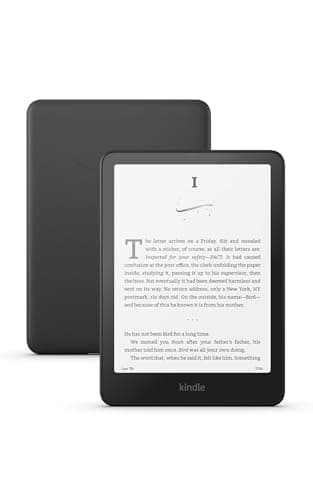
- Verdict: Yes — the Amazon Kindle Paperwhite is worth it, and it's the e-reader we'd recommend to almost anyone. If you want to read more, the Paperwhite removes the friction: no glare, no eye strain, no dead battery, and your whole library in one hand.
- Best for: Avid readers and book clubs
- Price: See today's price on Amazon
Our verdict
Yes — the Amazon Kindle Paperwhite is worth it, and it's the e-reader we'd recommend to almost anyone. If you want to read more, the Paperwhite removes the friction: no glare, no eye strain, no dead battery, and your whole library in one hand.
The short version
The Paperwhite is the sweet spot of the Kindle line. The e-ink screen reads like paper with zero glare in sunlight, the adjustable warm light is easy on the eyes at night, and one charge lasts weeks. It's waterproof for the bath or beach, and it holds thousands of books in something thinner than a paperback.
Pros
- Glare-free e-ink reads like real paper
- Adjustable warm light for night reading
- Waterproof for bath, pool and beach
- Weeks of battery on a single charge
- Holds thousands of books
- Easier on the eyes than a phone or tablet
Cons
- Black-and-white only — not for magazines
- Buying books ties you to Amazon's store
- No native support for some file formats
Why people love it
Load your library
Books download over Wi-Fi in seconds and sync your place across devices.
Read anywhere
The glare-free screen works in bright sun, and the warm light handles dark rooms.
Forget the charger
A single charge lasts weeks of normal reading, so it's always ready to go.
Who it's for
- Avid readers and book clubs
- Travelers who don't want to pack books
- Anyone reducing phone screen time
- Night readers who don't want eye strain
Is the Kindle Paperwhite worth it, or should you just read on your phone?
If you already read on a phone or tablet, the case for a dedicated Kindle comes down to two things: your eyes and your attention. The Paperwhite's e-ink screen isn't backlit the way a phone is — it reflects light like paper, so there's no glare in direct sun and far less eye strain during long sessions, especially at night with the adjustable warm light. Just as important, it does one thing. There are no notifications, apps or social feeds pulling you out of the book, which is why a lot of people simply read more once they switch.
The other wins are practical. A single charge lasts weeks, it holds thousands of books in something thinner than a paperback, and it's waterproof for the bath, pool or beach. The honest limitations: it's black-and-white, so it's poor for magazines, comics or anything visual, and buying books leans heavily on Amazon's store. But for someone who mainly reads novels and wants to read more, the Paperwhite removes the friction a phone adds.
Kindle Paperwhite vs. basic Kindle vs. Kindle Oasis/Signature: which to buy?
The Paperwhite is the sweet spot of the lineup, and understanding why helps you decide. The entry-level basic Kindle is cheaper but smaller, with a lower-resolution screen and, on some versions, no warm light or waterproofing — fine for casual readers, but you feel the compromises. The Paperwhite adds a larger, sharper, flush glass screen, an adjustable warm light for comfortable night reading, waterproofing, and weeks of battery, which covers what most readers actually want.
Above it, the Signature Edition Paperwhite adds wireless charging, auto-adjusting brightness and extra storage, while premium tiers may add page-turn buttons or a larger screen. For the vast majority of readers, the standard Paperwhite hits the right balance of features and price. Step up only if wireless charging or auto-brightness genuinely matters to you, and step down to the basic Kindle only if budget is the deciding factor and you read mostly in good light.
How to get library books and your own files onto a Kindle Paperwhite
You're not locked into buying every book from Amazon, even though that's the easiest path. In many regions you can borrow ebooks free from your public library through services like Libby or OverDrive and send them straight to your Kindle, which is one of the best-value things a Paperwhite can do. You can also subscribe to Amazon's all-you-can-read program for a flat monthly fee if you go through a lot of titles.
For your own documents, Amazon's Send to Kindle tool lets you email or upload files like PDFs and common ebook formats to your device over Wi-Fi, so personal documents and many DRM-free ebooks work fine. The main catch is format: Kindles don't natively read every file type, so the occasional book in an unsupported format needs converting first with free software. Once your library is loaded, everything syncs your reading position across the Kindle app on your phone, so you can pick up where you left off anywhere.
Our verdict · 9.8/10
See Kindle Paperwhite on Amazon
Check the latest price, photos and buyer reviews on Amazon.
Frequently asked questions
Is it really easier on the eyes?
Yes — e-ink isn't backlit like a phone, so most people find it far more comfortable for long reading sessions.
Can I use it outside?
It's designed for it — the matte e-ink screen has no glare in direct sunlight, and it's waterproof.
How long does the battery last?
Weeks per charge with typical daily reading, thanks to the low-power e-ink display. For long flights or trips where you don't want to hunt for an outlet at all, most travelers pair the Paperwhite with a slim Anker portable power bank — one 10,000mAh bank tops off a Kindle several times over and covers your phone at the same time.
Do I have to buy books from Amazon?
The Kindle store is the easiest source, but you can also send your own documents and borrow library books in many regions.
Does the Kindle Paperwhite have ads, and can I remove them?
Amazon often sells a lower-priced version with lock-screen ads (called Special Offers) and an ad-free version for a bit more. The ads only appear on the lock screen and home, never inside a book, and you can usually pay a one-time fee to remove them later if you started with the ad-supported model.
Can you listen to audiobooks on a Kindle Paperwhite?
The Paperwhite has no speaker, but it supports Bluetooth, so you can pair wireless headphones or a speaker to listen to Audible audiobooks. Some titles even let you switch between reading and listening while keeping your place, though you'll need a compatible Audible book and a Bluetooth audio device.
Is there a 'Kindle Whitepaper' or is the correct name Paperwhite?
You'll see both spellings online, but the official product is the Kindle Paperwhite — 'whitepaper' is a common typo for the same device. The name refers to the display technology: a bright, paper-white e-ink screen with adjustable warm and cool lighting that mimics the look of a printed page. If you're searching Amazon for a 'Kindle whitepaper,' the Kindle Paperwhite is what you want. Amazon also sells a step-up Kindle Paperwhite Signature Edition (adds wireless charging, auto-brightness and more storage) and a smaller basic Kindle at a lower price — the standard Paperwhite is the sweet spot for most readers.
As an Amazon Associate, TopCrate earns from qualifying purchases at no extra cost to you. Product image, price, availability and ratings are shown on Amazon and are subject to change.