Quick take
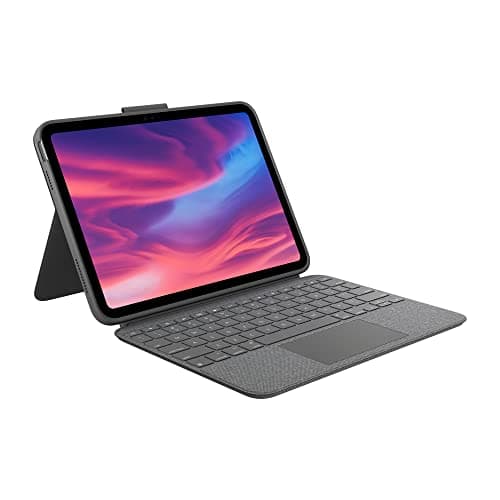
- Verdict: Yes — the Logitech Combo Touch is the iPad keyboard case to buy in 2026 if you want a laptop-like setup without paying Apple Magic Keyboard prices. Detachable backlit keyboard with multi-touch trackpad, Smart Connector pairing (no Bluetooth, no keyboard battery), four-way adjustable kickstand, rugged protective case, and $199-229 pricing vs the Magic Keyboard's $299-349.
- Best for: iPad Air or iPad Pro owners doing real writing
- Price: See today's price on Amazon
Our verdict
Yes — the Logitech Combo Touch is the iPad keyboard case to buy in 2026 if you want a laptop-like setup without paying Apple Magic Keyboard prices. Detachable backlit keyboard with multi-touch trackpad, Smart Connector pairing (no Bluetooth, no keyboard battery), four-way adjustable kickstand, rugged protective case, and $199-229 pricing vs the Magic Keyboard's $299-349. Wirecutter, PCMag and CNET all name it their top iPad keyboard pick for good reason. Skip if you specifically want the Magic Keyboard's floating-cantilever aesthetic or need the passthrough charging port. For everyone else — students, writers, note-takers, frequent travelers, iPad-as-primary-device users — this is the current-generation right pick. Make sure to buy the model that matches your specific iPad generation.
The short version
The Logitech Combo Touch is the iPad keyboard case Apple should have made. Instead of Apple's fixed-angle Magic Keyboard at $299-349, Logitech's Combo Touch delivers a genuinely better ergonomic experience — a four-way adjustable kickstand that goes from writing angle to full easel, a detachable backlit keyboard with multi-touch trackpad that clicks off when you want just the case, a full row of iPadOS shortcut keys, and Smart Connector pairing that means no Bluetooth pairing, no batteries to charge on the keyboard, and instant connectivity every time you attach it. The whole case wraps around the iPad in a rugged protective shell that survives real-world use (drops, coffee, backpack tosses). At $199-229 depending on iPad model, it's roughly 60-70% of the Apple Magic Keyboard's price with more flexibility. Wirecutter, PCMag and CNET have all named it their top iPad keyboard pick, and it's the specific accessory that makes an iPad Air or iPad Pro genuinely competitive with a laptop for writing, note-taking, and productivity work.
Pros
- Detachable keyboard — use case-only when you want just the iPad
- Smart Connector pairing (no Bluetooth, no charging needed on the keyboard)
- Backlit keys with 3 brightness levels
- Multi-touch trackpad supports full iPadOS gestures
- Four-way adjustable kickstand (writing angle to full easel)
- Full row of iPadOS function keys (brightness, media, spotlight)
- Rugged protective case wraps the whole iPad
Cons
- Adds significant bulk vs a naked iPad
- Trackpad click is louder than the Magic Keyboard's
- Requires the specific iPad model version — not universal
Why people love it
Snap the case onto the iPad
The rugged shell wraps around the iPad, with a magnetic attachment point on the back for the Apple Pencil (holds and charges when the case is oriented correctly).
Attach the keyboard via Smart Connector
The keyboard portion connects to the iPad via magnetic Smart Connector — instant pairing, no Bluetooth setup, no keyboard battery to charge (draws power from the iPad). Detach it magnetically any time you want to use the iPad as a pure tablet.
Adjust the kickstand for any use
The four-way kickstand adjusts from a writing angle (slight tilt) to a full easel (perfect for drawing or video watching). More flexibility than Apple Magic Keyboard's fixed dual-angle design.
Who it's for
- iPad Air or iPad Pro owners doing real writing
- Students who want a lightweight laptop alternative
- Anyone using their iPad as a primary work device
- Travelers wanting one device instead of laptop + tablet
Why the Combo Touch beats the Apple Magic Keyboard for most iPad users
Apple's Magic Keyboard for iPad is one of Apple's most-marketed accessories, and it's a great product — but for most users, the Combo Touch is a better fit. The three specific advantages: (1) Detachability. The Magic Keyboard is always attached to the iPad — you can't remove it without unhinging the iPad from the whole case. The Combo Touch's keyboard clicks off magnetically, so when you want to use the iPad as a pure tablet (Netflix, drawing with Apple Pencil, quick reading), you have that option instantly. This is a huge daily-use advantage. (2) Adjustable kickstand. The Magic Keyboard has two fixed angles — the tablet angle Apple picked and a slightly more upright version. The Combo Touch's four-way kickstand goes from a writing tilt to a full easel, which means you can use the iPad at whatever angle suits your specific situation. (3) Protective case. The Magic Keyboard leaves the back of the iPad exposed — a scratched iPad back is one of the most common damage patterns for Magic Keyboard users. The Combo Touch wraps the iPad in a rugged protective case that survives drops, coffee spills and backpack tosses without damage.
The trade-off is aesthetic. The Magic Keyboard's floating-cantilever design looks more premium — the iPad hovers above the keyboard on a magnetic arm rather than clicking into a case. It's genuinely beautiful in a way the Combo Touch isn't. If aesthetic matters more than functional flexibility, or if you're deep in the Apple ecosystem and want first-party accessories, the Magic Keyboard is fine. For most users making a rational functional-value decision, the Combo Touch's advantages outweigh the Magic Keyboard's design premium, especially at $100-150 less. Wirecutter, PCMag and CNET have all reached the same conclusion in their reviews. Combined with the specific iPad model's own hardware, the Combo Touch turns the iPad Air or iPad Pro into a genuinely competitive laptop alternative for writing, note-taking, and productivity work.
What using an iPad Pro or iPad Air with the Combo Touch actually feels like day-to-day
The daily-use experience with an iPad + Combo Touch is genuinely close to a laptop for most productivity work, and better than a laptop for some specific tasks. Where it wins: Apple Pencil integration (drawing, handwritten notes, marking up PDFs — trivial on iPad, awkward on a laptop), touch-first apps that don't exist on macOS (Notability, GoodNotes, Procreate), and iPadOS's excellent Split View / Slide Over / Stage Manager multitasking. Where a real laptop still wins: heavy multitasking with many browser tabs and desktop apps open, deep-focus workflows that need specific desktop software (Xcode, Logic Pro, Final Cut Pro X macOS versions), and any workflow requiring cross-app file management beyond what iPadOS's Files app provides. For students, writers, note-takers, PDF markup users, and anyone doing content consumption plus light-to-moderate writing, an iPad + Combo Touch replaces a laptop entirely.
The specific setups where the Combo Touch shines: (1) University students taking handwritten notes with Apple Pencil during lectures, then switching to keyboard mode for essay writing and research. (2) Field workers (real estate, medical, sales) who need touch interface for forms plus keyboard for typing responses. (3) Frequent travelers who want one lightweight device (iPad + Combo Touch weighs less than most laptops). (4) Casual home users doing email, web browsing, streaming, and occasional writing. The Combo Touch's four-way kickstand adapts to each of these use patterns cleanly — writing angle for typing, more upright angle for video calls or reading, full easel for drawing. Pair with a good pair of wireless earbuds like AirPods 4 for meetings and video calls, a portable charger like the Anker Nano 30W for road trips, and you have a complete mobile productivity setup for under $700 total.
How to pick the right Combo Touch model for your iPad (and what to check before buying)
The Combo Touch is sold in model-specific versions, and buying the wrong one wastes money — Logitech doesn't accept returns for incompatible fits. Before buying, identify your specific iPad: (1) The iPad model name (iPad Air, iPad Pro, iPad, iPad Mini). (2) The generation (10th gen, 11th gen, M2 iPad Air, M4 iPad Pro, etc.). (3) The screen size (11-inch vs 12.9-inch/13-inch for iPad Pro; 11-inch for iPad Air, etc.). Apple's website has a 'find your iPad model' page if you're not sure — check Settings > General > About > Model Name on your iPad. Then match to Logitech's Combo Touch product page for the compatible version.
Common mistakes: (1) Buying the iPad Pro Combo Touch for an iPad Air — the dimensions don't match. (2) Buying an older-generation Combo Touch (designed for 10th gen iPad) for a newer generation iPad — sometimes compatible, often not. (3) Not checking whether your iPad has the Smart Connector (all recent iPads do, but very old iPads and iPad Minis prior to 2021 don't). (4) Assuming universal compatibility — the Combo Touch is one of Apple's most-model-specific accessories. When in doubt, check the Amazon product page for your specific iPad model name in the 'compatible with' section. If you upgrade iPads later, you'll need a new Combo Touch — this is annual replacement cost worth budgeting for anyone who upgrades iPads regularly.
Our verdict · 9.7/10
See Logitech Combo Touch on Amazon
Check the latest price, photos and buyer reviews on Amazon.
Frequently asked questions
Is the Logitech Combo Touch worth it vs the Apple Magic Keyboard?
For most iPad users, yes — the Combo Touch is genuinely more functional at a lower price. Where it wins: detachable design (use just the case when you don't need the keyboard, vs the Magic Keyboard which is always attached), 4-way adjustable kickstand (Magic Keyboard has only 2 fixed angles), rugged full-body protection (Magic Keyboard leaves the iPad's back exposed), and $199-229 pricing (Magic Keyboard is $299-349). Where the Magic Keyboard wins: floating-cantilever design looks more premium, backlit keys are slightly better-tuned for the display, and the Magic Keyboard adds a passthrough USB-C port for charging (Combo Touch doesn't). For 90% of users, the Combo Touch's flexibility and price advantage outweigh the Magic Keyboard's design premium. Only buy the Magic Keyboard if you specifically want the floating-cantilever look, the passthrough charging port matters for your workflow, or you're already deep in Apple's ecosystem and want first-party accessories.
Which iPad models does the Logitech Combo Touch work with?
Model-specific. Logitech sells different versions of the Combo Touch for different iPad models — you need to buy the specific version matching your iPad: iPad 10th/11th generation (the entry-level iPad), iPad Air (4th/5th/6th generation and M2 iPad Air), or iPad Pro 11-inch / 12.9-inch (M1/M2/M3/M4 versions). Check your specific iPad model before buying — the wrong Combo Touch won't fit. Amazon's listings clearly label which iPad each version supports. The keyboard and trackpad features are identical across versions; only the case dimensions differ to fit each iPad size.
Does the Combo Touch trackpad support all iPadOS gestures?
Yes, all of them. iPadOS 13.4+ added full trackpad support for iPad, and the Combo Touch's multi-touch trackpad supports every standard gesture: single-tap to click, two-finger scroll, pinch to zoom, three-finger swipe to switch apps or return to home screen, three-finger swipe up to see all open apps. The tracking is responsive and accurate — feels genuinely laptop-like rather than 'iPad with a trackpad bolted on.' Combined with the full row of iPadOS shortcut keys (brightness, media, spotlight search), the keyboard is a first-class productivity accessory rather than a Bluetooth afterthought.
How does the battery work — does the keyboard need charging?
The keyboard doesn't have its own battery. It draws power from the iPad through the Smart Connector, which means you never charge the keyboard separately. The battery drain on the iPad is minimal (the keyboard uses very little power), and the backlight is what uses most of the power when it's on — turn the backlight off in bright environments to extend iPad battery life. Compared to a Bluetooth keyboard (which requires separate charging every 1-2 weeks and needs to be paired via Bluetooth setup), the Smart Connector design is much more convenient.
Logitech Combo Touch vs Logitech Slim Folio vs Brydge Max+: which iPad keyboard should I buy?
Three tiers of Logitech and third-party iPad keyboards. Combo Touch ($199-229): the premium pick — Smart Connector pairing (no Bluetooth), detachable design, 4-way kickstand, multi-touch trackpad, rugged protective case. Best for daily productivity use. Logitech Slim Folio Pro ($99-129): Bluetooth pairing, no trackpad, slim folio design. Best for lighter use where you don't need a trackpad and want a thinner package. Brydge Max+ ($249-329): laptop-clamshell design (looks and feels like a MacBook when closed), Bluetooth pairing, more expensive. Best for people who specifically want the laptop-clamshell aesthetic. For most iPad users, the Combo Touch is the answer — Smart Connector convenience, trackpad functionality, protective case, all at the mid-tier price point. Only step down to the Slim Folio Pro if trackpad isn't important; only step up to Brydge if the laptop-clamshell design is what you want.
Is the Combo Touch practical for using on my lap, or is it desk-only?
Practical for lap use, unlike some competitor designs. The four-way kickstand is stable enough to sit on your lap without collapsing (unlike the original Apple Smart Keyboard, which was notoriously lap-hostile), and the rigid case body distributes weight across your legs. That said, no iPad-plus-keyboard combination matches a real laptop's lap ergonomics — the aspect ratio and weight distribution differ. For 20-30 minute lap use sessions (coffee shops, plane tray tables, casual sofa work), the Combo Touch is fine. For extended lap-based work (a full 8-hour workday from the couch), a MacBook Air or similar laptop is genuinely more comfortable. This is a matter of iPad-form-factor limitation, not Combo Touch specifically — every iPad keyboard case shares the same challenge.
As an Amazon Associate, TopCrate earns from qualifying purchases at no extra cost to you. Only buy the version compatible with your specific iPad model. Product image, price, availability and ratings are shown on Amazon and are subject to change.