TRENDING ON AMAZON
HidrateSpark PRO Smart Water Bottle (21 oz Insulated) Review: Is It Worth It?
The insulated stainless-steel smart water bottle that actually logs every sip — SipSense weight sensor, Apple Health and Fitbit sync, and Find My so you never lose it again.
Quick answer: Yes — the HidrateSpark PRO is worth $79 if you want a smart water bottle that actually changes your hydration habit rather than being an abandoned gadget in a cabinet. The SipSense weight sensor is the specific breakthrough that fixed the accuracy problem earlier smart bottles couldn't solve, the vacuum-insulated stainless steel body competes as a real cold bottle (ice up to 24 hours), and Apple Find My integration means lost bottles ping back. Men's Health named it Best Overall in October 2024 and the review-consensus score of ~9.1 across CNET, TechRadar and Reviewed reflects that the accuracy problem got solved. Skip it if you already drink plenty and just want a cold bottle — a [Stanley Quencher](/reviews/stanley-quencher) or [Owala FreeSip](/reviews/owala-freesip) is cheaper and equally cold. Buy the PRO if you chronically end days dehydrated; buy one of the tumblers if you already hydrate well.
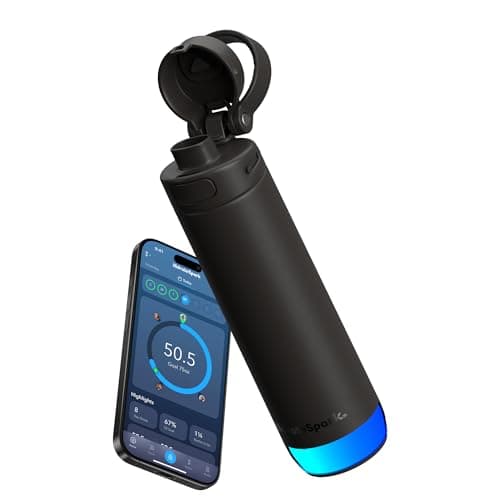
Product image from the Amazon listing.
Our verdict
Yes — the HidrateSpark PRO is worth $79 if you want a smart water bottle that actually changes your hydration habit rather than being an abandoned gadget in a cabinet. The SipSense weight sensor is the specific breakthrough that fixed the accuracy problem earlier smart bottles couldn't solve, the vacuum-insulated stainless steel body competes as a real cold bottle (ice up to 24 hours), and Apple Find My integration means lost bottles ping back. Men's Health named it Best Overall in October 2024 and the review-consensus score of ~9.1 across CNET, TechRadar and Reviewed reflects that the accuracy problem got solved. Skip it if you already drink plenty and just want a cold bottle — a [Stanley Quencher](/reviews/stanley-quencher) or [Owala FreeSip](/reviews/owala-freesip) is cheaper and equally cold. Buy the PRO if you chronically end days dehydrated; buy one of the tumblers if you already hydrate well.
The short version
Smart water bottles have been a gadget category full of misses — most estimate sips from tilt sensors, drift by mid-afternoon, and end up abandoned in a cabinet. The HidrateSpark PRO is the one that finally works. Its SipSense weight sensor logs each drink by measuring the actual water leaving the bottle, so the number in the app matches the number that went down your throat. It's vacuum-insulated stainless steel (holds ice up to 24 hours), 21 oz, syncs to Apple Health, Fitbit and Health Connect without you touching the phone, and it's registered with Apple Find My — so when you leave it in a conference room you can ping it. Men's Health named it Best Overall for smart bottles in October 2024, and a review-consensus score of ~9.1 across CNET, TechRadar and Reviewed sums up why: the accuracy problem got solved.
Pros & cons
Pros
- SipSense weight sensor logs each sip by weight, not by tilt
- Vacuum-insulated stainless steel — ice up to 24 hours
- Auto-syncs to Apple Health, Fitbit and Health Connect
- Apple Find My integration — ping the bottle when you lose it
- LED glow at the base reminds you to drink
- 21 oz — a manageable size that fits car cupholders
- Interchangeable straw and chug lids
Cons
- $79+ is a premium price for a water bottle
- Battery in the base needs USB-C charging every 5-7 days
- Not fully dishwasher-safe — the sensor cap is hand-wash only
Why people love it
Fill and set your daily goal
Fill the 21 oz stainless bottle with cold water and set your daily hydration goal in the free HidrateSpark app — it factors in weight, activity and climate, so the number isn't a guess.
Sip normally, sensor logs it
The SipSense sensor in the bottle base weighs the water each time you drink, so every sip is logged automatically. No buttons. No phone. Nothing to remember.
Glow reminders and app sync
The base glows every hour or two if you're falling behind, and the day's total syncs quietly to Apple Health, Fitbit or Health Connect the next time your phone is nearby.
Who it's for
- Anyone who chronically underhydrates
- Athletes tracking daily water alongside sleep and steps
- People who lose water bottles in the office (Find My)
- Gift shoppers for the wellness-obsessed
Why the HidrateSpark PRO is the smart water bottle that finally works
Smart water bottles have been a graveyard of hardware startups. Early attempts used motion sensors to estimate sips by watching bottle tilt — a clever idea in theory, useless in practice because someone who walks around, gestures with the bottle, or sets it on a moving surface generates hundreds of false sips per day, and the daily total drifts so far from reality that users lose trust and abandon the product within weeks. The HidrateSpark PRO solves this with a physical sensor at the base of the bottle that weighs the water each time you drink; the drink is only counted when weight actually leaves the bottle. It's a small engineering change with a huge product consequence: the daily number matches what you drank.
On top of that reliability, HidrateSpark stacked features that make the bottle usable long-term: vacuum-insulated stainless steel construction so it competes as a real cold-water bottle (ice up to 24 hours), Apple Find My integration so lost bottles ping like an AirTag, a subtle LED glow at the base that reminds you to drink without a phone notification, and automatic sync to the ecosystem apps most people already use (Apple Health, Fitbit, Health Connect). Consumer press picked up on the difference — Men's Health named it Best Overall in October 2024, and CNET, TechRadar and Reviewed converged on an aggregated score around 9.1. The PRO is the first smart bottle that most reviewers keep using months after unboxing.
HidrateSpark PRO vs Stanley Quencher vs Owala FreeSip vs YETI Rambler
A smart water bottle sits in a strange spot on the pricing curve — more expensive than the viral tumblers, less capable as a cold bottle than any of them individually, and offering something none of the tumblers offer (accurate tracking). Head-to-head with the Stanley Quencher, the Stanley wins on sheer capacity (40 oz vs 21 oz) and iconic desk-tumbler look; the HidrateSpark wins on tracking and Find My. Against the Owala FreeSip, Owala is the better bag-safe grab-and-go pick because of its genuinely leakproof locking lid; HidrateSpark wins on tracking and daily-goal accountability. Against the YETI Rambler, YETI is more rugged and holds temperature slightly longer; HidrateSpark wins on tracking and glow reminders.
The correct framing: HidrateSpark PRO is the water bottle for people who want to change their hydration behavior, not just carry cold water. If you already drink plenty every day, one of the tumbler picks above is cheaper and just as cold. If you chronically end days with a headache from underhydration, the tracking and glow reminders are exactly the intervention. Many people who buy the PRO keep a Stanley or Owala for weekends, road trips or the gym — the PRO lives on the desk where the tracking matters most, and a dumb tumbler handles the moving-around days when a delicate sensor puck and a weekly charge would be a hassle.
Building a smart hydration habit around the HidrateSpark PRO
Owning the bottle is only half the value; the other half is the small routine that turns it into a habit. Set your daily goal in the app based on the personalized calculation (weight, activity, climate) rather than the flat-8-glasses default — most adults benefit from a real goal in the 80-110 oz range, and the app's estimate is usually more accurate than mainstream rules. Charge the sensor puck weekly on the same night you charge the rest of your kit, so the battery never dies mid-day. Fill the bottle first thing in the morning at your sink so day one is a full 21 oz ahead of the reminders.
Combine the PRO's sipping data with a broader wellness stack for the biggest behavior change. Sleep and hydration are the two most correlated variables in most fitness trackers; pair the PRO's daily total with a sleep tracker like WHOOP Peak or a Fitbit Charge 6, and within a couple of weeks you'll see the mid-afternoon crash days line up with low water intake and low sleep. For travel, drop the PRO in a bag with a slim Anker portable power bank so the sensor never runs out on the road, and a compact Anker Nano 30W that shares the same USB-C cable. The stack fits in a small pouch and covers full-day hydration, phone charging, and analytics in a few ounces of gear.
See HidrateSpark PRO on Amazon
Check the latest price, photos and buyer reviews on Amazon.
Check Price on Amazon →Sold and shipped by AmazonFrequently asked questions
Is the HidrateSpark PRO worth $79 vs a regular insulated bottle?
For people who want to actually change their hydration habit, yes — the automatic tracking plus glow reminders reliably increases daily water intake, which is exactly what most buyers describe. Men's Health named it Best Overall in October 2024 and independent testing shows the SipSense weight sensor consistently agrees with a manual log within a couple of ounces per day. For someone who already drinks plenty of water and just wants a cold bottle, the Stanley Quencher, Owala FreeSip or YETI Rambler are cheaper picks that keep drinks equally cold without the smart features. The PRO earns its premium if you'll actually use the tracking; skip it if you won't.
How does the SipSense sensor actually work, and is it accurate?
SipSense is a weight sensor built into the bottom of the bottle — every time you drink, the sensor measures how much water left by weight and logs it. Because it's measuring weight (a physical quantity that can't drift like a tilt estimate), the accuracy is much better than earlier smart bottles that tried to guess sips from motion. In independent tests, the SipSense reading tracks a manual water log within a couple of ounces across a full day. Adding ice cubes doesn't confuse it — the sensor calibrates the water weight at rest between drinks. It's the specific technical breakthrough that separates the PRO from the smart-bottle failures that came before.
HidrateSpark PRO vs HidrateSpark TAP vs HidrateSpark Steel: which one should I buy?
The PRO (this review) is the flagship — vacuum-insulated stainless steel, weight-based SipSense sensor, Apple Find My, LED glow, and the fullest app experience. Best for serious hydration tracking and long-term daily use. The TAP is the value pick — plastic body, tap-to-sync feature (no weight sensor), simpler tracking, roughly half the price. Best for people who want reminders more than analytics. The Steel is the older generation — insulated stainless steel with tilt-based tracking, lower accuracy than PRO. Best if you find one cheap on sale. For the specific 'I want the smart water bottle that actually works,' the PRO is the correct choice; save money on the TAP only if you don't care about ice-cold water or precise logging.
Does the LED at the bottom really help you drink more water?
Reviewers overwhelmingly report yes. The base glows a soft color every hour or two if you're falling behind the daily goal, and the ambient cue is easy to notice without being annoying like a phone notification. Combined with app-based nudges and the small dopamine hit of watching the daily percentage tick up, most users describe hitting their goal on days they wouldn't have otherwise. If you find yourself remembering to drink only at meals, the glow reminders solve the specific '3 pm I forgot to drink water' problem that mid-afternoon slump often is.
How long does the battery last, and how do you charge it?
About 5-7 days of typical use per charge. The base charges via USB-C in roughly 90 minutes; the charging port is on the underside of the sensor puck, which twists off the bottom of the bottle. Most owners establish a weekly ritual — top up the bottle's battery on the same evening they charge their earbuds and a portable power bank — and never have the battery run out during the day. If the base dies mid-day the bottle itself still holds water perfectly; you just lose sip logging until the next charge.
Is the HidrateSpark PRO dishwasher safe? How do you clean it?
The bottle body and lids are dishwasher-safe on the top rack. The sensor puck at the base is NOT dishwasher-safe — it needs to be twisted off first, hand-washed with warm soapy water, and dried before reattaching. This adds a minor step to cleaning versus a dumb bottle, but it's about 15 seconds of extra effort. For deep cleaning (weekly recommended), use a bottle brush to reach the bottom and any residue in the straw lid; a diluted vinegar rinse periodically keeps smells at bay. Never submerge the sensor puck itself in water for long periods.
As an Amazon Associate, TopCrate earns from qualifying purchases at no extra cost to you. Illustrative image — see Amazon for the actual product. Battery in the sensor puck needs USB-C charging every 5-7 days. Product image, price, availability and ratings are shown on Amazon and are subject to change.