TRENDING ON AMAZON
Amazon Fire TV Stick 4K Max (Wi-Fi 6E, Ambient Experience) Review: Is It Worth It?
Amazon's fastest streaming stick — Wi-Fi 6E, 16GB storage, Dolby Vision and Ambient Experience wallpaper, priced roughly $10 above the standard Fire TV Stick 4K.
Quick answer: Yes — the Fire TV Stick 4K Max is worth it if you have (or plan to have) a Wi-Fi 6E router, or if you install many streaming apps. It delivers the same excellent 4K HDR streaming as the standard Fire TV Stick 4K, plus Wi-Fi 6E for buffer-free video on congested networks, 16GB storage, and the Ambient Experience feature that turns your TV into a photo frame when idle. For families on older Wi-Fi hardware, save $10 and get the standard Fire TV Stick 4K.
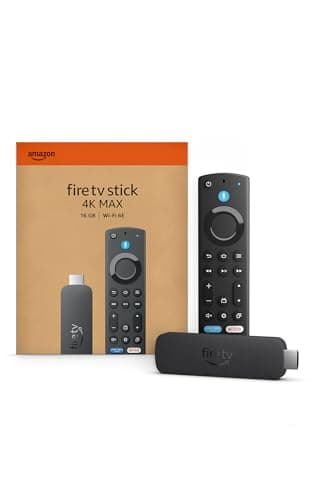
Product image from the Amazon listing.
Our verdict
Yes — the Fire TV Stick 4K Max is worth it if you have (or plan to have) a Wi-Fi 6E router, or if you install many streaming apps. It delivers the same excellent 4K HDR streaming as the standard Fire TV Stick 4K, plus Wi-Fi 6E for buffer-free video on congested networks, 16GB storage, and the Ambient Experience feature that turns your TV into a photo frame when idle. For families on older Wi-Fi hardware, save $10 and get the standard Fire TV Stick 4K.
The short version
The 4K Max is the top-of-the-line Fire TV Stick — the same 4K HDR streaming across Netflix, Prime Video, Disney+, Max, Hulu and every other app, but with Wi-Fi 6E (rare in a streaming stick, meaningful in busy home networks), 16GB storage (double the standard Fire Stick 4K's 8GB), a snappier processor, and Ambient Experience — an art-and-photo screensaver mode that makes the TV look like a photo frame when idle. If your home Wi-Fi is congested (lots of connected devices, or a 6GHz-capable router), the 4K Max is the streaming stick that finally stops buffering. If you're on basic 2.4/5GHz Wi-Fi, save the money and buy the standard [Fire TV Stick](/reviews/fire-tv-stick).
Pros & cons
Pros
- Wi-Fi 6E (6GHz band) — first streaming stick with it
- 16GB storage — double the standard Fire Stick 4K
- Dolby Vision, Dolby Atmos, HDR10+ all supported
- Ambient Experience — TV becomes photo/art frame when idle
- AI-powered Fire TV Search with Alexa+
- Ultra-fast processor — apps launch in 1-2 seconds
Cons
- Wi-Fi 6E only matters if you have a 6E router
- ~$10 premium over standard Fire TV Stick 4K
- Some Ambient Experience features gated behind Prime membership
Why people love it
Plug into HDMI
Snaps into any HDMI port on any TV made in the last 10 years — turns even old TVs into fully-modern streaming platforms.
Connect to Wi-Fi
Supports Wi-Fi 6E (6GHz), Wi-Fi 6 (5GHz), and standard Wi-Fi 5 — automatically picks the fastest band your router supports.
Stream, ask Alexa, or use Ambient
Voice remote with Alexa+ finds shows across apps; when idle, the TV becomes a photo frame or art display with the Ambient Experience feature.
Who it's for
- Homes with a Wi-Fi 6E router (or planning one)
- 4K HDR TV owners wanting Dolby Vision + Atmos
- Households with many connected devices
- Anyone wanting the Ambient Experience photo-frame feature
Wi-Fi 6E in a streaming stick: what it actually does
Wi-Fi 6E is the first version of Wi-Fi to add the 6GHz frequency band on top of the traditional 2.4GHz and 5GHz. Why it matters: modern homes have exploded in connected devices — smart bulbs, smart speakers, video doorbells, security cameras, phones, laptops, tablets, game consoles — all competing for the same 2.4GHz and 5GHz airwaves. The 6GHz band is essentially empty in most homes (very few devices have adopted it yet), so a Wi-Fi 6E connection gets a clean, uncongested lane to itself. For 4K HDR streaming, this eliminates the specific buffering pattern where your video pauses mid-scene because someone else's Zoom call or smart-doorbell alert grabbed bandwidth.
The Fire TV Stick 4K Max is the first (and as of 2026, still the only) streaming stick with Wi-Fi 6E. This creates an interesting situation: you need a Wi-Fi 6E router to benefit (about $200-400 for a decent one), but if you have one, the 4K Max delivers a demonstrably better streaming experience than any other stick. If you don't have a 6E router yet but plan to upgrade in the next year or two, buying the 4K Max now is future-proofing. If you're on Wi-Fi 5 hardware indefinitely, the standard Fire TV Stick 4K is fine — the 6E capability is dormant on your network.
Fire TV Stick 4K Max vs Apple TV 4K: when to spend $180 vs $50
The two premium streaming devices in the market are the Fire TV Stick 4K Max (~$60) and the Apple TV 4K (~$149-180). They occupy different tiers. Apple TV 4K delivers: a genuinely faster chipset (Apple A15 Bionic vs Amazon's MediaTek), more polished interface, no ads on the home screen (Fire TV shows Amazon promotions), better developer support for third-party apps, HomeKit hub functionality (controls smart-home devices), Ethernet port, and privacy-first design. Fire TV Stick 4K Max delivers: 3x cheaper, Wi-Fi 6E (Apple TV 4K is Wi-Fi 6 only), the same Dolby Vision/Atmos support, Alexa integration, and larger app selection for niche streaming services.
When to spend Apple TV 4K money: if you're in the Apple ecosystem (iPhone, Mac, iPad), if HomeKit smart home matters to you, if home-screen ads bother you significantly, or if you're a tech-forward household that values polish. When to save with Fire TV Stick 4K Max: if you're an Amazon-heavy household (Prime, Alexa, Echo devices), if you want the newest Wi-Fi capability, or if you just want great 4K streaming for less than $70. For most families that watch Netflix / Prime / Disney+ and don't own Apple hardware, the Fire TV Stick 4K Max is the right buy — same quality streams, one-third the price.
Setup, tips and getting the most out of your Fire TV Stick 4K Max
Setup takes 3 minutes. Plug into an HDMI port on your TV, connect the included micro-USB power cable to the wall (don't use a USB port on the TV — insufficient power), pair the remote by following the on-screen prompt, sign into your Amazon account, and connect to Wi-Fi (pick the 6GHz band if you have a 6E router — it may show up as a separate SSID). Install your streaming apps in the order you'll use them most; Fire OS puts recent apps at the top of the home screen. Enable Ambient Experience in Settings > Display & Sounds > Ambient Experience if you want the photo-frame feature.
Two settings worth tweaking that most people miss: 1) Enable HDR match settings (Settings > Display & Sounds > Display > HDR) so the TV switches between HDR and SDR based on content instead of leaving HDR on all the time (which crushes SDR content). 2) Adjust the Alexa voice remote's Instant Access shortcut buttons on the top row — you can remap them to your most-used apps in Settings > Equipment Control > Manage Equipment > TV. Finally, if you're annoyed by home-screen ads and rotating promotions, go to Settings > Preferences > Featured Content and disable both 'Allow Video Autoplay' and 'Allow Audio Autoplay' — it becomes noticeably calmer. Pair with a MagSafe Charger at your entertainment center for keeping phones topped up during marathons, and you've got a fully wired-up living room.
See Fire TV Stick 4K Max on Amazon
Check the latest price, photos and buyer reviews on Amazon.
Check Price on Amazon →Sold and shipped by AmazonFrequently asked questions
Is the Fire TV Stick 4K Max worth the extra money over the standard Fire TV Stick 4K?
Only if you have (or plan to buy) a Wi-Fi 6E router. The 6GHz band is what makes the 4K Max meaningfully different — on a 6E router with lots of devices competing for bandwidth (smart lights, doorbells, security cameras, smartphones), the 4K Max gets a clean, uncongested band to itself while everything else fights over 2.4 and 5 GHz. That means zero buffering during 4K HDR streaming. On a standard Wi-Fi 5 or 6 router, the 4K Max delivers the same real-world experience as the standard 4K — just with 16GB storage instead of 8GB, which helps if you install many streaming apps. If your router is 6E-capable, worth the ~$10 premium. If not, buy the standard Fire TV Stick 4K and save the money.
Fire TV Stick 4K Max vs Roku Ultra vs Google Chromecast with Google TV: which streaming device is best?
Three genuinely good picks with different strengths. Fire TV Stick 4K Max is the Amazon ecosystem pick — best if you're on Prime Video daily, use Alexa around the house, and want the tightest integration with Amazon devices. Interface is app-forward and Amazon-first. Roku Ultra is the neutral pick — the interface doesn't favor any specific streaming service, so Netflix, Max, Hulu and Disney+ all get equal billing. Best if you don't want Amazon promotions on your home screen. Chromecast with Google TV 4K is the Google ecosystem pick — best if you're on YouTube TV, use Google Assistant, and want tight Android integration. All three do 4K HDR with Dolby Vision and Atmos. Fire TV Stick 4K Max is uniquely Wi-Fi 6E; the other two aren't. If your household has a mix of ecosystems, Roku Ultra is the most neutral; if you're Amazon-heavy, Fire TV Stick 4K Max.
What is the Ambient Experience on Fire TV Stick 4K Max?
Ambient Experience is Amazon's feature that turns your TV into a smart-frame display when idle. It cycles through art (from a curated Amazon gallery), your own photos (via Amazon Photos), weather widgets, calendar events, and news headlines — kind of like a giant version of the Echo Show. It's completely free to use but some premium art collections and photo-frame features require an Amazon Prime membership. If you have a big TV in a living room that's often on but idle (background during dinner, weekend afternoons, holiday gatherings), Ambient Experience genuinely elevates the room. If you turn your TV off when you're not watching, this feature won't matter to you.
Does the 4K Max support Dolby Vision and Dolby Atmos?
Yes — full support for Dolby Vision (dynamic HDR that adjusts per-scene), HDR10, HDR10+, and HLG. On the audio side, Dolby Atmos and DTS surround are supported. This is unchanged from the standard Fire TV Stick 4K. You need a compatible 4K TV to actually see Dolby Vision, and either an Atmos-equipped receiver or an Atmos-capable soundbar to hear it. For the maximum viewing experience, pair with a Dolby-Vision-capable 4K TV plus a good soundbar like the Sonos Beam or Bose Smart Ultra.
How much storage does the Fire TV Stick 4K Max have and does it matter?
16GB internal storage, versus 8GB on the standard Fire TV Stick 4K. In practice, this matters if you install many streaming apps and games. The Fire OS operating system uses about 4GB, leaving ~12GB free for apps on the Max vs ~4GB on the standard. If you install just the big five streaming apps (Netflix, Prime, Disney+, Max, Hulu), 8GB is plenty. If you also want ESPN, Peacock, Paramount+, Apple TV+, YouTube TV, PBS, Crunchyroll, plus some casual games like Solitaire and streaming-app trials, 16GB gives real headroom. Most casual users won't feel the difference; heavy app installers will.
Is the Fire TV Stick 4K Max better than a smart TV's built-in streaming?
Almost always yes. Built-in smart TV platforms (Samsung Tizen, LG webOS, Vizio SmartCast) age poorly — after 3-5 years, apps stop getting updates, new services don't launch on them, and interfaces get sluggish as chipsets fall behind. The Fire TV Stick 4K Max is a modern, fast processor with Wi-Fi 6E and fresh Fire OS — much snappier than any 4-year-old smart TV's built-in system. It also has universal Alexa voice search across apps, which most built-in platforms lack. The one exception: if you have a brand-new (2024-2026) high-end smart TV, its built-in platform may be competitive for the first year or two. But 3+ years in, plugging in a Fire Stick 4K Max always improves the experience.
As an Amazon Associate, TopCrate earns from qualifying purchases at no extra cost to you. Product image, price, availability and ratings are shown on Amazon and are subject to change.