TRENDING ON AMAZON
Sonos Roam 2 Portable Waterproof Bluetooth Speaker Review: Is It Worth It?
Sonos's tiny 1-pound waterproof portable — the second-generation Roam finally fixes the first version's biggest annoyance (dedicated Bluetooth and power buttons), and it's still the only truly portable speaker that plays inside a full Sonos multi-room system without any workarounds.
Quick answer: Yes — the Sonos Roam 2 is the right portable speaker for anyone in the Sonos ecosystem, and a good-but-not-best pick for standalone Bluetooth users. The dedicated power and Bluetooth buttons fix the Roam 1's biggest annoyance, IP67 waterproofing handles real outdoor use, and 10-hour battery covers a full day. The unique value is what only Sonos delivers: automatic Wi-Fi/AirPlay 2 integration at home, seamless Bluetooth fallback when you leave. For non-Sonos users, the Bose SoundLink Flex or JBL Flip 6 deliver better pure-Bluetooth sound-per-dollar. But if you already have a Sonos Beam, Arc, Era or Move at home, the Roam 2 is the portable that completes the ecosystem — buy it without hesitation.
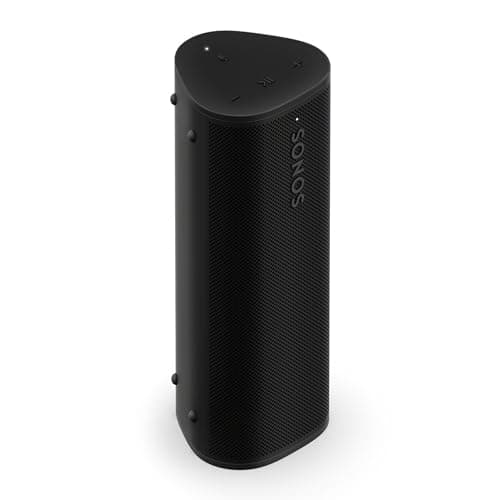
Product image from the Amazon listing.
Our verdict
Yes — the Sonos Roam 2 is the right portable speaker for anyone in the Sonos ecosystem, and a good-but-not-best pick for standalone Bluetooth users. The dedicated power and Bluetooth buttons fix the Roam 1's biggest annoyance, IP67 waterproofing handles real outdoor use, and 10-hour battery covers a full day. The unique value is what only Sonos delivers: automatic Wi-Fi/AirPlay 2 integration at home, seamless Bluetooth fallback when you leave. For non-Sonos users, the Bose SoundLink Flex or JBL Flip 6 deliver better pure-Bluetooth sound-per-dollar. But if you already have a Sonos Beam, Arc, Era or Move at home, the Roam 2 is the portable that completes the ecosystem — buy it without hesitation.
The short version
The Sonos Roam 2 keeps everything that made the first Roam a cult portable speaker — 1-pound weight, IP67 waterproof/dustproof rating, both Bluetooth 5.2 AND Wi-Fi (rare for a portable), 10 hours of battery, and true Sonos multi-room integration — and fixes the single most complained-about design flaw: it now has separate physical power and Bluetooth buttons on the rear, so pairing to a new phone doesn't require the finicky press-and-hold combos the original required. Sound is clear and full for a 6.5-inch-tall speaker; bass is present without being distorted; volume is enough for a shower, beach or picnic but honestly limited for larger outdoor spaces (get a Bose SoundLink Flex or JBL Flip 6 for those). Where the Roam 2 makes sense over anything else: existing Sonos household users who want a portable that becomes another Sonos speaker inside the house (grouped with the Arc soundbar, Beam, or Era 100 speakers, streaming from Sonos Radio or Apple Music via AirPlay 2), then flips to standalone Bluetooth when you leave. For non-Sonos users, cheaper Bose SoundLink Flex or Marshall Emberton II are better single-purpose portables.
Pros & cons
Pros
- Both Wi-Fi (AirPlay 2 + Sonos ecosystem) and Bluetooth 5.2
- Separate power and Bluetooth buttons (fixes Roam 1's flaw)
- 1 pound weight and IP67 waterproof/dustproof
- 10 hours of battery — enough for a full beach day
- Automatic Sonos ecosystem integration at home
- New monochromatic finish looks premium
Cons
- Volume limited for large outdoor spaces (single 20W amp)
- Premium price versus Bose SoundLink Flex or JBL Flip 6
- Sonos features require Sonos ecosystem (or at least an app)
Why people love it
Press power on the rear
The dedicated power button (finally!) turns the speaker on/off without any combo presses — the biggest quality-of-life fix over the original Roam.
Bluetooth or Wi-Fi
Press the separate Bluetooth button to pair to a phone as a standard speaker, or open the Sonos app for Wi-Fi connectivity, AirPlay 2 and multi-room grouping.
Take it anywhere
IP67 rated — fully waterproof (submerged up to 1m for 30 min) and dustproof, so shower, beach, pool, hiking or bathroom all work fine.
Who it's for
- Existing Sonos household users adding a portable
- Frequent shower, beach, pool and hiking listeners
- People wanting AirPlay 2 in a portable speaker
- Roam 1 owners upgrading for the button fix
Why the Roam 2's button fix matters more than any spec upgrade would
Product design details either help or annoy you every single day. The original Roam had one specific design frustration that turned it from a great speaker into a mildly-hated great speaker: to enter Bluetooth pairing mode, you had to press and hold the power button for 2 seconds to turn it on, wait for the startup chime, then press and hold the play button for 3 seconds to trigger Bluetooth discovery mode. Half the time users held the play button too briefly (nothing happens) or too long (accidentally activated a different function). Pairing a new device — like a friend's phone at a picnic — was a genuine hassle every time. Sonos fixed this exactly the right way in the Roam 2: two separate, dedicated physical buttons on the rear. Press one for power. Press the other for Bluetooth pairing. No combos, no confusion, no reading the manual before every pairing attempt.
This is why the Roam 2 is worth caring about even if the specs are 95% identical to the Roam 1. Consumer electronics evaluations tend to over-index on measurable specs (drivers, battery life, waterproof ratings) and under-index on daily-use friction. The button fix affects the Roam 2's usefulness every single time someone new visits or you switch devices — which is often. It's the kind of update that only makes sense after Sonos observed thousands of frustrated users doing the same wrong thing thousands of times. If you're a Sonos household adding your first portable, the Roam 2 is the right buy over the discounted Roam 1 for this reason alone.
Building a portable-plus-fixed Sonos audio setup on a real budget
Sonos's marketing pushes toward maximalist setups (Arc + Beam + Era 100s + Sub Mini + Ace headphones) that easily cost $3,000+. But a functional, satisfying Sonos setup for most homes lands around $700-1,000. The right starter setup: one Sonos Era 100 in the main listening space ($249) as the primary Wi-Fi speaker, one Sonos Roam 2 ($179) for the bathroom / kitchen / patio / travel. This is under $500 and covers the two most common household use cases (a proper stereo experience in one room, plus follow-you-around music elsewhere). Group them in the Sonos app when you want the audio to sync, or use them independently. For less than a mid-range single Bose or Sony home speaker, you get room-filling stereo plus a portable that also serves as a shower speaker.
Layered on top of this base, worthwhile additions in priority order: 1) Second Era 100 for stereo pairing in the primary room (+$249) — this actually delivers separation and a wider sound stage. 2) Sonos Beam Gen 2 soundbar for TV audio (+$449) — meaningful upgrade if you watch a lot of TV. 3) Second Roam 2 for the kitchen or opposite bathroom (+$179). 4) Sub Mini for adding real bass to the Era 100 or Beam setup (+$429) — only if you're a music-first household and care about bass extension. 5) Sonos Ace headphones for late-night listening (+$449) — the Ace can Content-Swap audio from the Beam or Arc for silent shared listening. Skip: the flagship Arc unless you have a large home theater setup and dedicated seating. Don't build for Sonos maximalism; build for the two or three spaces where you actually listen. Add Sonos Ace headphones or a Bose SoundLink Flex as your travel audio partner.
Sonos Roam 2 vs Sonos Move 2: which portable Sonos should you get?
Sonos makes two Wi-Fi + Bluetooth portables and the choice between them is meaningful. The Roam 2 (~$179) is the true portable — 6.5" tall, 1 pound, easily fits in a bag, 10-hour battery, single 20W amp driving stereo drivers. Best for actually traveling with, shower use, beach/pool, and small-space listening. The Move 2 (~$449) is the semi-portable — 9.5" tall, 6.6 pounds, with a carrying handle rather than being pocket-portable. It has two tweeters + a mid-woofer with 40W total amplification, delivering room-filling stereo sound from a single unit. 24-hour battery. IP56 rated (splash-proof but not submersible like the Roam 2). Best for moving between rooms at home, using in the backyard for entertaining, or as a battery-powered kitchen speaker.
Which one you want depends on your primary use case. Roam 2 = truly portable, worse sound quality but genuinely goes-anywhere. Move 2 = semi-portable, much better sound quality but you're not putting it in a backpack. If you want a Sonos speaker that also works outside the house occasionally, get the Move 2. If you want a genuinely portable Sonos that lives in a bag when you leave the house, get the Roam 2. Some heavy Sonos users own both: Move 2 for outdoor entertaining and rooms without power outlets, Roam 2 for personal listening. For most single-buyer decisions, pick based on where you'll listen most: kitchen/backyard/patio (Move 2), or bathroom/beach/personal (Roam 2). And if you want to add sound to a place neither Sonos will actually fit — a tent, a hotel-room desk, a hollow suitcase — a surface-vibration puck like the Anything Speaker is a legitimately different tool that uses whatever hard surface it's sitting on as the driver, taking up almost no space in a bag.
See Sonos Roam 2 on Amazon
Check the latest price, photos and buyer reviews on Amazon.
Check Price on Amazon →Sold and shipped by AmazonFrequently asked questions
Sonos Roam 2 vs Sonos Roam 1: what's different and is it worth upgrading?
Three main differences, one meaningful and two minor. The meaningful one: dedicated separate physical buttons for power and Bluetooth pairing on the rear panel — the single most complained-about issue with the original Roam. Instead of press-and-hold-combos that were finicky and often failed, you now have clear tactile control. Minor differences: updated monochromatic finish (matches newer Sonos products aesthetically), slightly refined internal antenna for better Wi-Fi range, and updated firmware/app support that will likely extend beyond what the Roam 1 receives long-term. Sound quality is identical — the Roam 1 and Roam 2 use the same drivers. Battery life is identical at 10 hours. If you have a Roam 1 that works fine, don't upgrade — the sonic experience is the same. If you're buying new or you've been frustrated with the Roam 1's buttons, the Roam 2 is worth the small price difference. Both are great; the 2 is just less annoying.
Sonos Roam 2 vs Bose SoundLink Flex vs JBL Flip 6: which portable Bluetooth speaker should I buy?
Three different priorities. Bose SoundLink Flex (~$149) is the sound-quality king for pure Bluetooth — bigger, deeper sound than any of the three, longer battery (12 hours), best for outdoor spaces and beach days. Best if pure portable sound matters most. JBL Flip 6 (~$130) is the party pick — loud, punchy bass, waterproof, great for group listening, and PartyBoost lets you link multiple Flips together for stereo or party mode. Best for entertaining or beach parties. Sonos Roam 2 (~$179) is the ecosystem pick — 90% of Bose Flex's sound quality in a smaller package, but it's the only one with Wi-Fi + AirPlay 2 + Sonos multi-room integration. Best if you already have Sonos speakers at home and want a portable that seamlessly extends the ecosystem. For pure standalone Bluetooth, the Bose or JBL wins on value. For Sonos households, the Roam 2 is essential — it plays in a group with your Arc, Beam or Era speakers automatically.
Does the Roam 2 sound good enough for outdoor entertaining or is it just a personal speaker?
Personal-to-small-group. The Roam 2 has a single 20W amp driving a tweeter and a mid-woofer — plenty for a shower, bathroom, kitchen counter, bedside table, or a small patio with 3-4 people. Above that, volume starts hitting its ceiling and bass thins out at max volume. For a backyard BBQ with 10+ people, or a beach day with music competing with wind and waves, get a Bose SoundLink Flex or JBL Xtreme 3 instead. Where the Roam 2 excels: any 1-3 person listening scenario where portability, waterproofing and Sonos integration matter more than raw output. Also: Sonos lets you stereo-pair two Roam 2s over Wi-Fi, which doubles the sound and roughly doubles the volume ceiling — a legitimate answer for people who want portable Sonos with more output than one unit.
How does Sonos multi-room work with the Roam 2 specifically?
When the Roam 2 is on your home Wi-Fi network, it appears in the Sonos app just like your Arc, Beam or Era 100 speakers — you can group it with any other Sonos speaker for synchronized multi-room audio. Common uses: group the Roam 2 in the bathroom with the Sonos Beam in the living room so morning music follows you from bedroom to shower to kitchen. Group it with an Arc soundbar — wait, better example — group it with a Sonos Era 100 on a bookshelf so you have stereo playback across the whole space. When you leave the house, the Roam 2 automatically switches to Bluetooth mode as it loses Wi-Fi, and back to Wi-Fi/Sonos mode when it rejoins your home network. The transition is seamless — no manual switching needed. This is what makes the Roam 2 uniquely valuable in a Sonos household; no other portable speaker does this.
Is IP67 waterproof rating actually enough for real pool and beach use?
Yes — IP67 is the strong end of consumer waterproofing. IP67 means: 6 = fully dustproof (no dust ingress possible), 7 = submersion up to 1 meter for 30 minutes. So you can drop the Roam 2 in a pool, retrieve it, and it will keep playing. You can shower with it under the water spray. It survives sand at the beach, splashing at a lake, and rain during a hike. What IP67 doesn't cover: submersion beyond 30 minutes or beyond 1 meter (deep pool bottoms), pressurized water (hose spray at close range or diving), or salt water without rinsing afterward (salt corrodes electronics over time even inside an IP67 enclosure). Rinse it with fresh water after any salt-water or sandy exposure and it'll last for years. For comparison: Bose SoundLink Flex is also IP67, JBL Flip 6 is IP67, Marshall Emberton II is IP67 — the entire premium portable category has standardized on IP67, which is enough for real outdoor use.
What's Trueplay tuning and does it work on the Roam 2?
Trueplay is Sonos's automatic room-calibration feature that uses your phone's microphone to measure the room's acoustics and adjust the speaker's tuning accordingly. It's genuinely useful — running it in a bathroom makes bass sound less boomy in the tile-heavy space, running it in a bedroom makes vocals clearer. The Roam 2 supports Trueplay in Wi-Fi mode when connected to the Sonos app. It's a quick 45-second walk-around procedure and the results are subtle but real. Standalone Bluetooth mode doesn't use Trueplay (no way to reach the Sonos app without Wi-Fi), so if you mostly use the Roam 2 as a Bluetooth speaker in different rooms, you won't benefit from Trueplay. But if you have one 'home base' room where the Roam 2 lives when on Wi-Fi, running Trueplay there noticeably improves sound quality.
As an Amazon Associate, TopCrate earns from qualifying purchases at no extra cost to you. Product image, price, availability and ratings are shown on Amazon and are subject to change.