HANDS-ON REVIEW
Omni DataSafe Encrypted Backup Drive Review: Is It Worth It?
A backup drive with a physical PIN pad and hardware encryption — your documents and photos locked in your drawer instead of floating in someone's cloud.
Quick answer: Yes — Omni DataSafe is worth $79 because it's the correctly-engineered version of the backup most families are missing: an offline, hardware-encrypted, PIN-locked USB drive that costs less than a year of cloud storage and can't be phished, subscribed away, or lockout-recovered by a stranger. Its strengths are literal (forget the PIN and privacy becomes permanence), so pair it with a second copy and a sealed hint. As the private, physical leg of your records strategy — sitting alongside a digitized archive from [iMemories](/reviews/imemories) and the household photo collection consolidated on a [ThePhotoStick](/reviews/thephotostick) — it's the missing piece for a household that can survive a stolen laptop.
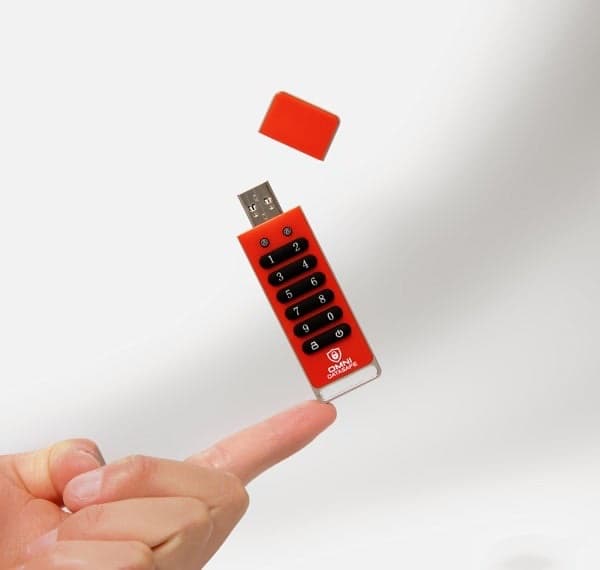
The keypad is the lock: no PIN, no data — on any computer, in anyone's hands. Photo: Omni DataSafe
Our verdict
Yes — Omni DataSafe is worth $79 because it's the correctly-engineered version of the backup most families are missing: an offline, hardware-encrypted, PIN-locked USB drive that costs less than a year of cloud storage and can't be phished, subscribed away, or lockout-recovered by a stranger. Its strengths are literal (forget the PIN and privacy becomes permanence), so pair it with a second copy and a sealed hint. As the private, physical leg of your records strategy — sitting alongside a digitized archive from [iMemories](/reviews/imemories) and the household photo collection consolidated on a [ThePhotoStick](/reviews/thephotostick) — it's the missing piece for a household that can survive a stolen laptop.
The short version
Everything important about you now lives as files — tax returns, IDs, medical records, the family photo archive — and most of it sits either unprotected on an aging laptop or in a cloud account one phished password away from a stranger. Omni DataSafe is the third option: a USB backup drive with a physical numeric keypad and hardware-level encryption. Files copied onto it are encrypted by the drive itself; without the PIN punched into the keypad, the contents are unreadable on any computer — lost, stolen or subpoenaed by your nosy brother-in-law. No subscription, no account, no cloud dependency: your archive, in your drawer, openable only by your code.
Pros & cons
Pros
- Hardware encryption with a physical PIN pad — no PIN, no data
- Works without software on any computer (plug, unlock, drag files)
- No cloud, no account, no monthly fee — you own the copy
- Useless brick to a thief; readable archive to you
- Small enough for a fire safe or a desk drawer
- One-time cost for permanent private storage
Cons
- Forget the PIN and the data is genuinely gone — that's the security working
- One drive is one copy: real backup strategy still wants a second
- Finite capacity — it's for the vital archive, not your movie library
How it works
Set your PIN
Choose a code on the drive's own keypad — the encryption key lives in the hardware, not on any computer or server.
Unlock and drag files
Punch the PIN, plug in over USB, and copy files like any drive — documents, photos, scans, records. Lock it and the contents encrypt.
Store it like a valuable
In the drawer, the fire safe, or the go-bag: your archive is offline, private, and readable only with your code.
Who it's for
- Anyone whose tax, ID and medical files live loose on a laptop
- Families consolidating the photo archive somewhere real
- Cloud skeptics who want possession, not subscription
- Estate-planners leaving accessible records for loved ones
The case for an offline copy in a cloud-everything era
Cloud storage is convenient and mostly safe — until the failure modes hit, and they're all identity-shaped: a phished password, a hijacked phone number, a locked account (support ticket, good luck), a subscription lapse quietly deleting 'inactive' data. The professional-world answer has always been the 3-2-1 rule: three copies, two media, one offline. The offline copy is the one no ransomware, account hijack or billing bot can touch — and it's the copy most households simply don't have.
Hardware encryption is what makes the offline copy safe to physically exist. A plain USB stick with your tax returns is a disaster waiting in a jacket pocket; a PIN-pad drive is a paperweight to everyone but you. Because the cipher runs in the drive's own chip, there's no software to install, no OS dependency, and no master password database anywhere — possession of the drive plus knowledge of the code is the entire trust model, the same one as a safe.
What belongs on it: building the vital archive
Think in categories, not gigabytes: identity documents (passport and license scans, birth certificates, SSN records), money (tax returns, insurance policies, deeds, account inventories), health (records, prescriptions, directives), and the irreplaceables — the family photo folders that exist nowhere physical anymore. That set fits comfortably in a modest capacity, which is why a keypad drive beats a bulk external disk for this job: the point is a curated vault, not a data dump.
It pairs naturally with the archive-building tools: a one-click photo consolidator to sweep scattered pictures off old machines first, digitized tapes and film as they come back from conversion, and a grab-and-go document box for the papers that must stay paper. Do the boring step: tape a sealed PIN hint (not the PIN) somewhere a spouse or executor can find, because the second failure mode after 'no backup' is 'backup nobody can open.'
Is Omni DataSafe worth $79?
Run it against the cloud subscription it replaces: $79 once versus $2–10 monthly forever, with the cloud's terms, breaches and account-recovery roulette riding along. Against a plain external drive, the delta buys the keypad and the hardware cipher — the difference between 'my files, hopefully nobody looks' and 'my files, mathematically private.' Comparable hardware-encrypted drives from enterprise brands run well north of this at similar capacities.
Discipline notes for doing it right: two copies beat one (a second drive or the cloud as the redundant leg satisfies 3-2-1 honestly); refresh the archive on a calendar reminder — quarterly is plenty for vital documents; and treat the PIN with password-manager seriousness, because the no-backdoor design that makes it private also makes 'forgot' permanent. As the offline, encrypted leg of a family's records strategy, it's the cheapest correctly-engineered option going.
Try Omni DataSafe for Yourself
Available now for $79.00.
Check Availability & Price →Ships to your doorFrequently asked questions
What happens if the drive is lost or stolen?
Without the PIN, the contents are hardware-encrypted noise on any computer in the world — the finder holds a paperweight. That's the entire design: possession plus code, like a safe.
Do I need to install software?
No — the encryption runs inside the drive itself. Punch the PIN on the keypad, plug into any USB port on any computer, and it behaves like a normal drive until you lock it again.
What if I forget my PIN?
The data is unrecoverable — no backdoor exists, which is precisely why it's trustworthy. Treat the PIN like a safe combination: store a sealed hint where a spouse or executor can find it.
Is this better than cloud backup?
It's different: the cloud is convenient but account-shaped (phishable, lockable, subscription-bound); this is possession-shaped — offline, private, one-time cost. The genuinely robust setup uses an offline encrypted copy alongside a second copy anywhere else.
What should I store on it?
The vital archive: ID scans, tax returns, insurance and property documents, medical records, password-manager emergency kits, and the irreplaceable family photos. It's a curated vault, not a media library.
How often should I update it?
Put a quarterly reminder on the calendar — copy the new tax year, fresh scans and the latest photo folders, then lock it and put it back. Ten minutes, four times a year, for a household that can survive a stolen laptop.
When you buy through links on this page, TopCrate may earn an affiliate commission at no extra cost to you. No storage product replaces a complete backup strategy; keep a second copy of vital data. Prices accurate as of publish time.