Quick take
- Verdict: Yes — the Amazon Firestick is worth it, and the Fire TV Stick 4K is the specific model most people should buy (spend up for the 4K Max if you want Wi-Fi 6 and snappier menus, save with the HD Fire Stick if your TV isn't 4K). For under $50 it turns any HDMI TV into a smart 4K streaming machine — every major app, Alexa voice remote, setup in under 10 minutes.
- Best for: Anyone with a non-smart or older TV
- Price: See today's price on Amazon
Our verdict
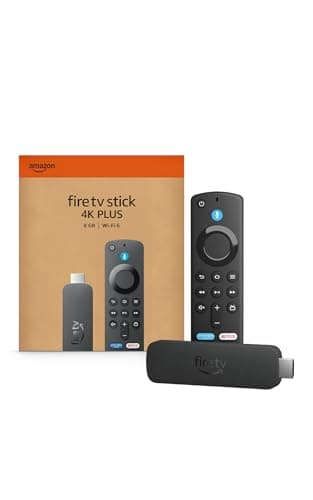
Yes — the Amazon Firestick is worth it, and the Fire TV Stick 4K is the specific model most people should buy (spend up for the 4K Max if you want Wi-Fi 6 and snappier menus, save with the HD Fire Stick if your TV isn't 4K). For under $50 it turns any HDMI TV into a smart 4K streaming machine — every major app, Alexa voice remote, setup in under 10 minutes. A tiny upgrade that punches well above its price and a perennial top seller for a reason.
The short version
Plug it into an HDMI port, connect to Wi-Fi, and an old or basic TV instantly streams Netflix, Disney+, YouTube and the rest in 4K. The voice remote means you can just ask for a show instead of pecking out titles, and it's cheap enough to put one on every TV in the house.
Pros
- Adds 4K streaming to any HDMI TV
- Voice remote — just ask for a show
- All the major apps in one place
- Cheap enough for every TV
- Quick, simple setup
- Frequent free content and deals
Cons
- Interface pushes Amazon content
- Needs decent Wi-Fi for smooth 4K
- Some apps require their own subscriptions
Why people love it
Plug it in
Pop the stick into an HDMI port and connect the power — no cables across the room.
Connect Wi-Fi
Sign in to your network and your streaming apps, and you're ready in minutes.
Just ask
Press the mic on the remote and say what you want to watch instead of typing.
Who it's for
- Anyone with a non-smart or older TV
- Cord-cutters
- Travelers wanting their apps in a hotel
- Adding streaming to a bedroom or guest TV
Is the Fire TV Stick 4K worth it, and which Fire Stick should you buy?
For turning an older or non-smart TV into a streaming machine, the Fire TV Stick 4K is one of the best-value gadgets going. It plugs into an HDMI port, connects to Wi-Fi, and within minutes you've got Netflix, Disney+, YouTube, Prime Video and the rest streaming in 4K, controlled by a voice remote so you can just ask for a show instead of pecking out titles. It's cheap enough to put one on every TV in the house.
Amazon sells a few tiers, and the choice is straightforward. If your TV is only 1080p, the standard HD Fire TV Stick is all you need and costs less. For a 4K TV, the Fire TV Stick 4K is the sweet spot for most people, while the 4K Max adds a faster processor, more storage and Wi-Fi 6 for snappier menus and better performance on a fast connection. Skip the 4K tiers entirely if your TV isn't 4K, since you'd be paying for resolution the screen can't display.
Fire TV Stick vs. Roku vs. Chromecast: which streaming device is best?
All three turn a dumb TV into a smart one and carry the major apps, so the real difference is the interface and ecosystem. The Fire TV Stick leans into Amazon — its home screen surfaces Prime Video and Amazon content prominently and pairs naturally with Alexa voice control, which is great if you're already in that world but can feel ad-heavy if you're not. Roku is generally praised for a simpler, more neutral interface that doesn't push any one service as hard.
Google's Chromecast with Google TV suits households deep in the Google and Android ecosystem and casting from a phone. The practical takeaway: pick Fire TV if you use Alexa or Prime and want the cheapest frequent deals, Roku if you want the most neutral, no-fuss menu, and Chromecast if you're a Google and Android household. Content-wise they're nearly identical, so it really comes down to which interface you'll enjoy living in every day.
How to set up your Fire TV Stick and fix common problems
Setup is genuinely a few minutes: plug the stick into an HDMI port, connect the included power adapter (use the wall adapter rather than a TV's USB port for reliable power), switch your TV to that HDMI input, then follow the on-screen prompts to join Wi-Fi and sign in to your Amazon account and streaming apps. The voice remote pairs automatically, and you'll want to set up the TV power and volume buttons so one remote runs everything.
If 4K playback stutters or buffers, the usual culprit is Wi-Fi, not the stick — smooth 4K needs a solid connection, so move your router closer or upgrade your plan if it's a regular problem. If the picture won't appear, double-check you're on the right HDMI input and that the stick is fully seated; the included HDMI extender cable helps on TVs where ports are cramped. And remember the device only runs apps — services like Netflix still need their own subscriptions, though there's plenty of free, ad-supported content too.
Our verdict · 9.8/10
See Fire TV Stick 4K on Amazon
Check the latest price, photos and buyer reviews on Amazon.
Frequently asked questions
What is amazon fire stick?
The Amazon Fire Stick (officially the Fire TV Stick) is a small streaming device that plugs into your TV's HDMI port and connects to Wi-Fi to turn any TV into a smart TV. It runs streaming apps like Netflix, Disney+, YouTube, Prime Video and Hulu, and comes with an Alexa voice remote so you can search for shows by speaking. The current 4K models add high-definition 4K streaming, and prices typically start around $30-50.
Will it work on my TV?
Any TV with an HDMI port works; for true 4K you'll want a 4K TV, though it also works on HD sets.
Do I need a subscription?
The device itself just runs apps — individual services like Netflix still need their own subscriptions, but plenty of free apps exist too.
Is setup hard?
No — plug into HDMI, connect Wi-Fi, sign in to your apps, done in a few minutes.
Does the remote really do voice?
Yes, the included voice remote lets you search and control playback by speaking.
Can I use a Fire TV Stick while traveling or in a hotel?
Yes, and it's a popular travel use. You can bring your apps and logins to a hotel TV with an HDMI port, though many hotel Wi-Fi networks use a sign-in page that the stick can't navigate directly. A common workaround is using your phone's hotspot or a travel router, so check the network type before you rely on it.
Does the Fire TV Stick come with live TV or only streaming apps?
Out of the box it runs apps, and it includes access to free, ad-supported live and on-demand channels through services like Amazon's own free tier. For traditional live TV you'd add an app like a live-TV streaming service or, on supported models, plug in an antenna setup, each of which may carry its own cost.
Is the Fire TV Stick worth it?
Yes for most households. For under $50 you turn any older or non-smart HDMI TV into a modern 4K streaming machine with every major app, an Alexa voice remote, and setup in under 10 minutes. It's the cheapest reliable way to add streaming to a bedroom, guest room or basement TV, and even people who already have a smart TV often pick one up because the interface is faster and better than what most TVs ship with. The honest reasons to skip: if you're already happy with a Roku or Apple TV you don't need to switch, and if you don't want an Amazon-forward home screen a Roku Streaming Stick 4K is more neutral. But at this price, for what it does, it's the mainstream answer.
As an Amazon Associate, TopCrate earns from qualifying purchases at no extra cost to you. Product image, price, availability and ratings are shown on Amazon and are subject to change.