TRENDING ON AMAZON
Amazon Echo Dot (Alexa) Review: Is It Worth It?
A tiny smart speaker that plays music, answers questions, sets timers and runs your smart home — all hands-free with your voice.
Quick answer: For the price, the Echo Dot is one of the most useful little gadgets you can buy — timers, music, answers and smart-home control, all hands-free. An easy first step into a smarter home.
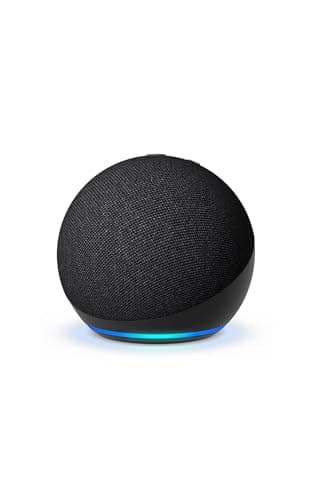
Product image from the Amazon listing.
Our verdict
For the price, the Echo Dot is one of the most useful little gadgets you can buy — timers, music, answers and smart-home control, all hands-free. An easy first step into a smarter home.
The short version
The Echo Dot is the easiest on-ramp to a smart home. Ask Alexa to play music, set timers while your hands are messy, check the weather, control smart lights and plugs, or run the kitchen. It's small, cheap, and genuinely useful from day one — which is why most people end up with more than one.
Pros & cons
Pros
- Hands-free music, timers and questions
- Controls smart lights, plugs and thermostats
- Surprisingly full sound for the size
- Cheap enough for every room
- Simple setup in the Alexa app
- Constant new skills and features
Cons
- Tied to Amazon's Alexa ecosystem
- Privacy-minded users may dislike always-listening
- Bass is limited versus larger speakers
Why people love it
Plug in and set up
Connect power, open the Alexa app, join Wi-Fi, and it's ready in minutes.
Just ask
Say 'Alexa…' to play music, set a timer, get the news or answer a question hands-free.
Run your home
Link smart bulbs, plugs and more to control them all by voice or schedule.
Who it's for
- Smart-home beginners
- Busy kitchens and hands-full moments
- Anyone who wants quick music in any room
- Households adding voice control on a budget
Is the Echo Dot worth it, and what can it actually do for you?
The Echo Dot is the cheapest, easiest way into a voice assistant, and for the price it's genuinely useful from day one. Hands-free, you can play music and podcasts, set timers and alarms while your hands are messy in the kitchen, ask questions, check the weather and news, build shopping lists, and control smart lights, plugs and thermostats. The sound is impressive for something so small — plenty for a bedroom, bathroom or kitchen — which is why most people who buy one end up with several.
It's worth being honest about the limits. The Dot is tied to Amazon's Alexa ecosystem, so it works best if you're comfortable in that world, and as an always-listening device it won't suit the most privacy-conscious buyers. The bass is limited compared to a larger speaker, so it's not your main-room music system. But as a low-cost, do-a-bit-of-everything helper in any room, very few gadgets give you this much utility for the money.
Echo Dot vs. Echo vs. Echo Dot with Clock: which one should you get?
The differences come down to sound and a couple of extras. The standard Echo Dot is the compact, affordable sphere that does everything most people need. The full-size Echo is larger and noticeably better for music, with fuller, room-filling sound — worth it if a speaker is going in a living room or anywhere you actually care about audio quality rather than just convenience and voice commands.
The Echo Dot with Clock adds a small LED display on the front that shows the time, timers, the temperature or a song title, which is genuinely handy on a nightstand or kitchen counter where glancing at the time matters. For most rooms, the regular Dot is the value pick. Choose the Clock version for bedrooms and kitchens, and step up to the full Echo only where music quality is the priority. All of them run the same Alexa, so the smart features are identical across the range.
How to set up your Echo Dot and connect smart-home devices
Getting started takes minutes: plug the Dot into power, open the Alexa app on your phone, sign in to your Amazon account, and follow the prompts to join your Wi-Fi network. From there you can pick a wake word, set your location for weather and traffic, and link music services like Amazon Music, Spotify or Apple Music so 'Alexa, play…' just works. It's useful immediately, even before you add anything else.
The Dot really comes alive when you connect smart-home gear. Smart bulbs, plugs and thermostats that support Alexa pair through the app — many newer devices using the Matter standard connect quickly — and then you control them by voice or schedule. Group devices by room so 'turn off the living room' kills several lights at once, and create routines so one phrase or a set time triggers a whole sequence, like dimming lights and playing music at bedtime. Start with a couple of smart plugs if you're new to it; they're the cheapest, most satisfying first step.
See Echo Dot on Amazon
Check the latest price, photos and buyer reviews on Amazon.
Check Price on Amazon →Sold and shipped by AmazonFrequently asked questions
What can it actually do?
Play music and podcasts, set timers and alarms, answer questions, give weather and news, make lists, and control compatible smart-home devices.
Do I need other smart devices?
No — it's useful on its own, but it shines when you add smart bulbs, plugs or a thermostat.
Is the sound good?
It's impressive for the size and great for a bedroom or kitchen; for a main room you may want a larger speaker.
Can I have more than one?
Yes — many people put one in each room and can even play music across all of them.
Can the Echo Dot make phone calls or work as an intercom?
Yes. You can call other Echo devices and Alexa app contacts hands-free, and the Drop In and Announce features let you use Echo devices around the house as a room-to-room intercom. Calling regular phone numbers is supported in some regions, so check what's available where you live.
Does the Echo Dot work without internet?
Not for its main features. Alexa relies on a cloud connection, so without Wi-Fi it can't answer questions, stream music or respond to most commands. A small number of locally processed smart-home actions may still work in limited setups, but for practical purposes the Dot needs an internet connection to be useful.
As an Amazon Associate, TopCrate earns from qualifying purchases at no extra cost to you. Product image, price, availability and ratings are shown on Amazon and are subject to change.