TRENDING ON AMAZON
Ray-Ban Meta Smart Glasses (Gen 2, Wayfarer) Review: Is It Worth It?
The smart glasses people actually wear all day — real Ray-Ban Wayfarer looks, an AI assistant, a 12MP camera and open-ear speakers built into a 48-gram frame you'd want to own even if it wasn't smart.
Quick answer: Yes — the Ray-Ban Meta (Gen 2) is worth it for anyone who takes a lot of point-of-view photos or video, travels frequently, or would replace a pair of prescription Ray-Bans anyway. The Wayfarer frame looks like normal Ray-Bans — the tech is invisible. Total weight is a hair over 48 grams (Meta glasses weight matters more than people credit — heavy smart glasses fail in daily wear). Meta AI genuinely helps for live translation and on-demand information, and the 12MP camera catches point-of-view moments a phone in a pocket misses. Battery life is the honest weakness — plan on nightly charging and keep the case in your bag. Skip if you'd only wear them for the novelty; buy if the daily uses match. The first smart glasses that people actually want to be seen wearing.
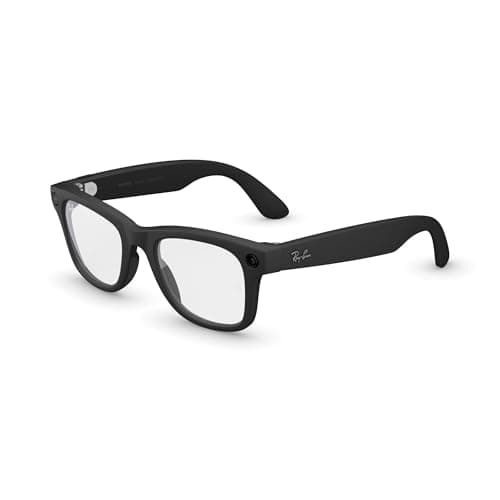
Product image from the Amazon listing.
Our verdict
Yes — the Ray-Ban Meta (Gen 2) is worth it for anyone who takes a lot of point-of-view photos or video, travels frequently, or would replace a pair of prescription Ray-Bans anyway. The Wayfarer frame looks like normal Ray-Bans — the tech is invisible. Total weight is a hair over 48 grams (Meta glasses weight matters more than people credit — heavy smart glasses fail in daily wear). Meta AI genuinely helps for live translation and on-demand information, and the 12MP camera catches point-of-view moments a phone in a pocket misses. Battery life is the honest weakness — plan on nightly charging and keep the case in your bag. Skip if you'd only wear them for the novelty; buy if the daily uses match. The first smart glasses that people actually want to be seen wearing.
The short version
Ray-Ban Meta is the pair of smart glasses that finally made the category work, and the Gen 2 refresh sharpened the whole formula. The Wayfarer frame is a genuine Ray-Ban silhouette (people compliment the glasses, not the tech), the total weight is a hair over 48 grams so they don't fatigue your nose, and inside are stereo open-ear speakers, five directional mics, a 12MP camera on the left temple and Meta's AI assistant you summon by saying 'Hey Meta.' Practical daily uses: hands-free photo and video capture that's noticeably better than a phone at eye-level moments, live translation of a menu or a conversation, music and calls without earbuds, and 'what am I looking at' AI answers for landmarks, plants and products. Not perfect — the camera privacy indicator is small, battery lasts a few hours of active use, and the display-less design means all output is audio. But at $379-459 depending on frame, they're the first pair of smart glasses people wear because they like wearing them.
Pros & cons
Pros
- Real Ray-Ban Wayfarer looks — the tech is invisible
- Only 48 grams, comfortable for hours
- Stereo open-ear speakers and five-mic array for calls and music
- 12MP camera captures point-of-view stills and 1080p video
- Meta AI answers 'what am I looking at' and translates on the fly
- Prescription and transitions lens options available
Cons
- Battery lasts a few hours of heavy use — the case tops it up
- No visual display (audio-only output)
- Small privacy indicator light is easy to overlook indoors
Why people love it
Wear like normal glasses
They pair with the Meta AI app on your phone over Bluetooth and Wi-Fi. Put them on, and the tech runs quietly in the background — you look and feel like you're wearing standard Ray-Bans.
Talk to Meta AI hands-free
Say 'Hey Meta' to ask questions, translate a phrase, get a quick summary, or take a photo. The five-mic array picks up your voice cleanly even outside.
Capture without a phone
Tap the temple button to shoot a photo or roll video of exactly what you're seeing — the camera sits above the left lens. Media syncs to the app for editing and sharing.
Who it's for
- Anyone who takes a lot of point-of-view photos and video
- Travelers who want on-the-fly translation and landmark ID
- Prescription-glasses wearers ready to upgrade
- People who prefer open-ear audio to earbuds
Why Ray-Ban Meta finally made smart glasses work when Google Glass didn't
Google Glass launched a decade earlier with a full display, a distinctive prism above the eye, and a clear message that you were wearing a computer on your face. It got called 'Glasshole' at bars, banned from restaurants, and the entire category stalled for years. Meta's insight in partnering with Ray-Ban was to invert that formula: hide almost every piece of the tech, deliver most of the value through audio and AI, and let the frame be a genuine Ray-Ban that people would want to wear even if it wasn't smart. There's no display, no visible prism, and the camera is small enough that most people don't notice it. That single design choice — being glasses first and technology second — is why Ray-Ban Meta is the first smart glasses product that broke through to mainstream buyers.
The Gen 2 refresh (released in 2026) sharpened every dimension without changing the formula: 4 grams lighter (48g total), 12MP camera up from 5MP, sharper stereo speakers, faster Meta AI with fewer hallucinations, and better wind noise handling on the mics. Battery got slightly better on paper (still not great in practice). Frame lineup expanded to include the sportier Oakley Meta HSTN and Vanguard for cyclists and runners. The upgrade is real if you're buying new; Gen 1 owners can safely wait for Gen 3. What isn't changing is the category philosophy: don't try to replace the phone, augment it hands-free. That's the lane that finally worked. For phone-in-hand photography and short-video capture, a dedicated camera phone remains the better tool — pair the Ray-Ban Meta with the case's supplemental battery and a solid phone.
Ray-Ban Meta vs Apple Vision Pro vs Amazon Echo Frames: what fits which use
Three very different products in adjacent categories. Apple Vision Pro is the immersive mixed-reality headset — $3,499, tethered essentially to a home or office setting, transformative for spatial computing and virtual displays, but not something you wear to lunch. Amazon Echo Frames are audio-only smart glasses with no camera, focused on hands-free Alexa access — cheaper (around $200), lighter, but functionally a wearable speaker with an eyewear form factor rather than a full smart glasses experience. Ray-Ban Meta sits in the practical middle: real glasses you wear all day, camera plus AI plus audio, priced between them. For $379-459, it's the everyday smart-glasses answer for most people who don't want a Vision Pro at home and want more than an audio-only wearable.
Category rule of thumb: Vision Pro for at-home spatial computing and immersive media, Echo Frames if you want a cheap hands-free audio wearable and don't care about the camera, Ray-Ban Meta for genuine daily-wear smart glasses with capture and AI. Meta's ecosystem also plays nicer with Instagram, WhatsApp and Facebook Messenger, which matters if you're already deep in Meta's apps. For iPhone users who mostly live in iMessage and iCloud, everything still works, but expect a few small syncing quirks. For Android and Instagram-heavy users, the integration is smoother. Skip the earbuds when you wear these; the open-ear speakers are better for situational awareness during a walk, a bike ride or a store.
How to actually get value from Ray-Ban Meta in daily life
The people getting the most value from Ray-Ban Meta share a few habits worth copying. First, they treat the glasses as a hands-free capture tool for moments a phone would miss — a kid's first steps, a bike ride through a new city, a hands-covered-in-flour moment cooking, a conversation with a landmark behind you. They use the temple button, not the voice command, for capture, because the button is faster and doesn't broadcast the shot. Second, they lean into Meta AI for on-demand information rather than pulling out a phone — 'what type of tree is that,' 'read me the menu specials,' 'translate this sign,' 'how long is that building.' The habit of asking hands-free changes what you notice around you.
Third, they charge the case nightly and keep the case in a bag whenever they leave the house — the case adds several full recharges and turns the battery weakness into a non-issue for day trips. Fourth, for prescription users, they pair with a solid daily-use protective case and treat the frame like premium eyewear, not a fragile electronic — Ray-Ban Meta's build is genuine Ray-Ban quality and takes daily wear well, but the electronics inside don't love drops. And for social use, they normalize the LED indicator by treating it as camera etiquette — in restaurants, quiet spaces, or around kids that aren't yours, they lift the glasses onto their head like sunglasses when the camera might feel intrusive. That etiquette is what keeps the category socially acceptable. Round out the daily-carry with a compact battery bank like the Anker Nano 30W for the case charging on the road, and a genuine everyday case for the glasses when they're off your face.
See Ray-Ban Meta on Amazon
Check the latest price, photos and buyer reviews on Amazon.
Check Price on Amazon →Sold and shipped by AmazonFrequently asked questions
How much do the Ray-Ban Meta glasses weigh, and are they comfortable to wear all day?
48 grams total for the Wayfarer frame — about 4 grams lighter than Gen 1, and comparable to a mid-weight pair of standard Ray-Ban sunglasses. In practical terms, Meta glasses weight is one of the specific reasons Ray-Ban Meta broke through where earlier smart glasses failed: the tech doesn't add enough mass for you to notice by lunchtime. Most owners wear them 6-10 hours a day without the nose-bridge pressure heavier smart-glasses designs cause. The trade-off is battery life — packing more electronics into a lighter frame means smaller batteries, so plan on nightly charging in the case. If you already comfortably wear traditional Ray-Bans daily, the Meta version will feel essentially identical after a few days of getting used to the temple-mounted camera and speakers.
Are Ray-Ban Meta smart glasses worth $379?
Yes if the daily uses match yours, no if you'd only wear them for the novelty. The three usage patterns that pay them off: (1) hands-free capture — parents, cyclists, cooks, travelers who miss shots because a phone is in their pocket. (2) frequent traveler — live translation of menus and signs, on-demand landmark and food-item ID, calls and music without earbuds. (3) prescription-glasses wearer — replacing your daily Ray-Bans anyway, with the tech mostly hidden and free. If you're none of those, they're a $379 gadget with a battery that fades in a few hours, and you're better served by a phone plus earbuds. The Gen 2 is meaningfully better than Gen 1 (4 grams lighter, sharper camera, faster Meta AI), so shop for current-gen rather than discounted originals.
Ray-Ban Meta Wayfarer vs Skyler vs Headliner vs Oakley HSTN: which frame should I pick?
Wayfarer is the classic and most face-shape-neutral — the default recommendation. Skyler is smaller and more cat-eye, better for narrower faces or people who want a slightly more modern look. Headliner is a slightly softer round-corner variant, popular with people who find Wayfarer too angular. The Oakley Meta HSTN and Vanguard are the sport-focused cousins built for cycling and running, with wraparound coverage and better wind protection but a decidedly sporty look. For daily wear, Wayfarer or Headliner. For narrow faces, Skyler. For active use, Oakley HSTN. Meta and Ray-Ban keep expanding the frame lineup — check the current selection before committing.
How long does the battery actually last?
About 4 hours of active use (music, camera, occasional Meta AI) or up to 8 hours if you're wearing them mostly passively for audio prompts and rare capture. The charging case adds several full recharges, so a day of travel with the case in your bag is comfortable. Heavy video capture (which pushes both camera and processor hard) drains the battery fastest — expect roughly an hour of continuous 1080p recording. Battery life is the honest weak point; charge them nightly and keep the case with you and it stops being a problem.
Can I get prescription lenses in the Ray-Ban Meta?
Yes, and this is one of the strongest use cases. Ray-Ban Meta accepts prescription lenses through Ray-Ban's own service and most third-party opticians who handle premium frames. Single-vision, progressives and photochromic (transition) lenses all fit. If you already wear glasses daily, replacing your existing Ray-Bans (or similar frames) with a prescription Meta pair means the smart tech comes essentially free with a frame upgrade you'd have made anyway. Budget for prescription costs on top of the frame price — expect $100-300 more depending on your prescription and lens type.
What can Meta AI actually do through the glasses?
The genuinely useful daily uses: (1) 'Hey Meta, what am I looking at' identifies landmarks, plants, menu items, storefronts and products. (2) Live translation of speech in eight languages — useful in restaurants, taxis and shops abroad. (3) On-the-fly summaries of long text or menus you're looking at. (4) Hands-free messaging, calls, music control and photo capture. (5) Quick factual questions ('how tall is that building') without pulling out a phone. What it doesn't do: display anything visually (audio-only output), open apps, or replace a phone for anything beyond quick capture and quick answers. Think of Meta AI here as a hands-free voice assistant with a camera, not a wearable smartphone.
How obvious is the camera privacy indicator when I'm shooting?
There's a white LED on the front of the right temple that lights up whenever the camera is active — for photo capture and video recording. In bright daylight it's visible but small; indoors it's clearly on. Meta has published guidance on courteous use, and the etiquette in most public settings is the same as any camera: be aware of the space, don't film people who haven't consented, and be transparent about capture. The indicator is a genuine feature, but it's not billboard-obvious, so behave like you're holding a phone camera up in the same setting.
As an Amazon Associate, TopCrate earns from qualifying purchases at no extra cost to you. Ray-Ban Meta is a consumer electronics product with built-in camera; use responsibly and respect local privacy laws. Product image, price, availability and ratings are shown on Amazon and are subject to change.