TRENDING ON AMAZON
Google Nest Learning Thermostat (4th Gen) Review: Is It Worth It?
The smart thermostat that learns your schedule, lowers your heating bill, and looks better than the beige plastic dial it replaces.
Quick answer: The Nest Learning Thermostat has been the smart-thermostat default for over a decade because the product delivers: real energy savings, a genuine auto-scheduling experience nobody else matches, and a design that earns its space on a wall. If your HVAC is compatible, this is the easy answer.
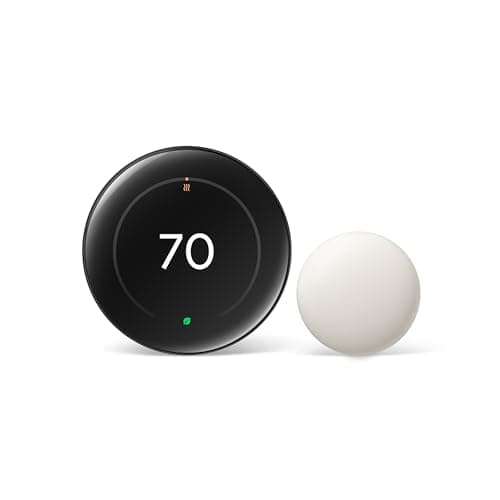
Product image from the Amazon listing.
Our verdict
The Nest Learning Thermostat has been the smart-thermostat default for over a decade because the product delivers: real energy savings, a genuine auto-scheduling experience nobody else matches, and a design that earns its space on a wall. If your HVAC is compatible, this is the easy answer.
The short version
The Nest is the smart thermostat people quote when they say smart homes pay for themselves. It learns your daily temperature preferences over the first week, builds an auto-schedule, senses when nobody's home, and uses energy reports to nudge you toward Energy Star-saving habits. Google says the average household saves 10-12% on heating and roughly 15% on cooling — enough to recoup the unit's cost within about two years for most homes. Installation is genuinely 20-30 minutes for a typical homeowner with a Phillips screwdriver and the included trim plate.
Pros & cons
Pros
- Auto-learns your schedule in about a week
- Geofencing turns the system down when nobody's home
- Reports estimate annual energy savings of 10-15%
- Beautiful machined-stainless ring and color display
- Works with Alexa, Google Assistant and Apple Home (via Matter on 4th gen)
- Compatible with most 24V residential HVAC systems
Cons
- Not compatible with high-voltage or millivolt heating systems
- Requires a 'C' wire (or the included power connector)
- Higher upfront cost than basic programmable thermostats
Why people love it
Install in 20-30 minutes
Turn off the breaker, snap a photo of your existing wiring, attach the Nest base plate, transfer the wires, and click the Nest onto the base.
Train it for a week
Adjust the temperature manually as you like for the first few days. The Nest learns your patterns and starts auto-scheduling without you setting a calendar.
Save automatically
Once a schedule is built, geofencing and presence detection drop the temperature when you're out, the Leaf icon nudges you toward efficient settings, and monthly energy reports show what you saved.
Who it's for
- Anyone with a forced-air HVAC system and a Wi-Fi network
- Households where people leave and return at varying times
- Renters with landlord permission to swap a wall thermostat
- Vacation homes where remote temperature control matters
Nest Learning Thermostat vs Ecobee vs Honeywell T9: which smart thermostat to buy
The three smart thermostats people compare are Nest Learning, Ecobee Smart Premium, and Honeywell Home T9. The Nest's standout strengths are the auto-learning algorithm (which builds your schedule without you programming it) and the design — the machined stainless ring genuinely looks high-end on a wall. It integrates beautifully with Google Home and (on 4th gen) Apple Home via Matter. The catch is no temperature sensors in other rooms; if you want multi-room balancing, look at Ecobee.
Ecobee Smart Premium ships with one remote room sensor and supports adding more, so the thermostat can average the temperature between, say, an upstairs bedroom and a downstairs hall. It also has built-in Alexa (acts as an Echo Dot), an air-quality sensor, and SmartSensor support. Honeywell T9 also offers room sensors at a lower price but with less polish in the app. For a single-zone home or condo, Nest is the prettier and easier choice; for a two-story home with hot/cold spots, Ecobee with multiple sensors solves a real problem Nest can't. Choose based on whether you need multi-room sensing.
How much does the Nest thermostat really save (and how to maximize it)
Google's published averages (10-12% heating, 15% cooling, around $130-145 saved per year) are based on independent studies of real households. Your actual savings vary by climate, home insulation, current usage habits and energy prices. The biggest savings come from two behaviors the Nest automates: setting back temperatures during sleep (down 7-10°F in winter, up 7-10°F in summer) and not heating/cooling an empty house. If you already manually did both, your savings will be smaller. If you set-and-forgot a single temperature year-round, savings can hit 20% or more.
To maximize savings, give the Nest a clean 'home/away' picture — keep geofencing enabled on family members' phones so Eco mode triggers reliably when the house is empty. Use the Energy History tab monthly to spot unusual usage, and follow the 'Leaf' icon when adjusting — it appears on temperature setpoints that save energy and is calibrated to your home. Use Seasonal Savings (Google's annual nudge program) when prompted; it tweaks setpoints by 1° at a time and most households don't notice the change but cut bills further.
Nest installation troubleshooting: C-wires, heat pumps and common gotchas
The most common Nest install problem is missing 'C' (common) wire — the wire that provides constant 24V power to keep the Wi-Fi radio alive. Modern Nest Learning Thermostats include a Power Connector that mounts at your HVAC unit and uses your existing R, W and Y wires to deliver power, eliminating the need for a C wire in most no-C-wire homes. Installation is 15 extra minutes at the furnace. If your system is pre-2000 millivolt or runs at 120V/240V (electric baseboard, boiler with no transformer), the Nest won't work and you need a different thermostat — Google's compatibility checker catches this before you buy.
Heat pump owners: the Nest supports both regular heat pumps and dual-fuel systems (heat pump primary + gas backup), but you must configure the system type during setup so the Nest doesn't engage auxiliary heat unnecessarily. The default 'Lockout Temperature' is conservative and runs aux heat too often in mild weather — adjust it down to 30-35°F manually for proper heat-pump efficiency. If you have a humidifier, dehumidifier or zone valve system, double-check the wire diagrams; the Nest supports them but the W2/O/B terminal assignments differ from non-zoned systems and following the app's photo-based wiring guide carefully matters.
See Nest Learning Thermostat on Amazon
Check the latest price, photos and buyer reviews on Amazon.
Check Price on Amazon →Sold and shipped by AmazonFrequently asked questions
Will the Nest Learning Thermostat work with my HVAC system?
It works with most 24V residential HVAC systems: forced-air gas/oil/electric heat, central AC, heat pumps with or without auxiliary heat, dual-fuel systems, and 1- or 2-stage cooling. It does NOT work with high-voltage line-voltage baseboard heating (120V/240V), millivolt systems, or proprietary systems without a 'C' (common) wire — though Nest includes a Power Connector that works in many no-C-wire homes. Google's online compatibility checker (you enter your existing thermostat wires) takes 2 minutes and gives a definitive answer.
How much money does the Nest thermostat actually save?
Google's independent studies put average savings at 10-12% on heating and 15% on cooling, which works out to around $130-145 per year for the average US home. The exact savings depend heavily on how much you adjusted your old thermostat (if you already turned it down before leaving the house, your Nest savings will be smaller; if you set-and-forgot, they'll be larger). For most homes, the Nest pays for itself within 2 years. After that it's pure savings, plus the convenience of remote control and scheduling.
Do I need a smart-home hub or subscription for the Nest?
No. The Nest connects directly to your home Wi-Fi and to the free Google Home app on your phone — no hub, no subscription required for the core thermostat features (scheduling, remote control, energy reports, geofencing). A Nest Aware subscription exists for the Nest camera and doorbell products, but the thermostat doesn't need it. All standard thermostat features remain free for the life of the device.
Is the Nest hard to install? Can I do it myself?
For a typical homeowner with a Phillips screwdriver and 30 minutes, installation is genuinely DIY-friendly. The Nest app walks you through it step-by-step: turn off your HVAC breaker, take a photo of your existing wiring for reference, attach the Nest base plate to the wall, transfer the labeled wires to matching terminals, snap the Nest display onto the base. Where it gets tricky is no-'C'-wire homes (where you may need the included Power Connector or in rare cases a professional adapter), so use the compatibility checker first.
Does Nest work with Apple HomeKit / Apple Home?
Yes, on the 4th generation Nest Learning Thermostat (released 2024) via Matter. Earlier generations don't have native HomeKit support — you'd need a third-party bridge like Homebridge. If Apple Home is your hub, make sure the listing says '4th gen' and 'Matter compatible.' For Alexa and Google Home users, every Nest generation supports voice and routine integration out of the box.
What's the difference between Nest Learning Thermostat and Nest Thermostat (the cheaper one)?
The Nest Learning Thermostat (this one) is the premium model with the machined stainless ring, large color HD display, full auto-learning algorithm, far-field display that lights up when you walk past, and Farsight feature that shows weather/time across the room. The plain 'Nest Thermostat' (no Learning) is the budget version with a plastic body, smaller display, and a schedule you build via the app rather than auto-learned. Same Wi-Fi connectivity. If you want the iconic 'sets itself' experience, get the Learning Thermostat; the basic Nest Thermostat is fine for vacation homes or rentals.
As an Amazon Associate, TopCrate earns from qualifying purchases at no extra cost to you. Product image, price, availability and ratings are shown on Amazon and are subject to change. Energy savings figures reflect Google's published averages and vary by household.