TRENDING ON AMAZON
TP-Link Kasa Smart Wi-Fi Plug (4-Pack) Review: Is It Worth It?
The cheapest, easiest way into a smart home — plug it in, name it, and run anything that has an on/off switch from your phone or voice.
Quick answer: If you've ever thought 'I should make my house a little smarter,' start here. A 4-pack of Kasa Smart Plugs is the cheapest, lowest-friction way to bring scheduling and voice control to anything with a plug — and it'll quietly pay for itself the first week.
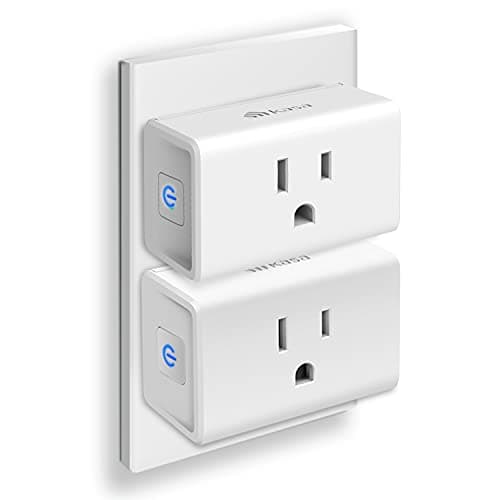
Product image from the Amazon listing.
Our verdict
If you've ever thought 'I should make my house a little smarter,' start here. A 4-pack of Kasa Smart Plugs is the cheapest, lowest-friction way to bring scheduling and voice control to anything with a plug — and it'll quietly pay for itself the first week.
The short version
Most people's first smart-home upgrade isn't a fancy thermostat or a doorbell — it's a $25 multipack of Kasa plugs. Pop one into any outlet and the lamp, fan, coffee maker or holiday lights plugged in suddenly become voice-controlled, scheduled and remote-accessible. Works with Alexa and Google Assistant, runs on regular 2.4GHz Wi-Fi without a separate hub, and the Kasa app is genuinely simple. It's the lowest-friction smart-home win you can buy.
Pros & cons
Pros
- No hub required — works over regular 2.4GHz Wi-Fi
- Works with Alexa, Google Assistant and Samsung SmartThings
- Schedule, timer and away-mode automation built in
- Compact enough to leave the second outlet free
- Energy-monitoring on the EP25/KP125 models
- 4-pack is the best price per plug on Amazon
Cons
- 2.4GHz Wi-Fi only — not 5GHz
- Setup needs the Kasa app and a few minutes per plug
- Not HomeKit-native on most older models
Why people love it
Plug it in
Slot the Kasa plug into any standard outlet and plug your lamp, fan, coffee maker or holiday lights into it.
Pair in the app
Open the Kasa app on your phone, scan for the new plug and connect it to your 2.4GHz Wi-Fi in a couple of taps.
Control it anywhere
Toggle on/off from your phone, set schedules and away-mode, or say 'Alexa, turn on the lamp' from across the room.
Who it's for
- Smart-home beginners
- Renters who can't rewire switches
- Anyone with a lamp they wish was scheduled
- Holiday-lights and away-from-home control
Is the Kasa Smart Plug worth it, or should you wait for Matter?
For a $5-to-$8-per-plug device, the Kasa Smart Plug pays back its cost the first time you schedule a lamp to come on at sunset instead of leaving the house dark, or shut off a curling iron from the airport. The hardware is a known quantity — TP-Link has been making these for years, and the failure rate in user reviews is genuinely low. Pair that with the simplest setup in the smart-plug category (no hub, no soldering, no rewiring) and it's the no-brainer entry point that's been at the top of Amazon's smart-plug category for nearly a decade.
The fair question right now is Matter, the new smart-home standard that lets a single plug work across Alexa, Google, Apple Home and SmartThings without separate integrations. TP-Link does make Matter-certified Kasa models, so if Apple HomeKit support is important to you or you want maximum future-proofing, look specifically for 'Matter' on the listing. For the average Alexa or Google household, though, the standard Kasa plugs already do everything you'd want and cost less — there's no reason to wait.
Kasa Smart Plug vs Amazon Smart Plug vs Wyze: which one to buy
Kasa, Amazon's own Smart Plug, and Wyze are the three Wi-Fi smart plugs people actually compare. The Amazon Smart Plug is the most seamless option for Alexa-only households — it sets up with a tap inside the Alexa app and just works. The downside is it only works with Alexa, no Google support and no Kasa-style scheduling outside of Alexa Routines.
Kasa wins on flexibility: it works with Alexa, Google and SmartThings, has a richer standalone app with timers and away-mode, and includes the same compact design so you can stack two plugs in one duplex outlet. Wyze plugs are the cheapest per unit and have the most basic feature set; they're fine for budget shoppers in a Wyze-heavy home. For the broadest compatibility and the smartest app at a fair price, Kasa is the default recommendation, which is exactly why it tops the bestseller list.
Smart-home automation ideas that pay off the Kasa plug instantly
The fastest win is scheduling a lamp to turn on around sunset and off around bedtime — your house never feels dark after a long day, and it works while you're traveling too. Pair that with an Alexa 'good morning' routine and the coffee maker can start brewing as your alarm goes off without any extra hardware. A plug under the holiday tree means the lights come on at 5pm and off at 11pm automatically, no more crawling behind the couch.
Less obvious uses are some of the most useful. Plug a space heater into a Kasa plug and set a 30-minute timer so you never forget to turn it off. Use one on the iron or curling iron for the same reason — peace of mind from anywhere via the app. Set an 'away' randomization that turns lamps on and off at varying times to make the house look occupied while you travel. The plug itself is dumb hardware; the value is in the small routines you stop having to think about.
See Kasa Smart Plug on Amazon
Check the latest price, photos and buyer reviews on Amazon.
Check Price on Amazon →Sold and shipped by AmazonFrequently asked questions
Do I need a hub to use a Kasa Smart Plug?
No. Unlike Zigbee or Z-Wave plugs, Kasa runs over your existing home Wi-Fi, so the only things you need are the plug, your router and the free Kasa app on your phone. That's a big part of why it's the go-to first smart-home device.
Does Kasa work with Alexa, Google and Apple HomeKit?
It works natively with Amazon Alexa and Google Assistant, and most models work with Samsung SmartThings. HomeKit support is limited — Apple users typically pair Kasa through the Home Assistant or Matter ecosystems, or pick a Matter-certified Kasa model.
Why does Kasa only work on 2.4GHz Wi-Fi?
2.4GHz has longer range and better wall penetration than 5GHz, which matters for tiny IoT devices scattered around a house. If your router broadcasts both bands under one name and only your phone sees 5GHz, you may need to temporarily split the bands or use the 'Forget 5GHz' workaround during pairing.
Can the Kasa Smart Plug track energy use?
Some models (notably the EP25 and KP125) include built-in energy monitoring, so the Kasa app shows watt-hours and cost estimates for whatever is plugged in. Basic models like the EP10 do not — check the specific model number before buying if energy monitoring matters.
Is it safe to use a Kasa plug with a space heater or air conditioner?
Kasa smart plugs are rated for standard household 15A loads, which is enough for most lamps, fans, small appliances and even most space heaters. Always check the wattage stamped on your appliance — large window AC units and high-wattage heaters can exceed the rating, in which case you should use a heavy-duty smart plug instead.
Will the Kasa plug still work if my internet goes down?
Manual on/off via the button on the plug always works. Local schedules and timers continue running because they live on the plug itself. What you lose during an outage is remote control from the app and voice assistants, which both need cloud connectivity — everything reconnects automatically once Wi-Fi returns.
As an Amazon Associate, TopCrate earns from qualifying purchases at no extra cost to you. Product image, price, availability and ratings are shown on Amazon and are subject to change.