TRENDING ON AMAZON
Govee Smart Wi-Fi RGBIC LED Strip Lights Review: Is It Worth It?
Color-changing RGBIC LED strips you control from your phone or voice — the smart lighting upgrade that goes from 'cool' to 'I can't believe I lived without this.'
Quick answer: Govee turned LED strip lights from a hobby project into a one-tap smart-home upgrade. The RGBIC effects, app polish and Alexa/Google integration set them apart from cheaper strips, and the price is approachable enough to put them in every room. The biggest 'wow per dollar' smart home thing you can buy.
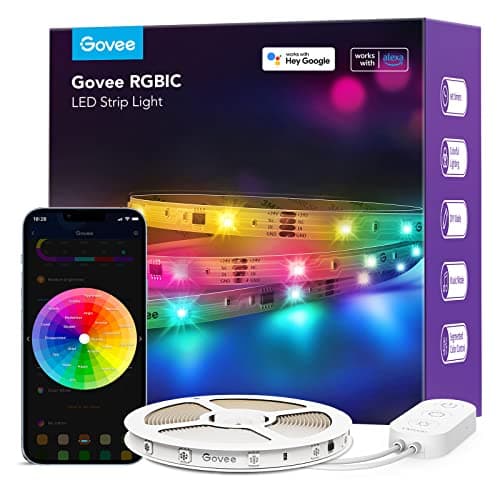
Product image from the Amazon listing.
Our verdict
Govee turned LED strip lights from a hobby project into a one-tap smart-home upgrade. The RGBIC effects, app polish and Alexa/Google integration set them apart from cheaper strips, and the price is approachable enough to put them in every room. The biggest 'wow per dollar' smart home thing you can buy.
The short version
Govee built its reputation on RGBIC LED strips that do something cheaper light strips can't: each segment can display a different color at the same time, enabling effects like running rainbows, gaming sync, and music-reactive patterns. The strips come in 16-foot rolls (and longer), peel-and-stick to the back of a TV, under cabinets, behind a desk or up a stairwell, and pair with the Govee Home app over Wi-Fi for scheduling, scenes and voice control via Alexa and Google. They're the easiest smart-home upgrade with the biggest 'wow' return — which is why TikTok keeps showing them off.
Pros & cons
Pros
- RGBIC chips display multiple colors per strip simultaneously
- Wi-Fi + Bluetooth — no hub required
- Music sync, gaming sync and 60+ preset scenes in the Govee app
- Works with Alexa, Google Assistant and many ecosystems via Matter on newer models
- Peel-and-stick installation in under 10 minutes
- Cuttable to length with included connectors
Cons
- Adhesive can fail on textured or dusty surfaces (use 3M VHB tape as backup)
- Cheaper strips lose brightness over a couple of years
- Govee's app can feel busy with too many scenes
Why people love it
Stick it up
Plan the run, wipe the surface clean, then peel the backing and press the strip down — corners use the bundled bend clips.
Pair with the app
Plug in, open the Govee Home app, and add the device over Wi-Fi or Bluetooth in under a minute.
Pick a scene or build your own
Use a preset (sunrise, gaming, movie), sync to music via the on-board mic, or create custom multi-color patterns and schedules.
Who it's for
- TV backlight bias-lighting for movies
- Gaming desks and computer rigs
- Under-cabinet kitchen accents
- Bedrooms, kids' rooms, dorms
Govee LED strips vs Philips Hue Lightstrip vs Nanoleaf: what to buy
Philips Hue Lightstrip Plus is the premium option — color accuracy is noticeably better, the integration with Hue's broader ecosystem (bulbs, lamps, hubs, motion sensors) is unmatched, and the build quality is highest. The downsides are a much higher per-foot price, the need for a Hue Bridge hub (or recent direct-Bluetooth-only models with reduced features), and that Hue strips are single-zone (not RGBIC) on most models. For people deep into the Hue ecosystem, Hue makes sense; for everyone else, the price-to-effect ratio is rough.
Nanoleaf is a different product entirely (modular wall panels, not strips). The closest Nanoleaf strip product is also pricier than Govee and harder to install in flexible runs. Govee wins on price, length per dollar, RGBIC support, and effect variety in the app. Color accuracy is slightly behind Hue but not in any way most people would notice. If you want one strip for a TV backlight or under a desk and you don't already have Hue, Govee is the clear value pick — and it's why TikTok and YouTube install videos are all Govee.
Best places to install Govee LED strips (with installation tips)
The single highest-impact spot is behind a TV as bias lighting. It softens the contrast between a bright screen and a dark room (which reduces eye fatigue), makes the picture look more vibrant, and adds a 'glowing TV' effect that looks far more expensive than it costs. Use a 16-foot RGBIC strip cut to fit the perimeter of the TV's back, plug into a powered USB port on the TV so it switches on with the screen, and set a warm-white scene for movies or a music-sync scene for parties.
Other high-return locations: under upper kitchen cabinets (warm white for ambiance, color for entertaining), behind a computer monitor at a desk (same eye-fatigue and aesthetic benefits as the TV setup), along stairs as a guided path light at night (set a motion-triggered scene with a separate sensor), and around a bed headboard for reading. Avoid: above doorways where they trap dust, inside cabinets that get hot, and outdoor exposed areas unless you buy the IP65-rated outdoor Govee strips specifically.
How to keep Govee LED strips looking great long-term
The adhesive is the part that most often fails. Before sticking the strip, wipe the surface completely free of dust and oils with isopropyl alcohol and let it dry fully — a clean surface roughly triples the adhesive bond. On textured surfaces (popcorn ceiling, brick, rough drywall), the stock adhesive will fail no matter what; use 3M VHB double-sided tape under the strip or small clear mounting clips spaced every 6-12 inches. If a section peels months later, don't pull harder — re-stick it with a small piece of fresh VHB tape rather than removing and reusing the failing adhesive.
For the LEDs themselves, brightness gradually dims over years of use (5-10% per year is normal). To maximize life, run them at 70-80% brightness rather than always-on full blast — the difference in perceived light is small, the lifespan boost is meaningful. Avoid bending strips at sharper than 90-degree angles, which can crack the chip controllers. And update the Govee app's firmware when it prompts you — Govee has rolled out genuine reliability and feature improvements via firmware over the years.
See Govee LED Strip on Amazon
Check the latest price, photos and buyer reviews on Amazon.
Check Price on Amazon →Sold and shipped by AmazonFrequently asked questions
What does RGBIC mean and why does it matter on Govee strips?
RGBIC stands for RGB plus an integrated chip (IC). Standard RGB strips display only one solid color across the entire length at a time. RGBIC strips contain segmented IC controllers that let each section show a different color simultaneously, enabling effects like running rainbows, color-flowing gradients, and music-reactive zones. If you're spending a few extra dollars, RGBIC is the upgrade — it's the difference between a strip that's basically a colorful nightlight and one that does the actual viral effects.
Do Govee LED strips need a hub or special bridge?
No. Govee strips connect directly to your 2.4GHz home Wi-Fi (and most models also support Bluetooth as a backup), and pair with the free Govee Home app on iOS or Android. There's no separate hub like Philips Hue requires. Newer Matter-compatible Govee models also work natively across Apple Home, Alexa, Google Home, and SmartThings without any extra hardware.
Can I cut Govee LED strips to fit my space?
Yes. Govee strips have visible cut marks (small scissor icons) every 4 inches or so where you can safely cut the strip to length. The cut end remains functional. Govee also sells connector clips and extension cables so you can join multiple sections around corners, run them up walls, or extend a strip if you bought too short. Plan and measure first — measure twice, cut once.
How long do Govee LED strips last and do they get hot?
The LEDs themselves are rated for 25,000-50,000 hours of use, which is over a decade at normal nightly use. The strips run warm to the touch but never hot — they don't pose a fire risk on normal surfaces, though Govee recommends not installing them inside fully sealed enclosures where heat can build up. The most common failure isn't the LEDs but the adhesive backing peeling off textured walls; use 3M VHB tape or small clear mounting clips if your surface is rough.
Will Govee strips work with Alexa, Google Home, and Apple HomeKit?
Alexa and Google Assistant: yes, natively, on virtually every Govee strip — voice on/off, color changes, scene activation. Apple HomeKit: only on newer Matter-certified Govee models (look for the Matter logo). If you're in an Apple Home household and HomeKit support matters, filter Amazon for 'Govee Matter' and pick from those models. Otherwise the standard Wi-Fi Govee strips cover everything Alexa and Google users need.
Are Govee LED strips safe to leave on all night?
Yes. They draw very little power (about 15-30 watts for a 16-foot strip on full brightness, far less than a single incandescent bulb), run cool to mildly warm, and have built-in protection against over-current. Many users leave them on dim warm-white as a night-light or run sleep-mode color cycles. Schedules in the Govee app can fade them off at a set time if you'd rather not leave them on overnight.
As an Amazon Associate, TopCrate earns from qualifying purchases at no extra cost to you. Product image, price, availability and ratings are shown on Amazon and are subject to change.