TRENDING ON AMAZON
Apple iPad Review: Is It Worth It?
The tablet everything else gets compared to — fast, gorgeous screen, all-day battery and the biggest app library, for browsing, streaming, notes and more.
Quick answer: The iPad remains the tablet to beat — fast, beautiful, long-lasting and backed by the best app library. For browsing, streaming, notes and everything in between, the standard model is the easy recommendation.
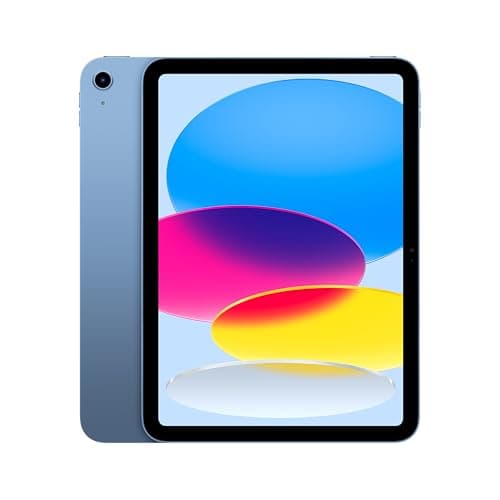
Product image from the Amazon listing.
Our verdict
The iPad remains the tablet to beat — fast, beautiful, long-lasting and backed by the best app library. For browsing, streaming, notes and everything in between, the standard model is the easy recommendation.
The short version
Tablets are a crowded space and the iPad still wins it. The screen is crisp, performance is quick even years in, battery lasts all day, and the app ecosystem is unmatched — from streaming and reading to notes, drawing and light work with the keyboard and pencil accessories. For most people, the standard iPad is the right amount of tablet for the money.
Pros & cons
Pros
- Crisp, bright display
- Fast and smooth for years
- All-day battery life
- The largest, best tablet app library
- Great for streaming, reading and notes
- Works with keyboard and pencil accessories
Cons
- Accessories add up quickly
- Base storage fills fast for some
- Not a full laptop replacement
Why people love it
Set it up in minutes
Sign in and your apps, photos and accounts sync over from your other Apple devices.
Do a bit of everything
Stream, browse, read, take notes, video call and play — all on one screen.
Add accessories if you want
Pair a keyboard or pencil to turn it into a light work and creativity device.
Who it's for
- Anyone wanting a do-everything tablet
- Students for notes and reading
- Streaming and browsing on the couch
- Kids, travel and creative hobbies
Which iPad should you buy? Standard vs Air vs Pro vs mini
For the large majority of people, the standard iPad is the right call: it handles streaming, browsing, reading, notes, video calls and games smoothly, the screen looks great, and it costs far less than the higher tiers. Step up to the iPad Air if you want a faster chip, a laminated display that feels more premium for drawing, and support for the better Apple Pencil — it's the sweet spot for hobbyist artists and note-takers who want more than the base model without going full Pro. The iPad mini is the pick if portability is everything and you want a tablet that fits in a jacket pocket or one hand.
The iPad Pro is genuinely overkill for most buyers. It targets professionals doing serious photo and video editing, music production, or demanding creative apps, with the brightest displays, the fastest silicon, and the most accessory support — capability most people will never tax. The single most common buyer mistake isn't picking the wrong model, it's under-buying storage: the base capacity fills fast once you add apps, offline video, photos and large games. If you can only upgrade one spec, choose more storage over a fancier model — you can't add it later.
Can an iPad replace a laptop?
For a lot of everyday computing, yes. Paired with a keyboard case, an iPad handles email, web browsing, document editing, note-taking, video calls and media consumption comfortably, and many people happily travel with one instead of a laptop. iPadOS has improved at multitasking and window management over the years, and the Pencil adds handwriting and markup that no traditional laptop matches. For students, casual users, and anyone whose work lives in a browser and a few apps, it can absolutely be the primary device.
Where it still falls short is heavy, specialized, or file-system-dependent work: complex spreadsheets with macros, professional desktop software with no tablet equivalent, large-scale coding, managing a deep folder structure, or juggling many overlapping windows the way a desktop OS allows. The accessories also add up quickly — a keyboard and Pencil can push the total cost toward laptop territory. The realistic answer is that an iPad replaces a laptop for some people and complements one for others; be clear about your actual workflow before assuming it can be your only computer.
Best iPad accessories and how to get the most from your tablet
Two accessories transform what the iPad can do. A keyboard — either Apple's folio-style cases or a cheaper third-party Bluetooth keyboard — turns it into a credible writing and email machine and props the screen at a usable angle. The Apple Pencil unlocks handwriting, sketching and precise markup, and it's the reason the iPad is so popular with students and note-takers. Crucially, different iPad models support different Pencil generations, so confirm compatibility before buying one — pairing the wrong Pencil to your model simply won't work.
Beyond input, a good case protects a device you'll carry everywhere, and a basic stand or paper-feel screen protector improves drawing and video calls. On the software side, lean into the ecosystem: iCloud syncing keeps notes, photos and files in step with your other Apple devices, Split View and Stage Manager let you run apps side by side, and offline downloads make the iPad a great travel and couch device. Manage storage actively by offloading unused apps and clearing downloaded video so the base capacity doesn't choke. And for the years of family photos and files that accumulate across your iPad, iPhone and computer, a physical archive like ThePhotoStick Omni is the subscription-free way to consolidate everything to one stick before an iCloud upgrade quietly becomes permanent.
See Apple iPad on Amazon
Check the latest price, photos and buyer reviews on Amazon.
Check Price on Amazon →Sold and shipped by AmazonFrequently asked questions
Which iPad should I buy?
For most people the standard iPad hits the value sweet spot; step up to Air or Pro only if you do heavy creative or pro work.
Can it replace a laptop?
For browsing, email, notes and light work with a keyboard, often yes; for heavy multitasking or specialized software, a laptop is still better.
Does it work with the Apple Pencil?
Yes — pencil and keyboard support make it great for notes, drawing and light productivity (check which pencil fits your model).
How long does the battery last?
About all day of typical mixed use on a charge.
How long do iPads get software updates and last before feeling slow?
Apple supports iPads with new iPadOS versions for many years — typically longer than most Android tablets — so a model bought today should keep getting features and security updates for a long time. Thanks to that and Apple's efficient chips, iPads tend to stay smooth and usable well beyond the point where cheaper tablets bog down.
Do you need the cellular iPad or is Wi-Fi enough?
For most people Wi-Fi-only is plenty, since it covers home, work, school and anywhere with a hotspot, and it costs less upfront with no data plan. Consider the cellular model only if you genuinely need internet on the go where Wi-Fi isn't available and don't want to tether to your phone.
As an Amazon Associate, TopCrate earns from qualifying purchases at no extra cost to you. Product image, price, availability and ratings are shown on Amazon and are subject to change.