HOME SECURITY
Security Cameras Without Drilling: The Renter-Friendly Setup That Actually Works
You want the porch covered and the driveway watched. You don't want to lose your deposit or ask the landlord for permission. Here's the honest short list of no-drill, no-wiring camera options — and the one that fits almost any porch in under a minute.
The camera problem for renters is the same everywhere: your lease says no permanent modifications, your landlord doesn't want holes in the siding, your porch is right where you want a camera, and every mainstream security-camera setup pitch assumes you own the walls you're screwing into. Meanwhile the package thefts, the strangers in the driveway, and the neighbor's dog on the lawn keep happening, and you'd like eyes on them without losing your deposit. It's a real problem with a smaller set of good answers than the marketplace makes it look.
This piece is the honest triage of the no-drill, renter-safe options: what actually works, what's cheaper than it looks, and the single approach that fits nearly any porch in under a minute without touching a screwdriver. It's also the part nobody says out loud — the specific things that go wrong with battery cameras, tape mounts, and stick-on brackets, and how to avoid the traps that stop this stuff from working after month two.
The renter's real constraints — and why they rule out most cameras
Most consumer security cameras were designed for owned homes. They screw into the exterior siding, they run on hardwired power through a hole you drilled to route the cable, they mount at a height that requires a ladder-and-a-drill weekend afternoon. That entire flow is dead for a renter — even if your landlord verbally OK's it, the holes stay, the mounting bracket stays, and coming off the wall at move-out often takes the paint or the caulk with it. That's how deposits vanish. The renter's real constraints are three: nothing drilled into walls or siding, nothing that requires wiring or running cable, and — for the tools you do install — everything must come off cleanly on the last day. Any camera that violates one of those is either paying a hidden deposit price or requiring landlord negotiation that most renters don't want.
Inside those constraints, three camera categories genuinely work: battery-powered magnetic-mount cameras, adhesive-mount cameras with removable 3M tape, and — the specific option this piece keeps coming back to — bulb-form cameras that screw into an existing porch light socket. None involves drilling. All can come off in five minutes. Each has honest tradeoffs the marketing pages don't quite lead with, and picking the right one depends on what you're covering and where the power's coming from.
Battery cameras: the freedom option with a charging chore
Battery-powered cameras are the obvious first answer, and they genuinely fit the renter constraint. A camera like an Arlo Essential or a Ring Stick Up Cam runs on internal rechargeable lithium cells, so there's no cable and no outlet needed. Most come with a magnetic ball mount that sticks to the wall with 3M-style tape, and the camera itself detaches from the mount for charging. In principle, you install it in 60 seconds, aim it at what you want to watch, and go. Battery cameras also handle the outdoor case cleanly — they're built for weather (properly-rated ones, anyway) and they cover the porch, back door, or side yard from any surface they can stick to.
The honest tradeoffs are three. First, the battery is a chore. Depending on how much motion the camera sees and whether it's constantly streaming, batteries in real use last two to six months between charges — and 'take the camera down, bring it in, USB-charge it for six hours, remount it, re-aim it' is a chore that lapses exactly when you need the camera most. Solar panel accessories fix this if the camera faces the right direction and gets sun; if it doesn't, you're on the charging rota. Second, the good models often nudge you toward a subscription for cloud storage of the footage — the local free tier is usable but limited. Third, the adhesive mount is only as good as the surface: it holds well on smooth painted wood, siding, and metal; on rough brick or unpainted concrete, it can pop off in a summer's worth of temperature swings. Test a small piece of the tape on the exact surface before committing.
The bulb-socket option: the fix nobody talks about
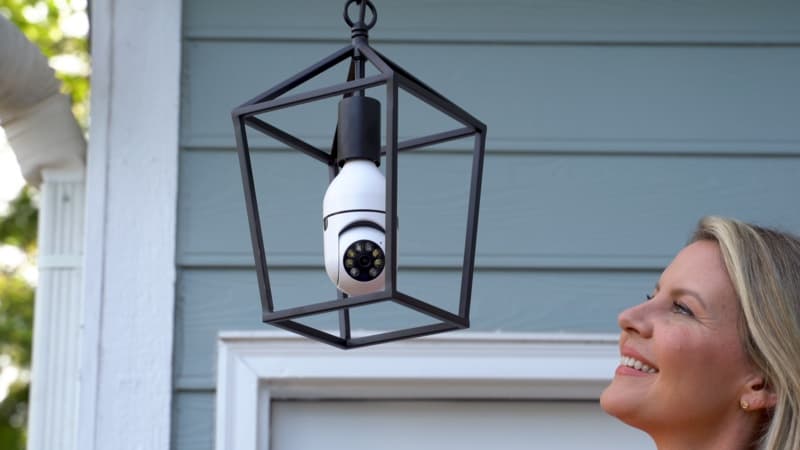
The renter-friendly option that keeps not getting mentioned is the one that solves both problems battery cameras have: bulb-form cameras that screw into an existing lamp socket. If you have a porch light, a garage-front floodlight fixture, a covered exterior lantern by the back door, or even a floor lamp facing an entry hallway indoors, you already have the two things a camera needs — a mounting spot at the right height, and a source of continuous power. A bulb camera like the Sight Bulb is a Wi-Fi pan-tilt HD camera packaged in a standard E26 bulb form. Screw it into the fixture where your porch bulb currently is, connect it to your Wi-Fi in the app, and the socket does the power for you — 24/7, no charging, no battery clock.
For the renter case specifically, this is the least-disruptive install that exists. You are not modifying the fixture, running any cable, or drilling any hole; you're changing a light bulb. On move-out day, the original bulb goes back in, the camera goes into a box, and there is literally no evidence a camera was there. The pan-tilt head means one socket covers a wide field (front porch plus driveway from a single lantern), the LED ring and IR handle night vision automatically, and the whole install is under two minutes. It's also the cheapest of the three options that genuinely covers an outdoor area — around $50, which is battery-camera territory without the battery baggage.
Two limits worth naming. First, the light switch has to stay on for the camera to keep working, so label the switch or tape it if you have housemates who habitually flip the porch light. Second, it belongs inside a covered fixture — a porch lantern, a garage-front box, an eave downlight — not hanging bare in the rain. Both are minor if the porch already has a fixture; both are dealbreakers if you're trying to put a camera where nothing exists to screw into.
Adhesive-mount cameras: the middle ground that requires surface honesty
The third category is small indoor/outdoor cameras that come with removable 3M-tape mounts or magnetic pucks. Something like a Blink Mini or a Wyze indoor cam, mounted to a shelf or bookshelf, covers the front door from inside the house — a legitimate option if your entryway has a window or a sightline through the door. A weatherproof version outdoors, stuck to a smooth wall, works too. These are typically the cheapest option ($25-50), they usually run on either battery or a low-voltage USB power cable (which you can route to an existing outlet without any wall work), and they're small enough to be discreet.
The honest limit is placement. Adhesive mounts are surface-honest — they hold well on the surfaces they're rated for and pop off the ones they aren't. Any painted surface should be tested with a small tape square first for adhesion; rough brick, textured stucco, and unpainted rough wood are usually a no-go without a mounting solution the camera didn't ship with. Also, adhesive-mount indoor cameras looking through a window can lose clarity at night (window glass reflects IR back into the camera), so if you want to watch the porch through a front window, pay attention to whether the camera has features designed for that or turn off IR and rely on your porch light. Which — full circle — is where a bulb camera on the porch light itself becomes the cleaner answer for the specific porch-and-driveway use case.
Wi-Fi coverage is the other half of the problem
Every Wi-Fi camera assumes the Wi-Fi signal actually reaches where the camera lives. This is the single most common reason a camera works fine indoors during setup and then fails a week later in its actual outdoor spot: the router's signal is weak at the porch, the video stream is choppy, motion alerts arrive late, and the camera drops offline whenever the neighbor's Wi-Fi gets loud. Run a quick signal check on your phone at the exact spot the camera will live before you commit. If the bars are half-strength or worse, plan for a range extender in the room nearest to the camera.
A plug-in extender like the Omega WiFi Amp at the outlet nearest the porch fixes weak-porch-Wi-Fi in most homes for under $50. Plug it in halfway between your router and the camera, tap WPS on both, and the camera gets a strong signal to lock onto instead of the flakey edge of your router's range. Our full why-is-my-wifi-slow-in-one-room piece covers the coverage-diagnosis playbook in detail — worth 10 minutes to read before you buy any Wi-Fi camera, because it saves the return trip.
The renter-friendly setup, ranked by porch reality
If your porch already has a covered light fixture: bulb camera in the fixture, plus a range extender if signal is weak at the door. Under $100 all-in, five-minute install, invisible on move-out. This is the cleanest renter setup for the porch-and-driveway coverage problem, and it's what most renters land on once they've cycled through the battery-and-charging routine on other cameras.
If your porch has no fixture but a wall you can mount to: battery-powered outdoor camera on a magnetic adhesive mount, ideally with a solar accessory to eliminate the charging chore. Plan the battery routine, or accept a subscription for cloud storage if you want the useful features. Total cost is higher (camera plus solar plus optional subscription), but it fits porches without power.
If you're covering an indoor entry, an interior hallway, or a window view of a shared exterior space: small adhesive-mount indoor camera on a shelf or windowsill, USB-powered from an existing outlet. Cheapest of the three, invisible install, works where the other two don't. Worst option for actual outdoor coverage in weather.
For any of them: the winning setup habit is 'install, then verify remotely.' The first weekend after you install a camera, leave the house, open the app on your phone, and confirm you can see the driveway live and get a motion alert on the delivery driver. Half of camera problems (dead spots, dead angles, misaligned view, buffering) only show up when you're not standing next to the camera to fix them. The other half — 'someone turned off the porch light,' 'the battery died,' 'the extender is unplugged because someone needed the outlet' — show up over months and are fixed by labeling the switch, setting a charge reminder, and telling the household not to unplug the little white box in the hall.
Read our Sight Bulb review
The renter-friendliest security camera in existence — screws into any E26 porch, garage, or lamp socket in under a minute, powered by the fixture 24/7 with no battery clock, and comes off cleanly on the last day of your lease.
Read our Sight Bulb reviewFrequently asked questions
What's the easiest security camera to install for a renter with no drilling allowed?
A bulb-form camera that screws into an existing porch or garage light fixture, if you have one. Products like the Sight Bulb install in the time it takes to change a light bulb — the socket provides continuous power, so there's no battery to charge, no cable to route, and no drilling required. On move-out the original bulb goes back in and there's no trace anything was ever there. If you don't have a covered fixture where you want the camera, a battery-powered camera on a removable adhesive mount is the next-easiest option, but you'll be on a charging rotation.
Will a security camera on 3M tape actually hold outdoors?
It depends on the surface. Removable 3M-style adhesive holds well on smooth painted wood, painted metal, smooth siding, and finished walls — for months to years in typical weather. It's less reliable on rough brick, unpainted concrete, textured stucco, and unfinished rough wood, especially through summer temperature swings and rainy stretches. Test a small square of the tape on the exact surface before committing. If the surface is rough, a bulb-form camera in an existing fixture or a camera with a magnetic mount screwed to something you already have permission for is the safer play.
Do I need a subscription for a renter-friendly security camera?
Not necessarily. Bulb cameras like the Sight Bulb and some battery cameras like the Wyze range include a usable free tier (live view, motion alerts, some local recording) that many renters get by with. The paid subscriptions unlock features that are nice-to-have — longer cloud recording history, smart person/package detection, unlimited devices — but aren't required for basic 'watch the porch, get an alert when someone shows up.' Decide what you actually need: if you just want live view and alerts, the free tier is often enough; if you want a 30-day recorded history and package detection, budget $3-10/month.
How does a light bulb security camera work?
A camera like the Sight Bulb packages a Wi-Fi pan-tilt HD camera, IR night vision, and an LED light ring into a standard E26 bulb shape. You screw it into any lamp socket the way you'd change a bulb — porch lantern, garage fixture, indoor floor lamp — and the socket's continuous power runs the camera 24/7. The app on your phone gives you live view, pan-tilt control, and motion alerts. The catch: the fixture's light switch has to stay on (label it, or tape it, so nobody kills the camera), and for outdoor use it needs to be inside a covered fixture like a lantern rather than exposed bare to weather.
What about Wi-Fi coverage at the porch — will my camera even connect?
Test it first. Walk your phone to the exact spot the camera will live and check the Wi-Fi bars. If it's half-strength or worse, plan for a range extender before you install the camera — a Wi-Fi camera on a weak signal drops offline, has choppy video, and delivers alerts late. A plug-in extender like the Omega WiFi Amp at the outlet nearest the porch typically fixes weak-porch-signal for under $50. Our why is my WiFi slow in one room piece covers the diagnosis playbook — worth 10 minutes before you buy any Wi-Fi camera.
Are wireless renter-friendly cameras as secure as wired ones?
For the specific 'watch the porch, get a motion alert, deter package theft' use case that most renters actually want, yes. The security limits of a Wi-Fi camera (someone could theoretically jam Wi-Fi to blind it) are edge cases that matter more for wealthy homes with targeted threats than for a typical rental. What actually matters day-to-day: pick a camera from a real brand (not a $12 marketplace no-name), use a strong app password with two-factor auth, and don't share the login. Those three things sit above 'wired vs wireless' by a wide margin in real-world reliability.
Can I put a security camera in a rental without telling the landlord?
For inside your own unit, in almost all US jurisdictions, yes — you have a right to your own belongings and your own security inside the space you rent. For anything mounted on the building exterior or a shared common area, the answer is usually 'ask' — and the good news is that a no-drill, no-modification bulb camera or removable adhesive-mount camera makes 'asking' an easier conversation, because the landlord knows the fixture is coming off cleanly at move-out. Some jurisdictions have rules about audio recording in shared spaces (which is legally distinct from video); disable audio on any camera pointed at a shared hallway or your neighbor's door. When in doubt, a bulb camera inside your own porch fixture is the least-likely-to-cause-drama option.
TopCrate is reader-supported. When you buy through links on our site we may earn an affiliate commission, at no extra cost to you. Content is for general information and isn't a substitute for professional advice.