TRENDING ON AMAZON
Roku Streaming Stick 4K Review: Is It Worth It?
Add 4K streaming to any TV with the simplest, most neutral interface in the game — every app, no clutter, one tidy remote.
Quick answer: For clean, neutral, no-fuss streaming, Roku is the go-to, and the Streaming Stick 4K is the sweet spot. It makes any TV smart with the least clutter of any streamer — a reliable, cheap upgrade.
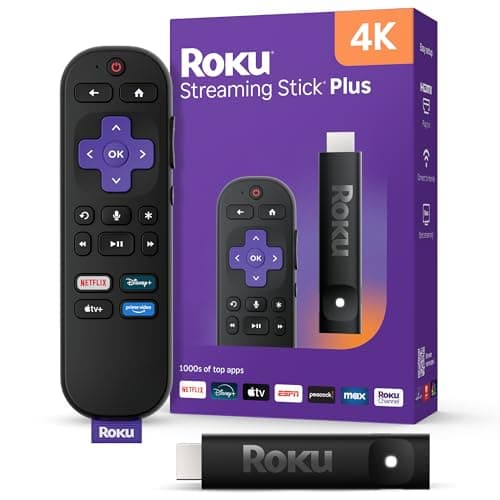
Product image from the Amazon listing.
Our verdict
For clean, neutral, no-fuss streaming, Roku is the go-to, and the Streaming Stick 4K is the sweet spot. It makes any TV smart with the least clutter of any streamer — a reliable, cheap upgrade.
The short version
Roku's appeal is simplicity and neutrality: a clean grid of every streaming app without pushing one brand's content over another. The Streaming Stick 4K turns any HDMI TV into a smart 4K TV, the search works across services to find the cheapest place to watch, and the remote is refreshingly uncomplicated. A great pick if you find other streamers cluttered.
Pros & cons
Pros
- Adds 4K streaming to any HDMI TV
- Clean, neutral, easy interface
- Universal search across apps
- Simple, no-nonsense remote
- All the major streaming apps
- Cheap enough for every TV
Cons
- Interface is plain by design
- Ads on the home screen
- Needs decent Wi-Fi for smooth 4K
Why people love it
Plug into HDMI
Pop the stick into an HDMI port and connect power.
Connect and sign in
Join Wi-Fi, sign in to your apps, and you're streaming in minutes.
Search across apps
Roku's search finds a show across every service so you watch it for less.
Who it's for
- Anyone with a non-smart or older TV
- People who find other streamers cluttered
- Cord-cutters
- Adding streaming to a bedroom or guest TV
Is the Roku Streaming Stick 4K worth it?
The Roku Streaming Stick 4K is worth it for one clear reason: it turns any TV with an HDMI port into a smart 4K streamer for very little money, with the simplest, most neutral interface in the category. Roku lays out every app in a clean grid without pushing one company's content over another, and its universal search scans across services to show you where a show is cheapest or free to watch. If you find other streamers cluttered or pushy, that neutrality is exactly the appeal.
It's not flawless. The interface is plain by design, which some people find a touch dated next to flashier rivals, there are ads on the home screen, and smooth 4K playback needs a decent Wi-Fi connection. But for adding streaming to an older or non-smart TV, kitting out a bedroom or guest TV, or simply replacing a sluggish built-in smart platform, it's a reliable, cheap upgrade that does its one job well. For most households, the simplicity is a feature, not a compromise.
Roku Streaming Stick 4K vs Amazon Fire TV Stick 4K
The core difference is philosophy. Roku's interface is neutral and even-handed — every app gets equal billing, and the home screen is a straightforward grid. Fire TV leans into Amazon's ecosystem, surfacing Prime Video content prominently and integrating tightly with Alexa, which suits heavy Amazon and Alexa users but feels more promotional to others. Both stream true 4K with HDR, both run all the major apps, and both are inexpensive, so picture quality isn't the deciding factor.
Choose based on how you like to navigate and what you already use. If you want the cleanest, least cluttered experience and a remote that just works, Roku is the natural pick, and its cross-app universal search is excellent for finding the cheapest place to watch. If you're deep into Amazon's world, want Alexa baked in, and don't mind Prime Video front and center, Fire TV fits better. Neither is objectively superior — it genuinely comes down to interface preference and ecosystem.
How to set up the Roku Streaming Stick 4K and fix common issues
Setup is genuinely a few-minute job. Plug the stick into an HDMI port, connect its power (use the included adapter rather than a TV USB port when possible for stable performance), switch your TV to that HDMI input, join your Wi-Fi, sign in to a free Roku account, and add your apps. From there, universal search lets you type or speak a title and see every service it's on, so you can pick the cheapest or free option instead of hunting app by app.
Most problems trace back to Wi-Fi or placement. If 4K stutters or buffers, your connection is usually the culprit — move the router closer, reduce congestion, or position the stick so it isn't buried behind the TV blocking the signal. A quick restart from the settings menu clears many glitches, and keeping the software updated improves stability and app compatibility. If the remote acts up, re-pair it or replace the batteries. With solid Wi-Fi, it's a set-it-and-forget-it device that rarely needs attention.
See Roku Streaming Stick 4K on Amazon
Check the latest price, photos and buyer reviews on Amazon.
Check Price on Amazon →Sold and shipped by AmazonFrequently asked questions
Roku vs Fire TV — what's the difference?
Roku's interface is more neutral and simpler, treating all apps equally, while Fire TV leans into Amazon's content. Both stream 4K; it comes down to interface preference.
Will it work on my TV?
Any TV with an HDMI port; for true 4K you'll want a 4K TV, but it works on HD sets too.
Do I need a subscription?
The device just runs apps — services like Netflix need their own subscriptions, but there are many free channels too.
Is setup easy?
Very — plug into HDMI, connect Wi-Fi, sign in, done in a few minutes.
Does the Roku Streaming Stick 4K remote control my TV's power and volume?
Yes, the included voice remote can control your TV's power and volume on most sets, so you can ditch the original remote for everyday use. It uses your TV's HDMI-CEC or infrared support to do this, and setup is part of the initial configuration. That means one tidy remote handles streaming and basic TV controls together.
Can you watch free TV on a Roku Streaming Stick without subscriptions?
Yes, the device includes access to free, ad-supported channels including The Roku Channel, plus other free streaming apps you can add. You only need paid subscriptions for premium services like Netflix or Max. Many people use it heavily for free content alongside one or two paid apps.
As an Amazon Associate, TopCrate earns from qualifying purchases at no extra cost to you. Product image, price, availability and ratings are shown on Amazon and are subject to change.