TRENDING ON AMAZON
Dreo Cruiser Pro T1 42" Oscillating Tower Fan Review: Is It Worth It?
The whisper-quiet 42-inch tower fan that pushes air 25 feet across a room — the bedroom fan that finally lets you sleep with the AC off.
Quick answer: Yes — the Dreo Cruiser Pro T1 is the tower fan to buy in 2026 if you care about noise, airflow strength, or both. 25dB sleep mode is genuinely bedroom-friendly (below the threshold where sleep researchers measure effects on sleep architecture), 25-foot airflow reaches across a full bedroom or living room, and the app plus Alexa/Google/HomeKit voice control is useful once set up. The best mid-range tower fan on Amazon and the biggest quiet-cooling upgrade over a Lasko Wind Curve or Honeywell tower for the money. For rooms without AC, or as a supplement to central AC on hot nights, this Dreo tower fan is the one.
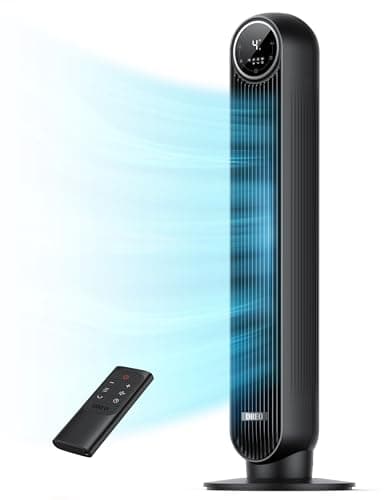
Product image from the Amazon listing.
Our verdict
Yes — the Dreo Cruiser Pro T1 is the tower fan to buy in 2026 if you care about noise, airflow strength, or both. 25dB sleep mode is genuinely bedroom-friendly (below the threshold where sleep researchers measure effects on sleep architecture), 25-foot airflow reaches across a full bedroom or living room, and the app plus Alexa/Google/HomeKit voice control is useful once set up. The best mid-range tower fan on Amazon and the biggest quiet-cooling upgrade over a Lasko Wind Curve or Honeywell tower for the money. For rooms without AC, or as a supplement to central AC on hot nights, this Dreo tower fan is the one.
The short version
Dreo blew up on Amazon by making tower fans that are meaningfully better than the Lasko and Honeywell defaults — quieter at high speeds, stronger airflow at max, and better-designed remotes. The Cruiser Pro T1 is their bestseller: 42 inches tall, six speeds (25dB whisper to strong gale), 90° oscillation, a genuinely usable remote, sleep mode that dims the display, and a smart app that adds scheduling and voice control via Alexa or Google. It moves air up to 25 feet — enough for a decent-sized bedroom or living room — and the pushbutton controls, sleep timer and adjustable modes are the small details that make you actually reach for it every night. For most rooms without AC, or as a supplement to central AC, it's the tower fan pick.
Pros & cons
Pros
- 25dB whisper mode — genuinely quiet enough to sleep with
- Airflow up to 25 feet — reaches across bedrooms
- Six speeds + four modes (Normal, Natural, Sleep, Auto)
- Remote with magnetic mount + smart app + voice control
- 90° oscillation with 12-hour timer
- LED display dims completely in sleep mode
Cons
- Highest speed is loud (55+ dB) — expected at full power
- Assembly requires a few minutes with the included tools
- Larger footprint than a compact 24" tower
Why people love it
90° oscillation with airflow throw
An engineered turbo blade design pushes air up to 25 feet with 90° oscillation coverage — enough for a normal bedroom, living room or open kitchen without needing multiple fans.
Six speeds + four modes
Normal (adjustable steady speeds), Natural (varying speed mimicking outdoor breeze), Sleep (progressively lower speeds through the night), Auto (adjusts based on room temperature) — the intelligent modes are what set it above cheaper fans.
Sleep-optimized 25dB minimum
At the lowest speed, the fan runs at 25dB — quieter than a whisper — and the LED display can be turned off completely, so it produces neither noise nor light for sensitive sleepers.
Who it's for
- Bedrooms without AC or with poor central airflow
- People sensitive to noise (25dB sleep mode)
- Renters wanting cooling without installing a window AC
- Living rooms needing supplemental airflow
How Dreo redefined the tower fan market (and why it matters for sleep)
Tower fans in the US market were essentially unchanged from the mid-2000s to the early 2020s — Lasko and Honeywell dominated with reliable but noisy 30-38dB fans, weak airflow, and outdated remotes. Dreo entered the market around 2020 with an engineering-forward approach: brushless motors for lower noise, redesigned turbo blades for stronger throw, and modern control interfaces (smart apps, magnetic remotes, dimming displays). The result was fans that measurably outperformed the incumbents on noise and airflow at similar prices, which is exactly what sleep-sensitive buyers had been waiting for.
The impact on bedroom sleep is real. Ambient noise above 30dB has documented effects on sleep architecture — reduced deep sleep, more micro-arousals, longer time to fall asleep. A Lasko or Honeywell tower running at 32-38dB in the bedroom measurably worsens sleep quality even when you don't consciously notice. Dreo's 25dB minimum is below the threshold where sleep researchers see effects, meaning you can run the fan all night without disrupting sleep architecture. For anyone whose bedroom needs airflow but who's sensitive to noise, the 5-10dB difference matters way more than the price premium suggests.
Dreo Cruiser Pro vs Vornado 660 vs Dyson Cool: which fan for which room
The fan market has three legitimately distinct categories, each best for specific rooms. Tower fans (Dreo Cruiser Pro, Lasko Wind Curve) push air in a wide oscillating band — best for bedrooms and living rooms where you want to distribute air across the whole space. Pedestal or air-circulator fans (Vornado 660, Vornado 5303) use a focused directional airflow to move a specific area of air — best for offices, kitchens or spot cooling where you want strong airflow at one location. Bladeless fans (Dyson Cool AM07) are the design-focused pick — quiet, safe around kids/pets, but weakest airflow-per-dollar and dramatically more expensive.
For a bedroom, the Dreo Cruiser Pro is the smart-money pick — quiet, wide coverage, sleep modes. For a home office where you want a strong directional breeze on your face, a Vornado 660 delivers more focused airflow and lasts 20+ years. For an open-plan living space where multiple people are in different spots, an oscillating tower reaches everyone. For nurseries or homes with pets that might touch fan blades, Dyson's bladeless is the safety pick. Match to the room and use case — the wrong fan in the right price range still underperforms.
How to use a fan (or fan + AC) to actually stay cool efficiently
The biggest energy-efficiency trick is running fans alongside AC set 4-6°F higher than you'd otherwise use. A ceiling fan or tower fan running at moderate speed creates a wind-chill effect that makes 78°F feel like 74°F — but the AC uses far less power at 78°F than at 74°F. This alone can cut summer cooling costs by 10-20% for most homes. The rule is 'fan on when you're in the room, off when you leave' — fans cool people, not spaces, so running them empty wastes electricity without contributing to your comfort when you return. For a desk or nightstand where a full tower fan is overkill, a smaller battery pick like the ChillWell portable air cooler puts a misted breeze exactly where you're sitting.
For bedrooms specifically: point the fan toward the bed (not away) so airflow reaches you directly — evaporative cooling from moving air across your skin is the actual mechanism of cooling. Use the Sleep mode, which gradually reduces speed through the night as your body naturally cools during sleep cycles. If you sleep with a partner sensitive to airflow, position the fan to circulate air across the room without blowing directly on them. Combine with an open window (if outdoor temps are below indoor at night) to draft cool air in — a fan pulling from an open window at night is often more effective than AC. In humid climates, dehumidification matters more than temperature; run AC for humidity control even at moderate temps.
See Dreo Cruiser Pro Tower Fan on Amazon
Check the latest price, photos and buyer reviews on Amazon.
Check Price on Amazon →Sold and shipped by AmazonFrequently asked questions
Dreo Cruiser Pro T1 vs Lasko Wind Curve vs Honeywell tower fans: what makes Dreo worth the premium?
Two things: measurably quieter operation at every speed, and better airflow throw. Independent noise tests put Dreo at 25dB minimum vs Lasko/Honeywell at 32-38dB — for anyone sleeping in the same room as their fan, this is a big deal. Airflow is genuinely stronger too; the Cruiser Pro pushes 30-40% more CFM than an equivalent-sized Lasko or Honeywell at comparable speeds. What Lasko and Honeywell have going for them: they're cheaper, they're proven durable over decades of use, and they don't require a smart app. Pick Dreo if you value quiet operation and modern features; pick Lasko/Honeywell if you want cheap, dumb, reliable air movement.
Do I need the smart app and voice control?
You don't need them — the fan works fully with the physical panel and remote. But they're genuinely useful once set up. The Dreo Home app lets you schedule the fan (turn on at 8pm before bedtime, off at 6am), adjust settings from your phone, and monitor room temperature via the fan's built-in sensor. Alexa/Google/HomeKit voice control lets you say 'turn on the bedroom fan' from another room. If you're comfortable with smart-home apps, spend the 5 minutes to pair it. If you're not, skip it — the remote does everything essential.
Is a tower fan actually enough to cool a bedroom, or do I need AC?
Tower fans move air; they don't cool it. In humid or high-temperature climates (85°F+), a fan alone won't lower body temperature enough to sleep comfortably — you still need AC or evaporative cooling. What a tower fan does very well: (1) accelerate evaporative cooling from your skin (you feel 3-5°F cooler because sweat evaporates faster), (2) improve airflow so cool air from AC circulates throughout the room, (3) replace AC when temperatures are moderate (65-78°F). Rule of thumb: if your bedroom is 65-78°F, a fan is often sufficient. If it's 78°F+, use AC and add the fan for better circulation.
How much power does it use? Is running it all night expensive?
Barely anything. Tower fans use 30-70 watts depending on speed — running the Dreo at medium speed for 8 hours consumes about 0.3-0.4 kWh, which costs pennies. Running it 24/7 for a month costs $2-4 in electricity at typical US rates. Compared to a window AC (500-1000 watts) or central AC (2000-4000 watts), a tower fan is essentially free to operate. This is the specific reason fans plus AC used strategically (fans on for circulation, AC set to a slightly higher temperature) is much cheaper than AC alone at a lower temperature.
Does it oscillate loudly? Do the pivot joints wear out?
Oscillation is quiet on the Cruiser Pro — a soft mechanical hum that's barely audible above the fan itself. Some cheaper towers develop a rhythmic click or squeak as the oscillation gearbox wears; the Dreo's mechanism has held up well in long-term reviews and forums, with most users reporting years of use without oscillation problems. If oscillation ever becomes noisy, the fix is usually a drop of silicone lubricant on the pivot point (accessible from the base after removing screws). Under normal use, expect 5-8 years of reliable oscillation before mechanical issues appear.
How easy is cleaning? Do bladeless-style towers accumulate dust?
Easier than a traditional box fan, but not zero effort. The tower's front grille catches most dust; wipe it with a slightly damp cloth or a vacuum brush attachment monthly. The internal fan blade accumulates dust every 3-6 months — Dreo makes this accessible via a back panel (unscrews easily) so you can clean the blade with a soft brush or damp cloth. Skip this step and airflow degrades noticeably after a year. Bladeless-style outer housing is easier to keep clean than an old-school box fan's rotating blade, but the internal turbo blade still needs periodic attention. A 10-minute quarterly cleanup keeps it performing like new.
As an Amazon Associate, TopCrate earns from qualifying purchases at no extra cost to you. Product image, price, availability and ratings are shown on Amazon and are subject to change.