TRENDING ON AMAZON
Cricut Explore 3 Smart Cutting Machine Review: Is It Worth It?
Cuts vinyl, iron-on and cardstock 2x faster than older Cricuts — the beginner-friendly craft machine for T-shirts, decals and party décor.
Quick answer: For hobbyists with specific projects in mind and would-be Etsy sellers, the Cricut Explore 3 is one of those rare tools that turns 'someday I'll make that' into an actual habit — 2× faster than the previous generation and beginner-friendly enough to finish your first project the day it arrives.
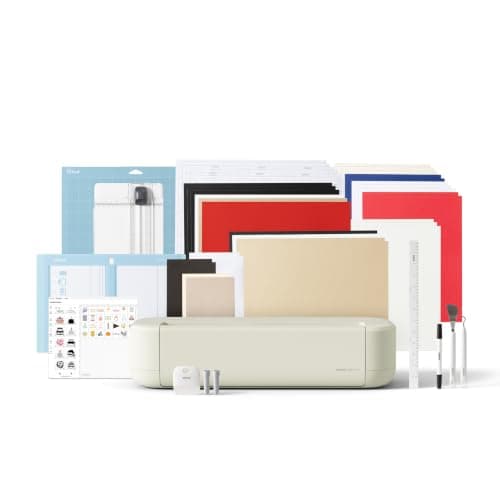
Product image from the Amazon listing.
Our verdict
For hobbyists with specific projects in mind and would-be Etsy sellers, the Cricut Explore 3 is one of those rare tools that turns 'someday I'll make that' into an actual habit — 2× faster than the previous generation and beginner-friendly enough to finish your first project the day it arrives.
The short version
Cricut Explore 3 is the craft cutting machine that took over Etsy shops, teacher classrooms, and craft-room Pinterest boards. It cuts vinyl for tumblers and car decals, heat-transfer for T-shirts and totes, cardstock for greeting cards and party invites, and 100+ other materials — designed and controlled from the free Cricut Design Space app on your phone or laptop. Explore 3 is 2× faster than the Explore Air 2 and adds Smart Materials support for matless cuts up to 12 feet long.
Pros & cons
Pros
- Cuts vinyl, iron-on, cardstock, sticker paper and 100+ materials
- 2× faster than the older Explore Air 2
- Smart Materials cut without a mat, up to 12 feet
- Beginner-friendly Design Space software
- Huge community of free templates and tutorials
- Great side income potential for Etsy sellers
Cons
- Design Space software requires a login and internet
- Access-all Cricut Access library is a paid subscription
- Blades and mats are consumables (~$10-20 replacements)
Why people love it
Design in Design Space
Use Cricut's free design software on your phone or laptop to pick a template, upload your own image or lay out text.
Load the material
Roll of vinyl, sheet of cardstock or iron-on — either on a sticky mat (traditional) or as a Smart Material (matless) that feeds straight from the roll.
Machine cuts precisely
Press 'Go' and the Explore 3 traces the design with a small blade — clean, precise cuts on vinyl, paper, iron-on and hundreds of other materials.
Who it's for
- Craft, DIY and party-décor hobbyists
- Etsy sellers making decals and shirts
- Teachers doing classroom projects
- Anyone making personalized gifts
Is a Cricut worth it, or will it sit in a closet?
The honest reality of Cricut ownership: about a third of people who buy one use it constantly for years, a third use it for a season and then stash it in a closet, and a third barely open the box. What predicts which group you'll fall into isn't crafting skill — it's specific project intent. If you already have a mental list of things you want to make (personalized shirts for the softball team, decor for a party you're hosting, a small Etsy shop idea), you'll use it. If you're buying it 'to be crafty someday,' it will likely gather dust.
The good news is the specific-project bar is low. Making a monogrammed tumbler for a friend, cutting stencils for a nursery mural, or making custom Christmas ornaments once a year is enough to justify the cost — a $50 T-shirt printer at a boutique is easily $10-15, and 5-6 shirts pay for the machine. Etsy shops selling Cricut-made decals routinely gross a few hundred dollars a month for hobbyists. If you have any use case in mind, it's a smart buy. If you don't, wait until you do.
Cricut Explore 3 vs Silhouette Cameo 4: the head-to-head
The two big brands in home cutting machines are Cricut and Silhouette. Cricut wins on user experience — Design Space is genuinely easier for beginners than Silhouette Studio, and the community, tutorials and templates are massive. Cricut also has better integration with its own hardware (Mug Press, EasyPress, Autopress) if you plan to expand. The trade-off: Design Space requires an active internet connection and a Cricut account, which some crafters find annoying, and paid Cricut Access is upsold aggressively.
Silhouette Cameo 4 is the pick for people who prefer to work offline and want more design flexibility for free — Silhouette Studio installs on your computer and works without internet, uploads accept more file formats without extra fees, and there's no equivalent to Cricut Access to nag you. Cameo also natively cuts thicker materials than Explore 3 with a deeper cut clearance. For most casual and hobbyist crafters the Cricut ecosystem (Design Space + tutorials + community) wins; for more design-oriented users who want maximum offline control, Silhouette is a legitimately better fit.
Cricut Explore 3 starter setup: what you actually need beyond the machine
A first-time Cricut haul is roughly: the Explore 3 machine itself, one or two 12x12 StandardGrip mats (or a roll of Smart Material for matless cutting), a weeder tool (for pulling excess vinyl off cuts), a scraper and a set of transfer tape rolls for moving cut vinyl onto tumblers or windows. That's about $250-300 all in for the machine plus starter supplies, and it's enough to complete the first month of projects.
Add-ons to consider only after you've committed to using the machine: a Cricut EasyPress (a small heat press specifically for iron-on projects, better than a home iron), a Cricut Mug Press if you plan to sell tumblers, and a Cricut Access subscription if you find yourself buying individual images in Design Space. Don't buy all this on day one — the machine plus a few rolls of vinyl and iron-on is enough to make five or six projects and figure out what direction you actually enjoy.
See Cricut Explore 3 on Amazon
Check the latest price, photos and buyer reviews on Amazon.
Check Price on Amazon →Sold and shipped by AmazonFrequently asked questions
Cricut Explore 3 vs Cricut Maker 3: which should I buy?
Explore 3 cuts about 100 materials — vinyl, iron-on, cardstock, faux leather, sticker paper. Maker 3 cuts all those plus deeper and harder materials like basswood, mat board, thicker leather and fabric with a rotary blade. If you mostly want to make T-shirts, decals, cards and party décor (95% of home users), Explore 3 is the right buy and saves money. Buy the Maker 3 only if you specifically want to cut wood, thick leather or unbacked fabric.
Cricut Explore 3 vs the older Explore Air 2: is the upgrade worth it?
Yes for new buyers — Explore 3 is 2× faster, supports 'Smart Materials' that cut without a mat and up to 12 feet long, and has a more powerful cut force. If you already own an Explore Air 2 and only cut small projects on mats, the upgrade is nice-to-have not must-have. If you're buying your first Cricut in 2026, get the Explore 3.
Do I need the Cricut Access subscription?
No — Design Space itself is free forever, and you can upload your own SVG files (from Etsy, free sites like Freesvg, or your own design) without paying anything. Cricut Access ($10-15/month) unlocks the huge in-app library of premade fonts, images and projects — it's optional and mostly worth it for people who don't want to source their own designs.
What can you actually make with a Cricut?
The most popular projects: iron-on T-shirts and totes, vinyl decals for car windows and laptops, personalized tumblers and mugs (with a Cricut Mug Press), greeting cards, birthday party décor and invitations, sticker sheets, personalized ornaments, and stencils for painting. Etsy is full of Cricut-made items, and it's a common side income for stay-at-home parents.
Is it hard to learn?
Not really — Cricut's whole marketing is 'anyone can do this' and Design Space is genuinely beginner-friendly. There's a small learning curve for the first project (figuring out which side of vinyl goes down, weeding, applying transfer tape) but the internet is saturated with free YouTube tutorials for every possible project. Most people complete their first T-shirt or decal in the first evening.
What ongoing costs should I expect?
Materials (rolls of vinyl or iron-on are ~$10-20 depending on brand and size), blades (~$20 for replacement blades that last hundreds of cuts), and mats (~$15 each, lasting many projects with proper care). Cricut Access is optional at $10-15/month. If you're making one project every couple of weeks, you're looking at $20-40/month on materials plus occasional consumables.
As an Amazon Associate, TopCrate earns from qualifying purchases at no extra cost to you. Product image, price, availability and ratings are shown on Amazon and are subject to change.